
Introduction
This manual provides essential information for the safe and efficient operation of your LUTEC 72W 7500LM 3-Head LED Motion Sensor Security Light. Please read thoroughly before installation and use.
- Energy Saving: LED units deliver 72W, 7500 Lumens, and 5000K daylight white brightness, equivalent to a 720W incandescent bulb, reducing electricity consumption by up to 88%.
- Motion-Activated: Features a 180-degree sensing angle with a detection range of 0-69 feet. The adjustable timer allows settings for 1, 3, or 10 minutes.
- Versatile Lighting Modes: Offers Test Mode, Security Mode, Dusk to Dawn Mode, and Manual Override Mode to suit various needs. Manual override provides constant 100% brightness for a selected period, deactivating during daylight hours.
- Durable & Adjustable Design: Constructed from aluminum, this light features IP65 waterproofing and a 50,000-hour lifespan. Adjustable heads provide customizable coverage for areas like porches, backyards, garages, driveways, walkways, and steps.
Setup and Installation
Ensure power is OFF at the circuit breaker before beginning installation. Consult a qualified electrician if you are unsure about any steps.
- Prepare the Mounting Surface: Ensure the mounting surface is clean and stable.
- Install Mounting Bracket: Secure the provided mounting bracket to your junction box.
- Connect Wiring: Connect the light's wires to your household wiring:
- Connect the green/yellow wire (ground) from the light to the ground wire from the junction box.
- Connect the white wire (neutral) from the light to the neutral wire from the junction box.
- Connect the black wire (live) from the light to the live wire from the junction box.
- Mount the Light Fixture: Carefully align the light fixture with the mounting bracket and secure it using the provided screws. Ensure the motion sensor faces outwards.
- Seal the Installation: Apply the included gasket to ensure a watertight seal between the fixture and the mounting surface.
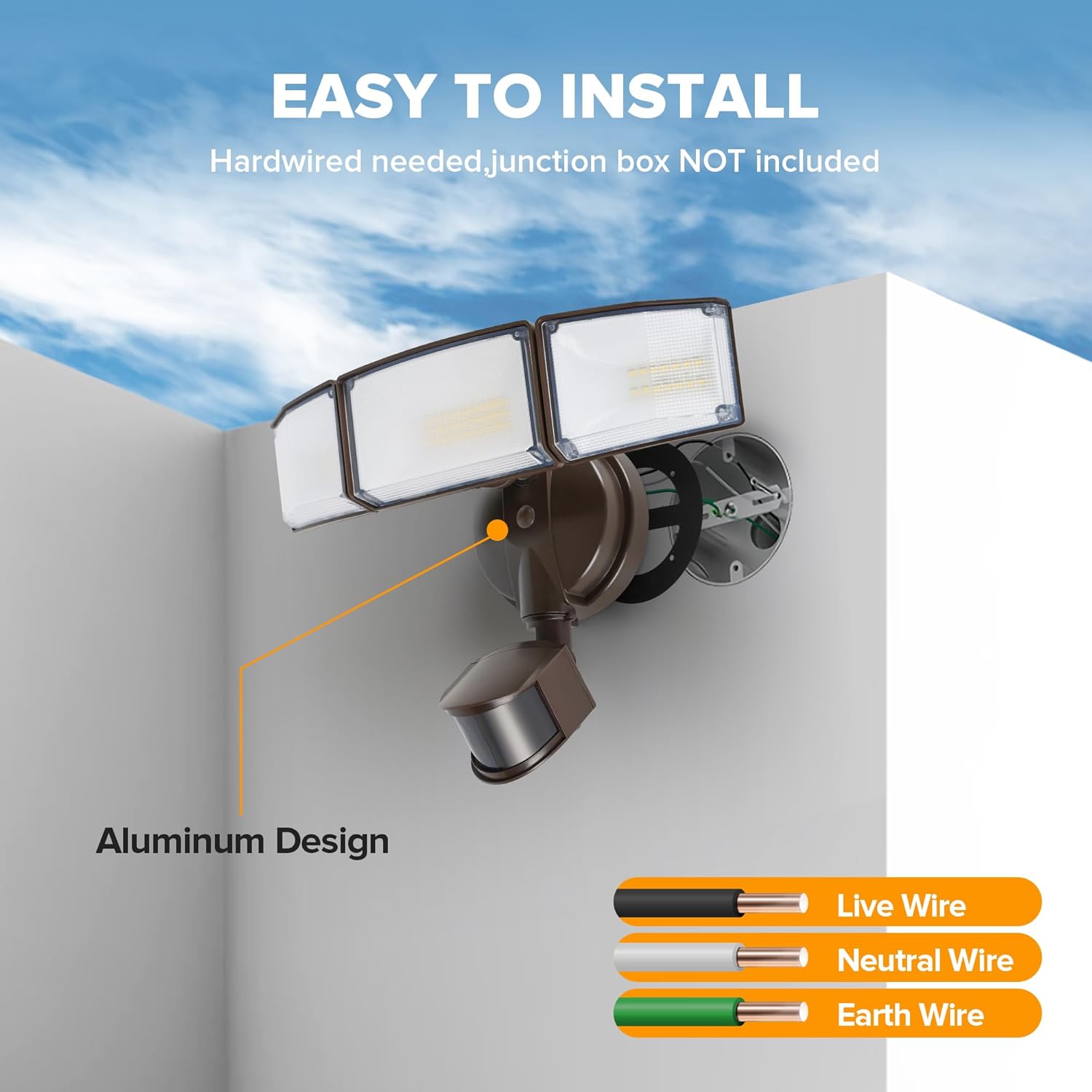
Figure 1: Wiring diagram for easy installation. Connect live, neutral, and earth wires securely.

Figure 2: Three simple steps to complete the installation of your security light.

Figure 3: Properly mounted light fixture. Ensure the motion sensor is positioned to face the desired detection area.
Operating Modes and Settings
The motion sensor unit features adjustable controls for distance (sensitivity) and time (duration) of illumination, along with four distinct operating modes.
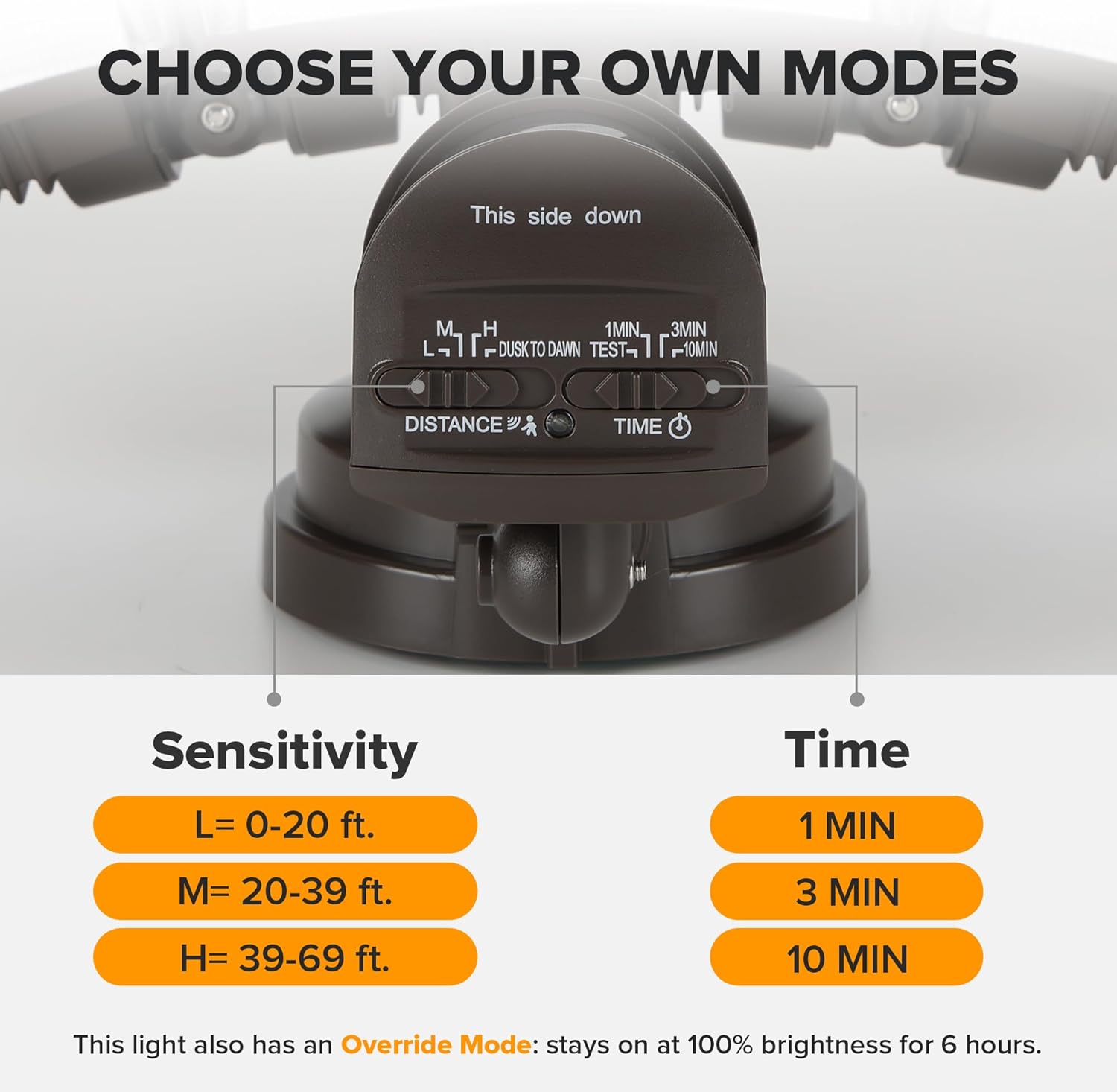
Figure 4: Motion sensor controls for adjusting sensitivity (Distance) and light duration (Time).
Distance (Sensitivity) Settings:
- L (Low): 0-20 ft detection range.
- M (Medium): 20-39 ft detection range.
- H (High): 39-69 ft detection range.
Time (Duration) Settings:
- 1 MIN: Light stays on for 1 minute after motion stops.
- 3 MIN: Light stays on for 3 minutes after motion stops.
- 10 MIN: Light stays on for 10 minutes after motion stops.
Lighting Modes:
- Test Mode: For initial setup and aiming. The light turns on for 5 seconds when motion is detected, even during daylight hours.
- Security Mode: Light activates to 100% brightness only when motion is detected during nighttime.
- Dusk to Dawn Mode: The light turns on at 20% brightness at dusk and remains on. It then switches to 100% brightness when motion is detected, returning to 20% after motion ceases.
- Manual Override Mode: Allows the light to operate continuously at 100% brightness for a selected period. This mode deactivates automatically during daylight hours.

Figure 5: Visual representation of the Dusk to Dawn mode, providing continuous low-level light with full brightness on motion.
Features and Design
The LUTEC LED Security Light is engineered for performance and durability in outdoor environments.
- High Brightness: 7500 Lumens at 5000K daylight white for clear, wide illumination.
- Adjustable Light Heads: Three rotatable light heads allow for flexible light direction, covering angles from 210° to 300°.
- Robust Construction: Made with high-quality aluminum for excellent heat dissipation and longevity.
- IP65 Waterproof: Designed to withstand various weather conditions, offering weather-resistant and frost-resistant performance.

Figure 6: Overview of the light's powerful illumination capabilities.
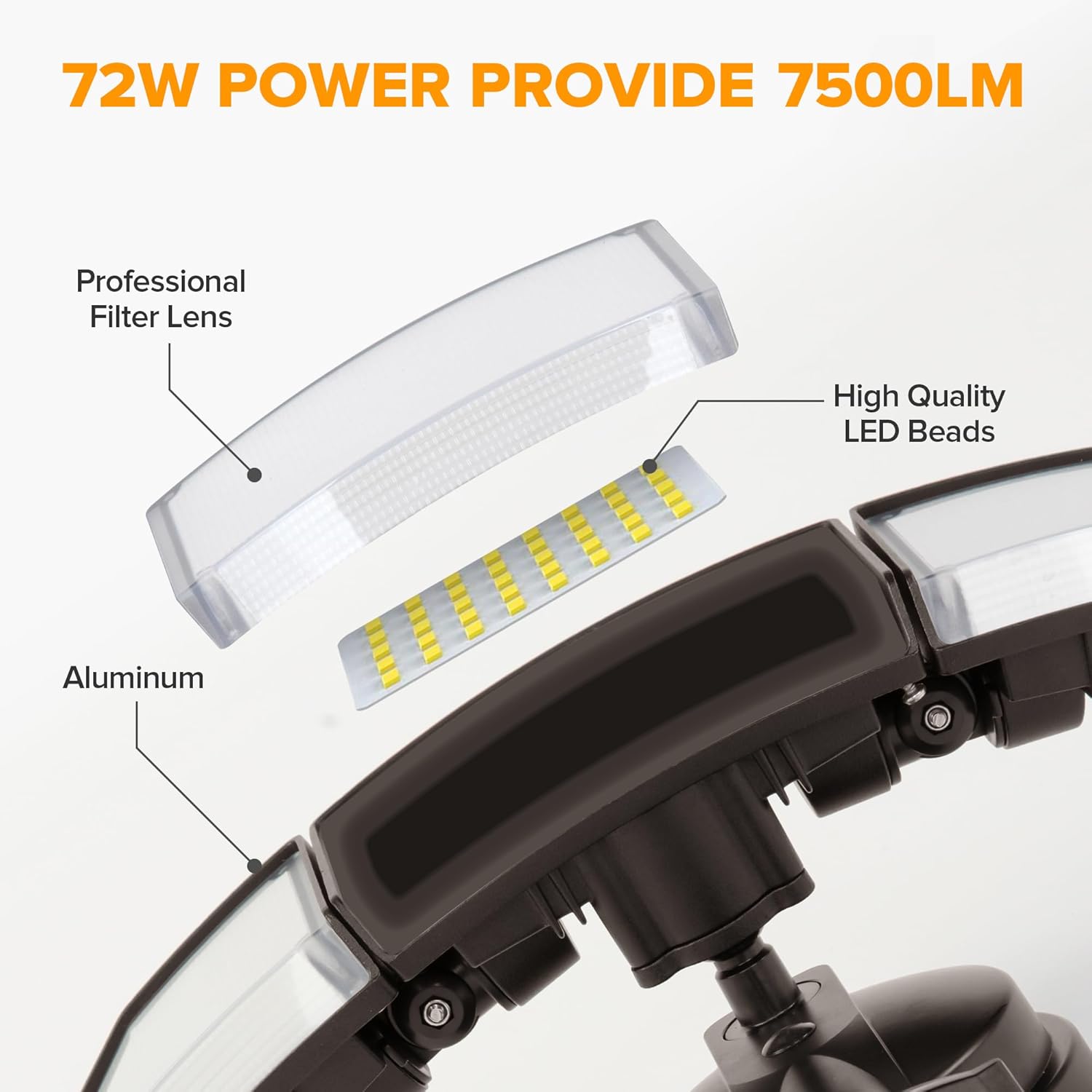
Figure 7: The adjustable heads allow you to direct light precisely where needed.

Figure 8: The IP65 rating ensures reliable performance in various outdoor conditions.
Video 1: Overview of the LUTEC Outdoor Motion Light's features and brightness.
Video 2: Demonstrating the various light modes and adjustable angles of the fixture.
Maintenance
To ensure optimal performance and longevity of your security light, follow these maintenance guidelines:
- Regular Cleaning: Periodically wipe the light fixture and motion sensor lens with a soft, damp cloth to remove dirt, dust, and debris. Avoid abrasive cleaners.
- Inspect Wiring: Annually inspect all wiring connections for any signs of wear, fraying, or corrosion. Ensure connections remain tight.
- Check Mounting: Verify that the light fixture remains securely mounted to the wall. Tighten any loose screws as needed.
- Avoid Obstructions: Ensure no new obstructions (e.g., growing foliage) block the motion sensor's view or the light's output.
Troubleshooting
If you encounter issues with your security light, refer to the following common troubleshooting steps:
- Light Not Turning On:
- Check the power supply at the circuit breaker.
- Ensure the light sensor is not obstructed by debris or positioned in an area that receives constant light.
- Verify the operating mode is correctly set (e.g., not in Test Mode during daylight).
- Light Stays On Continuously:
- Check the motion sensor for obstructions or constant movement within its detection range.
- Adjust the 'Time' setting to a shorter duration.
- Ensure the light is not in Manual Override Mode unintentionally.
- Light Not Detecting Motion:
- Adjust the 'Distance' (sensitivity) setting to a higher level.
- Clear any obstructions from the motion sensor's field of view.
- Ensure the sensor is positioned correctly to cover the desired area.
- Flickering Light:
- Check all wiring connections for tightness.
- Ensure the power supply is stable.
If problems persist after attempting these steps, please contact customer support.
Specifications
| Brand | LUTEC |
| Model Name | 3-Head Metal Motion Sensor |
| Item Model Number | 76328010xx |
| Power Source | Corded Electric (Hardwired) |
| Wattage | 72 watts |
| Brightness | 7500 Lumens |
| Color Temperature | 5000 Kelvin (Daylight White) |
| Motion Sensor Angle | 180 degrees |
| Motion Detection Range | Up to 69 feet |
| Material | Aluminum |
| Water Resistance Level | IP65 Waterproof |
| Lifespan | 50,000 hours |
| Product Dimensions | 12.99"L x 8.07"W x 5.12"H |
| Item Weight | 2.44 Pounds |
| Included Components | Mounting Hardware |
Warranty and Support
Your LUTEC LED Security Light comes with a Limited Warranty. For specific details regarding the warranty period and coverage, please refer to the warranty information included in your product packaging or contact customer support.
Customer Support: We provide 7*24h after-sales service. If you encounter any issues or have questions, please do not hesitate to contact us for assistance.


