
1. Introduction
Thank you for choosing the Dreamflame 84 inch Smart Electric Fireplace. This manual provides essential information for the safe installation, operation, and maintenance of your new electric fireplace. Please read all instructions carefully before use and retain this manual for future reference.

Figure 1.1: Dreamflame 84 inch Smart Electric Fireplace displaying realistic flames.
2. Safety Information
To reduce the risk of fire, electric shock, or injury, observe the following safety precautions:
- Read all instructions before installing or using this fireplace.
- Ensure the power outlet meets the electrical requirements specified in the 'Specifications' section.
- Do not operate the fireplace with a damaged cord or plug, or if the heater malfunctions or has been dropped or damaged in any manner.
- Always disconnect power before performing any cleaning or maintenance.
- Keep combustible materials, such as furniture, pillows, bedding, papers, clothes, and curtains, at least 3 feet (0.9 m) from the front of the fireplace.
- The glass panel remains cool to the touch when the hot air starts, but avoid covering the heat outlet or placing objects close to it. Maintain an 8-foot clearance from the hot air outlet.
- This appliance is equipped with an overheating protection system. If the heater overheats, it will automatically shut off. If this occurs, unplug the unit and wait 10 minutes before plugging it back in.
- Do not insert or allow foreign objects to enter any ventilation or exhaust opening as this may cause an electric shock or fire, or damage the heater.
3. Product Overview
The Dreamflame 84 inch Smart Electric Fireplace offers a modern heating solution with advanced features and versatile installation options.
Key Features:
- Smart Control: Operate via the "XARALYN" smartphone application, remote control, touch buttons, or voice control (Alexa, Google Home).
- Realistic Flame Effects: Features 3 flame colors, 3 ambient overhead light colors, and 2 ember media types (simulated crystals and resin logs) to create 18 distinct visual effects.
- Dual Heating Options: Provides 750W or 1500W (5120 BTUs) heating, capable of warming rooms up to 400 sq. ft.
- Adjustable Thermostat: Set desired room temperature between 71°F and 99°F.
- Timer Function: Programmable timer for 1 to 9 hours.
- Safety: Built-in overheating protection.
- Material: Constructed with a high-strength metal plate frame and a thickened tempered glass panel.

Figure 3.1: Overview of the fireplace's key features.
Components:

Figure 3.2: Labeled components of the Dreamflame Electric Fireplace.
- Tempered Glass: Front panel for protection and clear view of flames.
- LED Mood Light: Provides ambient lighting above the flame bed.
- Heat Outlet: Location for warm air discharge.
- Side Handle: For ease of handling during installation.
- Simulated Crystal: One type of ember media for flame bed customization.
- Resin Logs: Another type of ember media for flame bed customization.
- Standard Power Plug: 6-foot power cord for connection to an AC outlet.
4. Installation
The Dreamflame 84 inch Smart Electric Fireplace supports two primary installation methods: wall-mounted and in-wall recessed.
4.1. Pre-Installation Considerations
- Ensure the installation location is near a suitable electrical outlet. The fireplace requires an AC power source.
- Maintain proper clearances from combustible materials as outlined in the 'Safety Information' section.
- For recessed installation, ensure the framing dimensions are accurate.
4.2. Dimensions
The overall dimensions of the fireplace are approximately 86.43 inches (W) x 6.30 inches (D) x 17.72 inches (H).

Figure 4.1: Fireplace dimensions and recessed opening requirements.
4.3. Wall-Mounted Installation
For wall-mounted installation, the fireplace includes a hanging bracket. This bracket is initially fixed to the backboard of the fireplace and must be removed before mounting.
- Locate a suitable wall area, ensuring it can support the weight of the fireplace (approximately 94.8 lbs).
- Remove the hanging bracket from the back of the fireplace.
- Securely attach the hanging bracket to the wall using appropriate hardware (not included, consult a professional if unsure). Ensure it is level and firmly anchored to wall studs.
- Carefully lift the fireplace and hook it onto the installed wall bracket. Ensure it is securely seated.
- Connect the 6-foot power cable to a grounded AC outlet.
4.4. Recessed Installation
For in-wall recessed installation, a framed opening is required. The insert part of the fireplace for the 84-inch model measures approximately 84 inches (W) x 5.85 inches (D) x 15.75 inches (H).

Figure 4.2: Visual guide for recessed and wall-mounted installation.
Refer to the table below for recommended framing dimensions for recessed installation:
| Model | Required Framing Width | Required Framing Height | Required Framing Depth |
|---|---|---|---|
| 84" | 84.5" | 16.2" | 6.5" |
- Construct a framed opening in the wall according to the dimensions provided above. Ensure the framing is sturdy and level.
- Carefully slide the fireplace into the framed opening.
- Secure the fireplace to the framing using the provided mounting screws.
- Connect the 6-foot power cable to a grounded AC outlet.
5. Operation
Your Dreamflame Smart Electric Fireplace can be operated using multiple methods: the dedicated smartphone application, the included remote control, integrated touch buttons, or voice control via smart home devices.
5.1. Smartphone Application Control (XARALYN APP)
Download the "XARALYN" application from your smartphone's app store. Follow the in-app instructions to connect your fireplace to your home Wi-Fi network. Once connected, you can control various functions remotely, including power, flame settings, heating, and timer.

Figure 5.1: Smartphone app and remote control for the fireplace.
5.2. Remote Control
The included remote control provides convenient access to all fireplace functions. Ensure 2 AAA batteries are installed (not included).
- Power Button: Turns the fireplace ON/OFF.
- Flame Button: Cycles through flame color options.
- Light Button: Cycles through ambient overhead light colors.
- Heat Button: Selects between 750W, 1500W, or OFF.
- Temperature Up/Down: Adjusts the thermostat setting.
- Timer Button: Sets the automatic shut-off timer (1-9 hours).
5.3. Touch Button Control
The fireplace features integrated touch buttons on the unit itself for basic operation. These buttons typically mirror the functions available on the remote control.
5.4. Voice Control (Alexa, Google Home)
Once the fireplace is connected to the XARALYN app and integrated with your smart home system (e.g., Amazon Alexa, Google Home), you can use voice commands to control basic functions like turning the fireplace ON/OFF.
6. Flame and Heating Settings
6.1. Flame Effects
The fireplace offers a variety of flame and ambient light combinations to create different moods. You can choose from 3 flame colors, 3 ambient overhead light colors, and two types of ember media (simulated crystals and resin logs). These combinations result in 18 distinct visual effects.

Figure 6.1: Examples of various flame and light effects.
Use the 'Flame' and 'Light' buttons on the remote or app to cycle through the available options.
6.2. Heating Options
The fireplace provides two heating levels: 750W and 1500W. The 1500W setting delivers 5120 BTUs, suitable for supplemental heating in rooms up to 400 sq. ft.
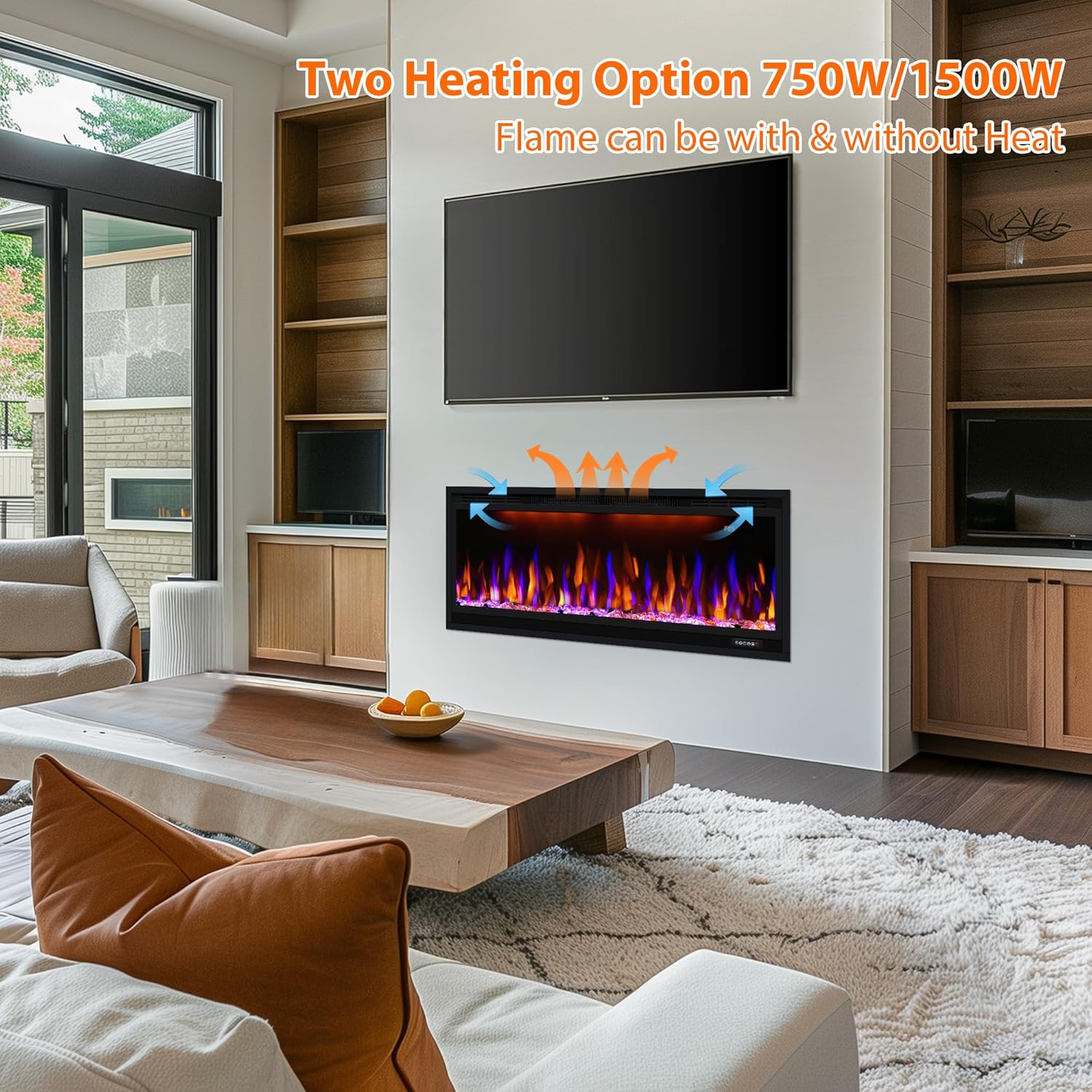
Figure 6.2: Illustration of the two heating power options.
Use the 'Heat' button on the remote or app to select the desired heating level or turn the heater off. The flame effect can be operated independently of the heating function.
6.3. Thermostat and Timer
The built-in thermostat allows you to set a desired room temperature between 71°F and 99°F. The fireplace will automatically adjust its heating output to maintain this temperature.
The timer function allows you to set an automatic shut-off for 1 to 9 hours, providing convenience and energy saving.

Figure 6.3: Fireplace operating with timer and low noise features.
7. Maintenance
Regular maintenance ensures the longevity and optimal performance of your electric fireplace.
7.1. Cleaning
- Always disconnect power before attempting any cleaning.
- Glass Panel: Wipe the tempered glass panel with a soft, damp cloth. Do not use abrasive cleaners or sprays that may scratch the glass.
- Exterior Surfaces: Clean the metal frame and other exterior surfaces with a soft, dry cloth.
- Ventilation Openings: Periodically vacuum or wipe the heat outlet and other ventilation openings to prevent dust buildup, which can impede airflow and cause overheating.
7.2. General Care
- Inspect the power cord and plug for any damage regularly. If damaged, discontinue use and contact customer support.
- Ensure the fireplace is not exposed to excessive moisture or direct water contact.
- Replace remote control batteries (2 AAA) as needed.
8. Troubleshooting
If you encounter issues with your Dreamflame Electric Fireplace, refer to the following common problems and solutions:
| Problem | Possible Cause | Solution |
|---|---|---|
| Fireplace does not turn ON. | No power to the unit. | Ensure the power cord is securely plugged into a working outlet. Check the circuit breaker. |
| No heat output. | Heater is OFF or thermostat setting is too low. | Press the 'Heat' button to select 750W or 1500W. Increase the thermostat setting. |
| Fireplace shuts off unexpectedly. | Overheating protection activated. | Unplug the unit, wait 10 minutes, then plug back in. Ensure heat outlet is not obstructed. |
| Remote control not working. | Dead batteries or obstruction. | Replace AAA batteries. Ensure no obstructions between remote and fireplace sensor. |
| App control not connecting. | Wi-Fi connectivity issues. | Ensure fireplace is within Wi-Fi range. Restart router and fireplace. Re-pair device in the XARALYN app. |
| Flame effects are not visible or flickering incorrectly. | Internal component issue. | If troubleshooting steps do not resolve the issue, contact customer support. |
If the problem persists after attempting these solutions, please contact Dreamflame customer support for assistance.
9. Specifications
| Feature | Detail |
|---|---|
| Brand | Dreamflame |
| Model Number | 9cdd6de0-b040-4e70-ad91-f74db91e610e |
| Product Dimensions (Overall) | 86.43" W x 6.30" D x 17.72" H |
| Insert Dimensions (for Recessed) | 84" W x 5.85" D x 15.75" H |
| Material | High-strength Metal Plate, Tempered Glass |
| Color | Black |
| Installation Type | Wall Mount, Recessed |
| Power Source | AC |
| Heating Power | 750W / 1500W (5120 BTUs) |
| Heating Coverage | Up to 400 sq. ft. |
| Thermostat Range | 71°F - 99°F |
| Timer | 1-9 Hours |
| Flame Effects | 3 Colors |
| Ambient Light Effects | 3 Colors |
| Ember Media | Simulated Crystals, Resin Logs |
| Control Methods | App (XARALYN), Remote Control, Touch Buttons, Voice Control (Alexa, Google Home) |
| Safety Features | Overheating Protection |
| Remote Control Batteries | 2 x AAA (not included) |
| Item Weight | 94.8 lbs |
10. Warranty and Support
10.1. Limited Warranty
This Dreamflame Electric Fireplace comes with a limited warranty. Specific terms and conditions of the warranty may vary. Please refer to the warranty card included with your product or contact Dreamflame customer support for detailed information regarding coverage and duration.
10.2. Customer Support
For technical assistance, troubleshooting beyond this manual, or warranty inquiries, please contact Dreamflame customer support. Contact information can typically be found on the product packaging, the official Dreamflame website, or through your retailer.
When contacting support, please have your model number (9cdd6de0-b040-4e70-ad91-f74db91e610e) and purchase date available.

