
Introduction
Thank you for choosing the Redkey P8 Cordless Vacuum Cleaner. This manual provides essential information for the safe operation, maintenance, and troubleshooting of your new appliance. Please read this manual thoroughly before first use and keep it for future reference.

The Redkey P8 Cordless Vacuum Cleaner shown with its main body, extension wand, floor brush, and various accessories, highlighting its versatile design.
Important Safety Instructions
Always follow basic safety precautions when using electrical appliances to reduce the risk of fire, electric shock, or injury.
- Read all instructions before using the appliance.
- Do not use outdoors or on wet surfaces.
- Do not allow to be used as a toy. Close attention is necessary when used by or near children.
- Use only as described in this manual. Use only manufacturer's recommended attachments.
- Do not use with damaged cord or plug. If appliance is not working as it should, has been dropped, damaged, left outdoors, or dropped into water, return it to a service center.
- Do not pull or carry by cord, use cord as a handle, close a door on cord, or pull cord around sharp edges or corners. Do not run appliance over cord. Keep cord away from heated surfaces.
- Do not unplug by pulling on cord. To unplug, grasp the plug, not the cord.
- Do not handle plug or appliance with wet hands.
- Do not put any object into openings. Do not use with any opening blocked; keep free of dust, lint, hair, and anything that may reduce air flow.
- Keep hair, loose clothing, fingers, and all parts of body away from openings and moving parts.
- Do not pick up anything that is burning or smoking, such as cigarettes, matches, or hot ashes.
- Do not use to pick up flammable or combustible liquids, such as gasoline, or use in areas where they may be present.
- Do not pick up toxic material (chlorine bleach, ammonia, drain cleaner, etc.).
- Do not use without dust cup and/or filters in place.
- Turn off all controls before unplugging.
- Use extra care when cleaning on stairs.
Package Contents
Carefully unpack your Redkey P8 Cordless Vacuum Cleaner and check that all items are present and in good condition. The package should contain the following components:
- Main Motor Unit
- Electric Floor Brush
- Metal Tube (Extension Wand)
- 2-in-1 Brush
- Crevice Nozzle
- Power Adapter
- Wall Mount
- HEPA Filters (3 included)
- Metal Filter

Detailed view of all components included with the Redkey P8 vacuum cleaner, showing the main motor, various filters, power adapter, wall mount, electric floor brush, 2-in-1 brush, crevice nozzle, and metal tube.
Product Overview
The Redkey P8 features a lightweight design with powerful suction and a user-friendly touchscreen display. Key components include:
- Main Unit: Houses the motor, dustbin, and control panel.
- Dustbin: Transparent container for collected debris, easily detachable for emptying.
- Electric Floor Brush: Equipped with an LED headlight and a flexible brush for effective cleaning on various floor types.
- Touchscreen Display: Provides real-time information on battery level, suction mode, and allows for easy adjustment of settings.
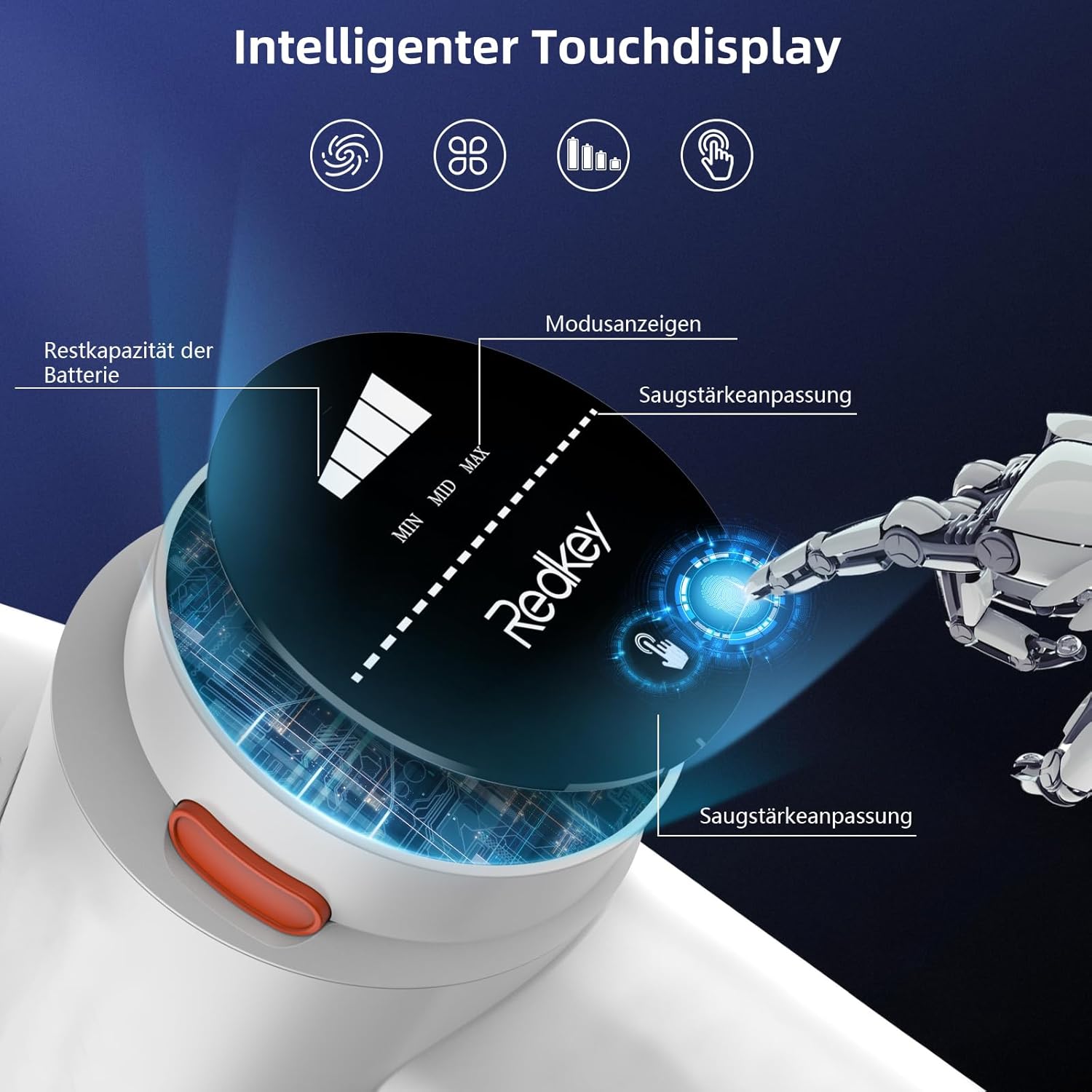
Close-up of the Redkey P8's intelligent touchscreen display, showing battery capacity, mode indicators, and suction power adjustment.
Setup
Follow these steps to assemble your Redkey P8 Cordless Vacuum Cleaner:
- Attach the Metal Tube: Insert the metal tube into the main motor unit until it clicks securely into place.
- Connect the Floor Brush: Attach the electric floor brush to the other end of the metal tube, ensuring it locks firmly.
- Charge the Battery: Before first use, fully charge the vacuum cleaner. Connect the power adapter to the charging port on the main unit and plug it into a wall outlet. The touchscreen display will show the charging status.
- Install Wall Mount (Optional): Use the provided wall mount to store your vacuum cleaner conveniently. Choose a suitable location and secure the mount to the wall using appropriate hardware (not included).
Operating Instructions
The Redkey P8 offers versatile cleaning modes and features for optimal performance.
Power On/Off
Press the power button on the main unit to turn the vacuum cleaner on or off.
Adjusting Suction Power
The intuitive touchscreen display allows you to easily switch between three suction modes:
- Eco Mode (7kPa): Ideal for daily light cleaning on hard floors and low-pile carpets, offering up to 40 minutes of runtime.
- Mid Mode (13kPa): Suitable for deeper cleaning of various surfaces, providing balanced power and runtime.
- Max Mode (25kPa): Provides maximum suction for stubborn dirt, pet hair, and deep cleaning of carpets, with approximately 10 minutes of runtime.
Simply touch the screen to cycle through the suction levels. The display will show the current mode and remaining battery life.

The Redkey P8 showcasing its powerful 25000 Pa suction, effectively picking up various debris like dust, hair, scraps, pet food, and fruit peels.
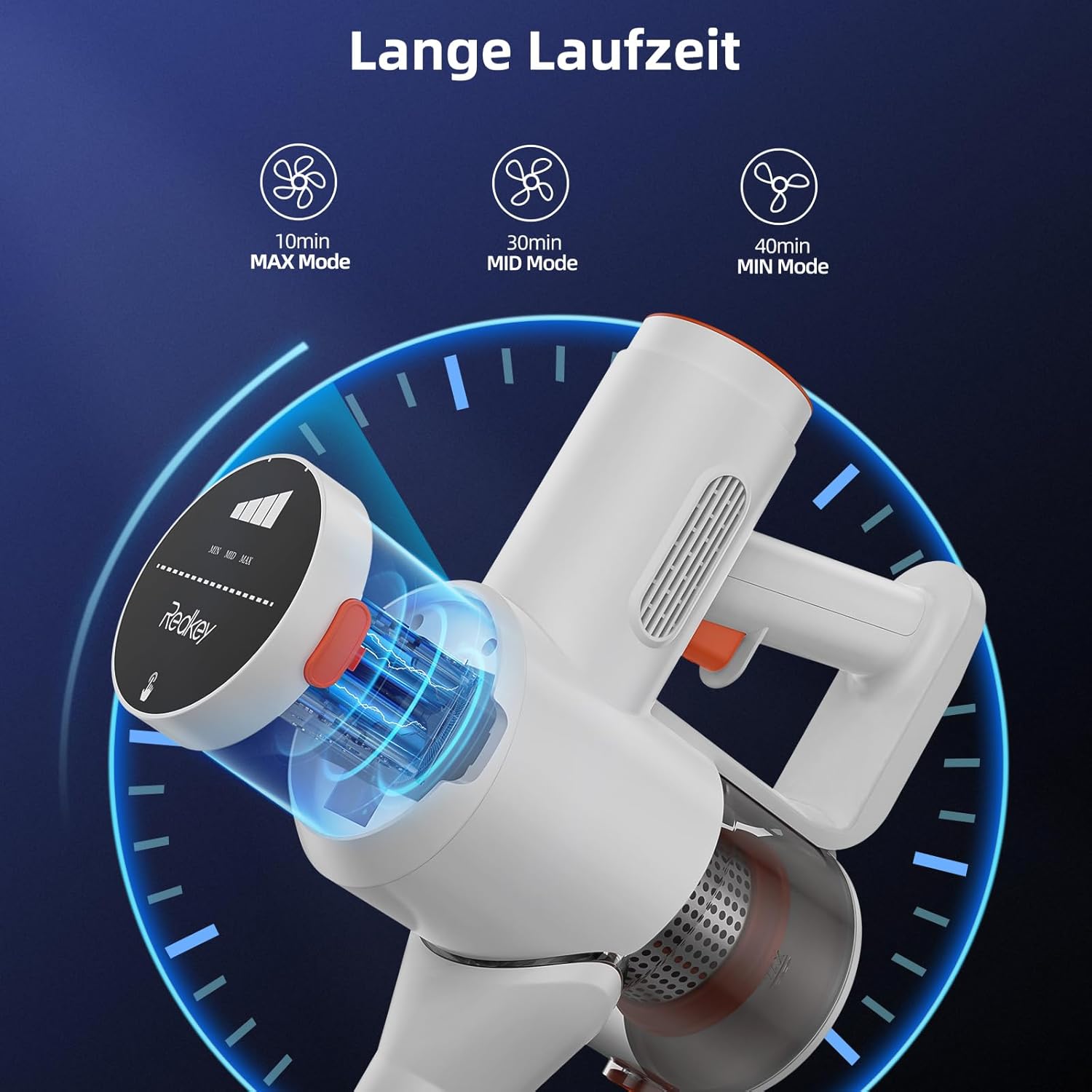
Illustration of the Redkey P8's battery life in different modes: 10 minutes in MAX mode, 30 minutes in MID mode, and 40 minutes in MIN mode.
Using Attachments
- Electric Floor Brush: Ideal for all floor types including tiles, wood, and carpets. The integrated LED headlight illuminates dark areas, and the flexible joint allows for easy maneuverability under furniture.
- 2-in-1 Brush: Use the brush mode for delicate surfaces like upholstery and curtains, or slide the brush back for a wider nozzle for general cleaning.
- Crevice Nozzle: Perfect for reaching tight corners, gaps, and narrow spaces.

The Redkey P8's electric floor brush featuring an LED headlight for improved visibility and a flexible joint allowing for 90-degree and 180-degree rotation for easy cleaning under furniture.

The Redkey P8 shown in different usage scenarios, including cleaning floors, reaching high areas, and converting to a handheld vacuum for upholstery and tight spaces.
Maintenance
Regular maintenance ensures optimal performance and extends the lifespan of your Redkey P8 vacuum cleaner.
Emptying the Dustbin
The dustbin features a one-touch emptying system to minimize contact with dust. When the dustbin is full, simply press the release button to open the bottom flap and empty contents into a trash can.

Step-by-step guide on how to clean the Redkey P8 vacuum cleaner, including releasing the dustbin, emptying it, cleaning the filter under water, and air drying.
Cleaning the Filters
The Redkey P8 utilizes a 4-stage HEPA filtration system to capture over 99.99% of particles down to 0.1 microns. Regular cleaning of the filters is crucial.
- HEPA Filter: Remove the HEPA filter from the dustbin. It can be washed under running water. Ensure it is completely dry before reinserting.
- Metal Filter: The metal filter can also be removed and cleaned.
- Mesh Filter: Blocks hair and general dust. Clean as needed.
- Carbon Filter: Adsorbs benzene and sulfide gas.
It is recommended to clean the filters regularly, especially if you notice a decrease in suction power. Two additional HEPA filters are included for convenience.

Diagram illustrating the Redkey P8's 4-stage HEPA filtration system, showing the Carbon filter, Filter cotton, Mesh filter, Cyclone system, and H13 HEPA filter, designed to remove 99.97% of allergens.
Cleaning the Brush Roll
Periodically check the electric floor brush for tangled hair or debris. Remove the brush roll and clean it with scissors or a brush. Reinsert it securely after cleaning.
Troubleshooting
If you encounter any issues with your Redkey P8, refer to the following common problems and solutions:
| Problem | Possible Cause | Solution |
|---|---|---|
| Vacuum cleaner does not turn on. | Battery is not charged; Power button not pressed correctly. | Charge the battery fully; Ensure the power button is pressed firmly. |
| Weak suction power. | Dustbin is full; Filters are clogged; Brush roll is tangled. | Empty the dustbin; Clean or replace filters; Clean the brush roll. |
| Brush roll not spinning. | Obstruction in the brush roll; Brush roll not properly installed. | Remove any obstructions; Reinstall the brush roll correctly. |
| Short battery runtime. | Using Max mode frequently; Battery not fully charged; Battery degradation. | Use Eco or Mid mode for longer runtime; Ensure full charge; Contact customer support if battery life significantly decreases. |
If the problem persists after trying these solutions, please contact Redkey customer support for assistance.
Specifications
| Feature | Detail |
|---|---|
| Brand | Redkey |
| Model | P8 |
| Color | White |
| Power | 250 Watts |
| Suction Power | 25 kPa (Max Mode) |
| Speed Settings | 3 |
| Runtime | Up to 40 Minutes (Eco Mode) |
| Noise Level | 78 dB |
| Filter Type | HEPA Filter System |
| Special Features | Large Touchscreen, HEPA Filtration System |
| Item Weight | 3.3 Kilograms |
| Cordless | Yes |
Warranty and Support
Redkey products are manufactured to the highest quality standards. This product comes with a standard manufacturer's warranty. For detailed warranty information, product support, or to purchase replacement parts, please visit the official Redkey website or contact their customer service directly.
Please retain your proof of purchase for warranty claims.


