Introduction
The Moulinex OptiGrill+ is an advanced electric indoor grill designed to deliver perfect grilling results every time. Featuring patented technology, this smart contact grill automatically adjusts cooking time based on the thickness and quantity of food, ensuring optimal doneness for various preferences.
The OptiGrill+ includes six automatic cooking programs and inclined non-stick plates that allow fat to drain away, making it easy to prepare a wide range of delicious and healthier meals. It also produces significantly less smoke compared to standard grills, providing a comfortable indoor cooking experience.
Important Safety Instructions
When using electrical appliances, basic safety precautions should always be followed, including the following:
- Read all instructions before use.
- Do not touch hot surfaces. Use handles or knobs.
- To protect against electrical shock, do not immerse cord, plugs, or appliance in water or other liquid.
- Close supervision is necessary when any appliance is used by or near children.
- Unplug from outlet when not in use and before cleaning. Allow to cool before putting on or taking off parts.
- Do not operate any appliance with a damaged cord or plug, or after the appliance malfunctions or has been damaged in any manner.
- The use of accessory attachments not recommended by the appliance manufacturer may cause injuries.
- Do not use outdoors.
- Do not let cord hang over edge of table or counter, or touch hot surfaces.
- Do not place on or near a hot gas or electric burner, or in a heated oven.
- Extreme caution must be used when moving an appliance containing hot oil or other hot liquids.
- Always attach plug to appliance first, then plug cord into the wall outlet. To disconnect, turn any control to "off", then remove plug from wall outlet.
- Do not use appliance for other than intended use.
Product Overview
The Moulinex OptiGrill+ features a robust design with intuitive controls for effortless grilling.
- Grill Plates: Two removable, non-stick grilling plates.
- Drip Tray: A large, removable tray positioned at a 7-degree angle to collect cooking liquids and fat.
- Control Panel: Features a power button, six automatic program buttons, a manual mode button, an 'OK' button, and a cooking level indicator.
- Automatic Sensor Cooking: Patented technology that measures food thickness and quantity to adapt cooking time.
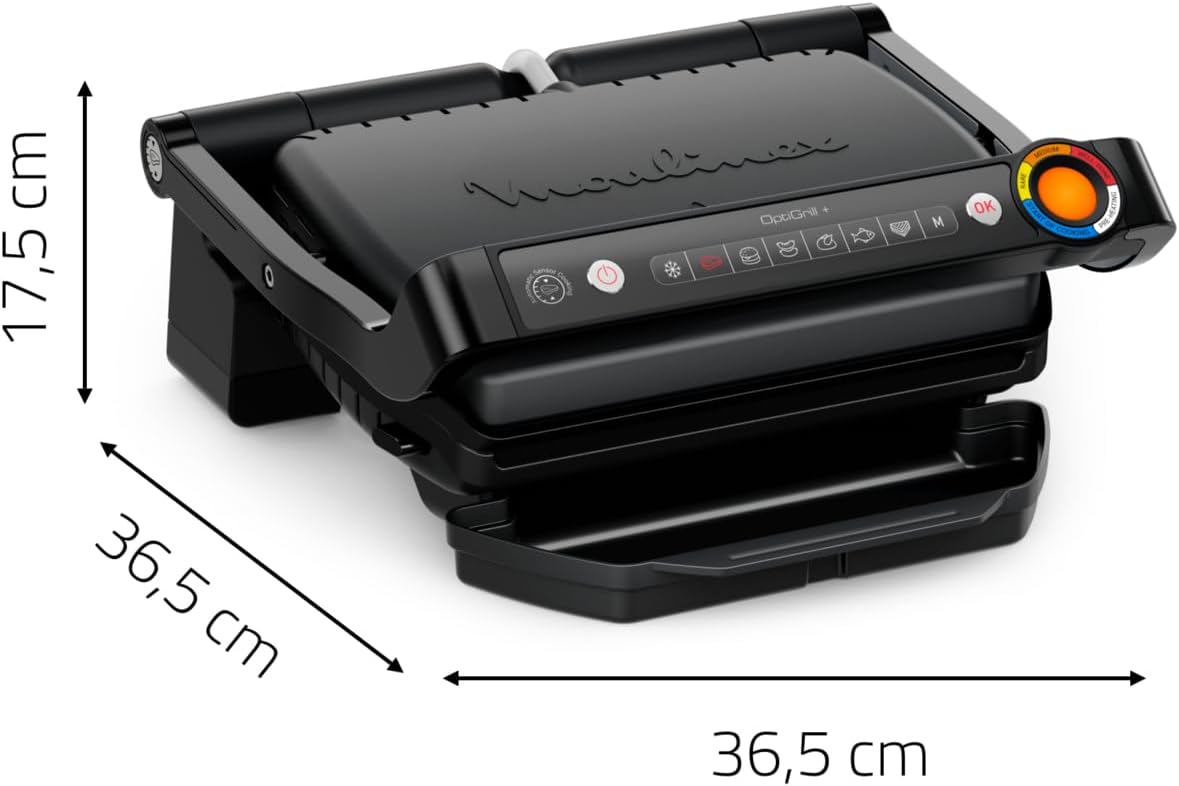
Image: Moulinex OptiGrill+ with indicated dimensions (45 cm x 19 cm x 34.6 cm). This image shows the overall design of the grill, including its closed form and the control panel on the side.
Setup
- Unpack: Carefully remove the grill and all accessories from the packaging. Remove any protective films or stickers.
- Clean Plates and Drip Tray: Before first use, wash the grill plates and the drip tray with warm, soapy water. Rinse thoroughly and dry completely. The plates and drip tray are dishwasher safe.
- Assemble: Insert the clean grill plates securely into the grill base. Place the drip tray beneath the front of the grill to catch any drippings.
- Position: Place the OptiGrill+ on a stable, flat, heat-resistant surface, away from walls or cabinets to allow for proper ventilation.
- Connect Power: Plug the power cord into a grounded electrical outlet. The grill is now ready for use.
Operating Instructions
Preheating
Always preheat the grill before placing food on it. This ensures accurate cooking results and proper activation of the automatic sensor.
- Plug in the grill. The power button will illuminate.
- Press the power button.
- Select your desired automatic cooking program (e.g., Steak, Burger) or Manual mode.
- Press the 'OK' button to start preheating. The cooking indicator light will flash purple.
- Once preheating is complete, the grill will beep, and the indicator light will turn solid purple. The grill is now ready to cook.
Automatic Cooking Programs
The OptiGrill+ features an automatic sensor that measures the thickness of your food and adapts the cooking cycle for perfect results. The cooking indicator changes color to show the cooking progress.

Image: Close-up of the Moulinex OptiGrill+ showing its thickness measurement capability, indicating precise cooking up to the millimeter.
To use an automatic program:
- After preheating (indicator solid purple), open the grill.
- Place your food on the grill plates. Close the lid.
- The grill will automatically detect the food and begin cooking.
- Monitor the cooking indicator for desired doneness:
- Yellow: Start of cooking.
- Orange: Rare.
- Red: Medium.
- Dark Red: Well-done.
- When the desired cooking level is reached, the grill will beep. Open the grill and remove your food.
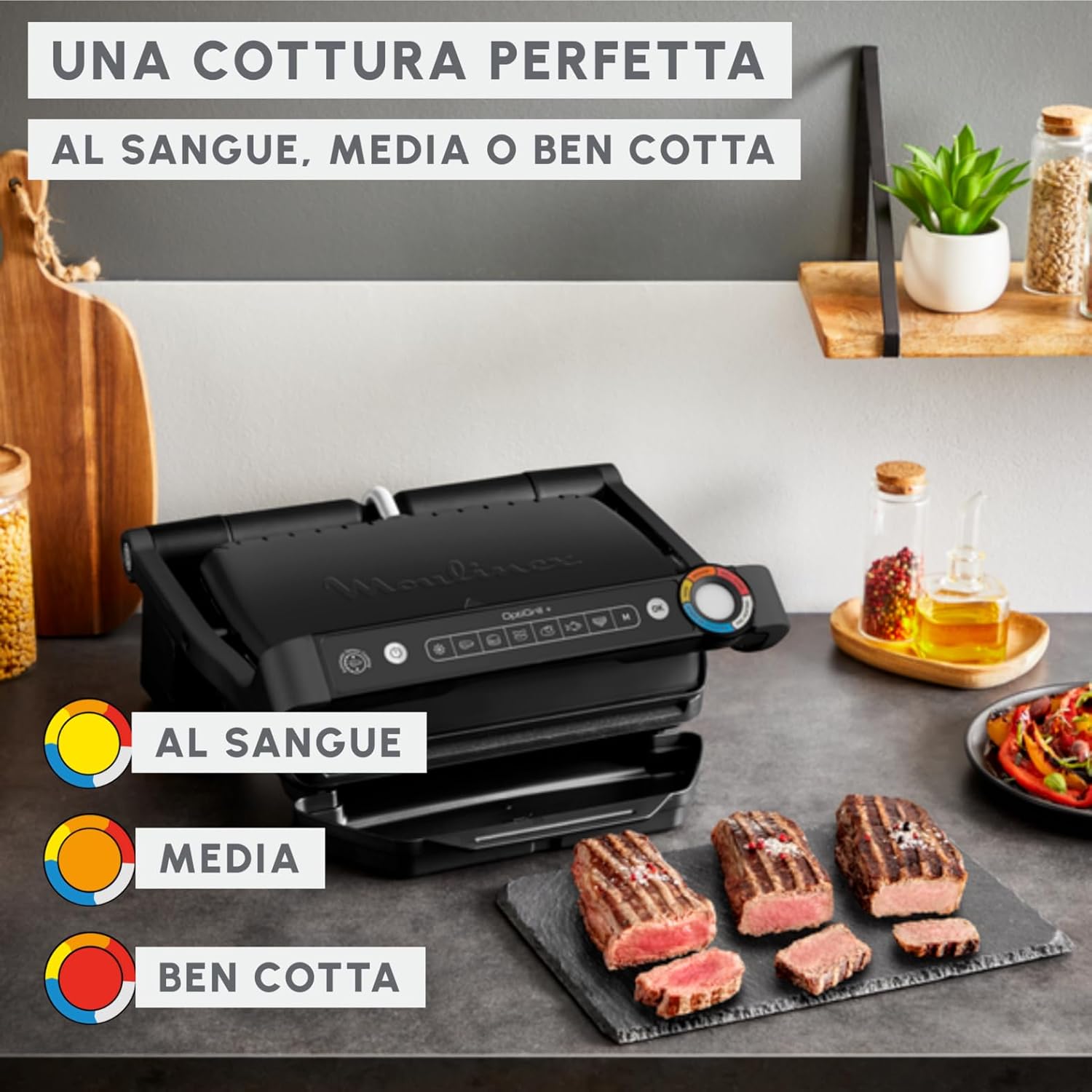
Image: Moulinex OptiGrill+ demonstrating perfect cooking levels (Rare, Medium, Well-done) with corresponding color indicators on the control panel. Cooked meat is shown on a serving plate.
The 6 automatic programs include:
- Red Meat (Steak)
- Burger
- Sausage
- Pork / Lamb
- Fish
- Sandwich / Panini

Image: A grilled chicken breast on a wooden plate, surrounded by icons representing the 6 automatic cooking programs: Steak, Burger, Sausage, Pork/Lamb, Fish, and Sandwich.
Manual Mode
For foods not covered by the automatic programs, or for custom cooking, use the manual mode.
- After preheating, select the manual mode button.
- Press 'OK'. The indicator light will turn green.
- Place your food on the grill.
- Monitor cooking visually and remove food when desired doneness is achieved.
Cleaning and Maintenance
Regular cleaning ensures the longevity and optimal performance of your OptiGrill+.
- Unplug and Cool: Always unplug the grill from the power outlet and allow it to cool completely before cleaning.
- Remove Plates and Drip Tray: Once cool, press the release buttons to detach the grill plates. Remove the drip tray.
- Wash: The grill plates and drip tray are dishwasher safe. Alternatively, they can be washed by hand with warm, soapy water and a non-abrasive sponge. Rinse thoroughly and dry completely.
- Clean Exterior: Wipe the exterior of the grill base with a damp cloth. Do not use abrasive cleaners or scourers. Never immerse the main unit in water or any other liquid.
- Storage: Once clean and dry, reattach the plates and drip tray. Store the grill in a dry place.

Image: Removable grill plates and the drip tray of the Moulinex OptiGrill+ placed inside a dishwasher, illustrating the ease of cleaning.
The inclined plates and large drip tray contribute to healthier grilling by allowing up to 44% less fat in your meals (based on internal tests with 20% fat burgers).

Image: Moulinex OptiGrill+ in use, showing fat draining from cooking meat into the collection tray, highlighting its healthy grilling feature.
Troubleshooting
If you encounter issues with your OptiGrill+, refer to the following common problems and solutions:
- Grill not turning on: Ensure the power cord is securely plugged into a working electrical outlet. Check if the power button has been pressed.
- Food not cooking evenly: Ensure the grill plates are clean and properly installed. Make sure the grill is fully preheated before placing food. Avoid overcrowding the grill.
- Excessive smoke: Ensure the drip tray is correctly positioned and empty. Clean the grill plates and drip tray regularly to prevent grease buildup.
- Automatic program not working: Ensure the grill is properly preheated. The sensor needs to be clean. If the issue persists, try using manual mode.
For problems not addressed here, please contact customer support.
Specifications
| Brand | Moulinex |
| Model | GI717810 |
| Color | Black |
| Dimensions (L x W x H) | 45 x 19 x 34.6 cm |
| Wattage | 2000 watts |
| Weight | 5.67 kg |
| Special Features | Non-stick coating, Removable plates, Drip tray |
| Number of Settings | 7 (6 automatic programs + 1 manual mode) |
Warranty and Support
This Moulinex OptiGrill+ is covered by a Limited Warranty. Please refer to the warranty card included with your product for specific terms and conditions, including coverage duration and limitations.
For technical assistance, troubleshooting beyond this manual, or warranty claims, please contact Moulinex customer support. Contact information can typically be found on the official Moulinex website or on your product packaging.
Please have your product model number (GI717810) and proof of purchase ready when contacting support.


