Introduction
The AIMIBO Wireless HDMI Transmitter and 4 Receivers kit provides a seamless solution for extending video and audio signals wirelessly to multiple displays. This system operates on a dual-band 2.4G/5.8GHz frequency, delivering 1080P@60Hz full HD content with minimal delay. It is designed for various applications, including home entertainment, conference rooms, retail spaces, and mobile setups, supporting up to 8 receivers or touchscreens simultaneously.
Product Overview
The package includes the following components:
- 1 x Wireless HDMI Transmitter (TX)
- 4 x Wireless HDMI Receivers (RX)
- 5 x USB C Cables
- 5 x HDMI Cables
- 2 x Mini/Micro HDMI Adapters
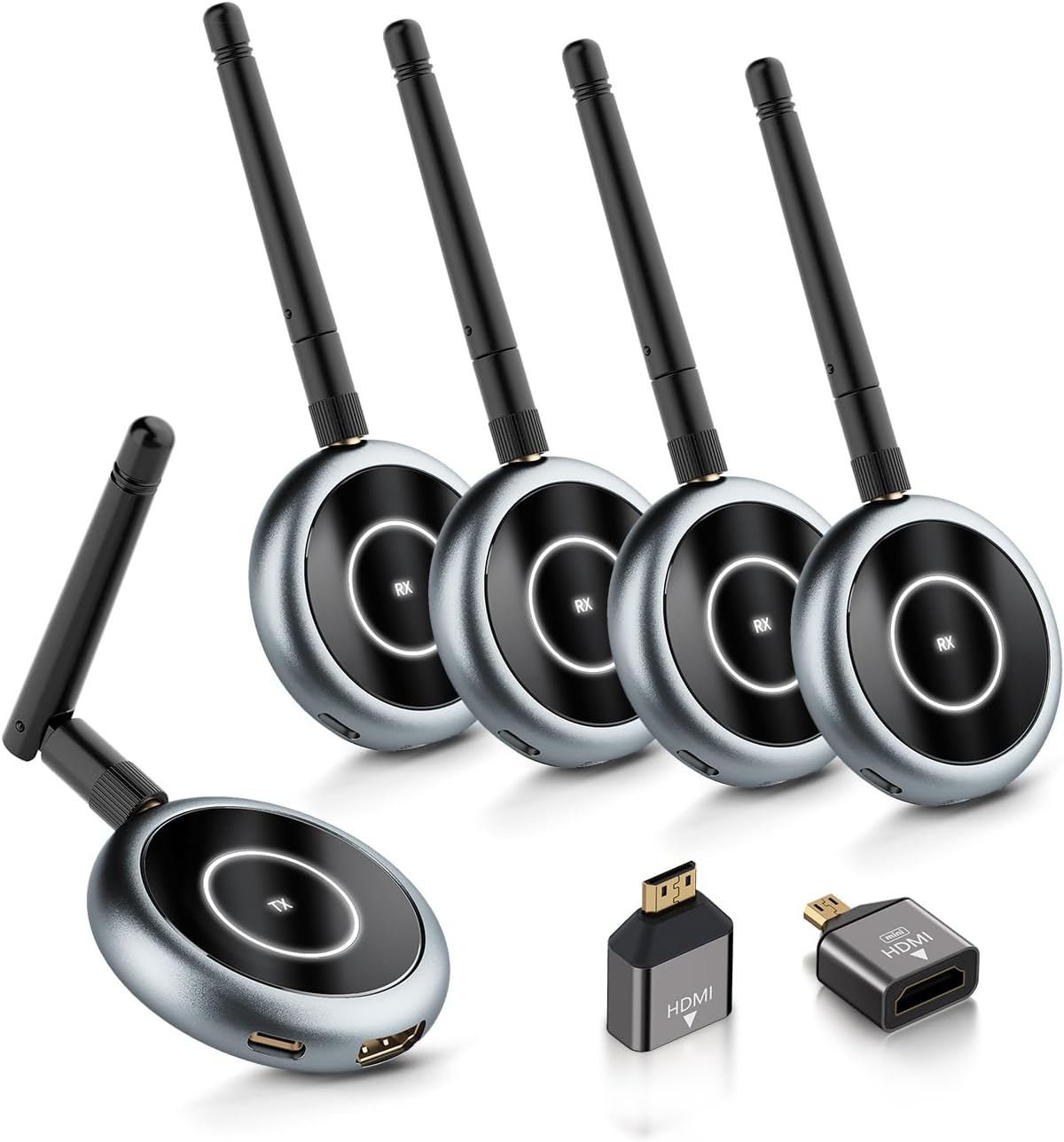
Figure 1: The AIMIBO Wireless HDMI Transmitter and 4 Receivers kit, including the transmitter, four receivers, and various connecting cables and adapters.
Setup
The AIMIBO Wireless HDMI kit is designed for plug-and-play operation. Units come pre-paired from the factory. Follow these steps for initial setup:
- Connect the Transmitter (TX): Connect one end of an HDMI cable to your source device (e.g., laptop, PS5, camera) and the other end to the HDMI input port on the Transmitter (TX). Connect a USB-C cable to the TX unit and to a power source (e.g., USB port on your device or a USB power adapter).
- Connect the Receiver(s) (RX): For each display, connect one end of an HDMI cable to the HDMI input port on your display (e.g., TV, projector, monitor) and the other end to the HDMI output port on a Receiver (RX) unit. Connect a USB-C cable to the RX unit and to a power source (e.g., USB port on your display or a USB power adapter).
- Power On: Ensure both the source device and all displays are powered on. The TX and RX units will automatically power on when connected to a power source.
- Automatic Connection: The pre-paired TX and RX units should automatically establish a connection within a few seconds. The indicator light on the units will show connection status.
- Re-pairing (if necessary): If units do not connect automatically or if you are pairing new receivers, long-press the function button on both the TX and RX units simultaneously for approximately 5 seconds until the indicator lights flash, indicating pairing mode. Release the buttons, and the units will attempt to pair.

Figure 2: Basic setup for connecting the transmitter to a source device and a receiver to a display.
Operating
The AIMIBO Wireless HDMI system offers versatile operating modes:
- Standard Wireless Extension: Once connected and paired, the system will mirror or extend your source device's display to the connected TV(s), projector(s), or monitor(s). This is ideal for presentations, home theater setups, or extending your workspace without long HDMI cables.
- Multi-Screen Broadcasting: The 1TX&4RX model allows simultaneous broadcasting to up to four displays. The system supports up to 8 receivers in total, enabling extensive multi-screen setups for large venues or multiple rooms.
- Phone/Tablet as Mobile Screen (App Function):
For mobile monitoring or collaborative viewing, connect the TX unit to your HDMI device. Download the dedicated app (e.g., TuTuLink Utilities) on your smartphone or tablet. Connect your mobile device to the Wi-Fi network broadcast by the TX unit. Open the app to view the mirrored content. This feature is particularly useful for camera shooting, business, or educational purposes. Note: Reverse operation from the touchscreen to the source device is not supported.

Figure 3: Using a smartphone or tablet as a portable monitor via the dedicated app.
- Channel Switching: To optimize signal quality and prevent interference, especially in environments with many Wi-Fi devices, you can switch wireless channels via the app's settings page.
Maintenance
To ensure the longevity and optimal performance of your AIMIBO Wireless HDMI kit, follow these maintenance guidelines:
- Cleaning: Use a soft, dry cloth to clean the exterior of the transmitter and receivers. Avoid using liquid cleaners or abrasive materials.
- Storage: When not in use for extended periods, disconnect the devices from power and store them in a cool, dry place away from direct sunlight and extreme temperatures.
- Handling: Handle the units and cables with care to prevent physical damage. Avoid bending cables sharply or applying excessive force to ports.
- Ventilation: Ensure the units have adequate ventilation during operation to prevent overheating. Do not cover the devices.
Troubleshooting
If you encounter issues with your AIMIBO Wireless HDMI kit, refer to the following common problems and solutions:
| Problem | Possible Cause | Solution |
|---|---|---|
| No signal on display | Loose connections, power issue, incorrect input selection, pairing issue. | Check all HDMI and USB-C cable connections. Ensure both TX and RX units are powered. Select the correct HDMI input on your display. Re-pair the TX and RX units by long-pressing their function buttons. |
| No sound, but image is transmitted | Audio settings on source device, unsupported audio format. | Check the audio settings of your source device and ensure it is set to 2.0 stereo output. The system does not support Dolby, 2.1 channel stereo, 5.1 channel stereo, or 7.1 channel stereo output. |
| Choppy video or signal drops | Interference from other wireless devices, excessive distance, physical obstructions. | Try switching to a different wireless channel via the app. Reduce the distance between TX and RX units. Minimize physical obstructions (e.g., thick walls) between units. Ensure antennas are properly screwed on and positioned. |
| App disconnects or video stops when exiting app | Mobile device disconnected from TX's Wi-Fi network. | To resume video playback, go to your phone's Wi-Fi settings, reconnect to the TX's Wi-Fi network (e.g., TuTuplay-xxx network), and then reopen the app. |
Specifications
| Feature | Detail |
|---|---|
| Brand | AIMIBO |
| Model Number | Q3 |
| Connectivity Technology | HDMI Wireless |
| Wireless Frequency | 2.4G/5.8GHz Dual Band |
| Video Resolution | 1080P@60Hz Full HD |
| Latency | 0.1s (Low Latency) |
| Transmission Range | Up to 165 feet (50m) in open areas |
| Max Receivers Supported | 8 (including mobile devices via app) |
| Audio Output Mode | Stereo (2.0) |
| Compatible Devices | HDTV, Projector, Monitor, Laptop, PC, MacBook, Camera, Set-top boxes, Cable Box, Blu-ray/DVD players, Roku, Satellite boxes, Gaming consoles, etc. |
| Special Features | Plug and Play, App function (phone/tablet as display), HDCP Support |
| Item Weight | 1.1 pounds |
| Product Dimensions | 1.18 x 0.79 x 1.97 inches |
Warranty & Support
AIMIBO is committed to providing high-quality products and customer satisfaction.
- Product Care: The product includes 12 months of product care from the date of purchase.
- Customer Support: For any inquiries, technical assistance, or support needs, please contact AIMIBO customer support, available 24/7.
- User Manual (PDF): A detailed PDF user manual is available for download at https://manuals.plus/m/a9f1a9fa3b75a0b8b964dfb4f5c655bc8ed9d6a6b09c2918c0bf75e66ad5ffd0.