
TOPUTURE TEB1
Toputure TEB1 Magnetic Stationary Exercise Bike User Manual
Model: TEB1
Important Safety Information
Please read all instructions carefully before using the Toputure TEB1 Exercise Bike. Retain this manual for future reference.
- The machine is for home use only.
- Children should not use this machine without adult supervision.
- To avoid injury, do not put your hands into the belt or flywheel when the machine is working.
- Please do not open the machine cover at will.
- Individuals with heart disease or lung disease should consult a doctor before starting any exercise program.

Image: Safety warning sticker located on the exercise bike frame, detailing important usage precautions.
Setup and Assembly
The Toputure TEB1 Exercise Bike is designed for straightforward assembly. All necessary tools are included in the package.
1. Unpacking and Component Check
Carefully remove all components from the packaging. Verify that all parts listed in the assembly guide are present and undamaged.
2. Base Stabilization
Attach the front and rear stabilizer bars to the main frame. Ensure all bolts are securely tightened. The bike features adjustable feet to ensure stability on uneven surfaces.
3. Handlebar and Seat Installation
Install the handlebar post and handlebars. Insert the seat post and attach the seat. Ensure all quick-release levers and adjustment knobs are tightened after setting your preferred height and position.

Image: A diagram illustrating the adjustable seat and handlebars, highlighting the range of motion for height and horizontal adjustments. The seat is 4-way adjustable, and handlebars are 2-way adjustable.
4. Pedal Attachment
Attach the pedals to the crank arms. Note that pedals are typically marked 'L' for left and 'R' for right. The left pedal tightens counter-clockwise, and the right pedal tightens clockwise.
5. LCD Monitor and Accessories
Connect the LCD monitor cables and mount the monitor onto the handlebar post. Ensure the tablet/phone holder is securely in place.

Image: Detailed view of key components: adjustable handlebars, comfortable seat, magnetic brake, bottle holder, non-slip pedals, and transport wheels, illustrating their design and placement.
Moving the Bike
The TEB1 is equipped with transport wheels on the front stabilizer for easy relocation. Tilt the bike forward and roll it to your desired position.

Image: A user demonstrating the ease of moving the exercise bike. The bike features front transport wheels, allowing it to be tilted and rolled for convenient storage or repositioning.
Operating Instructions
LCD Display Functions
The integrated LCD display provides real-time workout data. It monitors:
- Time: Duration of your workout.
- Speed: Current cycling speed.
- Distance: Distance covered during the current session.
- Mileage (Odometer): Total accumulated distance.
- Calories: Estimated calories burned.
- Scan: Cycles through all metrics automatically.

Image: The multi-functional LCD monitor and electronic device support. The display shows metrics such as distance, calories, time, odometer, and speed, allowing users to track their workout data in real-time.
Adjusting Magnetic Resistance
The TEB1 features a stepless magnetic resistance adjustment system. Turn the red knob clockwise to increase resistance and counter-clockwise to decrease it. The independent emergency brake handle allows for immediate stopping of the flywheel.

Image: A close-up of the micro-adjustable magnetic resistance knob, showing a dial from 0-100%. This allows for precise control over workout intensity, suitable for various training levels from warm-up to endurance building.
APP Connectivity
The TEB1 Exercise Bike supports popular fitness applications such as Z-Sport, Zwift, and Kinomap via Bluetooth. This allows for interactive training, real-scene simulations, and detailed data tracking.
- Connecting to APP: Ensure Bluetooth is enabled on your device. Open the desired fitness app and follow its instructions to connect to the TEB1 bike.
- Features: Enjoy riding lessons, virtual routes, multiplayer modes, and comprehensive sports data monitoring and recording.
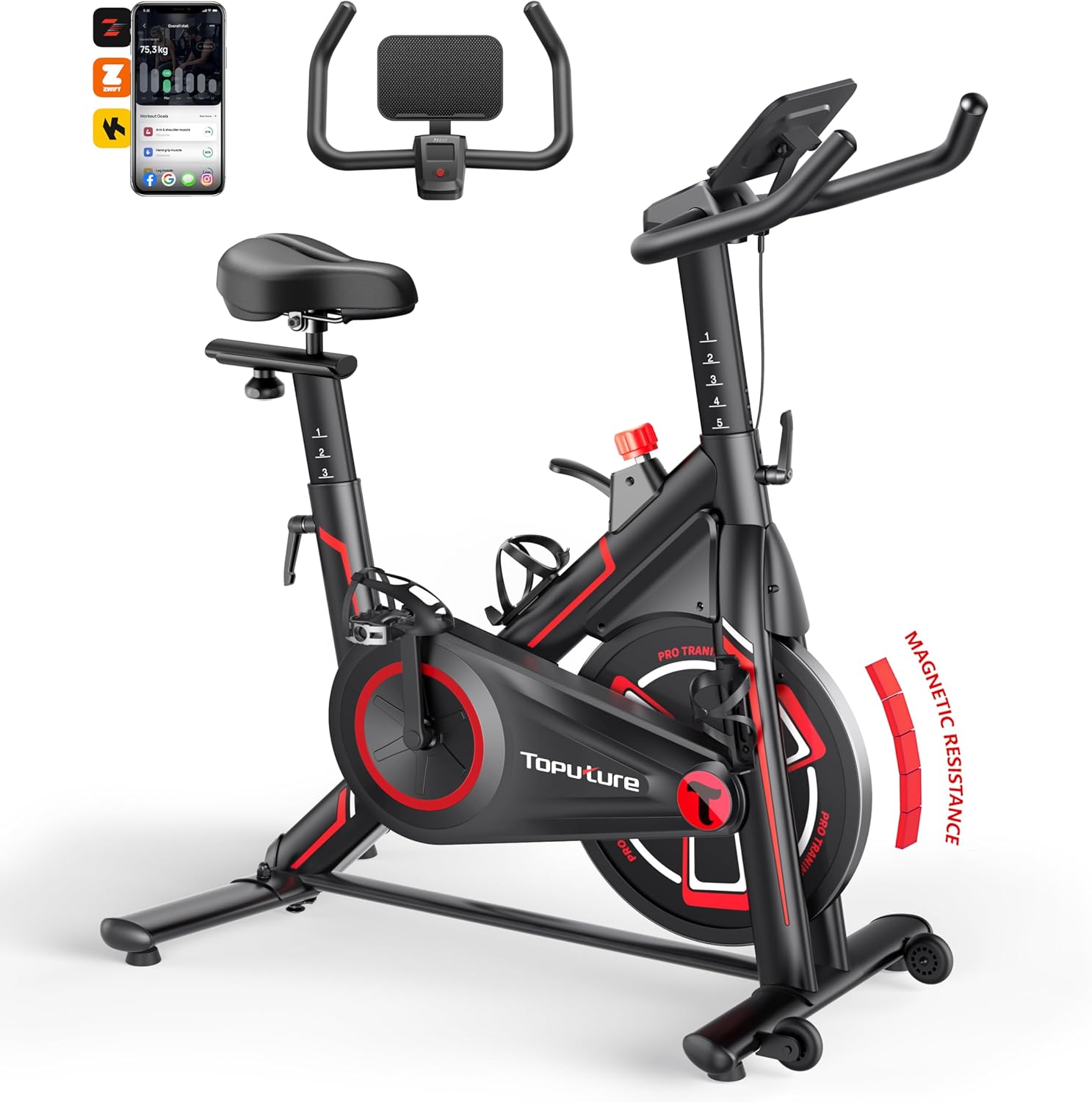
Image: The Toputure TEB1 Exercise Bike, showcasing its design and highlighting compatibility with Z-Sport, Zwift, and Kinomap applications for enhanced interactive workouts.

Image: A visual representation of tracking workouts using Z-Sport and Zwift applications. The image shows a user exercising while the app displays real-time data such as speed, distance, and calories, emphasizing Bluetooth connectivity for fitness goal tracking.
Silent Belt Drive System
The TEB1 utilizes a silent belt drive system combined with magnetic control, ensuring quiet operation. This allows for workouts at any time without disturbing others.

Image: An internal view highlighting the hyper-silent magnetic resistance system and durable belt drive. The design ensures a quiet cycling experience, operating at approximately 25 dB.
Maintenance
Regular maintenance ensures the longevity and optimal performance of your Toputure TEB1 Exercise Bike.
Cleaning
- Wipe down the bike after each use with a damp cloth to remove sweat and dust.
- Avoid using abrasive cleaners or solvents that could damage the finish or electronic components.
Inspections
- Periodically check all bolts and connections to ensure they are tight. Tighten any loose fasteners.
- Inspect the pedals, seat, and handlebars for any signs of wear or damage.
- The belt drive system is designed for low maintenance. No lubrication is typically required.
Troubleshooting
If you encounter any issues with your TEB1 Exercise Bike, refer to the following common solutions:
| Problem | Possible Cause | Solution |
|---|---|---|
| LCD display not working | Loose cable connection, dead batteries | Check all cable connections to the monitor. Replace batteries in the LCD unit. |
| Unusual noise during operation | Loose bolts, friction from components | Check and tighten all assembly bolts. Ensure no parts are rubbing. |
| Resistance not changing | Resistance knob not fully engaged, internal mechanism issue | Ensure the resistance knob is turned firmly. If the issue persists, contact customer support. |
| Difficulty connecting to APP | Bluetooth off, app issues, bike not active | Ensure Bluetooth is enabled on your device. Restart the app and the bike. Pedal to activate the bike's Bluetooth signal. |
For issues not listed here or if troubleshooting steps do not resolve the problem, please contact Toputure customer support.
Specifications
Key technical specifications for the Toputure TEB1 Exercise Bike:

Image: The exercise bike highlighting its robust construction. The text indicates 'Hard Steel Construction' and a 'Weight Capacity of 150KG (330LBS)', emphasizing its durability and stability with a multiple triangle structure.
| Feature | Detail |
|---|---|
| Model Number | TEB1 |
| Product Dimensions | 102 x 51 x 114 cm (40.1 x 20.1 x 44.9 inches) |
| Item Weight | 26 kg (57.3 lbs) |
| Maximum Weight Capacity | 150 kg (330 lbs) |
| Drive System | Belt Drive |
| Resistance Mechanism | Magnetic |
| Display Type | LCD |
| Recommended User Height | 150cm - 195cm (4'11" - 6'5") |
| Special Features | Adjustable Resistance Level, Adjustable Seat, Anti-Slip Floor Protector, App Connectivity, Calories Monitor |
Warranty and Support
The Toputure TEB1 Exercise Bike comes with a 12-month warranty from the date of purchase.
If you have any questions, require assistance with assembly, operation, or encounter any issues with your product, please do not hesitate to contact our professional after-sales support team. Refer to your purchase documentation for contact details or visit the official Toputure website.
Related documentsTEB1


Ask a question about this manual
Ask about setup, troubleshooting, compatibility, parts, safety, or missing instructions. Manuals+ will review the question and use this page’s manual context to help answer it.