
1. Introduction and Overview
The Lian Li Galahad II Trinity Performance 360 is an all-in-one (AIO) liquid CPU cooler designed for high-performance thermal management. This cooler features a 360mm radiator, daisy-chainable LCP fans, and an enhanced pump design to efficiently dissipate heat from your CPU. It is compatible with a wide range of Intel (LGA 1700, 1200, 115X) and AMD (AM5/AM4) sockets.
This manual provides essential information for the proper installation, operation, and maintenance of your Galahad II Trinity Performance 360 AIO liquid cooler.

Figure 1: Lian Li Galahad II Trinity Performance 360 AIO CPU Liquid Cooler (White version).
2. Key Features
- Enhanced Pump Design: The pump features a 15% larger impeller and a 31% faster motor speed compared to the standard Galahad II Trinity, ensuring strong water flow and efficient cooling.
- Optimized Cold Plate: The copper plate fin thickness and height are designed for improved coolant diffusion across the entire surface area, preventing substance buildup over time.
- High-Density Radiator: A 32mm thick double-stack fin radiator with 19 FPI (Fins Per Inch) provides increased surface area for superior heat dissipation.
- Daisy-Chainable LCP Fans: High-performance Liquid Crystal Polymer (LCP) fans are 28mm thick and feature a copper shield bearing for stability and quiet operation. They can be daisy-chained with a single short cable for simplified wiring.
- Customizable Pump Cover: Three interchangeable pump cover designs and two rings of colors allow for individual control of lighting effects.
- L-Connect 3 Software Control: Provides real-time monitoring of motor speed, lighting effect previews, and control over the pump and fan settings.

Figure 2: Performance enhancements of the Galahad II Trinity Performance pump, including larger impeller and faster motor speed.

Figure 3: Exploded view illustrating the internal components of the pump, including the 36mm impeller and revised fin structure.

Figure 4: The three interchangeable pump cover designs: Duo-Infinity, Dazzle, and Sink-Hole, offering various aesthetic options.

Figure 5: Detail of the 32mm thick radiator featuring a double-wave fin design for enhanced heat dissipation.

Figure 6: The daisy-chainable LCP fans, designed for high performance and simplified cable management.
3. Setup and Installation
Proper installation is crucial for optimal performance. Follow these general steps for mounting your AIO cooler. Refer to the detailed installation guide provided with your product for specific instructions for your CPU socket type.
3.1. Prepare Your Motherboard
- Identify your CPU socket type (Intel LGA 1700, 1200, 115X or AMD AM5/AM4).
- Install the appropriate backplate and mounting standoffs onto your motherboard. The Galahad II Trinity series features redesigned mounting backplates with fixed struts for easier installation.

Figure 7: Installation diagram highlighting compatibility with Intel LGA 1700/1200/115X and AMD AM5/AM4 sockets, along with mounting components.
3.2. Apply Thermal Paste
Apply a thin, even layer of thermal paste to the CPU's IHS (Integrated Heat Spreader). The cooler includes a thermal paste control film and spreader to help ensure the correct amount is applied for effective heat dissipation.

Figure 8: The cold plate showing a recommended thermal paste application pattern for optimal contact and heat transfer.
3.3. Mount the Pump and Radiator
- Carefully place the pump block onto the CPU, aligning it with the mounting holes. Secure it with the provided screws, tightening them in a diagonal pattern until snug.
- Mount the radiator and fans in your desired location within the PC case (e.g., top, front, or side). The innovative 45° tubing connectors allow for 360° rotation, providing flexibility for various installation orientations.
3.4. Connect Cables
Connect the necessary cables from the pump and fans to your motherboard and power supply. The controller is built into the pump, and fans can be connected to the pump via L-Connect 3.
- SATA Cable: Connect for power to the pump.
- USB Cable: Plug into a motherboard 9-pin USB header for L-Connect 3 software support.
- 4-Pin PWM Cable: Required for RPM control.
- ARGB and Fan Extension Input Cable: Connect an ARGB device or fan for control via L-Connect 3.
- 5V ARGB Cable: Required for motherboard sync (not needed if using L-Connect 3).

Figure 9: Overview of the simple connection points for power, USB, PWM, and ARGB cables.
3.5. Product Highlight Video
Video 1: Galahad II Trinity Performance Product Highlight Video. This video provides a visual overview of the cooler's features and design.
4. Operating Instructions
The Lian Li Galahad II Trinity Performance 360 AIO is controlled via the L-Connect 3 software, which allows for comprehensive monitoring and customization.
4.1. L-Connect 3 Software
- Download and install the latest version of L-Connect 3 software from the official Lian Li website.
- The software provides real-time insight into motor speed, fan RPM, and coolant temperature.
- Customize lighting effects for the pump cover and fans.
- Control fan speed with two modes:
- Performance Mode (H): Maximum speed at 200-3000 RPM for highest cooling capacity.
- Noise Optimized Mode (L): Maximum fan speed at 200-2300 RPM for quieter operation.

Figure 10: Screenshots of the L-Connect 3 software interface, demonstrating controls for fan/pump speed and personalized lighting effects.
5. Maintenance
Regular maintenance helps ensure the longevity and optimal performance of your AIO cooler.
- Dust Removal: Periodically clean the radiator fins and fan blades to prevent dust buildup, which can impede airflow and reduce cooling efficiency. Use compressed air or a soft brush.
- Inspect Connections: Occasionally check all cable connections (power, USB, PWM) to ensure they are securely seated.
- Check for Leaks: While AIOs are sealed systems, it is good practice to visually inspect tubing and fittings for any signs of leaks, especially after initial installation or system relocation.
6. Troubleshooting
If you encounter issues with your Galahad II Trinity Performance 360 AIO, consider the following troubleshooting steps:
- No Power/Fans Not Spinning: Ensure all power cables (SATA) are correctly connected to the power supply. Verify that the 4-pin PWM cable is securely connected to the motherboard's CPU_FAN header.
- No RGB Lighting: Check the 5V ARGB connection to the motherboard or ensure the USB cable for L-Connect 3 is properly connected and the software is running. Confirm lighting effects are enabled in L-Connect 3.
- High CPU Temperatures:
- Verify the pump is running (you may feel a slight vibration or hear a faint hum).
- Ensure the pump block is making proper contact with the CPU and that thermal paste was applied correctly.
- Check fan speeds in L-Connect 3 and ensure they are set to an appropriate profile (e.g., Performance Mode).
- Clean any dust buildup on the radiator fins.
- Unusual Noises: If you hear gurgling or excessive pump noise, it may indicate air trapped in the loop. Gently tilt your PC case to help move air bubbles to the radiator. Ensure the pump is not running dry.
If issues persist after following these steps, please contact Lian Li customer support.
7. Specifications
Below are the technical specifications for the Lian Li Galahad II Trinity Performance 360 AIO CPU Liquid Cooler (Model GA2P36W).
| Feature | Specification |
|---|---|
| Product Dimensions (L x W x H) | 4.96" x 1.05" x 15.65" (126mm x 26.7mm x 397.5mm) |
| Radiator Dimensions (L x W x H) | 396mm x 130mm x 32mm |
| Material | Aluminum (Radiator) |
| Cooling Method | Water |
| Compatible Devices | Desktop CPUs |
| CPU Socket Compatibility | Intel LGA 1700, 1200, 115X; AMD AM5, AM4 |
| Fan Type | LCP Fans (Daisy-chainable) |
| Maximum Rotational Speed (Fans) | 3000 RPM (Performance Mode), 2300 RPM (Noise Optimized Mode) |
| Air Flow Capacity (Max) | 109.6 CFM |
| Noise Level (Max) | 39.9 Decibels |
| Pump Motor Speed (Max) | 4200 RPM |
| Power Connector Type | 4-Pin PWM |
| Voltage | 12 Volts (DC) |
| Wattage | 36 watts |
| Item Weight | 5.5 Pounds (2.5 kg) |
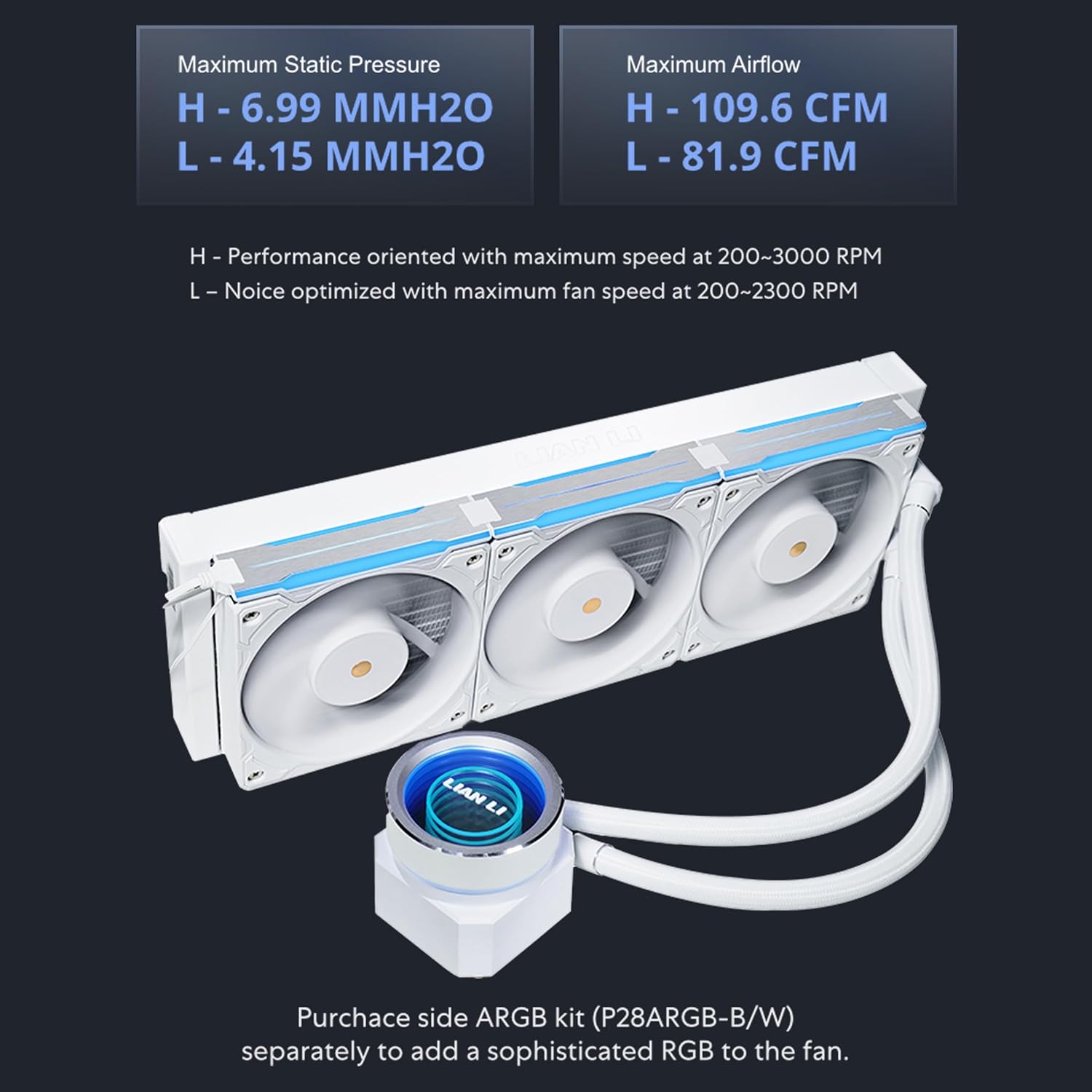
Figure 11: Detailed fan performance specifications for both high (H) and low (L) speed modes.

Figure 12: Radiator dimensions: 396mm (L) x 130mm (W) x 32mm (H).
8. Warranty Information
The Lian Li Galahad II Trinity Performance 360 AIO CPU Liquid Cooler comes with a 6-year defect coverage. For complete details regarding warranty terms, conditions, and claim procedures, please refer to the official Lian Li website or the warranty card included with your product.
9. Support
For further assistance, technical support, or to download the latest L-Connect 3 software and drivers, please visit the official Lian Li website:
You can also find additional resources and FAQs on the Lian Li support pages.


