
1. Introduction and Overview
The Apple AirPods (3rd Generation) are advanced wireless earbuds designed to deliver a high-quality audio experience within the Apple ecosystem. They feature spatial audio with dynamic head tracking, Adaptive EQ, and a contoured design for comfortable wear. These earbuds are sweat and water resistant, making them suitable for various activities. The included MagSafe Charging Case extends battery life and offers convenient charging options.

Image: Apple AirPods (3rd Generation) with their MagSafe Charging Case, showcasing the earbuds outside the case.
2. What's in the Box
- AirPods (3rd generation)
- MagSafe Charging Case
- Lightning to USB-C Cable
- Documentation
3. Setup
3.1 Initial Pairing with iOS Devices
- Ensure your iOS device (iPhone, iPad, or iPod touch) is running the latest version of iOS.
- Unlock your iOS device and go to the Home screen.
- Open the lid of your MagSafe Charging Case with your AirPods inside, and hold it next to your iOS device.
- A setup animation will appear on your iOS device's screen.
- Tap Connect, then tap Done.
Your AirPods are now paired with your iOS device and automatically set up for all supported devices signed in to iCloud with the same Apple ID.
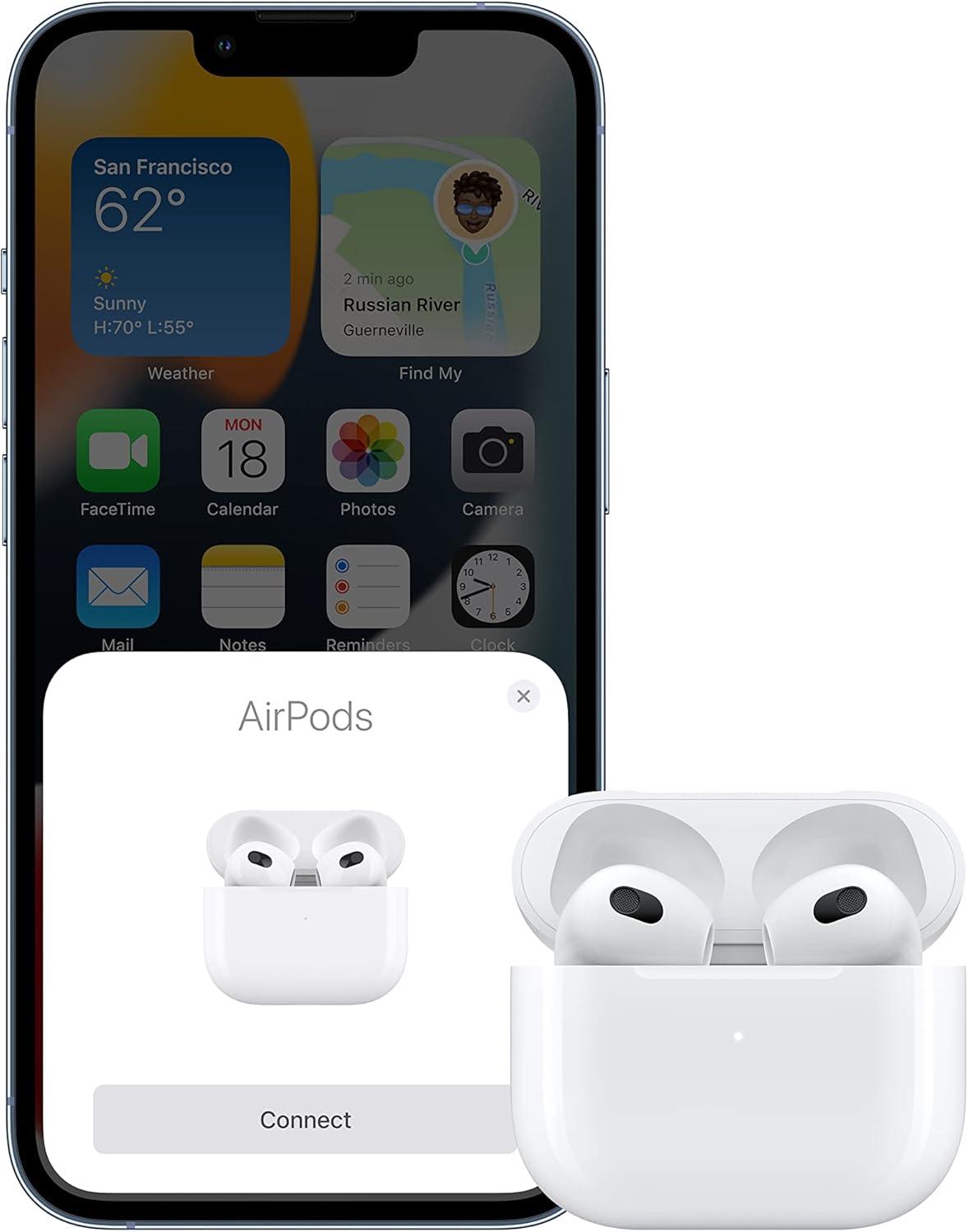
Image: An iPhone screen showing the "AirPods Connect" prompt, positioned next to an open MagSafe Charging Case with the AirPods inside, illustrating the pairing process.
3.2 Pairing with Other Devices (Bluetooth)
- With AirPods in their charging case, open the lid.
- Press and hold the setup button on the back of the case until the status light flashes white.
- On your non-Apple device, go to Bluetooth settings and select your AirPods from the list of available devices.
4. Operating Instructions
4.1 Wearing Your AirPods
Place the AirPods in your ears. The contoured design is intended for a comfortable and secure fit. If the fit is not snug, adjust the position of the AirPods in your ear. A proper fit is essential for optimal sound quality and performance.

Image: A person wearing Apple AirPods (3rd Generation) while exercising outdoors in the rain, highlighting their sweat and water resistance.
4.2 Controls (Force Sensor)
- Play/Pause: Press the force sensor once.
- Skip Forward: Press the force sensor twice.
- Skip Back: Press the force sensor three times.
- Answer/End Call: Press the force sensor once.
- Decline Call: Press the force sensor twice.
4.3 Spatial Audio with Dynamic Head Tracking
Spatial audio creates an immersive, theater-like experience by placing sound all around you. With dynamic head tracking, the sound adjusts as you move your head, making it feel like the audio is coming from a fixed point in space relative to your device.
4.4 Adaptive EQ
Adaptive EQ automatically tunes music to the shape of your ear, providing a rich, consistent listening experience by adjusting frequencies in real-time.
4.5 "Hey Siri" Support
Activate Siri by saying "Hey Siri" to control music, make calls, get directions, and more, hands-free.
5. Charging
5.1 Charging the AirPods
Place your AirPods into the MagSafe Charging Case. They will begin charging automatically. A single charge provides up to 6 hours of listening time.
5.2 Charging the MagSafe Charging Case
The MagSafe Charging Case can be charged using the included Lightning to USB-C cable or wirelessly with a MagSafe charger or Qi-certified charging mat. The case provides multiple additional charges for your AirPods, totaling up to 30 hours of listening time.

Image: Apple AirPods (3rd Generation) resting inside their open MagSafe Charging Case, showing the charging status light.

Image: A top-down perspective of the Apple AirPods (3rd Generation) nestled within their open MagSafe Charging Case.
6. Maintenance
6.1 Cleaning Your AirPods and Case
- Wipe AirPods and the charging case with a soft, dry, lint-free cloth.
- Do not use abrasive materials, aerosols, or cleaning sprays.
- Use a dry cotton swab to clean the microphone and speaker meshes.
- Avoid getting moisture in any openings.
6.2 Water and Sweat Resistance
AirPods (3rd generation) and the MagSafe Charging Case are sweat and water resistant for non-water sports and exercise. They are not waterproof. Sweat and water resistance are not permanent conditions and resistance might decrease as a result of normal wear. Do not attempt to charge wet AirPods; refer to Apple's support documentation for cleaning and drying instructions if they get wet.
7. Troubleshooting
7.1 Connectivity Issues
- Ensure Bluetooth is enabled on your device.
- Place AirPods back in the charging case, close the lid, wait 15 seconds, then open the lid.
- If issues persist, try resetting your AirPods: With the lid open, press and hold the setup button on the back of the case for about 15 seconds until the status light flashes amber, then white.
7.2 Sound Quality Issues
- Check the fit of the AirPods in your ears. A secure fit is crucial for optimal sound.
- Ensure the speaker meshes are clean and free of debris.
- Verify that the audio source is playing at an appropriate volume and quality.
7.3 Charging Issues
- Ensure the Lightning cable is securely connected to both the case and the power adapter.
- If charging wirelessly, ensure the case is properly aligned on the charging mat.
- Check the charging case's battery status light. Green indicates a full charge, amber indicates less than one full charge remaining.
8. Specifications
| Feature | Detail |
|---|---|
| Model Name | AirPods (3rd Generation) |
| Model Number | MME73LL/A |
| Connectivity Technology | Apple H1 Chip, Bluetooth, Wireless, NFC |
| Battery Life (Earbuds) | Up to 6 hours listening time |
| Battery Life (with Case) | Up to 30 hours listening time |
| Water Resistance Level | Sweat and Water Resistant (IPX4) |
| Control Type | Force Sensor (Call Control, Volume Control, Media Control, App Control, Voice Control, Noise Control) |
| Dimensions (Product) | 0.76 x 0.72 x 1.21 inches |
| Item Weight | 0.141 ounces |
| Manufacturer | Apple |
| Color | White |
| Material | Plastic |
| Compatible Devices | Cellphones, Desktops, Gaming Consoles, Laptops, Tablets |
9. Official Product Video
Video: An official product video showcasing the Apple AirPods (3rd Generation) Wireless Earbuds, highlighting their features and design.
10. Warranty and Support
Apple AirPods (3rd Generation) are covered by Apple's standard limited warranty. For detailed warranty information, service options, and technical support, please visit the official Apple Support website or contact Apple customer service. Keep your proof of purchase for warranty claims.
For further assistance, you can visit the Apple AirPods Support Page.