
1. Introduction
The QCY AilyBuds PRO+ are advanced wireless earbuds designed to deliver a superior audio experience with adaptive active noise cancellation, high-resolution audio support, and convenient features for daily use. This manual provides detailed instructions for setting up, operating, and maintaining your earbuds.
2. Package Contents
Ensure all items are present in your package:
- QCY AilyBuds PRO+ Wireless Earbuds (Left and Right)
- Charging Case
- USB-C Charging Cable
- User Manual (this document)

Image: QCY AilyBuds PRO+ Earbuds in their charging case, alongside the charging cable and user manual.
3. Product Overview
Familiarize yourself with the components of your QCY AilyBuds PRO+.

Image: Detailed diagram showing the location of the Feedback Mic, Feedforward Mic, and Talk Mic on the QCY AilyBuds PRO+ earbuds.
The earbuds feature a semi-in-ear design for comfortable wearing and are equipped with multiple microphones for clear call quality and effective noise cancellation.

Image: A person wearing the QCY AilyBuds PRO+ earbuds, illustrating their comfortable semi-in-ear design and lightweight nature (approx. 4g per earbud).
4. Setup and Pairing
4.1 Initial Pairing
- Ensure the earbuds are charged.
- Open the charging case. The earbuds will automatically enter pairing mode.
- On your device (smartphone, tablet, laptop), enable Bluetooth and search for "QCY AilyBuds Pro+".
- Select the earbuds from the list to connect.
4.2 One-Touch Pairing
Place the earbuds back into the charging case, close the lid, then open the lid and long-press the charging case button for 3 seconds to enter pairing mode.
4.3 Multipoint Connection
The QCY AilyBuds PRO+ support connecting to two devices simultaneously, allowing seamless switching between them (e.g., watching a movie on a tablet and answering a call on your phone).

Image: Illustration of QCY AilyBuds PRO+ connected simultaneously to a smartphone and a tablet, demonstrating multipoint connection capability.
4.4 QCY APP Installation
For full customization and advanced features, download the QCY APP:
- Search for "QCY" on the Google Play Store (for Android) or the Apple App Store (for iOS).
- Install the application and follow the on-screen instructions to connect your earbuds.

Image: Screenshots of the QCY App interface on a smartphone, demonstrating various customization options and controls for the earbuds.
5. Operating Instructions
5.1 Touch Controls
The earbuds feature intuitive touch controls. You can customize these controls via the QCY APP.
- Play/Pause/Answer/End Call: Double-tap either earbud.
- Next Track: Triple-tap the right earbud.
- Voice Assistant: Triple-tap the left earbud.
- Reject Call/Power On: Long-press for 1.5 seconds.
- ANC ON/OFF: Long-press the right earbud.
- Low Latency ON/OFF: Long-press the left earbud.
- Adaptive Audio: Long-press the right earbud to activate (can be disabled in the APP).

Image: Visual guide to the touch control functions on the QCY AilyBuds PRO+ earbuds, including playback, call management, and mode switching.
5.2 Active Noise Cancellation (ANC)
The earbuds feature Adaptive ANC, which intelligently recognizes ambient sounds and adjusts noise cancellation for an optimal listening experience. This can be toggled via touch control or the QCY APP.

Image: A person experiencing the Adaptive Active Noise Cancellation feature of the QCY AilyBuds PRO+, with visual representation of noise reduction.
5.3 Hi-Res Audio & LDAC Codec
The AilyBuds PRO+ are Hi-Res Audio Wireless certified and support the LDAC audio codec, transferring up to 3.5 times more detail than other Bluetooth earbuds for Ultra HD audio.

Image: A woman enjoying music, illustrating the LDAC Ultra HD Transmission feature of the earbuds, which provides approximately 3.5 times more data than traditional AAC transmission.
5.4 Call Quality
Equipped with 6 built-in microphones and intelligent AI call noise reduction technology, the earbuds ensure your voice is clear even in noisy environments.
6. Battery and Charging
The earbuds offer extended battery life and fast charging capabilities.
- Earbud Playtime: Up to 5 hours per full charge (ANC off), 4 hours (ANC on).
- Total Playtime with Charging Case: Up to 28 hours (ANC off), 23 hours (ANC on).
- Charging Time: Approximately 2 hours for the charging case.
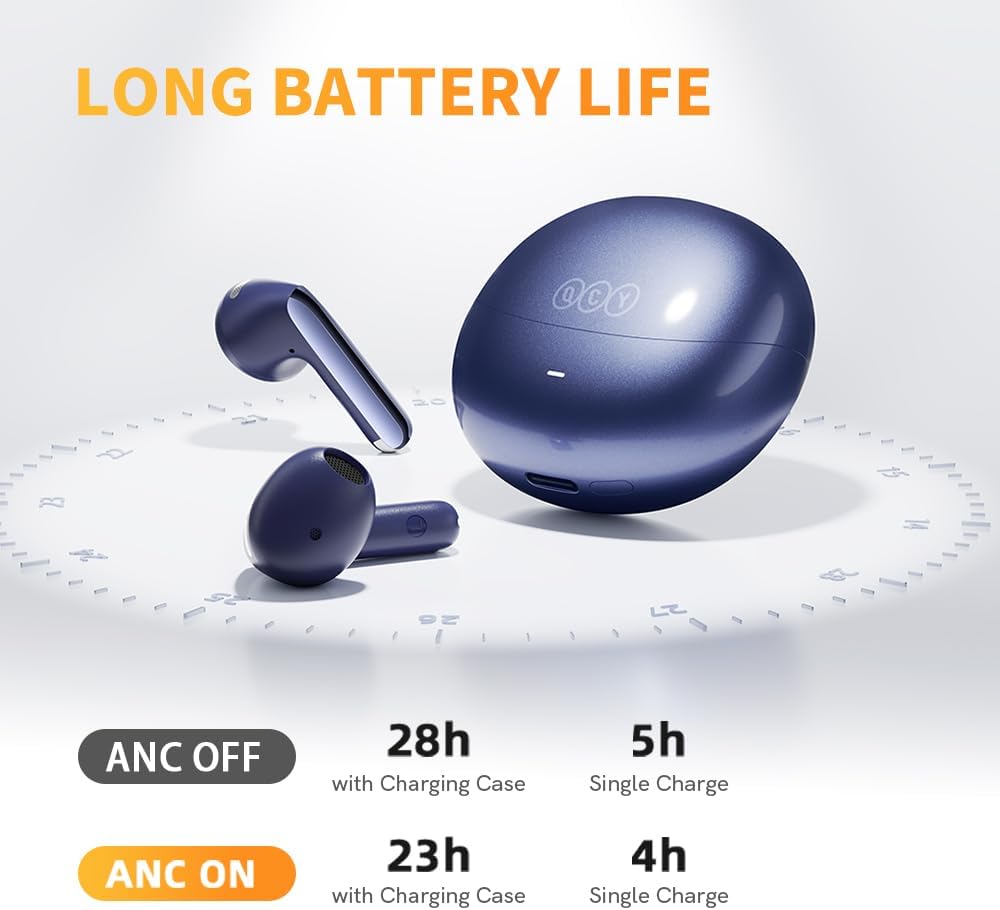
Image: Visual representation of the QCY AilyBuds PRO+ battery life, showing playtime with and without Active Noise Cancellation, and total hours with the charging case.
To charge the case, connect the provided USB-C cable to the charging port on the case and a power source.
7. Maintenance and Care
- Cleaning: Regularly clean the earbuds and charging case with a soft, dry cloth. Avoid using harsh chemicals.
- Water Resistance: The earbuds are IPX5 waterproof, meaning they are resistant to splashes and sweat. Do not submerge them in water.
- Storage: Store the earbuds in their charging case when not in use to protect them and keep them charged.
8. Troubleshooting
8.1 Connection Issues
- Ensure Bluetooth is enabled on your device and the earbuds are within range (up to 15 meters).
- Try resetting the earbuds: Place them back into the charging case, close the lid, then open the lid and long-press the charging case button for 10 seconds until the indicator light flashes.
- Forget the device in your phone's Bluetooth settings and re-pair.
8.2 Sound Quality Issues
- Check the fit of the earbuds in your ears using the QCY APP's fit check feature.
- Adjust EQ settings via the QCY APP.
- Ensure the earbuds are clean and free of debris.
8.3 App Functionality
- Ensure the QCY APP is updated to the latest version.
- Restart the app or your smartphone if issues persist.
9. Specifications
| Feature | Detail |
|---|---|
| Model Name | AilyBuds Pro+ |
| Connectivity Technology | Wireless (Bluetooth 5.3) |
| Bluetooth Range | 15 Meters |
| Audio Codec Support | LDAC (up to 24bit/96kHz) |
| Noise Control | Adaptive Active Noise Cancellation |
| Microphones | 6 Built-in Mics |
| Water Resistance Level | IPX5 (Waterproof) |
| Earbud Weight | Approx. 4 Grams (0.141 ounces) per earbud |
| Charging Case Battery Life | 28 Hours (ANC off) |
| Charging Case Dimensions | 0.78 x 0.72 x 1.33 inches |
| Control Type | Touch Control, App Control |
| Earpiece Shape | Semi-in-ear Bud |
10. Official Product Video
Video: An official product video showcasing the QCY AilyBuds Pro+ Wireless Earbuds, highlighting their features and design.
11. Warranty and Support
QCY products come with a standard manufacturer's warranty. For detailed warranty information, technical support, or service inquiries, please refer to the official QCY website or contact their customer support directly. Keep your purchase receipt for warranty claims.


