
1. Setup Instructions
The MCombo 7785 Power Swivel Glider Rocker Recliner is designed for quick and easy assembly, typically within 15 minutes. It arrives in three boxes. Follow these steps for proper setup:
1.1 Unpacking and Component Identification
Carefully unpack all components from the three boxes. Ensure all parts are present before beginning assembly. The main components include the base, backrest, left armrest, right armrest, manual, parts box, and power adapter.

Image: All components of the MCombo 7785 recliner laid out after unpacking.
1.2 Armrest and Backrest Assembly
- Remove any protective packaging from the armrest and backrest connection points.
- Align the metal brackets on the armrests with the corresponding slots on the base. Slide the armrests down until they securely lock into place.
- Similarly, align the backrest with the slots on the base and slide it down firmly until it clicks into position.
1.3 Wire Connections
Connect the internal wires for the massage, heat, and reclining functions. These connections are tool-free and typically involve matching color-coded or uniquely shaped connectors.
- Connect the massage wires (often red and white RCA-style connectors).
- Connect the massage remote control wire.
- Connect the USB wire.
- Connect the recline remote control wire.
- Plug the power adapter into the designated port on the chair and then into a wall outlet. Ensure the power switch on the chair's base is in the 'ON' position.
Video: Detailed assembly guide for the MCombo 7785 recliner, demonstrating armrest, backrest, and wire connections.
2. Operating Instructions
The MCombo 7785 recliner offers multiple features for enhanced comfort and convenience.
2.1 Power Reclining Function
Use the recline remote control to adjust the chair's recline angle. The chair can recline up to 142 degrees, allowing for various comfortable positions, including napping.

Image: The recliner demonstrating its maximum recline angle of 142 degrees.
2.2 Swivel and Gliding Movement
The chair features a 270-degree swivel movement and a smooth gliding motion. These functions operate manually by shifting your weight or gently pushing off the floor.
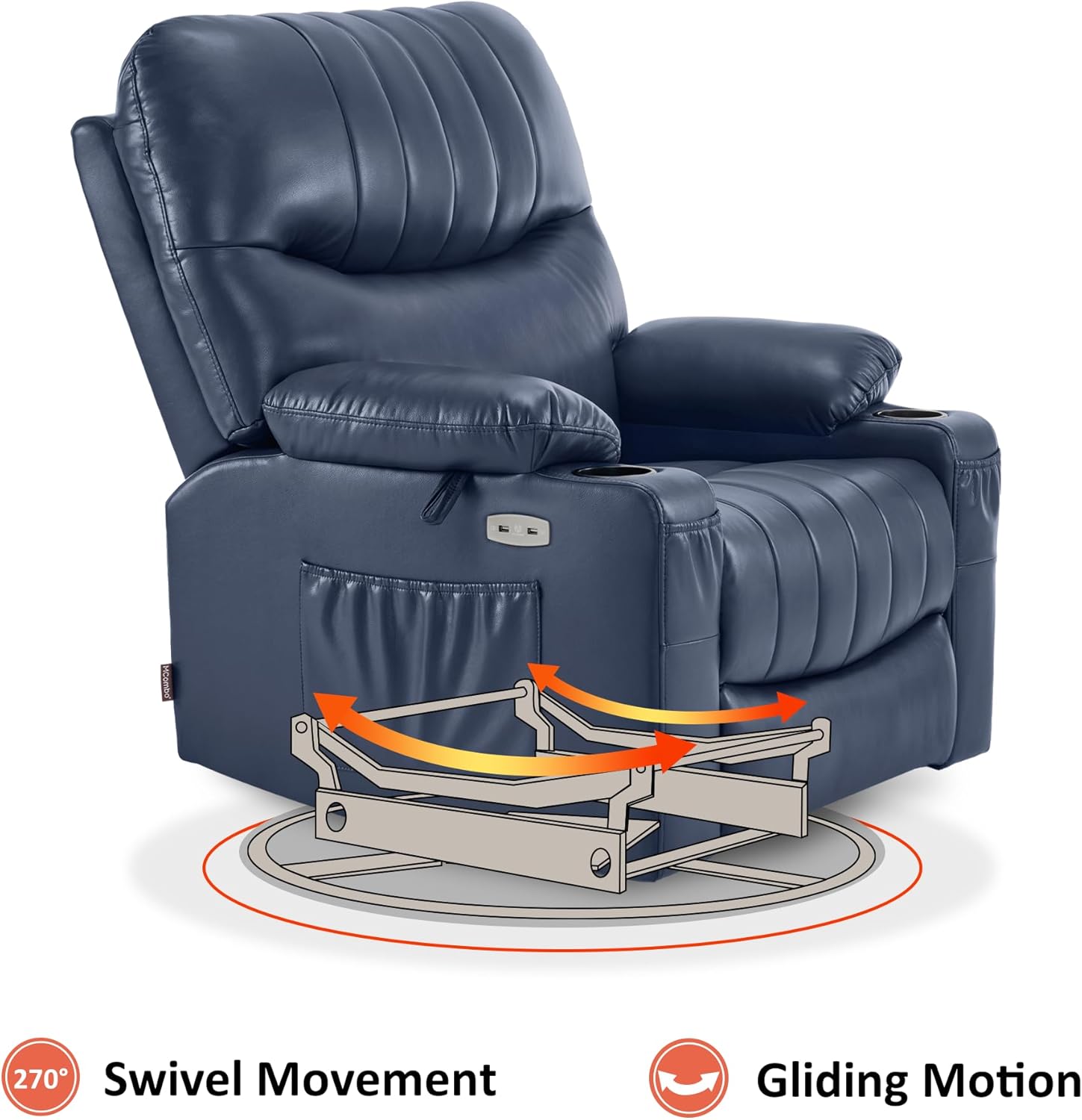
Image: Visual representation of the chair's swivel and gliding capabilities.
2.3 Heat and Vibration Massage
The chair includes a full-body vibration massage system with 7 points (shoulder, waist, thigh) and 1 lumbar heating zone. Use the massage remote control to customize massage modes, intensity, and set timers.
- Heat Function: Press the 'HEAT' button on the remote to activate lumbar heating.
- Vibration Massage: Select from various massage modes and adjust intensity using the remote.
- Timers: Set the massage duration using the timer buttons.

Image: The massage remote control, highlighting buttons for heat, massage modes, and timers.
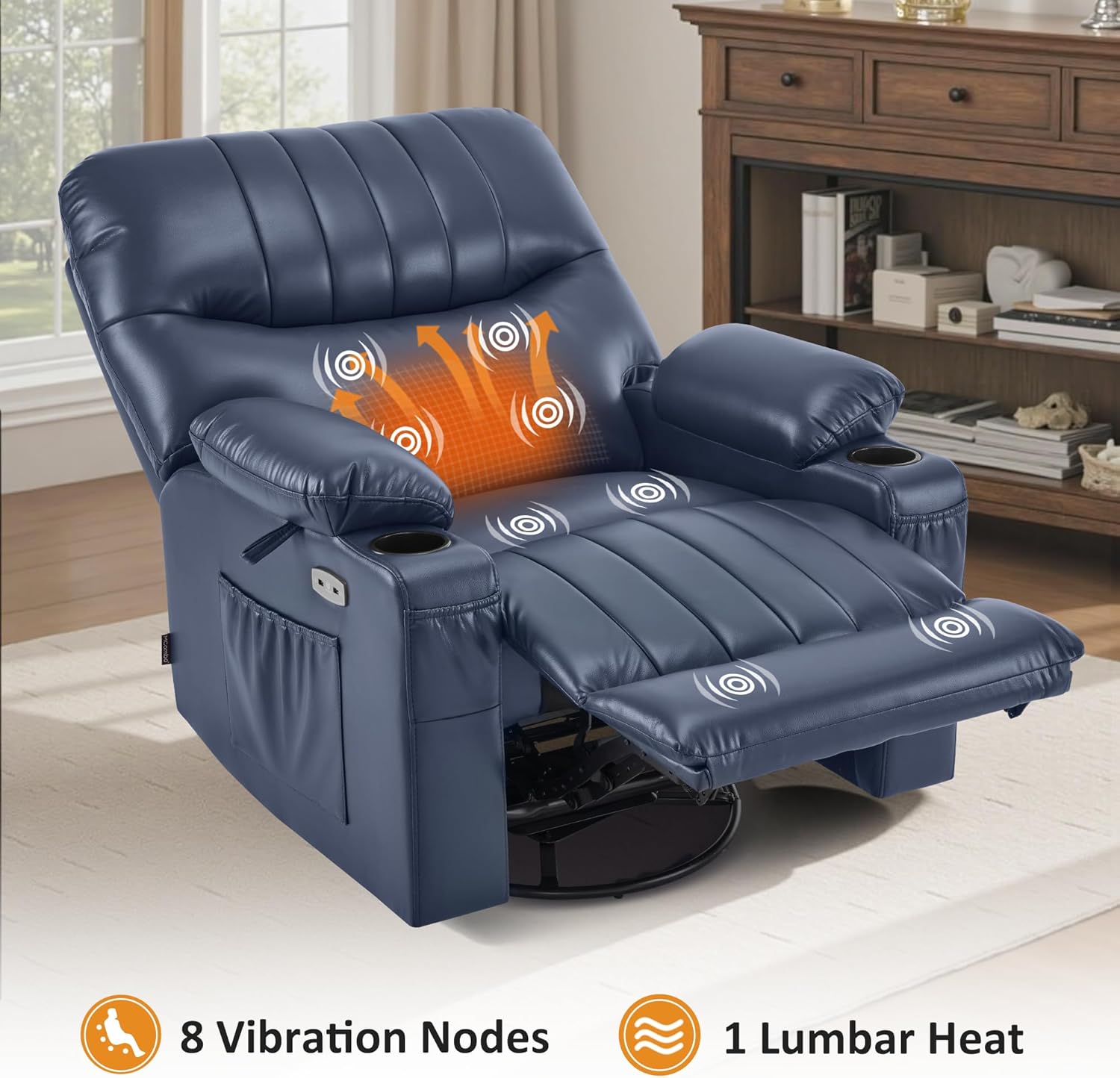
Image: The recliner showing the areas of vibration massage and lumbar heat.
2.4 USB Ports and Storage
The chair is equipped with USB ports for charging low-power devices, cup holders for beverages, and side/front pockets for storing items like magazines or remote controls.
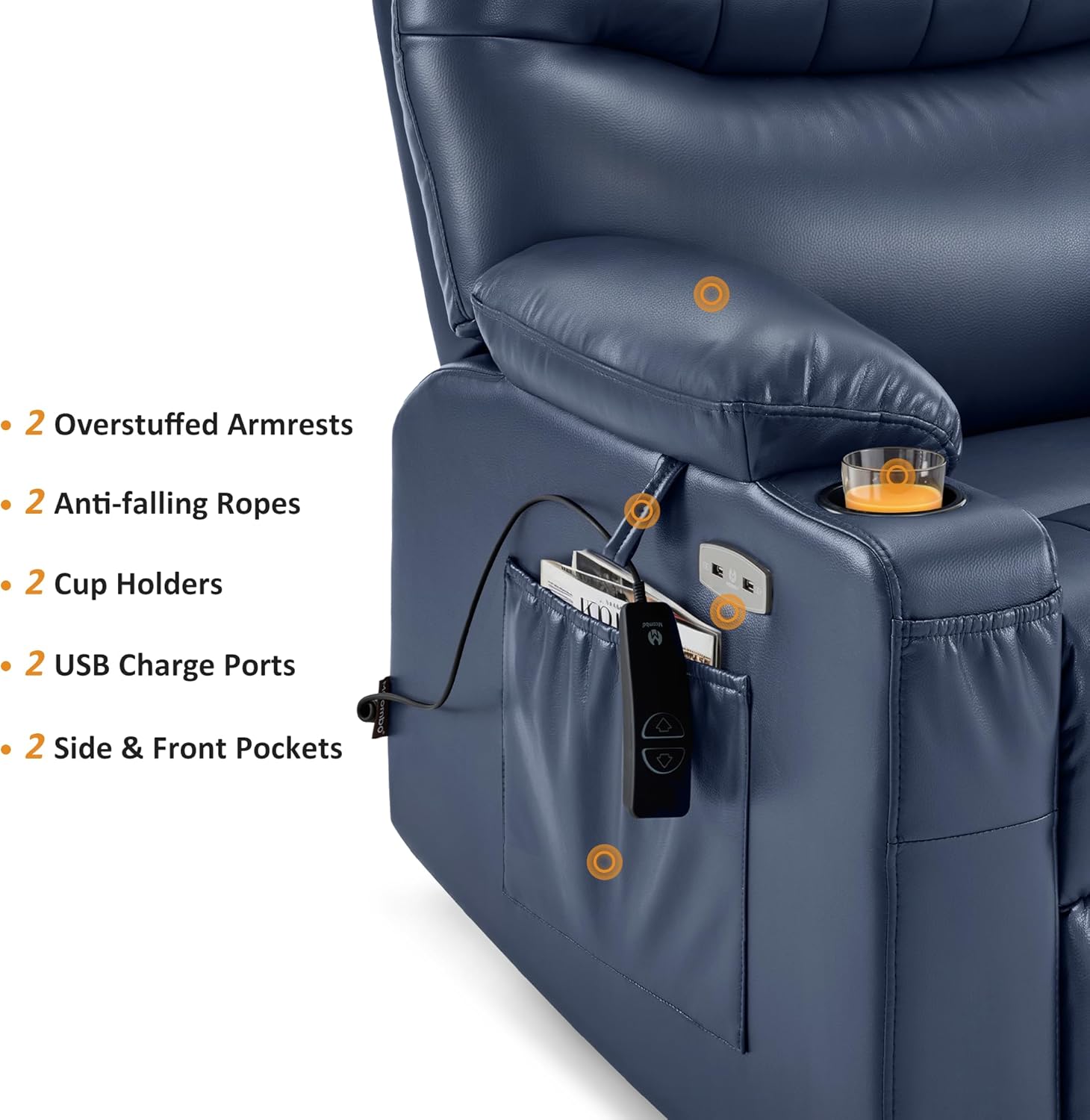
Image: Armrest features including USB ports, cup holders, and storage pockets.
3. Maintenance
Proper care ensures the longevity and appearance of your MCombo recliner.
3.1 Cleaning Instructions
- Faux Leather: Wipe clean with a damp cloth. Avoid harsh chemicals or abrasive cleaners, as these can damage the material.
- For spills, blot immediately with a clean, dry cloth.
3.2 General Care
- Avoid placing the chair in direct sunlight or near heat sources to prevent material fading or cracking.
- Regularly check all connections and fasteners to ensure they are secure.
- Do not exceed the maximum weight capacity of 320 pounds.
4. Troubleshooting
If you encounter issues with your recliner, refer to the following common solutions:
- Chair Not Reclining/No Power:
- Ensure the power adapter is securely plugged into both the chair and a working wall outlet.
- Check that the power switch on the chair's base is in the 'ON' position.
- Verify all internal wire connections are firm and correctly matched.
- Massage/Heat Not Working:
- Confirm the massage remote control is properly connected.
- Ensure the chair has power (see 'Chair Not Reclining' above).
- Check the specific buttons on the remote for activation.
- Unusual Noises During Operation:
- Inspect the chair's mechanism for any obstructions.
- Ensure all assembly bolts and connections are tightened.
If these steps do not resolve the issue, please contact MCombo customer support.
5. Specifications
| Feature | Detail |
|---|---|
| Brand | MCombo |
| Model Name | Power Swivel Glider Recliner (Model 7785) |
| Model Number | 6160-7785 |
| Color | Navy Blue |
| Material | Faux Leather (Seat Material), Wood (Frame Material), Sponge (Fill Material) |
| Product Dimensions (D x W x H) | 37.8"D x 39.8"W x 42.9"H |
| Item Weight | 146 Pounds |
| Maximum Weight Recommendation | 320 Pounds (Tested to endure 25,000 repetitions with a 350-lb load) |
| Reclining Angle | Up to 142° |
| Reclining Position Count | Infinite Position |
| Swivel Movement | 270° |
| Massage Features | Full-body Vibration (7 points: shoulder, waist, thigh), Lumbar Heating (1 zone) |
| Connectivity | USB Ports |
| Storage | Cup Holders (2), Side & Front Pockets |
| Minimum Wall Clearance | 12.2 inches |
| Assembly Required | Yes (Tool-free) |
| Product Care | Wipe Clean |
6. Warranty
The MCombo 7785 Power Swivel Glider Rocker Recliner comes with a 2-Year Limited Warranty. This warranty covers manufacturing defects and material flaws under normal use. Please retain your proof of purchase for warranty claims.
For specific details regarding coverage, exclusions, and how to make a claim, refer to the warranty information provided with your product packaging or contact MCombo customer support.
7. Customer Support
For any questions, assistance with assembly, troubleshooting, or warranty inquiries, please contact MCombo customer support.
- Online Support: Visit the official MCombo website for FAQs and support resources.
- Contact Information: Refer to your product packaging or the MCombo website for the most current contact details (phone, email).
When contacting support, please have your product model number (6160-7785) and proof of purchase readily available to expedite assistance.


