
Fafrees F20 Mate
Fafrees F20 Mate E-Bike Tricycle User Manual
Model: F20 Mate | Brand: Fafrees
1. Introduction
The Fafrees F20 Mate E-Bike Tricycle is a versatile and robust electric tricycle designed for adults, offering enhanced stability and cargo capacity. Featuring a powerful 48V 21Ah battery, 20*3.0 inch fat tires, and a triple hydraulic braking system, it provides a comfortable and secure riding experience for various terrains and purposes, including commuting and carrying groceries. This manual provides essential information for the safe assembly, operation, and maintenance of your F20 Mate tricycle.

Image: The Fafrees F20 Mate E-Bike Tricycle, showcasing its robust design, front and rear baskets, and included accessories like a helmet and phone holder.
2. Safety Information
Your safety is paramount. Please read and understand all safety instructions before operating the Fafrees F20 Mate E-Bike Tricycle. Failure to follow these instructions may result in serious injury or damage to the product.
- Always wear a helmet and appropriate safety gear when riding.
- Ensure all components are securely fastened and in good working order before each ride.
- Familiarize yourself with local traffic laws and regulations regarding electric tricycles.
- The tricycle is equipped with an EU-E-Mark certification, ensuring compliance with European safety standards.
- Important Note on Speed Adjustment: To comply with EU certification requirements, the speed adjustment system has been modified. When you wish to adjust the speed, you must first apply the brakes and then accelerate or decelerate.
- Do not exceed the maximum load capacity of 180 kg (including rider and cargo).
- Avoid riding in adverse weather conditions or on slippery surfaces.
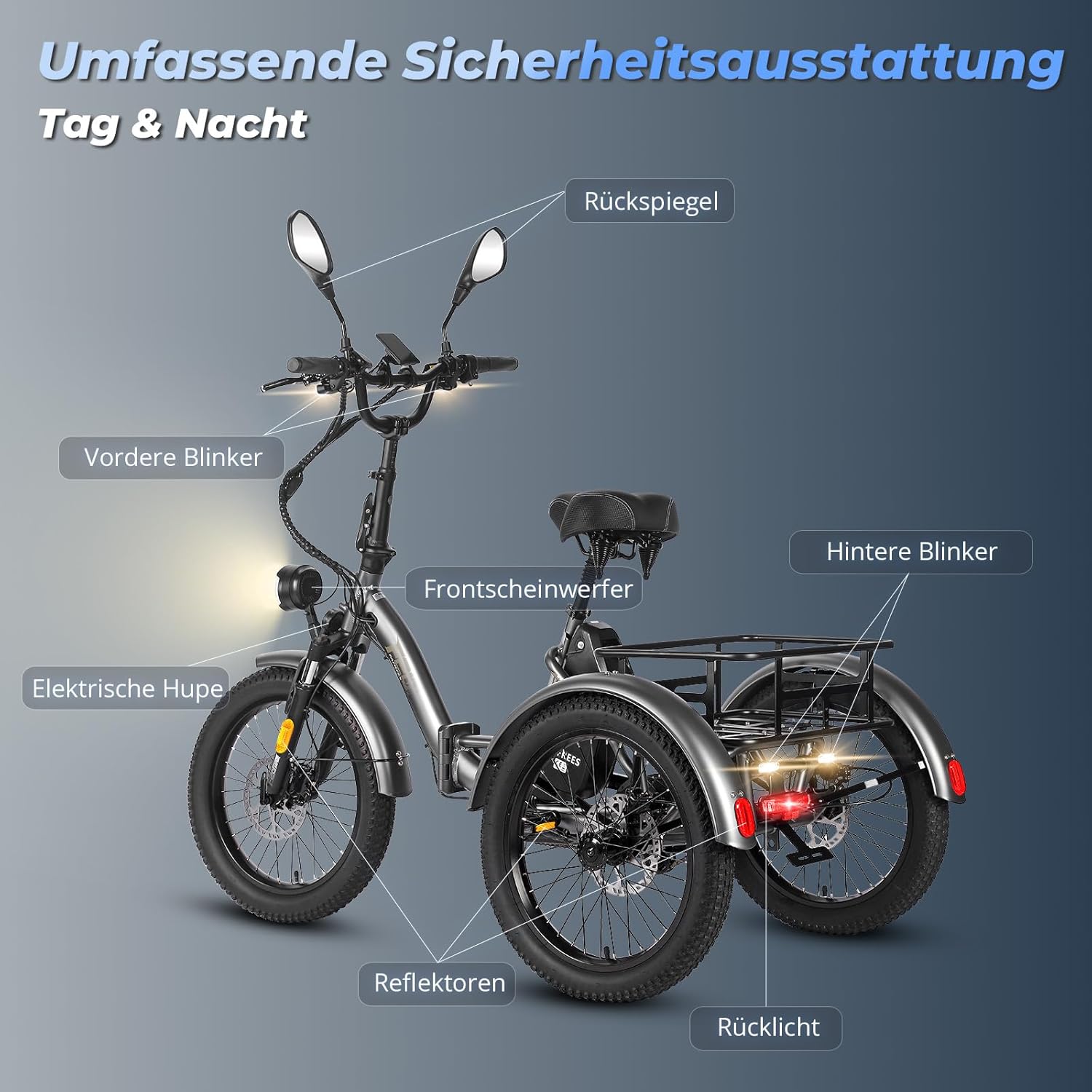
Image: Overview of the Fafrees F20 Mate's comprehensive safety features, including front and rear turn signals, hazard lights, rearview mirrors, electric horn, front headlight, and reflectors.
3. Components Overview
The Fafrees F20 Mate E-Bike Tricycle consists of several key components designed for performance and convenience:
- Frame: Foldable aluminum alloy frame for easy transport and storage.
- Wheels: 20*3.0 inch fat tires for enhanced grip and stability on various terrains.
- Braking System: Triple hydraulic disc brakes (front and rear) for precise and responsive stopping power.
- Suspension: Shock-absorbing fork (35mm travel) and suspension seatpost (15mm travel) for a comfortable ride.
- Motor: Rear-drive motor with 65 Nm maximum torque.
- Battery: Removable 48V 21Ah Lithium-Ion battery.
- Display: LCD color display showing speed, battery level, PAS level, and more.
- Baskets: Front basket and small rear basket included for cargo. Larger rear basket available separately.
- Lighting: Headlight, taillight, front and rear turn signals, and hazard lights.
- Differential: High-quality aluminum differential for balanced power distribution to the rear wheels.

Image: Close-up view of the Fafrees F20 Mate's sturdy rear basket, designed for convenient cargo transport.
4. Setup
The Fafrees F20 Mate E-Bike Tricycle arrives 80% pre-assembled. Follow these steps for final assembly:
- Unpacking: Carefully remove all components from the packaging.
- Handlebar Installation: Securely attach and adjust the handlebar to your preferred height (109–116 cm).
- Seatpost Adjustment: Adjust the seat height (82–106 cm) for comfortable pedaling.
- Basket Attachment: Attach the front and rear baskets using the provided hardware. Ensure they are firmly secured.
- Tire Inflation: Inflate tires to the recommended pressure (refer to tire sidewall for details).
- Brake Check: Verify that the hydraulic brakes are functioning correctly.
- Battery Installation: Insert the fully charged battery into its compartment.
For a visual guide on basket installation, please refer to the product video below:
Video: This short video demonstrates the assembly of the rear basket on the Fafrees F20 Mate E-Bike Tricycle, showing the simple screw-in process and how to load items.
5. Operating
Operating your Fafrees F20 Mate is intuitive. Here's how to get started and utilize its features:
5.1. Power On/Off and Display
Press and hold the power button on the LCD display to turn the tricycle on or off. The high-resolution LCD display provides real-time information:
- Current Speed (km/h)
- Battery Level Indicator
- PAS (Pedal Assist System) Level (0-5)
- Odometer and Trip Distance
- Cruise Control activation

Image: The Fafrees F20 Mate's LCD color display, showing speed, battery, and pedal assist levels, along with controls for various functions.
5.2. Riding Modes
The F20 Mate offers multiple riding modes:
- Pedal Assist Mode (PAS): Provides electric assistance as you pedal. Adjust the assist level (0-5) via the display.
- Full Electric Mode: Use the throttle for propulsion without pedaling.
- Manual Mode: Ride like a traditional bicycle without electric assistance.
5.3. Braking System
The tricycle is equipped with a triple hydraulic disc braking system for superior stopping power and safety. This system ensures a 30% shorter braking distance compared to double brakes. A parking brake lever is also integrated for secure standing on inclines.
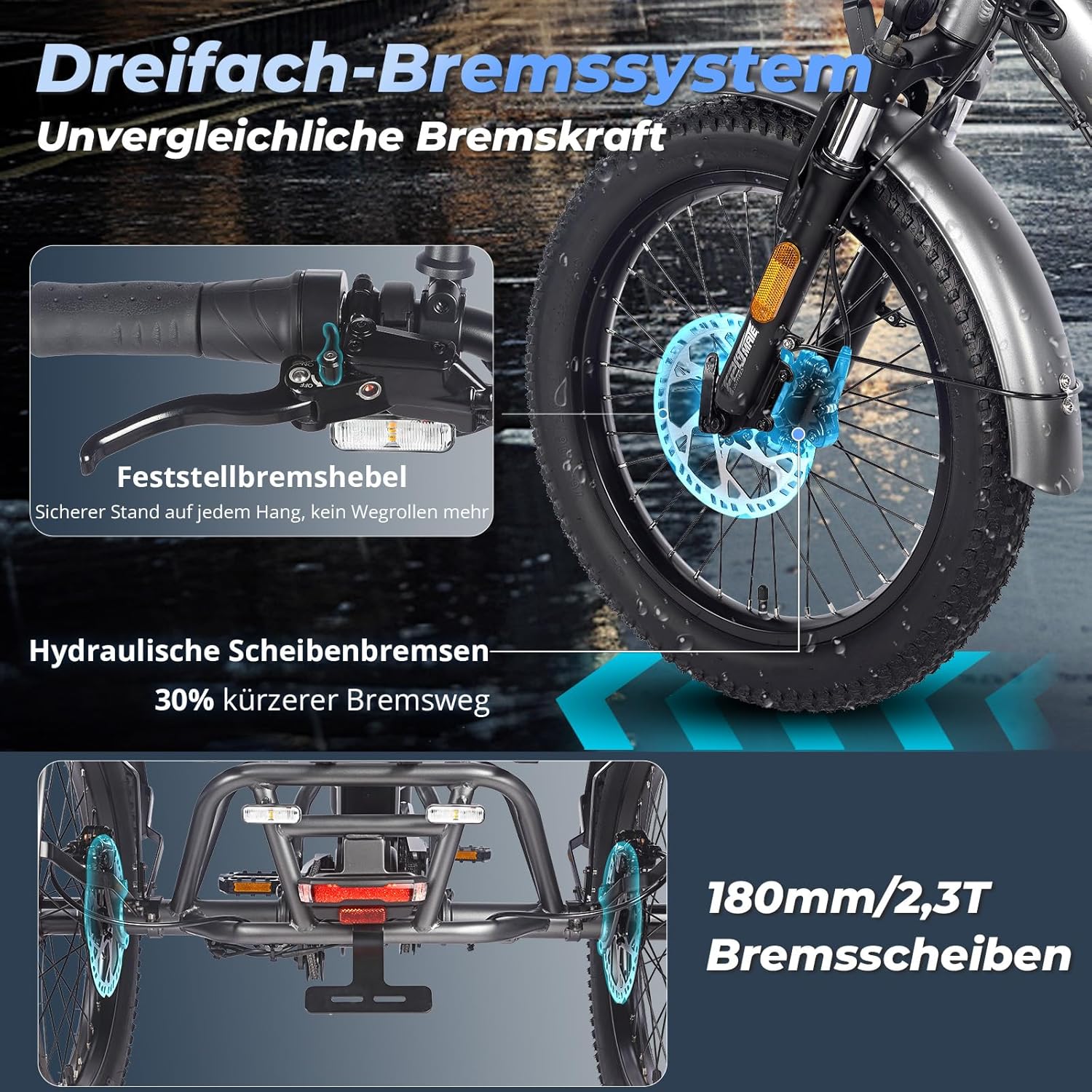
Image: Detailed view of the Fafrees F20 Mate's triple hydraulic braking system, highlighting the front disc brake and the parking brake lever for secure stopping.
5.4. Suspension System
Experience a smooth ride thanks to the triple suspension system, which includes a lockable suspension fork and a comfortable suspension seatpost. This system effectively absorbs shocks and vibrations from uneven surfaces.

Image: Illustration of the Fafrees F20 Mate's triple suspension system, featuring a lockable suspension fork, a wide leather saddle, and a suspended seatpost for enhanced comfort.
5.5. Fat Tires
The 20*3.0 inch fat tires provide excellent traction and stability, adapting to various terrains such as grassy ground, sandy beaches, gravel roads, snowy paths, and city streets.

Image: Visual representation of the Fafrees F20 Mate's 20*3.0 inch fat tires, highlighting their adaptability and superior grip on diverse surfaces like grass, sand, gravel, snow, and city roads.
For a comprehensive overview of the Fafrees F20 Mate's features and operation, please watch the video below:
Video: This video provides a detailed look at the Fafrees F20 Mate E-Bike Tricycle in action, showcasing its features, stability, and ease of use in various environments.
6. Maintenance
Regular maintenance ensures the longevity and optimal performance of your Fafrees F20 Mate E-Bike Tricycle:
- Battery Care: Charge the battery regularly, even when not in use, to prolong its lifespan. Store in a cool, dry place.
- Tire Pressure: Check tire pressure before each ride and inflate to the recommended PSI.
- Brake Inspection: Periodically inspect brake pads and discs for wear. Adjust or replace as needed.
- Cleaning: Clean the tricycle with a damp cloth. Avoid high-pressure washing directly on electrical components.
- Lubrication: Lubricate the chain and other moving parts regularly to ensure smooth operation.
- Fastener Check: Routinely check all bolts and fasteners for tightness.
7. Troubleshooting
This section addresses common issues you might encounter with your Fafrees F20 Mate E-Bike Tricycle. For more detailed troubleshooting, please refer to the full user manual included with your product.
| Problem | Possible Cause | Solution |
|---|---|---|
| Tricycle does not power on | Low battery, loose battery connection, power button issue | Charge battery, ensure battery is properly seated, contact support if issue persists. |
| Motor not assisting | PAS level too low, brake lever engaged, motor connection issue | Increase PAS level, ensure brake levers are fully released, check motor cable connections. |
| Brakes feel weak | Worn brake pads, air in hydraulic line, misaligned calipers | Inspect and replace brake pads, bleed hydraulic lines (professional recommended), adjust calipers. |
| Unusual noises during ride | Loose components, dry chain, tire rubbing | Check all fasteners, lubricate chain, inspect tire clearance. |
Remember the specific speed adjustment requirement: if you want to adjust the speed, you must first apply the brakes and then accelerate or decelerate.
8. Specifications
Detailed technical specifications for the Fafrees F20 Mate E-Bike Tricycle:
| Category | Specification |
|---|---|
| Model | F20 Mate |
| Type | Electric Cargo Tricycle |
| Unfolded Size | 174 x 74 x 116 cm |
| Folded Size | 100 x 74 x 82 cm |
| Adjustable Handlebar Height | 109–116 cm |
| Adjustable Seat Height | 82–106 cm |
| Tire Size | 20*3.0 Inch Fat Tires |
| Net Weight | 43 kg |
| Load Capacity | 180 kg (Max Rider Weight 150 kg, Max Front Basket 20 kg, Max Rear Basket 45 kg) |
| Frame Material | Aluminum Alloy |
| Max Range | 65–115 km |
| Max Climbing Angle | 15° |
| Battery Type | 18650 Lithium-Ion Battery |
| Battery Voltage | 48V |
| Battery Capacity | 21Ah |
| Motor Location | Rear Drive |
| Max Motor Torque | 65 Nm |
| Charger Input Voltage | 180–240 V |
| Charger Output Voltage | 54.6 V |
| Charging Time | 7-8 Hours |
| Fork Travel | 35 mm |
| Rear Shock Absorber Travel | 15 mm |
| Display Type | LCD Display |
| PAS Levels | 0-5 |
| Waterproof Rating | IPX5 |

Image: Graphic illustrating the Fafrees F20 Mate's 48V 21Ah Li-ion battery, highlighting its extended range (65-115KM) compared to other batteries, fast charging capability, and IPX5 waterproof rating.
9. Warranty and Support
Your Fafrees F20 Mate E-Bike Tricycle comes with a manufacturer's warranty. Please refer to the warranty card included in your package for specific terms and conditions. For technical support, spare parts, or any inquiries, please contact Fafrees customer service through the official brand store or your point of purchase.
Package Contents:
- 1 x FAFREES Electric Tricycle
- 1 x Charger
- 1 x Tool Kit
- 1 x User Manual (this document)
Related documentsF20 Mate


Ask a question about this manual
Ask about setup, troubleshooting, compatibility, parts, safety, or missing instructions. Manuals+ will review the question and use this page’s manual context to help answer it.