Introduction
This manual provides detailed instructions for the safe and efficient use of your OttLite Wellness Series Wireless Charging LED Table Lamp. This lamp features OttLite's exclusive ClearSun LED technology, designed to reduce eyestrain, along with convenient wireless charging and a USB charging port. Please read this manual thoroughly before operating the lamp and retain it for future reference.
Important Safety Instructions
To reduce the risk of fire, electric shock, or injury to persons, please observe the following:
- Do not use with a damaged cord or plug.
- Do not operate the lamp if it has been dropped or damaged.
- Do not attempt to modify the lamp.
- Use only the provided power adapter.
- Keep the lamp away from water or other liquids.
- This lamp is for indoor use only.
- The LED light source is not replaceable.
Package Contents
- OttLite Wellness Series Wireless Charging LED Table Lamp
- Power Adapter
Setup
- Unpack the Lamp: Carefully remove all components from the packaging.
- Connect Power: Insert the power adapter plug into the power input port located on the back of the lamp base. Plug the other end of the adapter into a standard 110V AC wall outlet.
- Position the Lamp: Place the lamp on a stable, flat surface. Ensure the power cord is not pinched or obstructed.
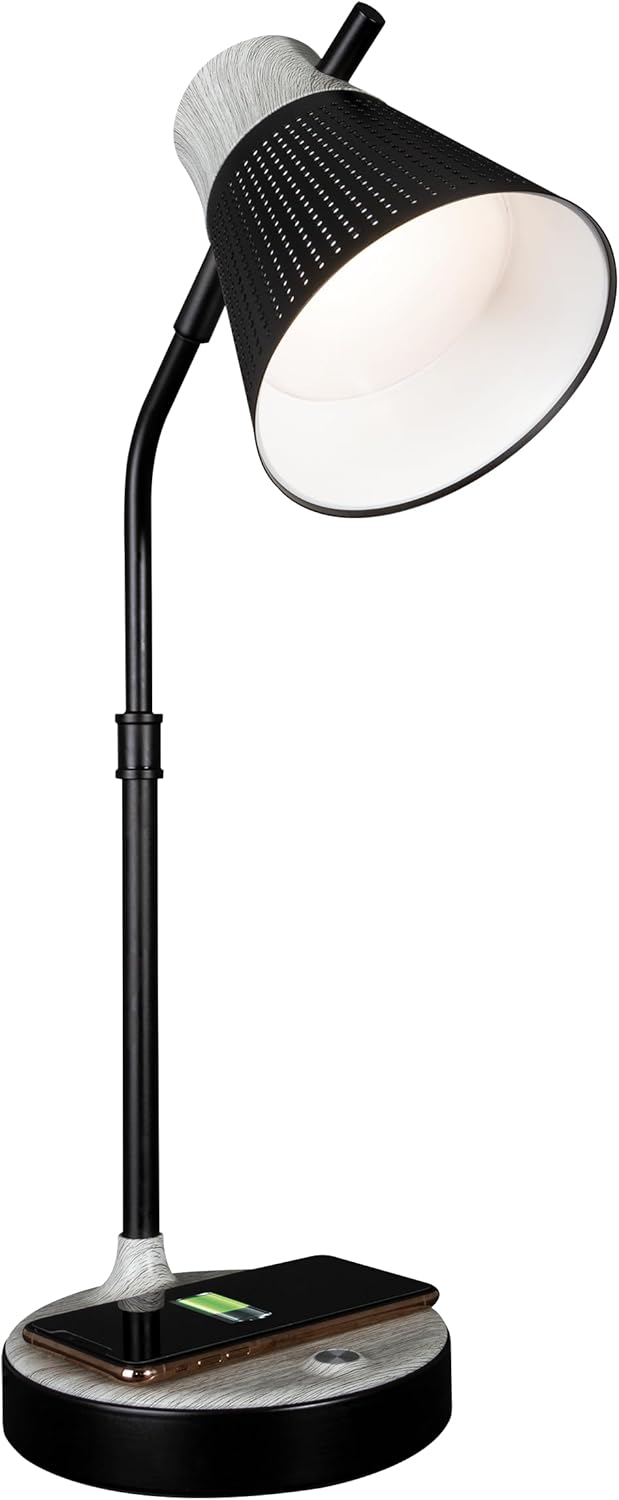
The lamp is now ready for operation.
Operating Instructions
1. Power On/Off and Brightness Control
The lamp features touch-sensitive controls located on the base.
- To Turn On/Off: Lightly touch the power icon on the lamp base.
- To Adjust Brightness: With the lamp on, repeatedly touch the power icon to cycle through three brightness levels.

2. Color Temperature Settings
The lamp offers three distinct color temperature modes:
- ClearSun Natural Daylight: Provides a balanced spectrum for reduced eyestrain.
- Warm White: A softer, warmer light ideal for relaxation.
- Bright White: A crisp, clear light suitable for tasks requiring focus.
To switch between color temperatures, touch the mode icon on the lamp base. Cycle through the available options to select your preferred light.

3. Adjusting the Lamp
The lamp features a flexible neck and an adjustable shade for precise light placement.
- Flexible Neck: Gently bend the lamp neck to direct light where needed.
- Adjustable Shade: The shade can be moved up, down, and side-to-side to optimize illumination.

4. Wireless Charging
The lamp base includes a Qi-compatible wireless charging pad.
- Place your Qi-compatible device (e.g., smartphone) directly onto the charging pad on the lamp base.
- Ensure the device is centered on the charging pad for optimal connection.
- A charging indicator on your device will confirm that charging has begun.

5. USB Charging Port
A 5V, 2.1A USB charging port is integrated into the lamp base for charging additional devices.
- Connect your device's USB charging cable to the USB port on the back of the lamp base.
- Connect the other end of the cable to your device (e.g., headphones, smartwatch, tablet).

Maintenance
- Cleaning: Disconnect the power before cleaning. Use a soft, dry cloth to wipe the lamp. Do not use abrasive cleaners or solvents.
- LED Care: The LED light source is designed for long-term use and does not require replacement. Avoid direct contact with the LED panel.
Troubleshooting
| Problem | Possible Cause | Solution |
|---|---|---|
| Lamp does not turn on. | Power adapter not connected or faulty outlet. | Ensure power adapter is securely plugged into the lamp and a working wall outlet. Test the outlet with another device. |
| Wireless charging not working. | Device not Qi-compatible or not properly aligned. | Verify your device supports Qi wireless charging. Reposition the device on the charging pad, ensuring it is centered. Remove any thick phone cases. |
| USB charging not working. | USB cable faulty or device not compatible. | Try a different USB cable. Ensure the device is compatible with 5V, 2.1A charging. |
| Light flickers or is inconsistent. | Loose power connection or electrical interference. | Check all power connections. Move the lamp away from other electronic devices that might cause interference. |
Specifications
- Model Number: CSAQABG9-SHPR
- Brand: OttLite
- Product Dimensions: 6.88"D x 6.88"W x 25"H (adjustable height)
- Item Weight: 4.99 pounds
- Power Source: Corded Electric (110 Volts AC)
- Light Source Type: LED (ClearSun Technology)
- Wattage: 10 watts
- Control Method: Touch
- Special Features: Wireless Charging, USB Charging Port, Flexible Neck, Adjustable Shade, 3 Brightness Settings, 3 Color Temperatures
- Material: Metal, Wood
- Finish Type: Painted
- Indoor/Outdoor Usage: Indoor only

Warranty Information
OttLite products are manufactured to high-quality standards. For specific warranty details, including coverage period and terms, please refer to the warranty card included with your purchase or visit the official OttLite website. Keep your proof of purchase for warranty claims.
Customer Support
If you have any questions, require assistance, or need to report an issue with your OttLite Wellness Series Wireless Charging LED Table Lamp, please contact OttLite customer support through their official website or the contact information provided in your product packaging.
For more information, visit the OttLite Store.


