
1. Safety Information
Please read and understand all safety instructions before operating this device. Failure to follow these instructions may result in injury or damage to the product.
- Laser Safety: Avoid direct eye exposure to the laser beam. This product uses Class 3R lasers, which can cause eye injury if viewed directly.
- Power Supply: Ensure the power supply matches the device's requirements (AC110-240V, 50/60Hz). Disconnect power before cleaning or servicing.
- Ventilation: Ensure adequate ventilation around the unit to prevent overheating. Do not block ventilation openings.
- Placement: Place the unit on a stable, flat surface or mount securely. Avoid placing in damp or dusty environments.
- Children: Keep out of reach of children.
2. Package Contents
Verify that all items are included in your package:
- 21-Eyes RGB Laser & UV LED Strobe Party Light Unit
- Remote Control
- Power Cord
- User Manual

Image: Contents of the product package, showing the main light unit, remote control, power cable, and user manual.
3. Product Overview
The Flashback Events 21-Eyes RGB Laser & UV LED Strobe Party Light is a versatile stage lighting solution designed to create dynamic visual effects for various events. It combines multiple lighting technologies to produce a rich and immersive atmosphere.
Key Features:
- 21-Lens Laser System: Projects vibrant red, green, and blue laser patterns.
- RGB & UV LED Strobe: Features bright RGB and UV (purple) LEDs for wash and strobe effects.
- Multiple Control Modes: Supports Sound-Activated, DMX512, Auto, and Master/Slave modes.
- Durable Construction: Made from aluminum and plastic for reliability.
Product Dimensions and Components:

Image: Diagram detailing the product's dimensions (7.87"L x 5.11"W x 3.95"H) and key specifications like power (15W) and control modes.
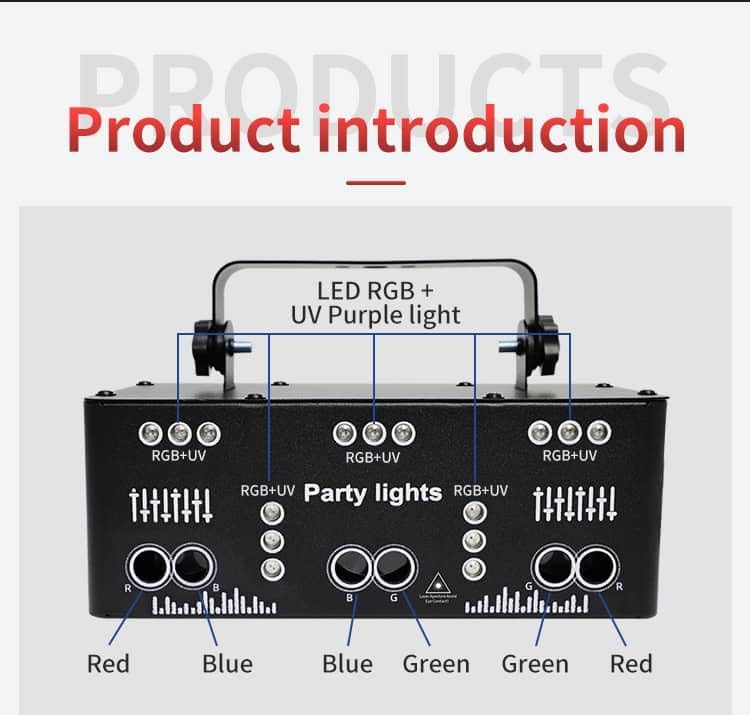
Image: Breakdown of the light's components, showing the arrangement of Red, Blue, Green, and UV LEDs and lasers.
4. Setup
4.1 Mounting the Unit
The light can be placed on a flat surface or mounted using the adjustable bracket. Ensure the mounting location is stable and can support the weight of the unit.
- Table Placement: Place the unit on a stable, level surface.
- Ceiling/Truss Mounting: Use appropriate clamps and safety cables (not included) to secure the unit to a ceiling or truss system. Adjust the bracket to direct the light as desired.
4.2 Power Connection
Connect the provided power cord to the unit's power input and then to a compatible power outlet (AC110-240V, 50/60Hz).
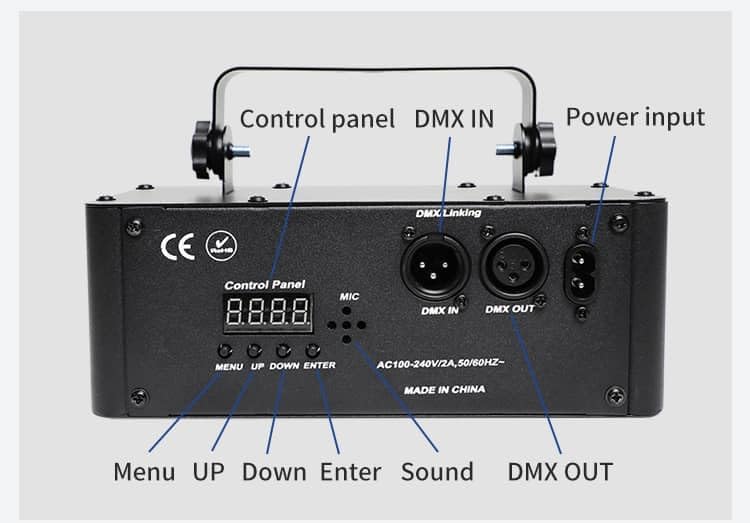
Image: Rear panel of the light, highlighting the power input and control buttons.
5. Operating Modes
The light offers various operating modes, which can be selected via the control panel buttons or the remote control.
5.1 Control Panel Operation
Use the MENU button to cycle through modes, UP/DOWN to adjust settings, and ENTER to confirm.
5.2 Remote Control Operation
The included remote control provides convenient access to all functions:

Image: Detailed layout of the remote control with all button functions labeled.
- ON/OFF: Power on or off the unit.
- AUTO Mode: Cycles through pre-programmed light patterns automatically.
- DJ Sound Mode: Activates sound-responsive lighting effects.
- Flash Mode: Controls strobe effects.
- LED Switch: Toggles LED lights on/off.
- Pattern Switch: Changes laser patterns.
- Motor Speed +/-: Adjusts the rotation speed of patterns.
- Laser Color Buttons (R, G, B, RGB): Select individual or combined laser colors.
- LED Color Buttons (Red, Green, Blue, UV Purple): Select individual LED colors.
- Strobe Speed +/-: Adjusts the speed of the strobe effect.
5.3 Sound-Activated Mode
In DJ Sound mode, the built-in microphone detects music and adjusts the light patterns and colors to the beat, creating a synchronized show.
5.4 DMX512 Control
For professional setups, connect a DMX controller to the DMX IN port. Use the DMX OUT port to daisy-chain multiple units. Refer to your DMX controller's manual for specific programming instructions. This unit typically uses 11 DMX channels for advanced control over patterns, colors, and movement.
5.5 Master/Slave Mode
Link multiple units together using DMX cables. Set one unit as the Master and others as Slaves. The Slave units will mirror the Master's operation, creating a coordinated light show.
5.6 Visual Demonstrations
Video: Demonstration of the Flashback Events 3-in-1 and 21-Eyes Party Lights operating together with haze, showcasing various laser and LED effects.
Video: A dynamic display of the 21-Eyes Rave Party Light's LED strobe and laser effects in action.
Video: The 21-Eyes Stage Light showcasing disco dance, DJ party, and strobe light effects.
Video: A comprehensive demonstration of the Flashback Events 21-Eyes LED Strobe Laser Party Light's features and effects.
Video: The 21-Eyes light in action within a large bedroom setting with haze, demonstrating its coverage and visual impact.
6. Maintenance
Regular maintenance ensures optimal performance and longevity of your light unit.
- Cleaning: Use a soft, dry cloth to clean the exterior of the unit. Do not use harsh chemicals or abrasive cleaners.
- Lens Cleaning: Gently wipe the laser and LED lenses with a soft, lint-free cloth to maintain clear light output.
- Ventilation: Periodically check that the ventilation openings are clear of dust and debris.
- Storage: When not in use, store the unit in a cool, dry place away from direct sunlight and extreme temperatures.
7. Troubleshooting
If you encounter issues with your light, refer to the following common problems and solutions:
| Problem | Possible Cause | Solution |
|---|---|---|
| No power | Power cord not connected; power outlet faulty | Ensure power cord is securely connected. Test outlet with another device. |
| No light output | Unit is off; mode not selected; remote battery low | Turn unit on. Select an operating mode. Replace remote control battery (CR2032). |
| Lights not responding to music | Sound-activated mode not selected; music too quiet | Ensure DJ Sound mode is active. Increase music volume or move unit closer to sound source. |
| DMX control not working | Incorrect DMX address; faulty DMX cable; DMX controller issue | Check DMX address settings. Test DMX cables. Verify DMX controller is functioning correctly. |
8. Specifications
| Feature | Detail |
|---|---|
| Model Number | YSH-503 |
| Color | Black |
| Material | Aluminum, Plastic |
| Light Source Type | Light Emitting Diode (LED) |
| Power Source | Corded Electric |
| Voltage | 110 Volts (AC) |
| Maximum Compatible Light Source Wattage | 15 Watts |
| Mounting Type | Table / Ceiling / Truss |
| Light Source Special Features | Strobe, Sound-Activated |
| Number of Light Sources | 21 |
| Item Dimensions L x W x H | 7.87"L x 5.11"W x 3.95"H |
| Remote Control Battery | 1 CR2032 battery required (not included) |
| Manufacturer | Shenzhen Yushenghang Electronics Co., Ltd |
9. Warranty and Support
This Flashback Events product comes with a 1-year manufacturer warranty.
For any questions or assistance, our support team is available to respond within 24 hours. Please refer to the contact information provided with your purchase or visit the official Flashback Events store on Amazon for further details.
Thank you for choosing Flashback Events!