
Introduction
This manual provides detailed instructions for the proper setup, operation, and maintenance of your Waterdrop WFD-22L-DF 40-Cup Water Filter Dispenser. Please read this manual thoroughly before using the product to ensure optimal performance and longevity.
The Waterdrop WFD-22L-DF features a dual-filter system designed for faster filtration and extended filter life, providing clean and great-tasting water. It is NSF-certified for the reduction of chlorine, taste, and odor, and made with food-grade, lead-free, and BPA-free materials.
Product Components
Your Waterdrop WFD-22L-DF Water Filter Dispenser package includes the following:
- Water Filter Dispenser System (1 unit)
- Water Filter Replacement (2 units)
- User Manual (1 unit)

Image: Waterdrop WFD-22L-DF Water Filter Dispenser with two filters included.
Setup Instructions
- Unpack and Wash: Carefully remove all components from the packaging. Wash the dispenser reservoir, lid, and filter housing with mild soap and warm water. Rinse thoroughly. Do not wash the filter cartridges with soap.
- Prepare Filters: Submerge each filter cartridge in cold water for 10 minutes to remove any air bubbles. This helps ensure proper water flow.
- Install Filters: Insert the prepared filter cartridges into their designated slots in the filter housing. Ensure they are seated firmly.
- Assemble Dispenser: Place the filter housing with installed filters into the main reservoir. Secure the lid on top of the dispenser.
- Initial Fill and Flush: Fill the dispenser with tap water. Allow the water to filter through completely. Discard the first two full batches of filtered water. This flushes out any carbon dust and prepares the filters for use.
Video: Waterdrop 40 Cup Dual Filter Dispenser Setup. This video demonstrates the installation of the filters and initial setup process.

Image: Close-up of a hand installing a Waterdrop filter cartridge into the dispenser.
Operating Instructions
- Filling the Dispenser: To refill, slide open the cover on the top of the dispenser. Pour tap water directly into the top section. The dual filters will process the water quickly.
- Dispensing Water: Position a glass or container under the spigot. Push the lever on the spigot to dispense filtered water. Release the lever to stop the flow.
Video: Demonstrates the easy filling process of the Waterdrop dispenser by sliding the lid and pouring water.

Image: Close-up of the sliding cover for easy water refills.

Image: Close-up of the easy-pour spigot on the Waterdrop dispenser.
Maintenance
Filter Replacement
The filter cartridges have a lifespan of approximately 400 gallons or 2 months, whichever comes first. The dispenser features an intelligent filter reminder to indicate when replacement is needed.
- Blue Light: Stays on for 5 seconds - Filter is in good condition.
- Red Light (flashes 6 times): Replace filter now.
- Red Light (stays on for 5 seconds): Replace filter soon.
To activate the indicator, hold the button for 5 seconds until the blue light flashes.
- Remove the old filter cartridges from the housing.
- Prepare new filter cartridges by submerging them in cold water for 10 minutes.
- Insert the new filters firmly into the housing.
- Perform an initial flush by discarding the first two batches of filtered water.
- Reset the filter reminder by holding the button on the lid until the blue light flashes.

Image: The smart filter reminder on the dispenser lid, indicating filter status with blue and red lights.
Cleaning the Dispenser
Regularly clean the dispenser reservoir, lid, and filter housing with mild soap and warm water. Rinse thoroughly. Do not use abrasive cleaners or put components in a dishwasher unless specified by the manufacturer.
Troubleshooting
| Problem | Possible Cause | Solution |
|---|---|---|
| Slow water flow |
|
|
| Water tastes bad or unusual |
|
|
| Filter reminder light not working |
|
|
Video: Waterdrop filter Dispenser Frequently Asked Questions, addressing common issues and solutions.
Video: How To Fix Slow Water Flow in Waterdrop Water Filters, providing practical tips for resolving flow issues.
Specifications
- Brand: Waterdrop
- Model Name: WD-WFD-22L-DF
- Capacity: 40 cups (19 cups in the body)
- Product Dimensions (L x W x H): 12.4" x 8.7" x 8.5"
- Material: Carbon Fiber (filter), Food-grade, BPA-free, Lead-free materials (dispenser)
- Special Feature: Chlorine Reduction, NSF certified
- Purification Method: Activated Carbon
- Installation Type: Countertop
- Supported Water TDS Level Maximum: 100 PPM (Note: This system does not lower TDS value as it retains beneficial minerals.)
- Filter Life Cycle: 2 months or 400 gallons
- Certifications: NSF/ANSI 42 and 372 certified

Image: Diagram showing the dimensions of the Waterdrop WFD-22L-DF dispenser, indicating it fits nicely in a refrigerator.
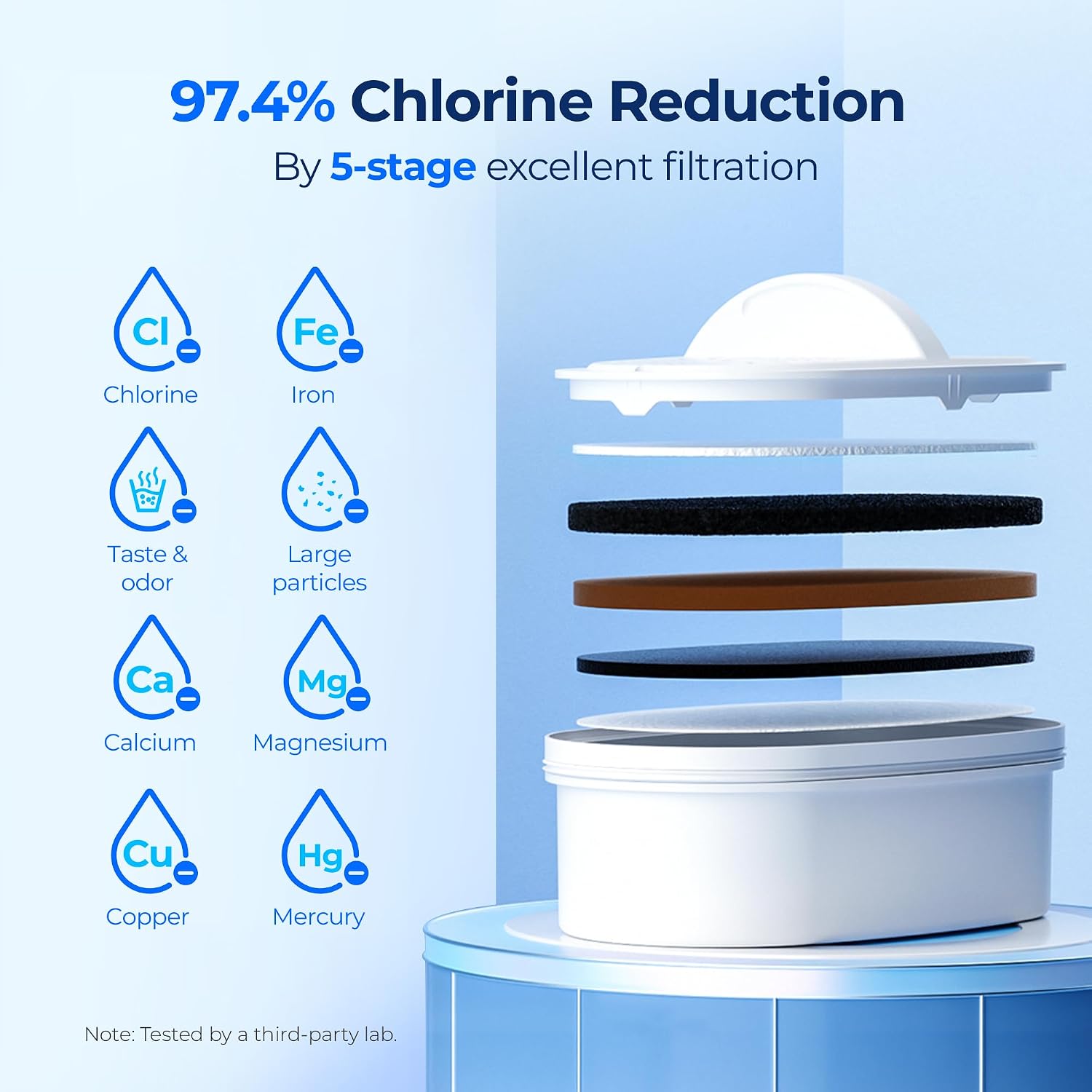
Image: Illustration of the 5-stage filtration process and the contaminants reduced, including chlorine, iron, taste & odor, large particles, calcium, magnesium, copper, and mercury.

Image: Waterdrop dispenser highlighting NSF/ANSI 42 & 372 certifications, BPA-free, lead-free, and food-grade materials.
Warranty Information
Specific warranty details are not provided in this manual. Please refer to the product packaging or contact Waterdrop customer support for comprehensive warranty information.
Customer Support
For further assistance, questions, or to purchase replacement filters (Model: WD-PF-01A), please visit the official Waterdrop store or contact their customer service.
Official Waterdrop Store: Waterdrop Store on Amazon


