
1. Introduction
The SwanScout 502M is a portable 2-in-1 magnetic wireless charging station designed to simultaneously charge your Apple Watch and an iPhone (12 series or newer) or AirPods. This device features a compact design, making it suitable for home, office, and travel use. It incorporates multiple safety protections to ensure secure charging for your devices.
2. Package Contents
Please verify that all items are present in your package:
- 1 x SwanScout 502M Wireless Charger
- 1 x 5 ft (1.5 m) USB-C to USB-C Charging Cable
- 1 x User Manual
3. Product Overview
The SwanScout 502M features a sleek, black design with dedicated charging areas for your Apple Watch and iPhone/AirPods. The Apple Watch charging stand is adjustable for optimal viewing and contact.
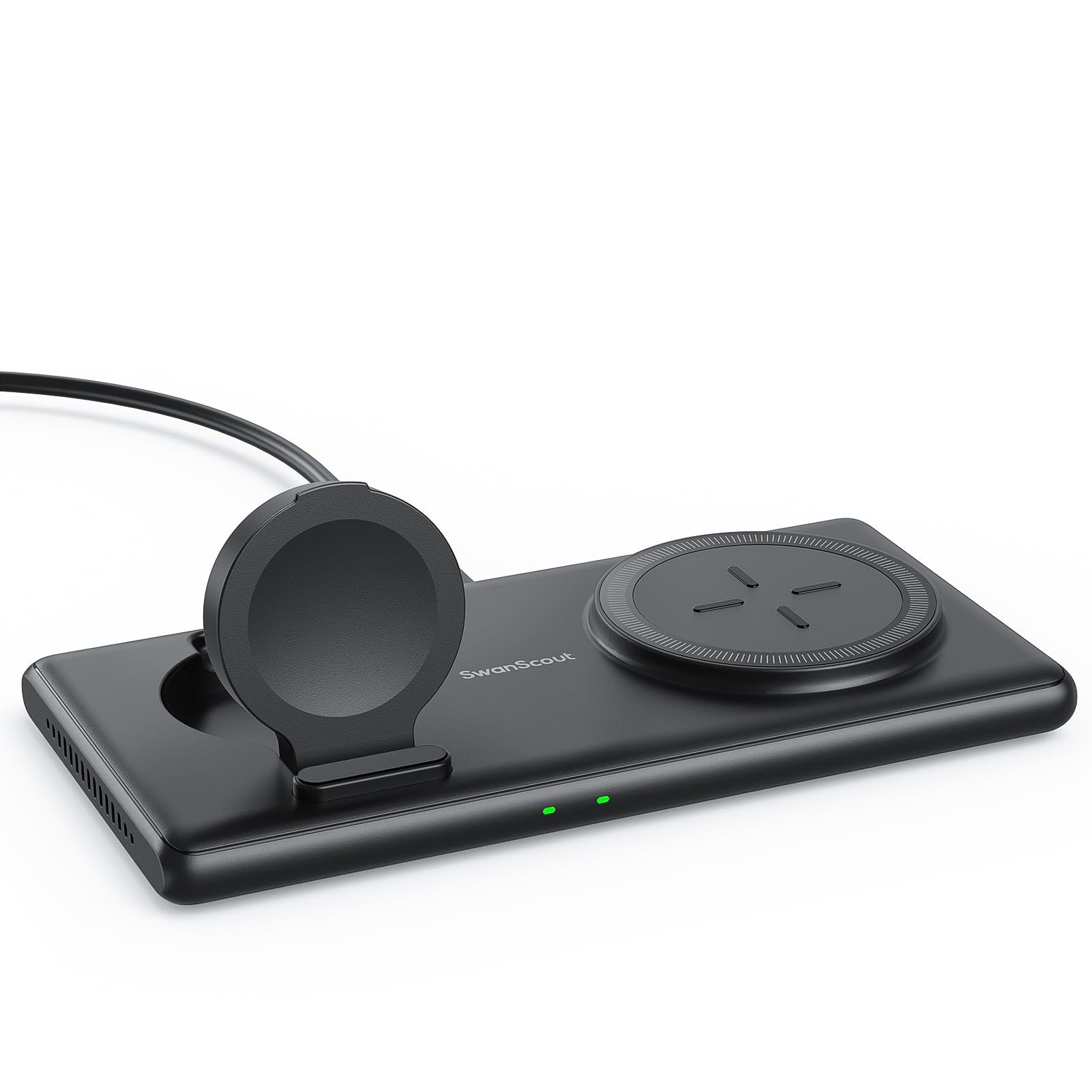
Image: The SwanScout 502M wireless charger, showcasing its compact design and two charging pads.

Image: Diagram illustrating the auto-adjustable height design of the Apple Watch charging stand, ensuring proper contact for all Apple Watch series.

Image: The SwanScout 502M charger being placed into a bag, demonstrating its portability and compact size (6.10 x 3.07 x 0.47 inches).
4. Specifications
| Model Number | S10021 |
| Input Voltage | 9 Volts |
| Amperage | 2 Amps |
| Wattage | 10 Watts (Max for iPhone) |
| Output Current | 2 Amps |
| Output Voltage | 9 Volts |
| Connector Type | USB Type C |
| Material | Acrylonitrile Butadiene Styrene |
| Item Weight | 135 Grams |
| Dimensions | 6.10 x 3.07 x 0.47 inches (approximate, based on image) |
Charging Speeds:
- Apple Watch Series 9-4: Approximately 2.5 - 3.5 hours for 0-100% charge.
- iPhone 15-12 Series: Approximately 3 - 4 hours for 0-100% charge.

Image: Infographic detailing approximate charging times for Apple Watch Series 9-4 (2.5-3.5 hours) and iPhone 15-12 Series (3-4 hours).
5. Setup Instructions
- Connect Power: Use the provided USB-C to USB-C charging cable to connect the SwanScout 502M charger to a compatible power adapter (not included). A power adapter with at least 9V/2A output is recommended for optimal performance.
- Placement: Place the charger on a flat, stable surface.
- Power On: Once connected to power, the indicator lights on the charger will illuminate briefly, indicating it is ready for use.
6. Operating Instructions
The SwanScout 502M allows for simultaneous charging of an Apple Watch and an iPhone or AirPods.
6.1 Charging an Apple Watch
- Adjust the Apple Watch charging stand to an upright position.
- Place your Apple Watch onto the magnetic charging module. Ensure the watch is centered and makes proper contact. The watch display will show a charging indicator.
6.2 Charging an iPhone or AirPods
- Place your iPhone (12 series or newer) or AirPods (with wireless charging case) onto the flat magnetic charging pad. Ensure the device is centered on the pad for optimal magnetic alignment and charging.
- The device's screen or indicator light will confirm that charging has begun.

Image: A visual demonstration of an iPhone and an Apple Watch simultaneously charging on the SwanScout 502M.
Video: A demonstration of the SwanScout 502M wireless charger in use, showing how to place devices for charging.
Video: A detailed video showcasing the charging process for both Apple Watch and iPhone on the SwanScout 502M.
7. Compatibility
The SwanScout 502M is designed for Apple devices and select wireless charging earbuds.
- Apple Watch: Apple Watch Ultra 2 / Ultra / SE, Apple Watch Series 9 / 8 / 7 / 6 / 5 / 4 / 3 / 2 / 1.
- iPhone: iPhone 16 / 15 / 14 / 13 / 12 Series (Pro Max, Plus, Pro, Mini, Standard models).
- AirPods: AirPods Pro 2 / Pro / 3 / 2 (with wireless charging case).
- Other Earbuds: Compatible with Samsung Galaxy Buds / Buds+ / Buds Live / Buds Pro / Buds 2, and other earbuds with wireless charging cases.

Image: A comprehensive chart detailing the universal compatibility of the SwanScout 502M with various iPhone, Apple Watch, and earbud models.
7.1 Case Compatibility
For optimal charging, ensure your phone case is compatible with wireless charging. Cases thicker than 0.19 inches (5mm) may hinder charging. Remove any metal cases, credit cards, or grips/stands from your phone before charging.

Image: Visual guide on compatible and incompatible phone cases for wireless charging, highlighting the importance of MagSafe compatibility and avoiding metal or thick cases.
8. Safety Information
The SwanScout 502M is equipped with smart safety protections to ensure the safety of your devices and the charger itself.
- Foreign Object Detection (FOD): The charger will detect if foreign metal objects are placed on the charging pad and will stop charging to prevent overheating.
- Short Circuit Protection: Protects against electrical shorts.
- Temperature Control: Prevents the charger and your devices from overheating during charging.
- Avoid exposing the charger to extreme temperatures, direct sunlight, or humid environments.
- Do not disassemble or attempt to repair the charger yourself.
- Keep out of reach of children.
9. Troubleshooting
- Device not charging:
- Ensure the charger is properly connected to a power source.
- Verify that your power adapter meets the recommended specifications (e.g., 9V/2A).
- Check if your device is correctly aligned on the charging pad/stand.
- Remove any thick or metal phone cases, credit cards, or foreign objects from your device.
- Restart your device and try again.
- Slow charging:
- Ensure you are using a compatible power adapter with sufficient output.
- Verify proper alignment of your device on the charging pad.
- Close unnecessary background applications on your device.
- Indicator lights not working:
- Ensure the charger is receiving power. Try a different USB-C cable or power adapter.
10. Maintenance
- Clean the charger regularly with a soft, dry cloth.
- Do not use harsh chemicals or abrasive cleaners.
- Keep the charging pads free from dust and debris to ensure efficient charging.
11. Warranty and Support
The SwanScout 502M comes with a 12-month worry-free warranty. For any product-related inquiries, technical support, or warranty claims, please contact SwanScout customer service through the retailer where you purchased the product or visit the official SwanScout website.
Video: A demonstration highlighting the portable features and ease of use of the SwanScout 502M charging station.
Video: A quick 6-second overview showcasing the design and rotation of the SwanScout 502M wireless charger.


