1. Introduction
Thank you for choosing the boAt Wave Flex Connect Smart Watch. This manual provides essential information for setting up, operating, and maintaining your device. Please read it carefully to ensure optimal performance and longevity of your smartwatch.
2. What's in the Box
- boAt Wave Flex Connect Smart Watch
- Charging Cable
- User Manual
- Warranty Card
3. Setup
3.1 Initial Charging
Before first use, fully charge your boAt Wave Flex Connect Smart Watch. Connect the charging cable to the watch's charging port and plug the USB end into a compatible power adapter (not included) or a computer's USB port. The watch display will indicate charging status.

Image: The smartwatch screen showing 100% battery, indicating a full charge. This image highlights the impressive battery life of up to 10 days on normal use and 30 days on standby.
3.2 Pairing with Your Smartphone
- Download the "boAt Crest" app from your smartphone's app store (Google Play Store for Android or Apple App Store for iOS).
- Ensure Bluetooth is enabled on your smartphone.
- Open the boAt Crest app and follow the on-screen instructions to create an account or log in.
- Select "Add Device" within the app and choose "Wave Flex Connect" from the list of available devices.
- Confirm the pairing request on both your smartphone and the smartwatch.
4. Operating Your Smart Watch
4.1 Basic Navigation
The boAt Wave Flex Connect features a responsive touch display and a physical button for navigation.
- Swipe Up/Down: Scroll through notifications, menus, or quick settings.
- Swipe Left/Right: Access different widgets like activity tracking, heart rate, weather, or music control.
- Tap: Select an item or open an application.
- Press Button: Return to the home screen or wake the display.
4.2 Bluetooth Calling
The Wave Flex Connect supports Bluetooth calling, allowing you to make and receive calls directly from your wrist when connected to your smartphone.

Image: The smartwatch screen showing an incoming call notification, demonstrating the Bluetooth calling feature. Users can accept or decline calls directly from the watch.
4.3 Display Features
Experience clear visuals on the 1.83" HD Display with a resolution of 240 x 280. The 2.5D Curve Display and 550 Nits Brightness ensure excellent readability even in bright conditions. The Wake Gesture feature allows you to simply raise your wrist to activate the screen.

Image: A close-up of the smartwatch display, emphasizing its 1.83" HD screen, 240x280 resolution, 2.5D curve, and 550 Nits brightness for clear visibility.
4.4 Health & Wellness Monitoring
The boAt Wave Flex Connect helps you keep track of your health with various monitoring features:
- Heart Rate Monitoring: Continuously track your heart rate throughout the day.
- Blood Oxygen (SpO2) Monitoring: Measure your blood oxygen levels.
- Sleep Monitoring: Analyze your sleep patterns (deep sleep, light sleep, awake time).
- Sedentary Alerts: Receive reminders to move after periods of inactivity.
4.5 Utility Features
Your smartwatch comes equipped with several convenient utility functions:
- Alarm: Set alarms directly from your watch.
- Weather Update: Get real-time weather information.
- Music Control: Control music playback on your connected smartphone.
- Camera Control: Use your watch as a remote shutter for your phone's camera.
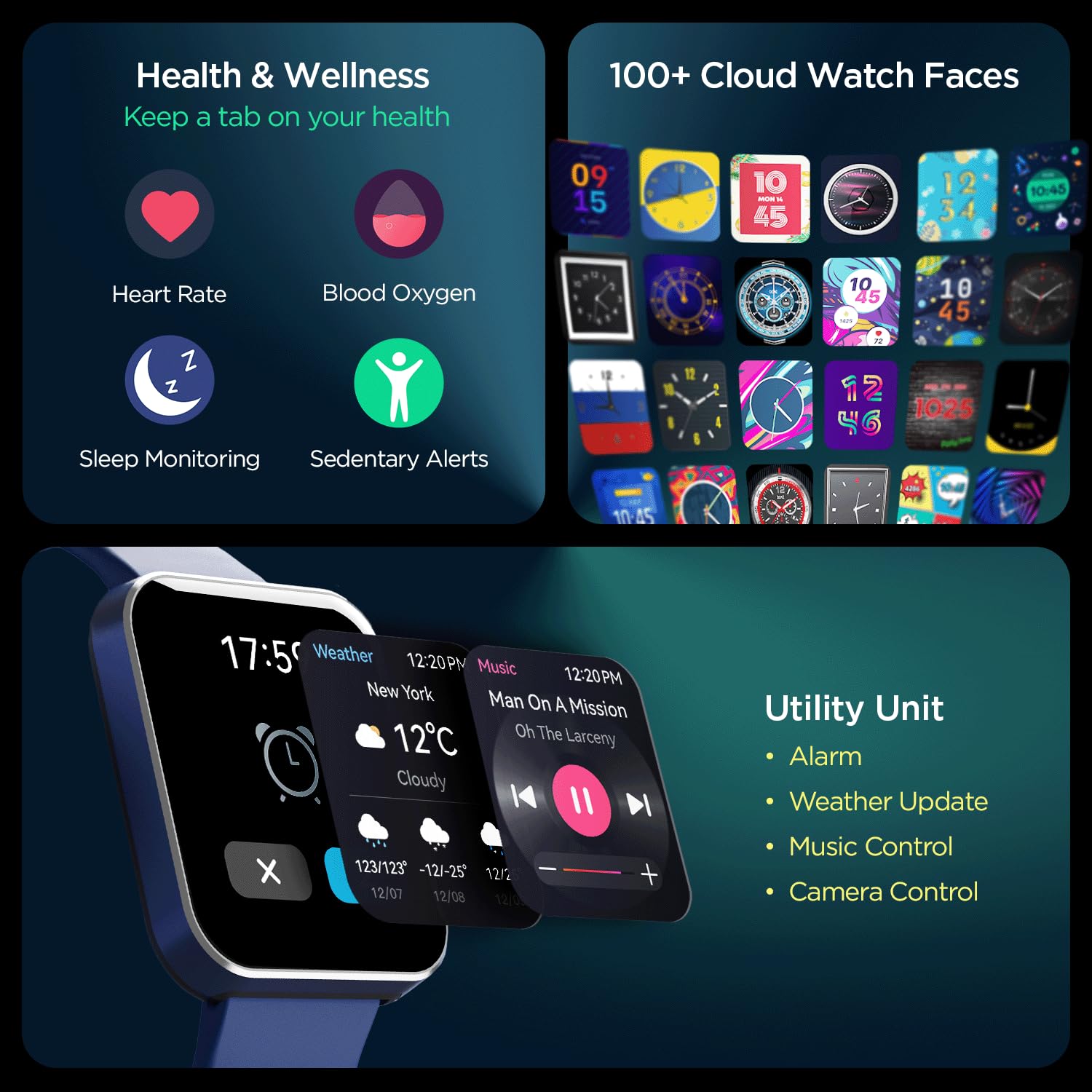
Image: A comprehensive view of the smartwatch's capabilities, including health tracking (heart rate, SpO2, sleep, sedentary alerts), a wide selection of watch faces, and practical utilities like weather, music, and camera control.
4.6 boAt Coins Integration
Earn rewards via boAt Coins on the boAt Crest App by engaging with your smartwatch and the ecosystem.

Image: The smartwatch paired with a smartphone showing the boAt Crest app interface, highlighting the boAt Coins reward system and available vouchers.
5. Maintenance
- Cleaning: Wipe the watch and strap regularly with a soft, dry cloth. For stubborn dirt, use a slightly damp cloth and dry thoroughly.
- Water Resistance: Refer to the product specifications for water resistance ratings. Avoid exposing the watch to hot water, steam, or high-pressure water jets.
- Charging: Use only the provided charging cable. Avoid using damaged cables or chargers.
- Storage: Store the watch in a cool, dry place away from direct sunlight and extreme temperatures.
6. Troubleshooting
6.1 Watch Not Turning On
- Ensure the watch is fully charged. Connect it to the charger for at least 30 minutes.
- Press and hold the side button for 10-15 seconds to attempt a forced restart.
6.2 Pairing Issues
- Ensure Bluetooth is enabled on your smartphone and the watch.
- Make sure the watch is within the Bluetooth range of your phone (typically 10 meters).
- Restart both your smartphone and the smartwatch.
- Forget the device in your phone's Bluetooth settings and try pairing again through the boAt Crest app.
6.3 Inaccurate Health Data
- Ensure the watch is worn snugly on your wrist, about one finger's width above the wrist bone.
- Keep the sensor clean and free from dirt or sweat.
- Note that environmental factors and individual physiology can affect sensor accuracy.
7. Specifications
| Feature | Detail |
|---|---|
| Brand | boAt |
| Model Name | Wave Flex Connect |
| Display Size | 1.83 inches |
| Resolution | 240 x 240 pixels |
| Display Type | Digital LCD |
| Brightness | Up to 550 Nits |
| Battery Life | Up to 10 days (normal use), 30 days (standby), 3 days (with Bluetooth Calling) |
| Battery Type | Lithium Polymer |
| Connectivity | Bluetooth |
| Compatible Devices | Smartphone |
| Operating System | Smartwatch OS |
| Item Weight | 51 g |
| Manufacturer | Imagine Marketing Limited. |
8. Warranty and Support
8.1 Warranty Information
Your boAt Wave Flex Connect Smart Watch comes with a 1 Year Warranty from the date of purchase. Please retain your purchase receipt and the warranty card for any warranty claims. The warranty covers manufacturing defects and does not cover damage caused by misuse, accidents, unauthorized repairs, or normal wear and tear.
8.2 Customer Support
For any queries, technical assistance, or warranty claims, please contact boAt customer support. You can find contact details on the official boAt website or refer to the warranty card included in your product package.
Manufacturer: Imagine Marketing Limited., info@imaginemarketingindia.com


