
ANNFUZ 6206B
ANNFUZ Mechanical Keyless Entry Door Handle Lock Model 6206B Instruction Manual
Model: 6206B | Brand: ANNFUZ
Introduction
This manual provides detailed instructions for the installation, operation, and maintenance of your ANNFUZ Mechanical Keyless Entry Door Handle Lock, Model 6206B. This full mechanical lock offers keyless entry via a keypad, auto-locking functionality, and a passage mode for convenience. It requires no batteries or wiring, ensuring reliable operation.
Key Features:
- Full Mechanical Operation: No batteries, power, or wiring required.
- Keyless Entry: Access via a customizable 4-7 digit combination code.
- Auto-Locking: Automatically locks after closing the door for enhanced security.
- Passage Mode: Allows the door to remain unlocked for frequent entry/exit without a code.
- Durable Construction: Made from solid zinc alloy with long-lasting plating.
- Adjustable Handle: Works with both left and right-handed doors.
- Wide Application: Suitable for doors with 30mm-55mm (1.2in-2.2in) thickness.
Setup and Installation
Before installation, ensure your door meets the following requirements:
- Door Thickness: 30mm-55mm (1.2in-2.2in). Not applicable to glass doors.
- Backset: The latch is designed for a 60mm (2-3/8”) backset only. A 70mm (2-3/4”) latch replacement can be provided if needed.
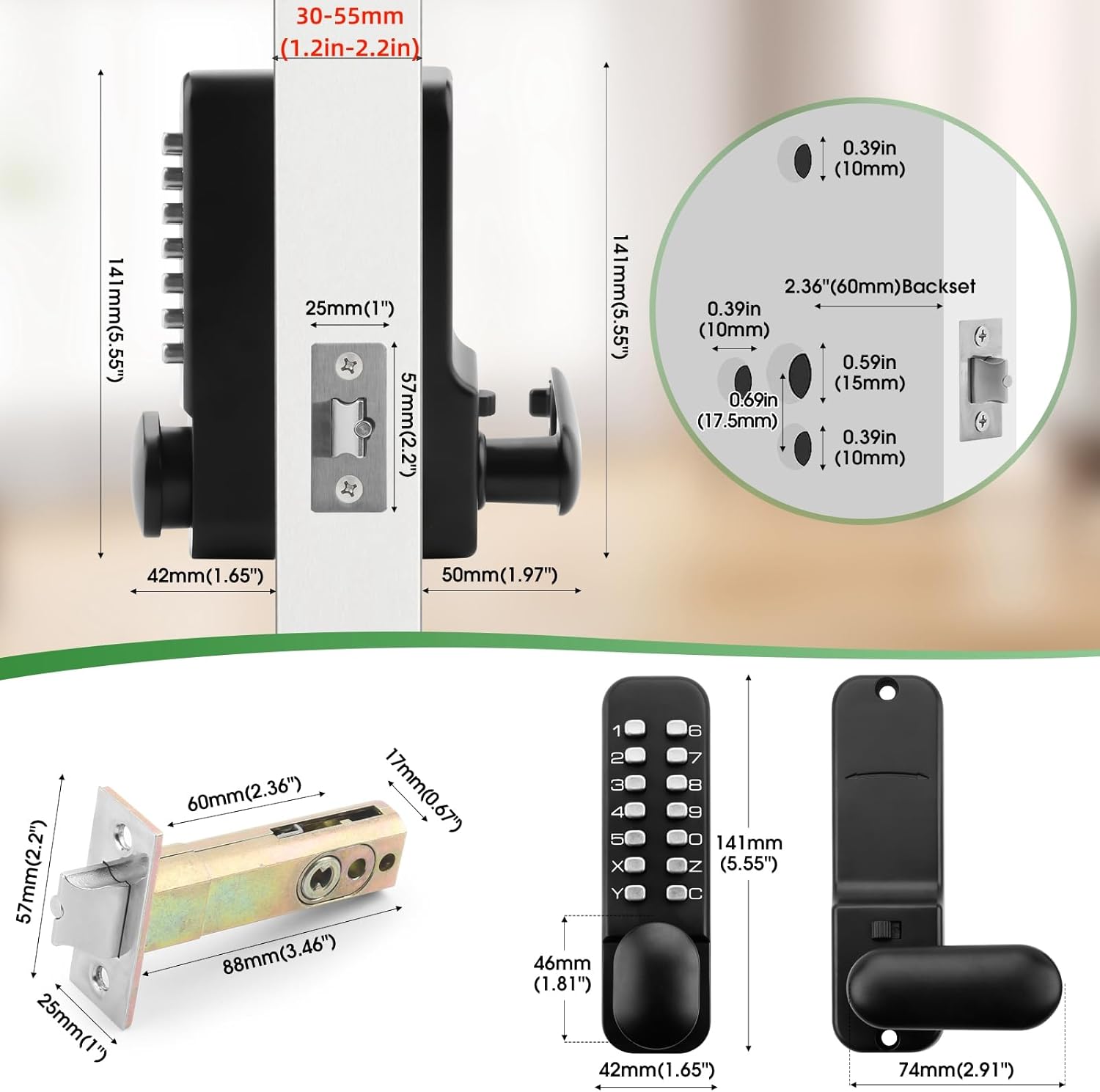
Figure 1: Lock Dimensions and Compatibility. This image provides detailed measurements for the lock, including the required door thickness (30-55mm) and the 60mm backset, along with the dimensions of the exterior panel, interior panel, and latch mechanism.
Package Contents:
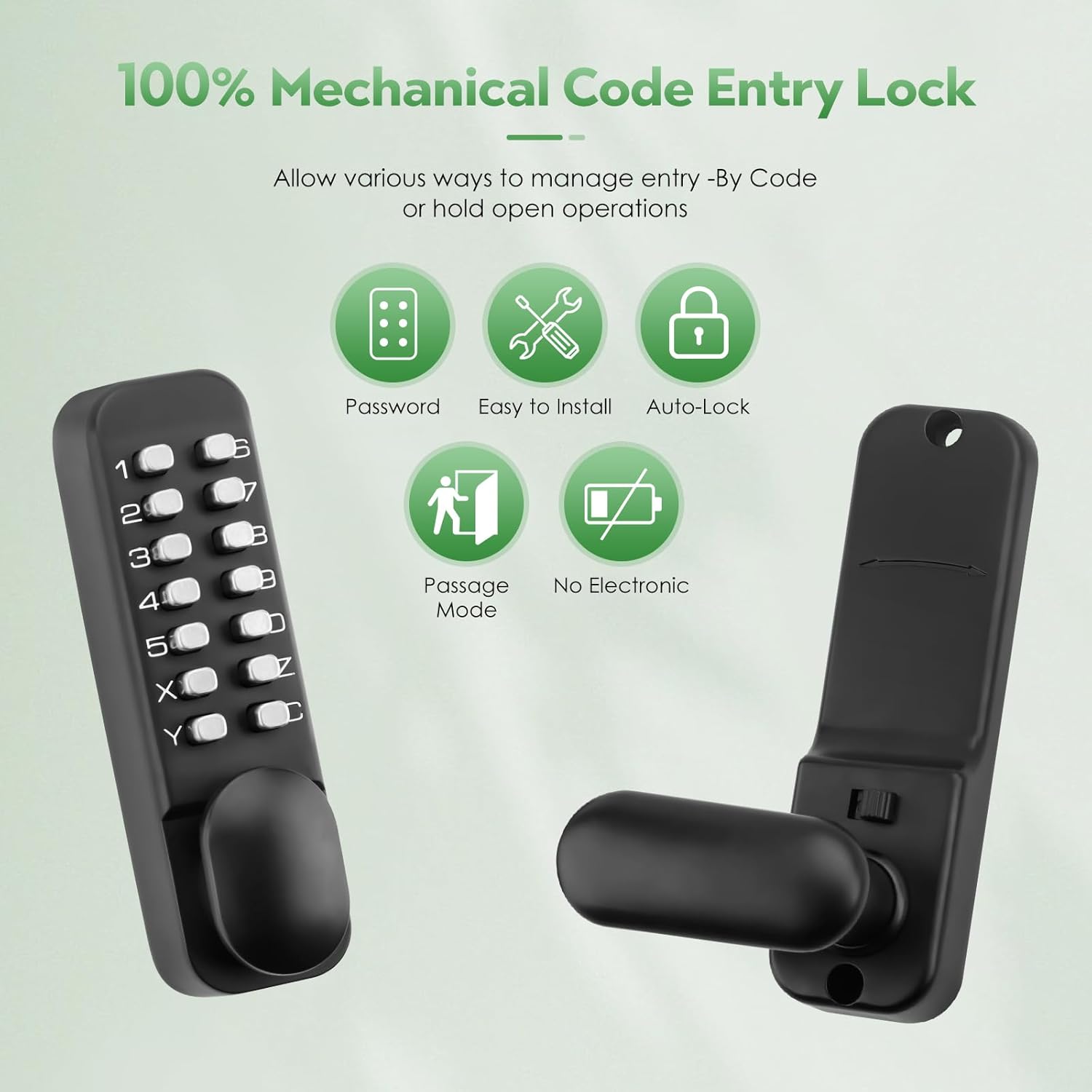
Figure 2: Included Components. This image displays all parts included in the package, such as the exterior keypad panel, interior panel, spindle, latch, strike plate, strike box, brass keys, rubber seal, instruction manual, and various screws.
- Prepare the Door: Ensure the door is properly drilled for a 60mm backset.
- Install the Latch: Insert the 60mm latch into the door edge.
- Install Exterior Panel: Position the exterior keypad panel on the outside of the door.
- Install Interior Panel: Align the interior panel with the exterior panel, ensuring the spindle passes through the latch. Secure with screws.
- Install Strike Plate and Box: Install the strike plate and strike box on the door frame.
- Adjust Handle Direction: The handle direction can be adjusted for left or right-handed doors. Use a Phillips screwdriver bit (Shank diameter: 5mm, Shank length: at least 50mm) to change the handle orientation if needed.
Operating Instructions
Setting the Combination Code:
The lock uses a mechanical code system. The combination can be 4-7 digits long, composed of numbers or letters (no repeats), excluding the 'C' button. Always press button "C" before entering the code.

Figure 3: Code Setting Mechanism. This image illustrates the internal mechanism for setting the code. Pins with "fish eyes" facing inwards (toward 'F') are not part of the password, while pins facing outwards (towards 'C') are part of the code. Codes with 4 digits provide maximum security.
- Remove the back panel of the exterior keypad.
- Locate the code setting pins. Each pin has a "fish eye" on one side.
- To include a number/letter in the code, use a flathead screwdriver to turn its pin so the "fish eye" faces outwards (towards 'C').
- To exclude a number/letter, turn its pin so the "fish eye" faces inwards (towards 'F').
- Ensure your chosen code has 4-7 unique digits/letters.
- Replace the back panel.
Unlocking the Door:
To unlock, press the "C" button, then enter your combination code in any order. Finally, turn the handle to open the door.
Auto-Locking Feature:
The lock is designed to automatically lock after the door is closed, providing continuous security without manual intervention.
Passage Mode:
Passage mode allows the door to be opened without entering a code, useful for periods of frequent entry and exit. To activate or deactivate passage mode, follow these steps:
Video 1: How to set "Passage Mode" on the exterior keypad. This video demonstrates the sequence of button presses to activate and deactivate the passage mode feature on the lock's exterior keypad.
Video 2: How to set passage mode using the interior panel. This short video illustrates how to engage or disengage the passage mode from the interior side of the lock by manipulating a small switch.
- To Activate Passage Mode (Exterior Keypad): Press "C", enter your password, hold the handle down, press "Y", then release the handle. The lock will now remain unlocked.
- To Deactivate Passage Mode (Exterior Keypad): Hold the handle down, press "C", then release the handle. The lock will resume auto-locking.
- To Activate/Deactivate Passage Mode (Interior Panel): Press down on the handle, flip the small switch located on the interior panel, then release the handle.
Maintenance
- Cleaning: Wipe the lock surface with a soft, damp cloth. Avoid abrasive cleaners or solvents that may damage the finish.
- Lubrication: Periodically apply a small amount of graphite-based lubricant to the internal mechanisms (latch bolt, spindle) to ensure smooth operation. Do not use oil-based lubricants as they can attract dust and debris.
- Inspection: Regularly check all screws and components for tightness. Ensure the handle operates smoothly and the latch retracts fully.
Troubleshooting
| Problem | Possible Cause | Solution |
|---|---|---|
| Lock does not open with correct code. | "C" button not pressed first; incorrect code entered; passage mode active. | Ensure "C" is pressed before the code. Verify the code. Check if passage mode is active and deactivate if necessary. |
| Handle is stiff or latch does not retract fully. | Lack of lubrication; misaligned components; screws too tight. | Apply graphite lubricant to moving parts. Check alignment of interior and exterior panels. Loosen mounting screws slightly if they are overtightened. |
| Passage mode does not activate/deactivate. | Incorrect procedure followed. | Refer to the "Passage Mode" section in Operating Instructions and follow the steps precisely. |
| Code setting pins are difficult to turn. | Debris or corrosion. | Clean the mechanism carefully. Apply a small amount of dry lubricant if needed. |
Specifications
- Brand: ANNFUZ
- Model Name: Mechanical Keyless Door Lock with Keypad
- Model Number: 6206B
- Material: Zinc Alloy
- Color: Matte Black
- Lock Type: Combination Lock, Keypad
- Special Features: Auto-Lock, One-Touch Lock, Passcode Unlock, Resettable
- Item Dimensions (L x W x H): 3.3 x 5.5 x 1.9 inches
- Item Weight: 2.6 Pounds
- Door Thickness Compatibility: 30mm-55mm (1.2in-2.2in)
- Backset: 60mm (2-3/8”)
- Batteries Required: No
- UPC: 717023010045
Warranty Information
For specific warranty details regarding your ANNFUZ Mechanical Keyless Entry Door Handle Lock, Model 6206B, please refer to the warranty card included in your product packaging or contact ANNFUZ customer support directly. Keep your proof of purchase for warranty claims.
Customer Support
If you encounter any issues or have questions about your ANNFUZ Mechanical Keyless Entry Door Handle Lock, please contact ANNFUZ customer support. You can typically find contact information on the product packaging or the official ANNFUZ website.
Related documents6206B


Ask a question about this manual
Ask about setup, troubleshooting, compatibility, parts, safety, or missing instructions. Manuals+ will review the question and use this page’s manual context to help answer it.