
LINKChef HB
LINKChef 7-in-1 Immersion Blender User Manual
Model: HB
Brand: LINKChef
Introduction
Thank you for choosing the LINKChef 7-in-1 Immersion Blender. This versatile kitchen appliance is designed to simplify your food preparation tasks, offering powerful blending, chopping, whisking, and frothing capabilities. With its robust 800W motor and multiple attachments, you can effortlessly create a wide range of dishes, from smoothies and soups to baby food and whipped cream. Please read this manual thoroughly before first use to ensure safe and optimal operation.
Important Safety Information
To reduce the risk of fire, electric shock, or injury, basic safety precautions should always be followed, including the following:
- Read all instructions before using the appliance.
- Do not immerse the motor unit in water or other liquids. Only the detachable parts are washable.
- Keep hands, hair, clothing, as well as spatulas and other utensils away from moving blades during operation to prevent injury and/or damage to the appliance.
- Blades are sharp. Handle with care.
- Unplug from outlet when not in use, before putting on or taking off parts, and before cleaning.
- Do not operate any appliance with a damaged cord or plug, or after the appliance malfunctions or has been dropped or damaged in any manner.
- This appliance is not intended for use by persons (including children) with reduced physical, sensory or mental capabilities, or lack of experience and knowledge, unless they have been given supervision or instruction concerning use of the appliance by a person responsible for their safety.
- Do not use outdoors.
- Do not let cord hang over edge of table or counter, or touch hot surfaces.
- Do not use attachments not recommended or sold by the manufacturer.
Product Components
The LINKChef 7-in-1 Immersion Blender set includes the following parts:
- 1. Main Motor Unit: The handheld power unit with speed control and turbo button.

Image: The complete LINKChef 7-in-1 Immersion Blender set, showcasing the main motor unit, blending shaft, whisk, milk frother, chopper bowl, measuring cup, and various blades.
- 2. Blending Shaft: Stainless steel shaft with a unique bell guard and two titanium steel blades (4-leaf blade and ice crusher blade).

Image: A detailed view of the 4-leaf blending blade, designed for smooth textures.
- 3. 500ml Chopper Bowl: For chopping ingredients like meat, vegetables, and nuts. Includes a chopping blade.

Image: The chopper bowl demonstrating its capability to crush ice and chop meat, highlighting its versatility.
- 4. 20oz Measuring Cup: For blending liquids and measuring ingredients.
- 5. Whisk Attachment: For whisking eggs, cream, and light batters.
- 6. Milk Frother: For creating foamy milk for coffee and other beverages.
- 7. Accessories Holder: For organized storage of attachments.
Setup
Before first use, wash all parts that will come into contact with food (blending shaft, chopper bowl, measuring cup, whisk, milk frother, and blades) in warm soapy water, then rinse and dry thoroughly. The motor unit should only be wiped clean with a damp cloth.
Assembling the Immersion Blender:
- Align the blending shaft with the motor unit.
- Twist the blending shaft clockwise until it clicks securely into place.
- To disassemble, twist counter-clockwise and pull apart.

Image: Visual guide demonstrating the simple two-step process for assembling and disassembling the blender for use and cleaning.
Assembling the Chopper:
- Carefully place the chopping blade onto the center pin inside the chopper bowl.
- Add your ingredients to the chopper bowl. Do not overfill.
- Place the chopper lid onto the bowl, ensuring it is properly seated.
- Align the motor unit with the top of the chopper lid and twist clockwise to lock it in place.
Attaching the Whisk/Milk Frother:
- Insert the whisk or milk frother into its respective adapter.
- Align the adapter with the motor unit and twist clockwise to secure.
Operating Instructions
Always ensure the appliance is unplugged before attaching or removing any accessories.
General Operation:
- Plug the appliance into a standard electrical outlet.
- The immersion blender features a 1-20 stepless speed control dial on top of the motor unit. Rotate the dial to select your desired speed.
- Press and hold the Power Button to start operation. Release to stop.
- For maximum power, press the Turbo Button. This will operate the blender at its highest speed regardless of the dial setting.

Image: A detailed view of the blender's control panel, showing the 20-speed dial and the separate turbo button for maximum power.
Using the Blending Shaft:
Ideal for smoothies, soups, sauces, and purees.
- Attach the blending shaft to the motor unit.
- Immerse the blending shaft into the ingredients. Ensure the bell guard is fully submerged to prevent splashing.
- Press the Power Button and move the blender up and down gently to ensure even blending.
- The bell guard is designed to prevent scratches on non-stick cookware and reduce suction.
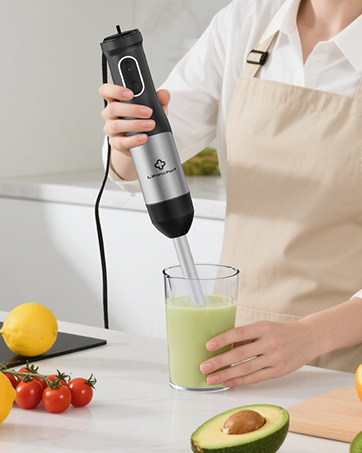
Image: A user operating the immersion blender to create a green smoothie in a tall glass.
Using the Chopper Bowl:
Suitable for chopping meat, vegetables, nuts, and crushing ice.
- Assemble the chopper bowl with the appropriate blade (chopping or ice crusher).
- Add ingredients to the bowl. Do not overfill.
- Attach the motor unit to the chopper lid.
- Press the Power Button in short pulses for coarse chopping, or hold for finer results. Use the Turbo Button for tough ingredients like ice.

Image: A user demonstrating the chopper attachment by mincing meat in the bowl.
Video: Demonstration of the 800W Turbo Mode Hand Blender in action, showcasing its power and efficiency for various tasks.
Using the Whisk Attachment:
Perfect for whipping cream, beating eggs, and mixing light batters.
- Attach the whisk to its adapter, then attach the adapter to the motor unit.
- Place the whisk into your ingredients.
- Start at a low speed and gradually increase as needed.
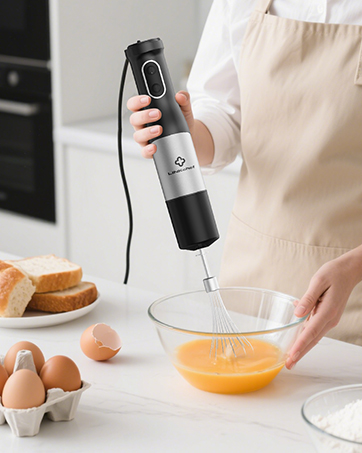
Image: A user utilizing the whisk attachment to beat eggs in a glass bowl.
Using the Milk Frother:
For creating rich, creamy foam for lattes, cappuccinos, and hot chocolate.
- Attach the milk frother to its adapter, then attach the adapter to the motor unit.
- Submerge the frother head just below the surface of the milk.
- Turn on the appliance and move it slightly up and down to incorporate air.

Image: A cup of frothed coffee, with the milk frother visible in the background, illustrating its use.
Maintenance and Cleaning
Proper cleaning and maintenance will extend the life of your LINKChef Immersion Blender.
Cleaning:
- Always unplug the appliance before cleaning.
- The motor unit should only be wiped clean with a damp cloth. Do not immerse it in water.
- All detachable parts (blending shaft, chopper bowl, blades, measuring cup, whisk, milk frother) are dishwasher safe. For best results, rinse immediately after use.
- For stubborn food residue on the blending shaft, fill the measuring cup with warm water and a drop of dish soap, then immerse the blending shaft and run the blender for a few seconds. Rinse thoroughly.
- Handle blades with extreme care as they are very sharp.

Image: A composite image illustrating both hand rinsing of the blending shaft under a faucet and the dishwasher-safe nature of the detachable parts.
Storage:
- Ensure all parts are completely dry before storing.
- Use the provided accessories holder to keep all attachments organized and easily accessible.
- Store the appliance in a cool, dry place.

Image: The LINKChef immersion blender and its accessories neatly arranged on a kitchen counter, demonstrating easy storage.
Troubleshooting
| Problem | Possible Cause | Solution |
|---|---|---|
| Blender does not turn on. | Not plugged in; power outlet not working; motor unit not properly attached. | Check power cord connection; test outlet with another appliance; ensure motor unit is securely twisted onto the attachment. |
| Motor stops during operation. | Overheating due to continuous use or processing too tough ingredients; too much food in the container. | Unplug and let cool down for 15-20 minutes; reduce the amount of food; cut large ingredients into smaller pieces. |
| Food is not blending/chopping evenly. | Insufficient liquid (for blending); ingredients too large; not pulsing correctly (for chopping). | Add more liquid; cut ingredients into smaller, uniform pieces; use short, controlled pulses for chopping. |
| Splashing during blending. | Blending shaft not fully submerged; too high speed initially. | Ensure bell guard is fully immersed before starting; begin at a lower speed and gradually increase. |
Specifications
| Feature | Detail |
|---|---|
| Brand | LINKChef |
| Model | HB |
| Power | 800W |
| Voltage | 120V |
| Speed Settings | 20 Stepless Speeds + Turbo Mode |
| Blade Material | Titanium Steel (4-leaf blade & ice crusher blade) |
| Chopper Bowl Capacity | 500ml |
| Measuring Cup Capacity | 20oz (approx. 600ml) |
| Material Type Free | BPA Free Plastic, Baby-Grade Silicone, 304 Stainless Steel |
| Product Dimensions | 10"D x 9"W x 6"H |
| Item Weight | 3.33 pounds |
| Country of Origin | China |
Video: A comparative video showcasing the LINKChef blender's performance against another brand, highlighting its features and capabilities.
Warranty and Support
LINKChef offers a 5-year warranty for this product, covering manufacturing defects and issues arising from normal use. For any questions, concerns, or warranty claims, please contact LINKChef customer support. We provide lifetime customer service and 24/7 customer support to ensure your satisfaction.
For support, please refer to the contact information provided with your product packaging or visit the official LINKChef website.
Ask a question about this manual
Ask about setup, troubleshooting, compatibility, parts, safety, or missing instructions. Manuals+ will review the question and use this page’s manual context to help answer it.