1. Introduction
This user manual provides essential information for the safe operation, assembly, and maintenance of your Kidzone Smart Bumper Car. Designed for toddlers and kids aged 18 months to 6 years, this electric ride-on toy offers interactive features including app control, LED lights, Bluetooth connectivity, and a 360-degree spin function. Please read this manual thoroughly before use to ensure proper functionality and safety.
What's in the Box
- Ride on Car
- Charger
- Remote Control
- Manual
- DIY Sticker Sheets
2. Safety Guidelines
Your child's safety is paramount. Always supervise children during operation and ensure all safety features are properly utilized. This product complies with ASTM/CPSIA/CPSC/CA Prop 65/FCC safety regulations.
- Age and Weight Limit: Suitable for children aged 18 months to 6 years, with a maximum weight capacity of 66 lbs.
- Seat Belt: Always ensure the adjustable 5-point seat belt is securely fastened before operation.
- Supervision: Adult supervision is required at all times.
- Surface: Use on smooth, flat surfaces. Avoid slopes, stairs, and uneven terrain.
- Obstacles: Ensure the play area is clear of obstacles, water, and other hazards.
- Charging: The vehicle must be OFF and cannot be operated when charging.
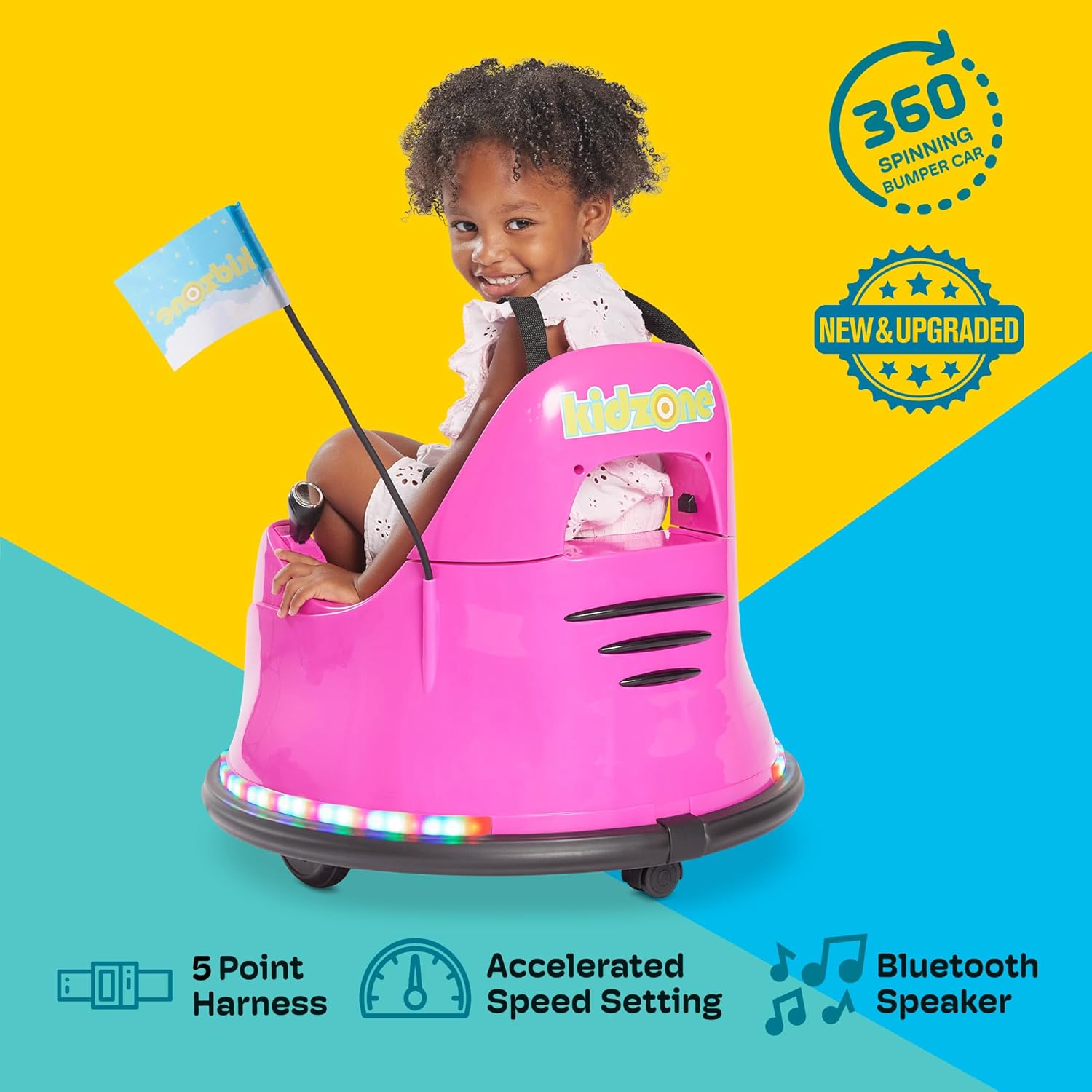
Figure 2.1: Child securely fastened in the bumper car, demonstrating the 5-point harness for safety.

Figure 2.2: The bumper car features a safety flag for increased visibility during play.
3. Setup and Assembly
The Kidzone Smart Bumper Car comes mostly pre-assembled. Follow these steps to prepare it for first use:
- Unpack: Carefully remove all components from the packaging.
- Battery Connection: The battery may come disconnected for shipping safety. Locate the battery compartment (usually under the seat) and connect the battery terminals as per the included quick start guide.
- First Charge: Fully charge the battery for 8-12 hours before initial use. Do not charge for more than 20 hours.
- Attach Flag: Insert the racing flag into its designated slot on the rear of the bumper car.
- Apply Stickers: Personalize your bumper car using the provided DIY sticker sheets.

Figure 3.1: Customize your bumper car with the included DIY stickers, featuring numbers, letters, and fun designs.
4. Operating Instructions
Control Panel Overview
The main control panel is located within the seating area. It allows for power control, mode selection, speed adjustment, and light customization.

Figure 4.1: The intuitive control panel for easy operation by children or parents.
- Power Button: Press to turn the bumper car ON/OFF.
- Battery Indicator: Displays current battery level.
- Mode Selector: Toggle between Joystick (child-driven), Remote (parental control), and APP control modes.
- Speed Settings: Choose between Slow (0.75 mph) and Fast (1.3 mph) speeds.
- Light Controls: Activate and cycle through various multi-colored LED light combinations for both upper and lower light strips.
Driving Modes
The Kidzone Smart Bumper Car offers three distinct driving modes:
- Joystick Input Mode: Children can drive the car independently using the two joysticks located on either side of the seat. Pushing both forward moves the car forward, pulling both back moves it backward, and pushing one forward while pulling the other back enables 360-degree spins.
- 2.4G Remote Control Mode: Parents can take full control of the bumper car's direction and speed using the included 2.4G remote control. This is ideal for younger children or for guiding the car in specific areas.
- APP Control Mode: Connect the bumper car to the free Kidzone APP (available on iOS and Android) via Wi-Fi. The app allows control over direction, speed, lights, and music. It also features "Play Mode" with games and rewards for an enhanced interactive experience.

Figure 4.2: The included remote control allows parents to guide the bumper car.

Figure 4.3: Control the bumper car and access interactive features via the Kidzone mobile application.
Lights and Sound
The bumper car features multi-colored LED lights on both the upper frame and around the base, offering 25 light combinations. It also includes Bluetooth connectivity, allowing you to play music or audio files through the car's speaker for an immersive experience.
Video 4.1: Official product video demonstrating the Kidzone Smart Bumper Car's features, including app control and movement. This video is provided by the seller, Align Inc.
5. Maintenance
- Battery Care: The 12V rechargeable lead-acid battery provides approximately 40 minutes of playtime on a full charge. Charge the battery at least once a month, even if not operating the vehicle, to maximize battery life. Avoid completely draining the battery.
- Cleaning: Wipe the bumper car with a damp cloth. Avoid using harsh chemicals or abrasive cleaners.
- Storage: Store the bumper car in a dry, cool place away from direct sunlight and moisture.
6. Troubleshooting
If you encounter issues with your Kidzone Smart Bumper Car, refer to the following common problems and solutions:
| Problem | Possible Cause | Solution |
|---|---|---|
| Car does not turn on. | Battery is low or disconnected. | Check battery connection and charge fully. |
| Car does not move. | Incorrect driving mode selected or remote not paired. | Ensure correct mode (Joystick/Remote/APP) is selected. Re-pair remote if necessary. |
| Lights are not working. | Light function is turned off. | Press the light control buttons on the panel to activate. |
| App control not connecting. | Wi-Fi issue or app not properly synced. | Ensure Wi-Fi is enabled on your device. Restart app and bumper car. |
For further assistance, please refer to the full user manual or contact Kidzone customer support.
7. Product Specifications
| Feature | Detail |
|---|---|
| Product Dimensions | 22.4 x 22.4 x 20.3 inches |
| Item Weight | 12.4 pounds |
| Manufacturer Recommended Age | 18 months - 6 years |
| Weight Capacity | 66 lbs |
| Motors | Two 15W motors |
| Battery | 12V rechargeable lead-acid |
| Playtime per Charge | Approximately 40 minutes |
| Charging Time | 8-12 hours (max 20 hours) |
| Driving Speeds | 0.75 - 1.3 mph |
| Safety Features | Adjustable 5-point seat belts, anti-flat tires, cushioned rubber bumper, slow start |
| Connectivity | Wi-Fi (for APP control), Bluetooth |
8. Warranty and Support
For warranty information, product support, or to purchase replacement parts, please contact Kidzone customer service directly. Refer to the original packaging or the official Kidzone website for contact details.
A detailed User Manual (PDF) is available for download: Download User Manual


