
Introduction
Welcome to the user manual for your Marea Smartwatch B60004/1. This guide provides essential information for setting up, operating, maintaining, and troubleshooting your device. Please read these instructions carefully to ensure optimal performance and longevity of your smartwatch.
What's in the Box
- Marea Smartwatch B60004/1
- Charging Cable
- Metal Strap
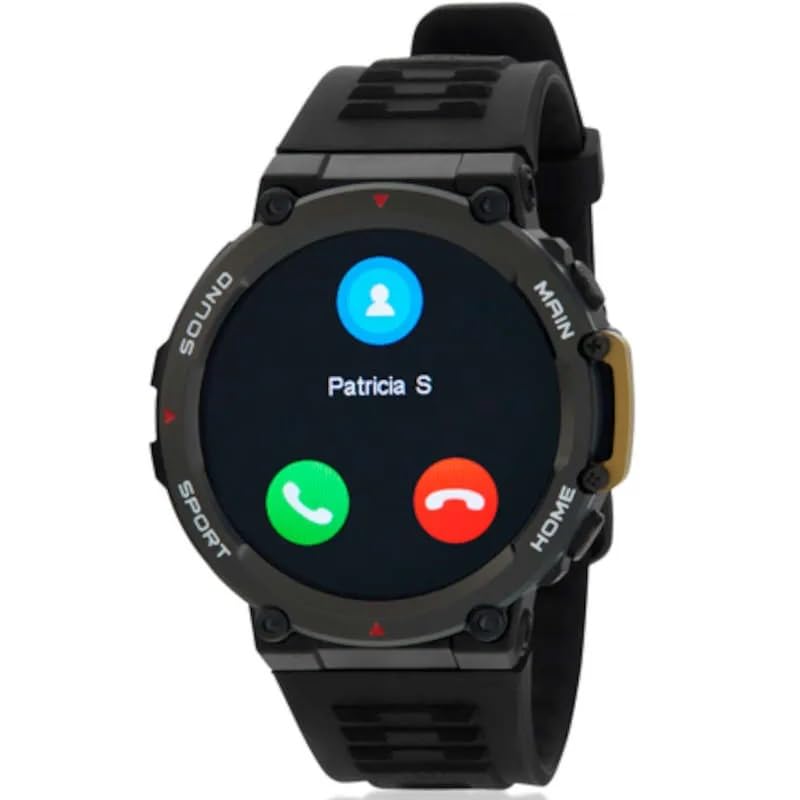
Image: Marea Smartwatch B60004/1. This image shows the smartwatch with its round display and black metal strap, alongside the charging cable.
Setup
1. Charging the Smartwatch
Before initial use, fully charge your smartwatch. Connect the charging cable to the charging port on the back of the watch and plug the other end into a USB power adapter (not included) or a computer's USB port. The watch will display a charging indicator. A full charge typically takes approximately 2-3 hours. The average battery life is up to 72 hours depending on usage.
2. Powering On/Off
- To Power On: Press and hold the side button until the screen illuminates.
- To Power Off: Press and hold the side button, then select the "Power Off" option on the screen.
3. App Installation and Pairing
To unlock the full functionality of your Marea Smartwatch, you need to install the companion application on your smartphone. Search for the official Marea smartwatch app in your smartphone's app store (Google Play Store for Android or Apple App Store for iOS).
- Download and install the application.
- Open the app and follow the on-screen instructions to create an account or log in.
- Ensure Bluetooth is enabled on your smartphone.
- In the app, navigate to the device pairing section and select your Marea B60004/1 from the list of available devices.
- Confirm the pairing request on both your smartphone and the smartwatch.
The smartwatch uses Bluetooth connectivity for communication with your smartphone.
Operating Instructions
Basic Navigation
The Marea Smartwatch B60004/1 features a 1.5-inch resistive touchscreen display with a resolution of 390 x 390 pixels. Navigate through menus and functions by swiping across the screen and tapping icons.
- Swipe Up/Down: Scroll through notifications or menu options.
- Swipe Left/Right: Access different widgets or quick settings.
- Tap: Select an item or open an application.
- Side Button: Typically used to return to the home screen or access the main menu.
Voice Calls
This smartwatch supports voice calls. Once paired with your smartphone, you can make and receive calls directly from your watch. Ensure your watch is within Bluetooth range of your phone for this feature to function.
Health Monitoring
The Marea B60004/1 includes several health monitoring features:
- Heart Rate Monitor: Measures your heart rate throughout the day.
- Blood Pressure Monitor: Provides estimated blood pressure readings.
- Blood Oxygen Monitor: Measures your blood oxygen saturation (SpO2).
- Electrocardiogram (ECG) Monitor: Records electrical activity of the heart.
Note: These features are for general wellness and fitness purposes only and are not intended for medical diagnosis, treatment, or prevention of disease. Consult a medical professional for any health concerns.
GPS Functionality
The smartwatch supports GPS via your smartphone. When connected to your phone, it can utilize your phone's GPS for tracking activities and location data.
Notifications and Communication Apps
Receive notifications from communication applications on your smartphone directly on your smartwatch. Manage notification settings through the companion app on your phone.
Maintenance
Cleaning Your Smartwatch
Regularly clean your smartwatch and strap to prevent skin irritation and maintain its appearance. Use a soft, lint-free cloth. If necessary, slightly dampen the cloth with water. Avoid using harsh chemicals, abrasive materials, or strong detergents.
Battery Care
- Avoid fully discharging the battery frequently.
- Do not expose the device to extreme temperatures, as this can affect battery life.
- Use only the provided charging cable.
Water Resistance
The Marea Smartwatch B60004/1 is not water resistant for general use. Avoid submersion in water. While it may withstand splashes up to 1.5 meters depth, it is not recommended for swimming, showering, or other water-based activities. Exposure to water may cause damage not covered by warranty.
Troubleshooting
| Problem | Possible Solution |
|---|---|
| Smartwatch does not power on. | Ensure the device is fully charged. Connect it to the charger for at least 30 minutes. |
| Cannot pair with smartphone. |
|
| Inaccurate health readings. |
|
| Notifications are not received. |
|
Specifications
| Model Name | B60004/1 |
| Product Model Number | B60004-01 |
| Brand | Marea |
| Display Size | 1.5 Inches |
| Display Resolution | 390 x 390 |
| Display Type | Resistive Touchscreen |
| Connectivity Technology | Bluetooth |
| Battery Capacity | 290 mAh (Lithium Polymer) |
| Average Battery Life | 72 Hours |
| Special Features | Voice Calls, Heart Rate Monitor, Blood Pressure Monitor, Blood Oxygen Monitor, Electrocardiogram Monitor, GPS via smartphone |
| Water Resistance Level | Not water resistant for general use; may withstand splashes up to 1.5 meters depth. |
| Case Material | Metal |
| Strap Material | Metal |
| Compatible Devices | Smartphone (All models) |
Warranty and Support
Your Marea Smartwatch B60004/1 comes with a Limited Warranty. For specific details regarding warranty coverage, duration, and terms, please refer to the warranty card included with your product or visit the official Marea website.
For technical support, troubleshooting assistance, or service inquiries, please contact Marea customer support through their official channels. Contact information can typically be found on the product packaging or the official brand website.
Always retain your proof of purchase for warranty claims.


