
STREETZ CMB-100
STREETZ CMB-100 Bluetooth Speaker User Manual
Model: CMB-100 | Brand: STREETZ
Introduction
Thank you for choosing the STREETZ CMB-100 Bluetooth Speaker. This portable, splash-proof speaker offers high-quality audio, hands-free calling, and versatile connectivity options including Bluetooth and AUX. Please read this manual carefully to ensure proper use and to maximize your enjoyment of the product.
Safety Information
- Do not expose the speaker to extreme temperatures or direct sunlight.
- Do not immerse the speaker in water, despite its splash-proof design.
- Keep the speaker away from strong magnetic fields.
- Do not attempt to disassemble or repair the speaker yourself. Contact qualified service personnel.
- Use only the specified charging cable.
- Keep out of reach of children.
Package Contents
- STREETZ CMB-100 Bluetooth Speaker
- USB Charging Cable
- AUX Audio Cable
- User Manual
Product Overview

Figure 1: Front-side view of the STREETZ CMB-100 Bluetooth Speaker, showing the integrated handle and the two main speaker grilles with dynamic lighting.

Figure 2: Angled view of the speaker, highlighting its robust, textured casing and portable design.
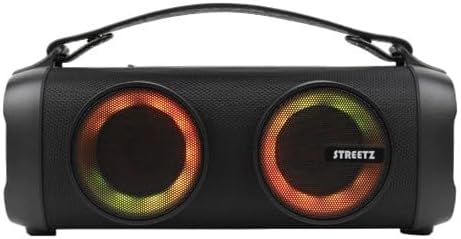
Figure 3: Direct front view of the speaker, showcasing the vibrant illumination of the speaker grilles.
Controls and Ports:
- Power Button: Turns the speaker on/off.
- Play/Pause Button: Controls media playback and answers/ends calls.
- Volume Up/Next Track Button: Increases volume or skips to the next track.
- Volume Down/Previous Track Button: Decreases volume or goes to the previous track.
- Mode Button: Switches between Bluetooth and AUX modes.
- USB Charging Port: For charging the speaker.
- AUX Input: For wired audio connection.
Setup
1. Charging the Speaker
- Connect the supplied USB charging cable to the speaker's USB charging port.
- Connect the other end of the USB cable to a USB power adapter (not included) or a computer's USB port.
- The charging indicator light will illuminate during charging and turn off when fully charged.
- A full charge typically takes approximately 3-4 hours.
2. Power On/Off
- To Power On: Press and hold the Power button for 2-3 seconds until you hear an audible prompt or see the indicator lights illuminate.
- To Power Off: Press and hold the Power button for 2-3 seconds until you hear an audible prompt and the indicator lights turn off.
Operating
1. Bluetooth Pairing
- Ensure the speaker is powered on and in Bluetooth mode (indicated by a flashing blue LED). If not, press the Mode button to switch.
- Enable Bluetooth on your device (smartphone, tablet, computer).
- Search for available Bluetooth devices. You should see "STREETZ CMB-100" in the list.
- Select "STREETZ CMB-100" to pair. Once connected, the blue LED will stop flashing and remain solid, and you may hear a confirmation sound.
- If prompted for a password, enter "0000".
2. AUX Mode
- Connect one end of the supplied AUX audio cable to the speaker's AUX input port.
- Connect the other end of the AUX cable to the audio output jack of your device (e.g., smartphone, MP3 player).
- The speaker will automatically switch to AUX mode, or you may need to press the Mode button to select it.
- Audio will now play through the speaker from your connected device.
3. Hands-free Function
- When connected via Bluetooth, the speaker can be used for hands-free calls.
- To Answer a Call: Press the Play/Pause button once.
- To End a Call: Press the Play/Pause button once during a call.
- To Reject a Call: Press and hold the Play/Pause button for 2 seconds.
Maintenance
- Clean the speaker with a soft, dry cloth. Do not use abrasive cleaners or solvents.
- Store the speaker in a cool, dry place when not in use.
- Avoid dropping the speaker or subjecting it to strong impacts.
- If the speaker will not be used for an extended period, charge it fully at least once every three months to preserve battery life.
Troubleshooting
| Problem | Possible Cause | Solution |
|---|---|---|
| Speaker does not power on. | Low battery. | Charge the speaker fully. |
| No sound. | Volume too low; incorrect mode; device not connected. | Increase speaker/device volume; ensure correct mode (Bluetooth/AUX); re-pair Bluetooth or check AUX cable. |
| Cannot pair via Bluetooth. | Speaker not in pairing mode; device Bluetooth off; too far apart. | Ensure speaker is flashing blue LED; enable Bluetooth on device; move devices closer (within 10m). |
| Poor sound quality. | Low battery; interference; device volume too high/low. | Charge speaker; move away from other electronic devices; adjust volume on both speaker and device. |
Specifications
- Model: CMB-100
- Product Dimensions: 34 x 18 x 17 cm
- Weight: 1 kg
- Connectivity: Bluetooth, AUX
- Features: Hands-free function, Splash-proof design
- Power Source: USB (rechargeable battery)
Warranty and Support
This STREETZ CMB-100 Bluetooth Speaker comes with a guarantee of at least 2 years from the date of purchase. This warranty covers manufacturing defects and ensures proper functionality under normal use. For warranty claims or technical support, please contact your retailer or the official STREETZ support channels.
For further assistance or inquiries, please visit the official STREETZ website or contact their customer service.
Related documentsCMB-100


Ask a question about this manual
Ask about setup, troubleshooting, compatibility, parts, safety, or missing instructions. Manuals+ will review the question and use this page’s manual context to help answer it.