
LUTEC 7637801012-2pcs
LUTEC LED Security Light User Manual
Model: 7637801012-2pcs
1. Introduction
Thank you for choosing the LUTEC LED Security Light. This manual provides essential information for the safe installation, operation, and maintenance of your new security lights. Please read this manual thoroughly before installation and keep it for future reference.

Image: Two LUTEC LED Security Lights. These lights feature a durable black aluminum housing, two adjustable light heads, and integrated motion sensors, designed for outdoor security lighting.
2. Safety Information
Always follow basic safety precautions when installing and operating electrical products to reduce the risk of fire, electric shock, and personal injury.
- WARNING: Risk of electric shock. Disconnect power at the fuse or circuit breaker before installation or servicing.
- This product must be installed in accordance with the applicable installation code by a person familiar with the construction and operation of the product and the hazards involved.
- Use only UL-listed wire connectors.
- Do not install this fixture on surfaces that can support its weight or are flammable.
- Ensure all connections are secure and properly insulated.
- Do not look directly into the LED light source when illuminated.
3. Package Contents
Verify that all components are present before beginning installation:
- LUTEC LED Security Light (x2)
- Mounting Hardware (screws, wire nuts, mounting plate)
- User Manual
4. Product Features
- High Brightness: 35W, 2500 Lumens at 5000K (Daylight White) for powerful illumination.
- Dual Motion Sensors: Enhanced detection with two independent sensors.
- Wide Detection Angle: 240-degree detection angle with a range of up to 33 feet.
- Adjustable Light Heads: Each light head is independently adjustable for precise light direction.
- Multiple Lighting Modes: Test, Motion (Security), Dusk to Dawn, and Manual Override modes.
- Durable Construction: Aluminum material with IP65 waterproof rating for all-weather performance.
5. Setup and Installation
Important: Before starting installation, ensure the power supply to the circuit is turned OFF at the circuit breaker or fuse box.
5.1 Pre-Installation
- Choose a suitable mounting location, ideally 8.2 feet (2.5 meters) above the ground for optimal motion detection.
- Ensure the mounting surface is stable and can support the weight of the fixture.
5.2 Dimensions
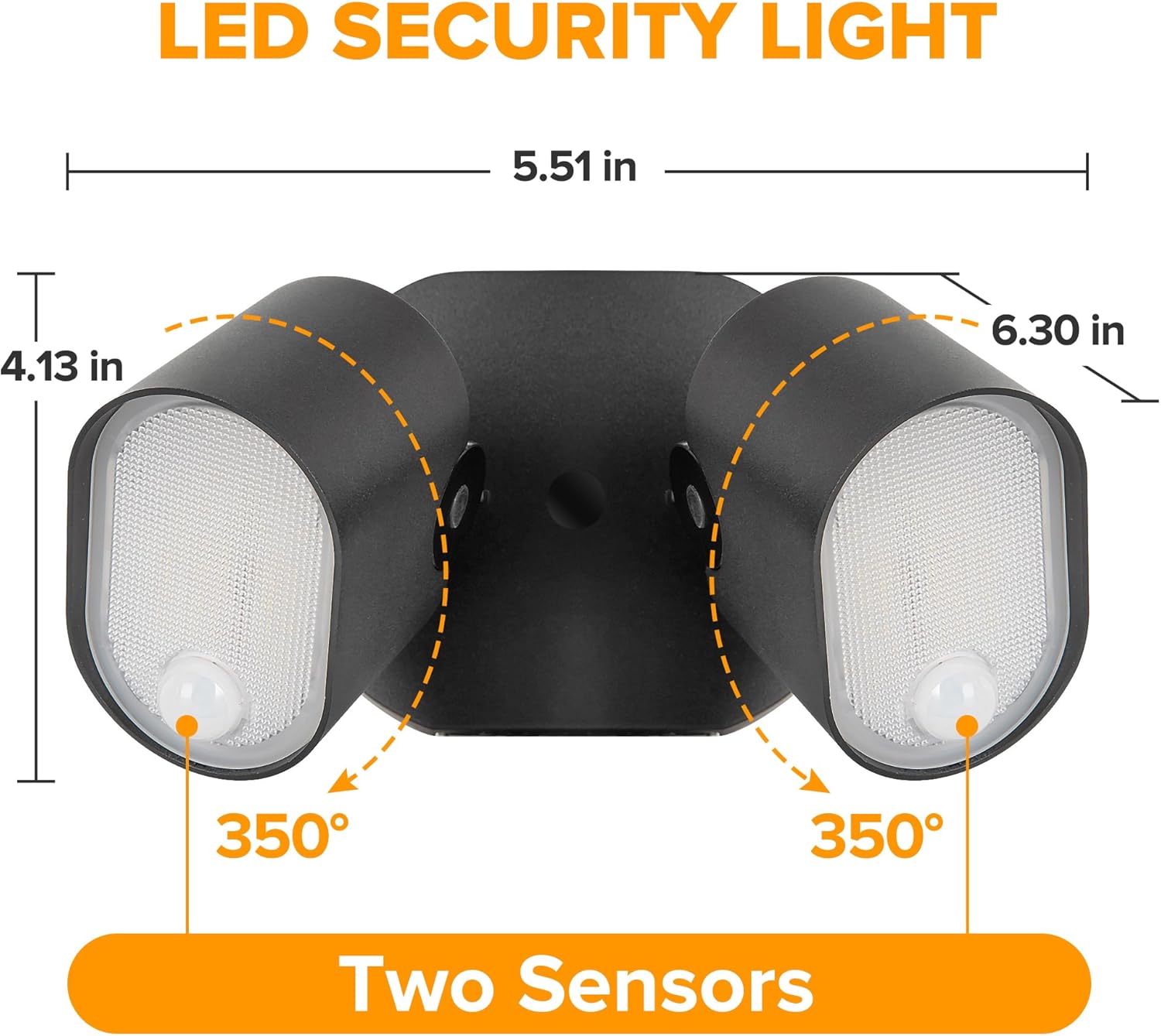
Image: Product dimensions and adjustability. The diagram illustrates the compact size of the light (5.51 in x 4.13 in x 6.30 in) and the 350-degree rotational capability of each light head, allowing for flexible light direction.
5.3 Mounting and Wiring
- Attach the mounting plate to the junction box using the provided screws.
- Connect the electrical wires: Black to Black (Live), White to White (Neutral), and Green/Bare Copper to Green (Ground) using wire nuts.
- Carefully tuck the wires into the junction box.
- Align the fixture with the mounting plate and secure it with the provided screws.
- Adjust the light heads to the desired angle.
- Restore power at the circuit breaker.
6. Operating Instructions
The LUTEC LED Security Light features adjustable settings for sensitivity (DISTANCE) and illumination time (TIME), along with four distinct lighting modes.

Image: Control panel for LUTEC LED Security Light. This image details the control interface, including sliders for adjusting motion sensor sensitivity (L=0-10 ft, M=10-20 ft, H=20-33 ft) and illumination duration (1 Min, 3 Min, 10 Min), as well as indicators for the four operational modes.
6.1 Sensitivity (DISTANCE) Adjustment
- L (Low): 0-10 feet detection range.
- M (Medium): 10-20 feet detection range.
- H (High): 20-33 feet detection range.
6.2 Time Adjustment
- 1 MIN: Light stays on for 1 minute after motion stops.
- 3 MIN: Light stays on for 3 minutes after motion stops.
- 10 MIN: Light stays on for 10 minutes after motion stops.
6.3 Lighting Modes
- Test Mode: For initial setup and aiming. The light will turn on for a few seconds when motion is detected, regardless of ambient light.
- Motion (Security) Mode: The light remains off until motion is detected. It then illuminates at 100% brightness for the set duration (1, 3, or 10 minutes) and turns off when motion ceases. This mode is active only at night.
- Dusk to Dawn (D2D) Mode: The light automatically turns on at 20% brightness at dusk and stays on throughout the night. When motion is detected, it brightens to 100% for the set duration, then returns to 20% brightness. It turns off automatically at dawn.
- Manual Override Mode: The light stays on at 100% brightness for 6 hours, regardless of motion or ambient light. To activate, quickly turn the power OFF and ON twice within 2 seconds. The light will then stay on for 6 hours or until dawn. To exit, turn the power OFF and ON once.

Image: Operational scenarios for the LUTEC LED Security Light. This visual guide demonstrates how the light functions in different conditions: automatically turning off at dawn, maintaining 20% brightness throughout the night in Dusk to Dawn mode, and activating to 100% brightness upon motion detection before dimming back to 20%.
6.4 Motion Sensor Coverage

Image: Motion sensor detection capabilities. This diagram illustrates the 240-degree wide detection angle and up to 33-foot detection distance of the motion sensor, highlighting its effectiveness in covering large outdoor areas when installed at the recommended height of 8.2 feet.

Image: Adjustable sensor range configurations. This image demonstrates the versatility of the motion sensor, showing how its detection angle can be adjusted from a maximum of 240 degrees to a minimum of 120 degrees, or configured with two separate 120-degree detection zones for flexible coverage.
7. Maintenance
Regular maintenance ensures optimal performance and longevity of your security light.
- Cleaning: Clean the fixture periodically with a soft, damp cloth. Do not use abrasive cleaners or solvents.
- Inspection: Periodically check for any loose wiring or damage to the fixture. Ensure the motion sensor lens is clear of dirt or obstructions.
- Weather Resistance: The IP65 rating ensures protection against dust and water jets.

Image: IP65 Waterproof rating. This image shows the light operating effectively in rainy conditions, emphasizing its IP65 waterproof, weather-resistant, and frost-resistant design, ensuring reliable performance in various outdoor environments.
8. Troubleshooting
| Problem | Possible Cause | Solution |
|---|---|---|
| Light does not turn on. | No power; faulty wiring; sensor obstructed; ambient light too high. | Check circuit breaker/fuse; verify wiring connections; clear sensor lens; ensure it's dark enough for operation (if not in Test Mode). |
| Light stays on constantly. | Sensor continuously detecting motion; Manual Override Mode active; faulty sensor. | Adjust sensor sensitivity/angle to avoid constant detection; turn power OFF/ON to exit Manual Override; contact support if sensor is faulty. |
| Light flickers or dims. | Loose wiring; power fluctuations; end of product life. | Check wiring connections; consult an electrician for power issues; consider replacement if product is old. |
| Motion not detected. | Sensor sensitivity too low; sensor obstructed; incorrect angle. | Increase sensitivity setting; clear sensor lens; adjust sensor angle for better coverage. |
9. Specifications
| Attribute | Specification |
|---|---|
| Brand | LUTEC |
| Model Number | 7637801012-2pcs |
| Wattage | 35W |
| Brightness | 2500 Lumens |
| Color Temperature | 5000K (Daylight White) |
| Light Source Type | LED |
| Voltage | 120 Volts |
| Material | Aluminum |
| Water Resistance Level | IP65 Waterproof |
| Motion Sensor Angle | 240 degrees |
| Motion Sensor Range | Up to 33 feet |
| Product Dimensions | 4.13 x 6.3 x 5.51 inches |
| Item Weight | 4.4 pounds |
| Installation Type | Wall Mount |
| Number of Items | 2 (Pack) |
10. Warranty and Support
For warranty information and customer support, please refer to the documentation included with your purchase or visit the official LUTEC website. Keep your purchase receipt as proof of purchase for any warranty claims.
Related documents7637801012-2pcs


Ask a question about this manual
Ask about setup, troubleshooting, compatibility, parts, safety, or missing instructions. Manuals+ will review the question and use this page’s manual context to help answer it.