
1. Introduction
Thank you for choosing the YMOO Y7Pro Active Noise Cancelling Headphones. These headphones are designed to provide a superior audio experience with advanced features such as LDAC Hi-Res Audio, Bluetooth 6.0 connectivity, and an impressive 100-hour playtime. This manual will guide you through the setup, operation, and maintenance of your new headphones.
What's in the Box
- YMOO Y7Pro Headphones x1
- USB Charging Cable x1
- 3.5mm to Type-C Audio Cable x1
- Aircraft Adapter x1
- Headphones Storage Box x1
- User Manual x1
2. Product Overview & Features
The YMOO Y7Pro headphones combine cutting-edge audio technology with user-friendly design for an immersive listening experience.

Image: YMOO Y7Pro headphones being worn, showcasing their sleek design and comfortable fit.
Key Features
- High-Resolution Audio: Equipped with 40mm dynamic drivers, bio-diaphragm, and LDAC technology for powerful bass, soft mid-frequencies, and clear highs up to 40kHz.
- Hybrid Active Noise Cancellation (ANC): Built-in 4 ANC microphones and a fine-tuned digital algorithm effectively reduce ambient noise by up to 90%, ideal for travel and noisy environments.
- Bluetooth 6.0: Provides a stable wireless connection up to 32 feet, ensuring clear sound without interruptions.
- Extended Playtime: An 850mAh battery offers up to 100 hours of music playback on a full charge. A 10-minute quick charge provides 5 hours of power.
- AI Voice Interaction: Supports hands-free AI voice interaction, contextual English practice, adaptive learning, and real-time translation in 103 languages.
- Customizable Audio via App: The smart app allows customization with 6 EQ presets and easy switching between ANC, Transparency, and Normal modes.
- Wired & Wireless Modes: Can be used wirelessly via Bluetooth or wired with the included 3.5mm to Type-C audio cable, making them versatile for various devices.
- Pressure-free Comfort: Features ultra-soft protein leather earcups and memory foam padding for long-term wear. Adjustable telescopic rod and foldable design enhance portability.

Image: Close-up of the YMOO Y7Pro earcup, illustrating the Hybrid Active Noise Cancellation feature with sound wave graphics.

Image: Diagram showing the internal 40mm dynamic drivers of the YMOO Y7Pro headphones, emphasizing Hi-Res Audio and LDAC support.

Image: A person wearing YMOO Y7Pro headphones with an overlay indicating 100 hours of playtime and quick charge capabilities.
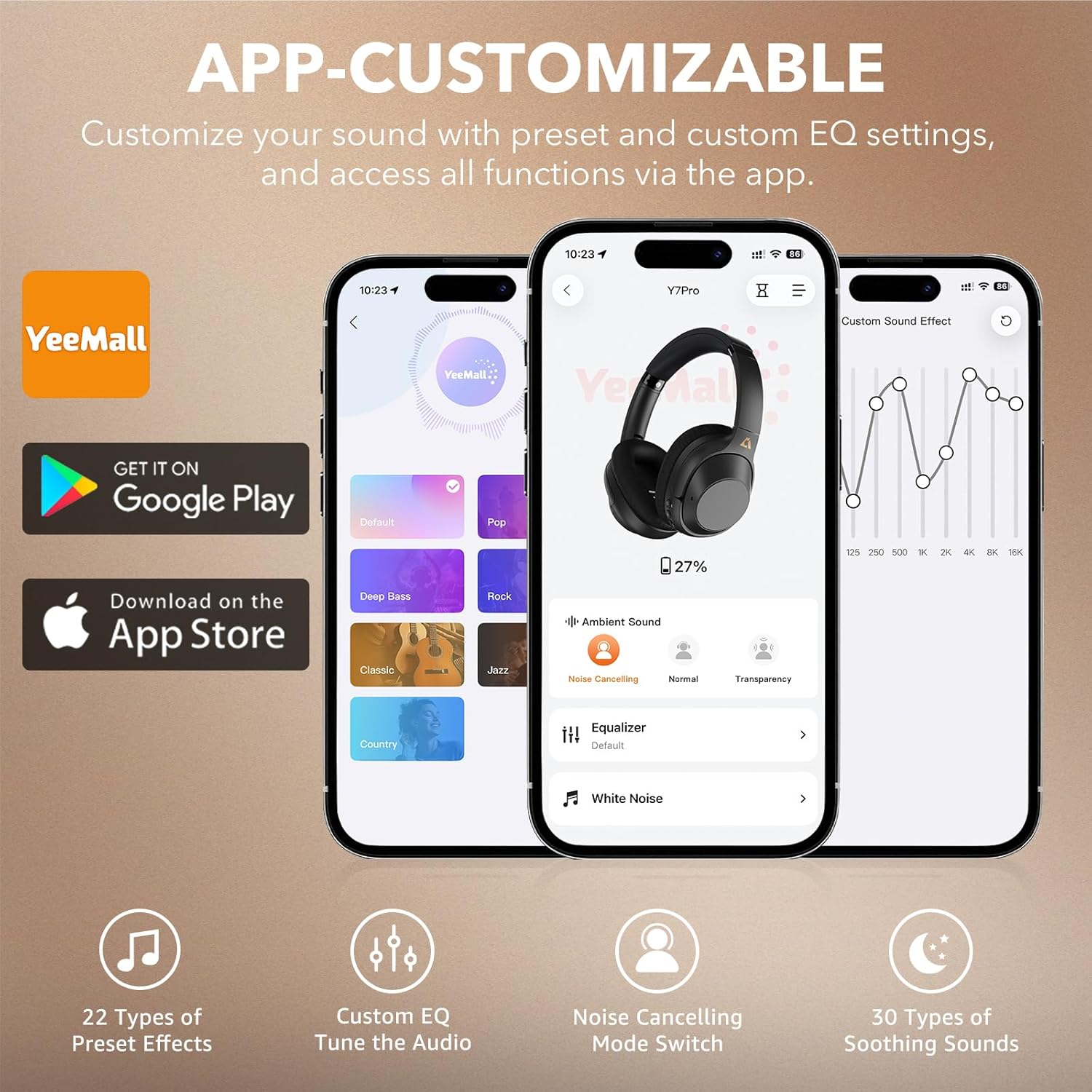
Image: Screenshots of the YeeMall app interface showing custom EQ settings, ANC mode switching, and soothing sounds for YMOO Y7Pro headphones.

Image: YMOO Y7Pro headphones showcasing their comfortable protein leather earcups, adjustable headband, and foldable design for portability.

Image: Detailed view of the YMOO Y7Pro headphones' function buttons, including On/Off/Pairing, Volume/Next/Previous, ANC, and Type-C Charging Port.

Image: Illustration of YMOO Y7Pro headphones being used wirelessly via Bluetooth and wired via 3.5mm cable with various devices.
Video: A short demonstration of the Riibox Y7Pro Hybrid Active Noise Canceling Headphones, highlighting key features like comfort, adjustability, 40mm dynamic drivers, Hi-Res Audio, ANC, and 100-hour playtime.
3. Setup
3.1 Charging Your Headphones
Before first use, fully charge your YMOO Y7Pro headphones. Connect the provided USB charging cable to the Type-C charging port on the headphones and a compatible USB power source. The LED indicator will show charging status and turn off when fully charged. A full charge takes approximately 2 hours.
3.2 Bluetooth Pairing
- Ensure your headphones are powered off.
- Press and hold the Power/Pairing button for approximately 5 seconds until the LED indicator flashes blue and red, indicating pairing mode.
- On your device (smartphone, tablet, laptop), enable Bluetooth and search for available devices.
- Select "YMOO Y7Pro" from the list of devices.
- Once connected, the LED indicator will flash blue slowly.
For seamless dual-device pairing, enable "Dual-Device Connection" in the YeeMall APP and ensure LDAC is off to pair with two devices simultaneously.
4. Operating Instructions
4.1 Basic Controls
- Power On/Off: Long press the Power/Pairing button for 2 seconds.
- Play/Pause: Short press the Power/Pairing button.
- Volume Up/Next Track: Short press the "+" button for volume up. Long press the "+" button for next track.
- Volume Down/Previous Track: Short press the "-" button for volume down. Long press the "-" button for previous track.
- Answer/End Call: Short press the Power/Pairing button.
- Reject Call: Long press the Power/Pairing button.
4.2 Active Noise Cancellation (ANC) Modes
The ANC button allows you to switch between different listening modes:
- ANC Mode: Activates hybrid active noise cancellation, reducing ambient noise by up to 90%.
- Transparency Mode: Allows you to hear your surroundings while still enjoying your audio.
- Normal Mode: Disables ANC and Transparency modes.
Press the dedicated ANC button to cycle through these modes.
4.3 Using the YeeMall App
Download the YeeMall app from Google Play or the App Store to unlock full customization options:
- Custom EQ Settings: Adjust audio frequencies to your preference or choose from 6 preset EQ profiles.
- ANC Mode Control: Easily switch between ANC, Transparency, and Normal modes.
- Soothing Sounds: Access 30 types of soothing sounds for relaxation or focus.
- AI Voice Interaction: Utilize hands-free AI for various tasks, including translation and contextual practice.
5. Maintenance
5.1 Cleaning
- Wipe the headphones with a soft, dry cloth.
- Do not use harsh chemicals or abrasive materials.
- Clean earcups gently to maintain material integrity.
5.2 Storage
- Store the headphones in the provided storage box when not in use to protect them from dust and damage.
- Avoid storing in extreme temperatures or high humidity.
6. Troubleshooting
| Problem | Solution |
|---|---|
| Headphones won't power on | Ensure the headphones are charged. Connect to a power source and try again. |
| Unable to pair via Bluetooth | Make sure headphones are in pairing mode (flashing blue/red LED). Disable and re-enable Bluetooth on your device. Move closer to the device. |
| No sound | Check volume levels on both headphones and connected device. Ensure headphones are properly paired or the audio cable is securely connected. |
| ANC not working effectively | Ensure ANC mode is activated. Adjust headphone fit to ensure a good seal around your ears. |
7. Specifications
- Model: Y7PRO
- Brand: YMOO
- Connectivity Technology: Wireless (Bluetooth 6.0), Wired (3.5 mm Jack)
- Ear Placement: Over Ear
- Noise Control: Active Noise Cancellation
- Audio Driver Size: 40 Millimeters
- Frequency Range: 20 Hz - 40,000 Hz
- Impedance: 16 Ohms
- Battery Capacity: 850mAh
- Battery Average Life: 100 Hours
- Battery Charge Time: 2 Hours
- Item Weight: 268 Grams
- Product Dimensions: 7 x 20 x 15.6 cm
- Control Method: App, Push Button
- Compatible Devices: Tablets, Telephones, Desktops, Laptops, Smart Speaker, Car Audio Systems, Television, Cellphones
8. Warranty and Support
YMOO offers a 30-day free return policy and a 12-month warranty for the Y7Pro headphones. For any support inquiries or warranty claims, please contact YMOO customer service through the retailer's platform or visit the official YMOO website.


