
Inateck BK2007-G-US
Inateck iPad Keyboard Case User Manual
Model: BK2007-G-US
1. Product Overview
The Inateck Ultralight Keyboard Case is designed to enhance your iPad experience by providing a comfortable typing solution and robust protection. This innovative accessory integrates a keyboard directly into a protective case, offering a seamless transition between tablet and laptop modes. Its ultra-thin and super-light design ensures portability without compromising functionality.
Key features include:
- Automatic 1-second start-up upon attachment to your iPad.
- Integrated pen holder for convenient storage and charging of your Apple Pencil (2nd generation).
- Convenient iOS shortcut keys for efficient control of your device.
- Long-lasting battery with up to 150 days of standby time.
- Comfortable typing experience with 15mm*15mm keys and 1mm key travel.
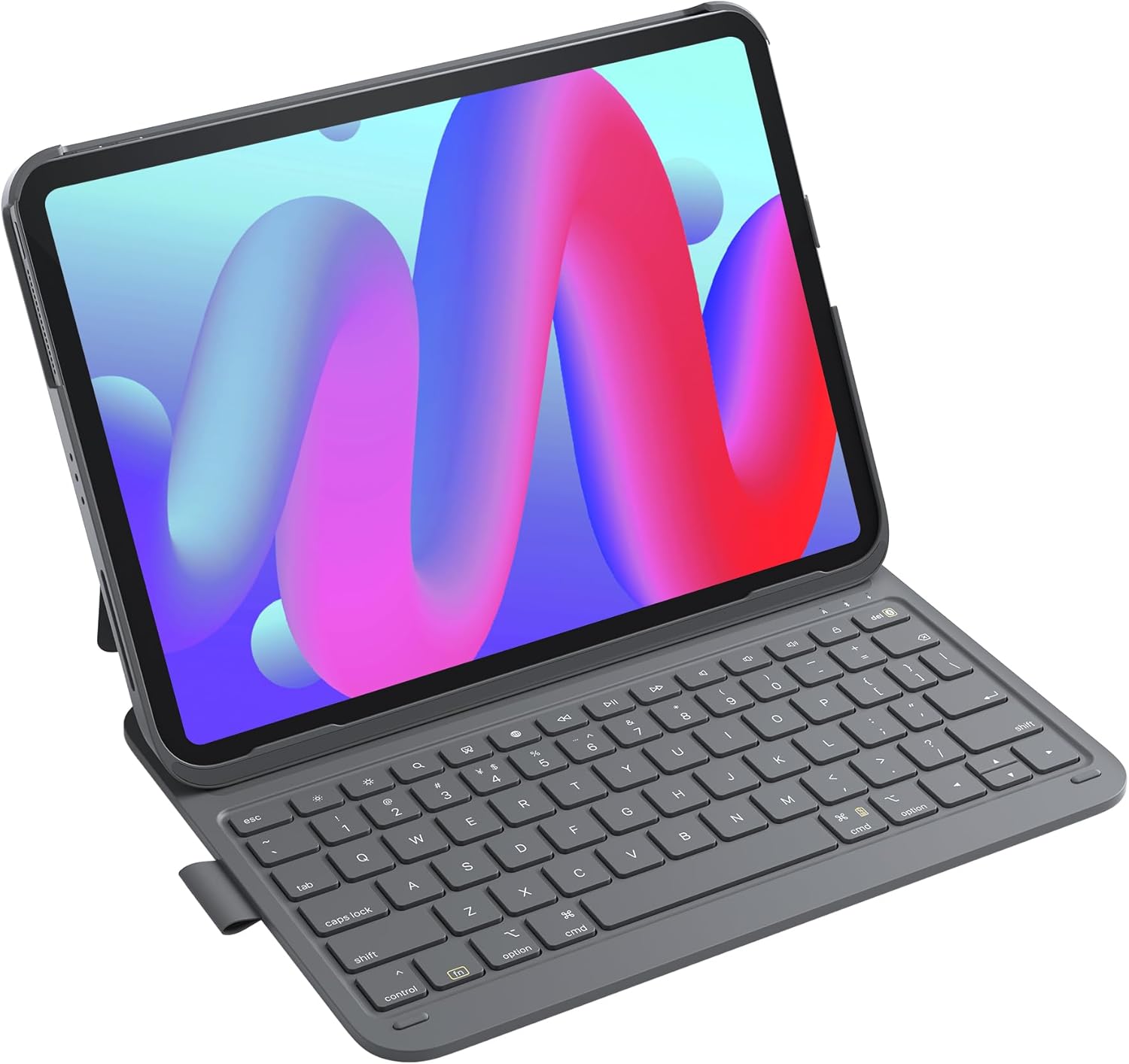
Figure 1: The Inateck iPad Keyboard Case in use, showing the iPad securely held and the keyboard ready for typing. The case features an anti-fingerprint finish.
2. Compatibility
This keyboard case is specifically designed for a range of iPad models, ensuring a precise fit and full functionality. Please verify your iPad model number for compatibility.
- iPad 11th Gen (2025 A16): Models A3354, A3355, A3356
- iPad 10th Gen (2022 10.9"): Models A2696, A2757, A2777, A3162
- iPad Air 11 inch (M3/M2) 2025: Models A3266, A3267, A3270
- iPad Air 5th Gen (2022 10.9"): Models A2591, A2589, A2588
- iPad Air 4th Gen (2020 10.9"): Models A2325, A2324, A2316, A2072
- iPad Pro 11 inch 4th Gen (2022): Models A2435, A2759, A2761, A2762
- iPad Pro 11 inch 3rd Gen (2021): Models A2301, A2377, A2459, A2460
- iPad Pro 11 inch 2nd Gen (2020): Models A2228, A2068, A2230, A2231
- iPad Pro 11 inch 1st Gen (2018): Models A1980, A2013, A1934, A1979
Note: Not compatible with iPad Pro 11" M4 (2024).

Figure 2: Visual guide detailing the compatible iPad models and their respective generations and sizes.
3. Setup
3.1 Initial Connection
The Inateck keyboard case is designed for quick and effortless connection. Simply attach your compatible iPad to the case. The keyboard will automatically power on and attempt to establish a Bluetooth connection with your iPad. No physical power switch is required.

Figure 3: Illustration of the 1-second quick start feature, where the keyboard activates automatically upon iPad attachment.
3.2 Bluetooth Pairing (If Needed)
In most cases, the keyboard will pair automatically. If your iPad does not detect the keyboard or if the connection is unstable, you may need to manually pair it or perform a factory reset:
- Ensure Bluetooth is enabled on your iPad.
- Go to Settings > Bluetooth on your iPad.
- Look for "Inateck Keyboard" or a similar device name in the list of available devices and tap to connect.
- If the keyboard is not found or fails to connect, perform a factory reset by pressing and holding the ESC key and the += key simultaneously for approximately 15-20 seconds. This will reset the keyboard's Bluetooth connection.
- After resetting, repeat steps 1-3.
3.3 Smart Screen On/Off Functionality
The case features smart screen functionality. Opening the case will automatically wake your iPad's screen, and closing the case will put your iPad to sleep, conserving battery life.

Figure 4: Visual representation of the smart screen on/off feature, illustrating how opening and closing the case affects the iPad's display.
4. Operating Instructions
4.1 Keyboard Modes
The Inateck keyboard case supports various modes to suit your needs:
- Office Mode: Position your iPad upright with the keyboard extended for a laptop-like experience, ideal for productivity tasks.
- Typing Mode: The keyboard can be split from the case, allowing for more flexible positioning and efficient typing.
- Reading Mode: Fold the keyboard behind the iPad to use your device as a tablet, perfect for reading or browsing.
Video 1: This video demonstrates the various modes of the Inateck iPad Keyboard Case, including Office Mode for productivity, Typing Mode with the split keyboard, and Reading Mode for tablet use. It also highlights the ultra-thin design, automatic startup, and integrated pen holder.
4.2 iOS Shortcut Keys
The keyboard features a dedicated row of function keys for quick access to common iPad functions, enhancing your workflow. These keys allow you to control various aspects of your iPad without needing to touch the screen.

Figure 5: Detailed layout of the iOS shortcut keys, explaining their functions from left to right: Esc (undo), Screen Brightness (adjust up/down), Search (bring up search field), Screenshot, Language Switch, Media Controls (Back, Play/Pause, Forward), Volume Controls (Mute, Volume up, Volume down), and Screen off (locks iPad screen).
5. Features
5.1 Ultra-Thin and Super-Light Design
The Inateck keyboard is engineered for maximum portability. With a thickness of only 0.5cm (0.3 inches) and an overall weight of 427g (15 ounces) when capped with the cover, it is significantly lighter than many comparable products, making it ideal for travel and on-the-go use.

Figure 6: A visual representation emphasizing the slim profile and light weight of the keyboard case, illustrating its portability.
5.2 Integrated Pen Holder
The keyboard case includes a built-in PU pen holder, providing a secure and convenient place to store your Apple Pencil. The frameless design of the holder allows for magnetic charging of the second-generation Apple Pencil directly on your iPad, ensuring it's always ready for use. (Note: Apple Pencil is not included).

Figure 7: A close-up view of the integrated pen holder, demonstrating how it securely holds the Apple Pencil and facilitates magnetic charging.
5.3 Optimal Typing Experience
The keyboard is designed for a comfortable and efficient typing experience, similar to a traditional laptop keyboard. It features 15mm x 15mm keycaps for ample finger space, a 1mm key travel for responsive feedback, and 0.2mm amplitude for a skin-feel typing sensation.

Figure 8: An exploded view of a key, illustrating the design elements that contribute to the ultimate typing experience, including keycap dimensions, key travel, and amplitude.
5.4 Extended Battery Life
The keyboard is equipped with a powerful battery that provides extended standby time. A full charge, typically taking 2-3 hours, can last for up to 150 days, significantly reducing the frequency of recharging.

Figure 9: Visual emphasizing the long battery life, indicating 150 days of standby time after a full charge, and showing the USB-C charging port.
6. Maintenance
To ensure the longevity and optimal performance of your Inateck iPad Keyboard Case, follow these general maintenance guidelines:
- Cleaning: Use a soft, dry, lint-free cloth to clean the keyboard and case. For stubborn marks, slightly dampen the cloth with water. Avoid using harsh chemicals, abrasive cleaners, or solvents.
- Storage: When not in use for extended periods, store the keyboard case in a cool, dry place away from direct sunlight and extreme temperatures.
- Charging: Charge the keyboard regularly, even if not in constant use, to maintain battery health. Avoid fully depleting the battery for prolonged periods.
- Handling: Handle the case with care to prevent drops or impacts that could damage the internal components or the iPad itself.
7. Troubleshooting
If you encounter issues with your Inateck iPad Keyboard Case, refer to the following common problems and solutions:
| Problem | Possible Cause | Solution |
|---|---|---|
| Keyboard not connecting to iPad / Not detected by iPad. | Bluetooth not enabled, keyboard not in pairing mode, temporary software glitch. |
|
| Bluetooth connection drops frequently or does not reconnect automatically after closing/opening the case. | Interference, software issue, or specific iPad/iOS behavior. |
|
| Keys are unresponsive or typing is delayed. | Low battery, poor Bluetooth connection, software issue. |
|
8. Specifications
| Feature | Detail |
|---|---|
| Model Number | BK2007-G-US |
| Wireless Type | Bluetooth |
| Operating System | iOS |
| Item Weight | 15 ounces (approx. 427g) |
| Product Dimensions (LxWxH) | 9.92 x 8.39 x 7.72 inches (25.2 x 21.3 x 19.6 cm) |
| Color | Gray |
| Power Source | Battery Powered (1 Lithium Polymer battery included) |
| Number of Keys | 78 |
| Special Features | 1s Start-up, Lightweight, Rechargeable, Pen Holder |
| Included in Box | USB Cable, Keyboard Case, User Manual |
9. Warranty and Support
Specific warranty details for this product are typically provided at the point of purchase or within the product packaging. Please refer to your purchase receipt or the included warranty card for information regarding warranty coverage and duration.
For further assistance, technical support, or to inquire about warranty claims, please visit the official Inateck website or contact their customer service directly. You can also find more information and support resources on the Inateck Brand Store on Amazon.
Related documentsBK2007-G-US


Ask a question about this manual
Ask about setup, troubleshooting, compatibility, parts, safety, or missing instructions. Manuals+ will review the question and use this page’s manual context to help answer it.