
Blackview BV5200
Blackview BV5200 Rugged Smartphone User Manual
Model: BV5200
Introduction
This manual provides detailed instructions for the Blackview BV5200 Rugged Smartphone. Designed for durability and performance, the BV5200 features IP68/IP69K water and dust resistance, MIL-STD-810H drop protection, a large 5180mAh battery, and runs on Android 12. Please read this manual carefully to ensure proper use and maintenance of your device.

Image: Front and rear view of the Blackview BV5200 Rugged Smartphone, highlighting its robust design and the 7GB+32GB storage capacity on the screen.
1. Setup
1.1 Unboxing and Package Contents
Carefully open the package and ensure all items are present. The standard package for the Blackview BV5200 includes:
- Blackview BV5200 Rugged Phone
- USB Cable
- Power Adapter (5V/2A)
- SIM Ejector Tool
- Protective Film (Tempered Glass)
- User Manual

Image: A visual representation of the Blackview BV5200 package contents, including the phone, charger, USB cable, and documentation.
1.2 SIM and MicroSD Card Installation
The BV5200 supports three card slots, allowing for two Nano-SIM cards and one MicroSD card simultaneously for expanded storage up to 1TB.
- Locate the SIM card tray on the side of the phone.
- Insert the SIM ejector tool into the small hole next to the tray to open it.
- Place your Nano-SIM cards and MicroSD card into the designated slots on the tray, ensuring correct orientation.
- Gently push the tray back into the phone until it clicks into place.

Image: An infographic detailing the internal components of the Blackview BV5200, including 4GB RAM + 3GB expansion, MediaTek Helio A22 processor, Face ID, 3 card slots (SIM1, SIM2, MicroSD), 32GB ROM + 1TB TF expansion, IP68/IP69K/MIL-STD-810H ratings, 5180mAh battery, and GPS capabilities.
1.3 Initial Charging and Power On
Before first use, it is recommended to fully charge the device.
- Connect the USB cable to the phone's charging port and the other end to the power adapter.
- Plug the power adapter into a wall outlet.
- Once charged, press and hold the Power button until the Blackview logo appears to turn on the phone.
2. Operating Instructions
2.1 Basic Navigation (Android 12)
The BV5200 runs on Android 12, offering an intuitive user experience. Navigate using gestures or on-screen buttons. Swipe down from the top for notifications and quick settings. Customize your home screen by long-pressing on empty space.
2.2 Camera Usage
The phone features a 13MP dual rear camera and a 5MP front camera. Open the Camera app to capture photos and videos.
- Photo Mode: Tap the shutter button to take a picture.
- Video Mode: Switch to video mode and tap to start/stop recording.
- Panorama: Utilize the ArcSoft 360° panoramic capture for wide-angle shots.
- Settings: Access settings within the camera app to adjust resolution, flash, and other parameters.
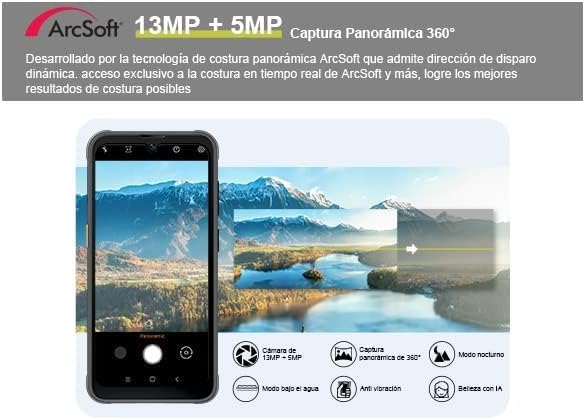
Image: A depiction of the Blackview BV5200's camera interface, highlighting its 13MP + 5MP dual camera system and the ArcSoft 360° panoramic capture feature.
2.3 Special Features
- Face Unlock: Configure Face ID in Security settings for quick and secure unlocking.
- Glove Mode: Enable this feature in settings to use the touchscreen while wearing gloves, ideal for outdoor workers.
- NFC (Near Field Communication): Use NFC for contactless payments, quick pairing with devices, and data transfer. Enable NFC in Quick Settings or main Settings menu.
- OTG (On-The-Go): Connect USB peripherals like flash drives, keyboards, or mice using an OTG adapter (not included).
- Customized Shortcut Button: The BV5200 features a customizable side button. You can assign up to 7 different functions for quick access, such as PTT (Push-to-Talk), flashlight, SOS, or camera. Configure this in the phone's settings.

Image: An illustration showcasing the Blackview BV5200's customized shortcut button with various assignable functions (e.g., flashlight, SOS, camera), along with its MIL-STD-810H drop-proof, IP68 waterproof, and IP69K dustproof ratings.
2.4 Connectivity
- Wi-Fi: Supports 5G Wi-Fi for faster and more stable internet connections.
- Cellular: Compatible with GSM network operators (e.g., T-Mobile, MetroPCS). Ensure your carrier is supported.
- Bluetooth: Pair with Bluetooth headphones, speakers, and other devices.
- GPS: Integrated GPS/GLONASS/Beidou/Galileo for accurate navigation.
3. Maintenance
3.1 Rugged Features and Protection
The Blackview BV5200 is built to withstand harsh conditions:
- IP68 Waterproof: Can be submerged in up to 1.5 meters of water for 30 minutes. Ensure all port covers are securely closed before exposure to water.
- IP69K Dustproof: Fully protected against dust ingress.
- MIL-STD-810H Dropproof: Designed to withstand drops from up to 1.5 meters.
While rugged, avoid intentional abuse. Always ensure port covers are sealed when in dusty or wet environments.
3.2 Cleaning Instructions
To clean your device:
- Use a soft, lint-free cloth to wipe the screen and body.
- For stubborn dirt, slightly dampen the cloth with water. Avoid harsh chemicals or abrasive materials.
- If the phone has been exposed to saltwater, rinse it thoroughly with fresh water and dry completely before charging or opening any ports.
3.3 Battery Care
The BV5200 is equipped with a 5180mAh battery, providing extended usage times.
- Use only the provided charger and cable to prevent damage.
- Avoid extreme temperatures, which can degrade battery life.
- For optimal battery longevity, avoid frequently draining the battery completely or keeping it at 100% charge for extended periods.

Image: An illustration showing the 5180mAh battery capacity of the Blackview BV5200 and its estimated usage times for standby (710H), music (25H), calling (18H), video (9H), and gaming (8.5H).
4. Troubleshooting
If you encounter issues with your Blackview BV5200, try the following common solutions:
- Device not turning on: Ensure the battery is charged. Connect to the charger and wait a few minutes before attempting to power on.
- Screen frozen/unresponsive: Press and hold the Power button for about 10-15 seconds to force a restart.
- Poor network signal: Check if your SIM card is properly inserted. Move to an area with better network coverage. Verify your carrier is supported by the device.
- Apps crashing: Clear the cache of the problematic app (Settings > Apps > [App Name] > Storage > Clear cache). If the issue persists, try reinstalling the app.
- Battery draining quickly: Reduce screen brightness, disable unused features like Wi-Fi, Bluetooth, GPS when not needed. Close background apps.
- Water exposure issues: If the phone gets wet, ensure all ports are sealed. If water enters, power off immediately and allow it to dry completely before powering on or charging.
For persistent issues, contact Blackview customer support or refer to their official website for further assistance.
5. Specifications
Below are the key technical specifications for the Blackview BV5200 Rugged Smartphone:
| Feature | Specification |
|---|---|
| Model Name | Rugged Smartphone Blackview BV5200/Black |
| Operating System | Android 12 |
| Processor | MTK Helio A22 (Quad-core) |
| RAM | 4GB (expandable up to 7GB virtual RAM) |
| Internal Storage | 32GB ROM |
| Expandable Storage | Up to 1TB via MicroSD card |
| Display | 6.1-inch Incell HD+ (720*1560) |
| Rear Camera | 13MP Dual Camera |
| Front Camera | 5MP |
| Battery Capacity | 5180mAh Lithium Polymer |
| Durability Ratings | IP68 Waterproof, IP69K Dustproof, MIL-STD-810H Dropproof |
| Connectivity | 4G LTE, 5G Wi-Fi, Bluetooth, NFC, OTG, USB |
| Navigation | GPS/GLONASS/Beidou/Galileo |
| Special Features | Face ID, Glove Mode, Customized Shortcut Button |
| Dimensions | 6.3 x 2.36 x 5.13 inches |
| Item Weight | 15.5 ounces |

Image: An illustration detailing the MediaTek Helio A22 processor, 7GB RAM (4GB + 3GB expansion), and 32GB ROM (expandable up to 1TB) of the Blackview BV5200, emphasizing its performance capabilities.
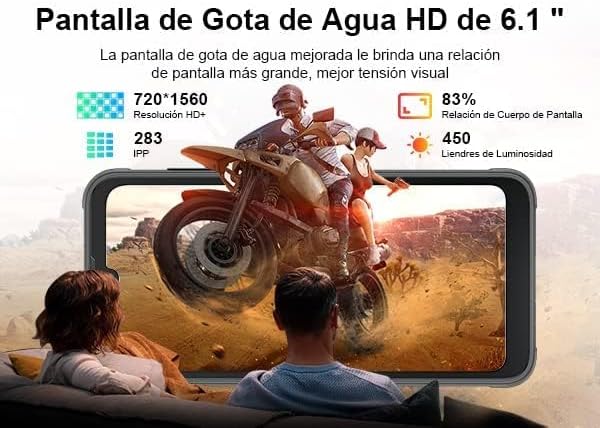
Image: A visual representation of the Blackview BV5200's 6.1-inch HD+ Incell display, showing its resolution (720*1560), pixel density (283 PPI), screen-to-body ratio (83%), and brightness (450 nits).
6. Warranty and Support
Blackview products typically come with a standard manufacturer's warranty. Please refer to the warranty card included in your package or visit the official Blackview website for specific warranty terms and conditions.
For technical support, troubleshooting assistance, or service inquiries, please contact Blackview customer service through their official channels. Keep your purchase receipt and product serial number handy when seeking support.
Official Blackview Store: Blackview Store on Amazon
Related documentsBV5200


Ask a question about this manual
Ask about setup, troubleshooting, compatibility, parts, safety, or missing instructions. Manuals+ will review the question and use this page’s manual context to help answer it.