
Jackery JE-3000A
Jackery Portable Power Station Explorer 3000 Pro User Manual
Model: JE-3000A
Introduction
This manual provides essential information for the safe and efficient operation of your Jackery Portable Power Station Explorer 3000 Pro. The Explorer 3000 Pro is a high-capacity portable power station designed to provide reliable power for various applications, from outdoor adventures to home emergencies. It features a 3024Wh capacity and a 3000W output, capable of powering a wide range of appliances.
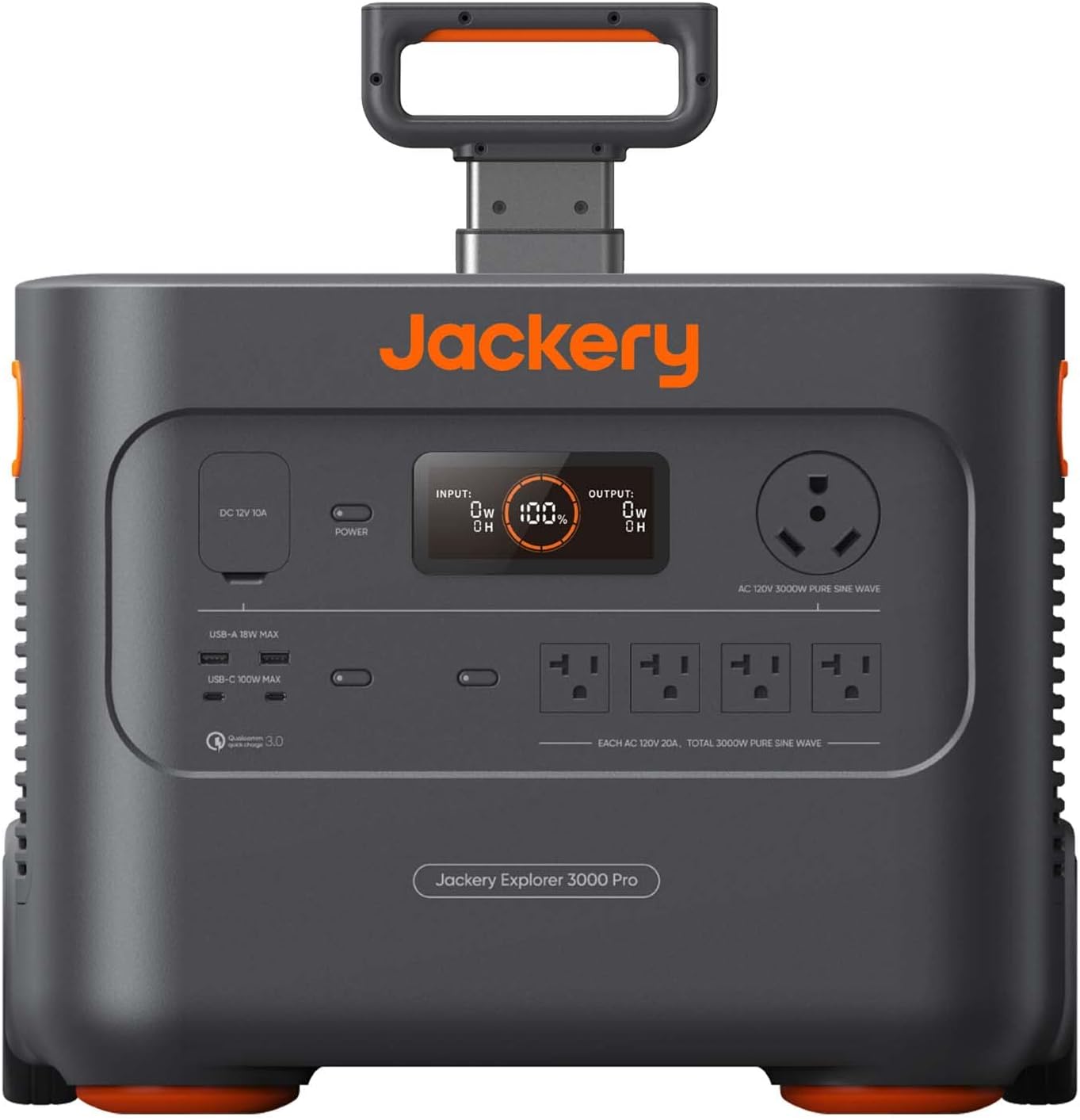
Figure 1: Front view of the Jackery Explorer 3000 Pro Portable Power Station, showing the display, various output ports (AC, USB-A, USB-C, DC), and power button.
Setup
Unpacking and Initial Inspection
Upon receiving your Jackery Explorer 3000 Pro, carefully unpack all components and inspect for any signs of damage. The package should include:
- 1x Jackery Explorer 3000 PRO Portable Power Station
- 1x AC Charge Cable
- 1x Car Charge Cable
- 2x DC7909 to DC8020 Adaptors
- 1x Accessories Bag
- 1x User Manual (this document)
Placement
Place the power station on a stable, flat surface in a well-ventilated area. Ensure there is adequate space around the unit for proper heat dissipation. The unit features an aluminum alloy pull rod and non-slip silicone strip for easy maneuverability and convenient stowing.

Figure 2: The portable suitcase design with a pull rod and wheels for easy transport.
Initial Charging
Before first use, fully charge the power station. It can be charged via a standard wall outlet or compatible solar panels.
- Wall Outlet: Fully charged in approximately 2.4 hours. Simply connect the AC Charge Cable to the power station and a standard wall outlet.
- Solar Panels: Can be solar charged in 3-4 hours with 6x 200W Jackery SolarSaga panels. The power station supports industry-leading solar conversion efficiency of up to 25%.

Figure 3: The power station connected to multiple solar panels for ultra-fast charging.
Operating Instructions
Powering On/Off
To power on the unit, press and hold the main power button until the display illuminates. To power off, repeat the process. The power station is designed for simple operation: turn it on, plug in your devices, and continue with your activities.
Connecting Devices
The Explorer 3000 Pro supports 99% of common appliances and devices. It offers various output ports:
- AC Outlets: Multiple AC 120V outlets for standard household appliances.
- USB-C Ports: Two USB-C ports with up to 100W max output, ideal for laptops and modern devices.
- USB-A Ports: Two USB-A ports with up to 18W max output for smartphones and smaller electronics.
- DC 12V 10A Port: For automotive and other 12V DC devices.
Simply plug your device's power cable into the appropriate port on the power station.
Typical Appliance Run Times (Approximate)
| Appliance | Power Consumption (Approx.) | Run Time (Approx.) |
|---|---|---|
| Refrigerator | 15W-520W | 1-2 days (72 hours) |
| Espresso Machine | ~1000W | Multiple uses |
| Toaster | ~850W | Multiple uses |
| Portable Fan | ~50W | 60 hours (2.5 days) |
| Washer/Dryer | High | 4 cycles |
| Standard Router | ~10W | 12 days |
| TV | ~100W | 30 hours |
| Laptop | ~60W | 80 charges |
| Smartphone | ~10W | 300 charges |
Note: Actual run times may vary based on appliance power consumption, usage patterns, and battery health.

Figure 4: The power station can keep essential appliances like refrigerators running during outages.

Figure 5: Powering entertainment devices like a TV is also possible.
Smart App Control
Monitor the real-time status of your power station, including remaining battery level, estimated running time, and input/output wattages, using the Jackery app via Wi-Fi or Bluetooth. You can also customize settings according to your needs directly from the app.

Figure 6: The Jackery app provides convenient monitoring and control features.
Maintenance
Storage
The Jackery Explorer 3000 Pro features Zero Drain Technology, allowing it to sit idle for a full year and still retain 95% of its power. For optimal long-term storage, ensure the unit is fully charged and stored in a cool, dry place away from direct sunlight and extreme temperatures.
Safety Features
The power station incorporates an upgraded Battery Management System (BMS) for enhanced safety. Key safety features include:
- 12 forms of protection against various electrical issues.
- 30% improved heat dissipation efficiency to prevent overheating.
- An embedded security chip for reliable and versatile charging.

Figure 7: Advanced BMS ensures all-round safety during operation.
Troubleshooting
Common Issues and Solutions
- Unit Not Turning On: Ensure the battery is charged. If not, connect to an AC outlet or solar panels for charging.
- No Output from Ports: Check if the specific output (AC, USB, DC) is enabled. Some outputs may have individual power buttons. Ensure the device connected is within the power station's output limits.
- Overload Protection: If the power station shuts down, it may be due to an overload. Disconnect some devices and restart the unit. Refer to the specifications for maximum output.
- Display Not Working: Ensure the unit is powered on. If the issue persists, try a full recharge.
For persistent issues not covered here, please contact Jackery customer support.
Specifications
| Feature | Detail |
|---|---|
| Brand | Jackery |
| Model Name | Explorer 3000 Pro (JE-3000A) |
| Capacity | 3024Wh |
| Output Wattage | 3000W (Pure Sine Wave) |
| Voltage | 120 Volts |
| Power Source | Solar Powered, Battery Powered |
| Fuel Type | Non-gasoline |
| Charging Time (Wall Outlet) | 2.4 hours |
| Charging Time (Solar) | 3-4 hours (with 6x 200W SolarSaga panels) |
| USB-C Output | 2x 100W Max PD Ports |
| USB-A Output | 2x 18W Max Ports |
| Item Weight | 63.9 Pounds |
| Product Dimensions | 18.62 x 14.13 x 14.69 inches |
| Color | Black, Orange |
Warranty and Support
Warranty Information
Jackery offers a 6-month warranty for all its renewed products. This warranty covers defects in materials and workmanship under normal use.
Customer Service
For any issues or inquiries regarding your Jackery Explorer 3000 Pro, please contact Jackery customer service. You can find contact information on the official Jackery website or through your purchase platform.
Related documentsJE-3000A


Ask a question about this manual
Ask about setup, troubleshooting, compatibility, parts, safety, or missing instructions. Manuals+ will review the question and use this page’s manual context to help answer it.