
KTC 123
KTC 27-inch QHD 240Hz OLED Gaming Monitor User Manual
Model: 123
Product Overview
The KTC 27-inch QHD 240Hz OLED Gaming Monitor is designed to deliver an exceptional visual experience for both gaming and professional use. Featuring a high-resolution OLED panel, ultra-fast refresh rate, and rapid response time, this monitor ensures crisp, vibrant, and smooth imagery.
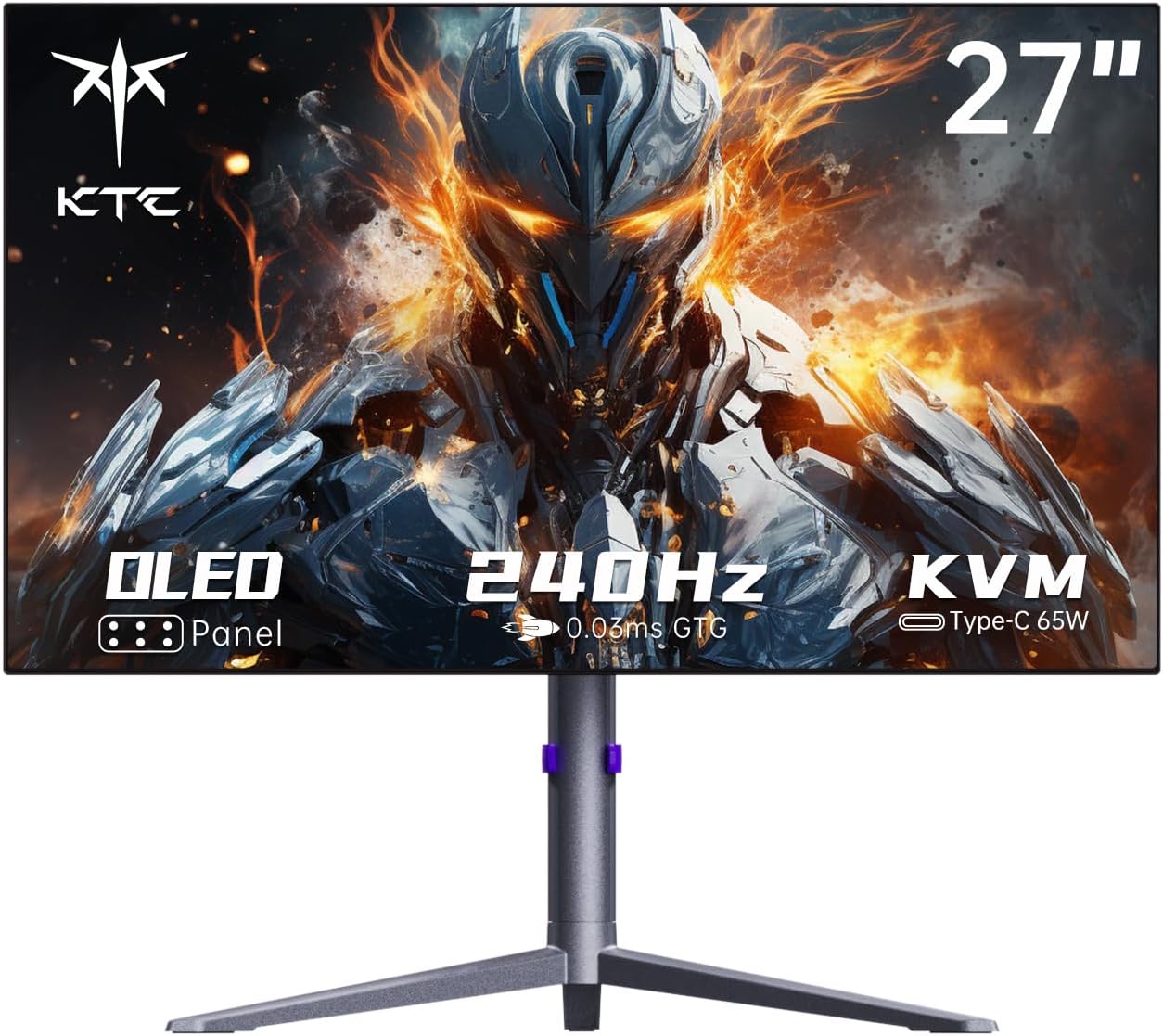
Figure 1: Front view of the KTC 27-inch QHD 240Hz OLED Gaming Monitor.
This monitor combines cutting-edge display technology with practical features, including versatile connectivity options and an ergonomic stand, making it a central component for any high-performance setup.
Key Features
- Display: High-resolution OLED panel for crisp visuals and vivid colors, offering pure blacks and exceptional contrast.
- Resolution: QHD (2560 x 1440) for sharp and detailed picture quality.
- Refresh Rate: 240Hz refresh rate for incredibly smooth motion handling, crucial for fast-paced gaming.
- Response Time: Ultra-fast 0.03ms GtG response time to minimize motion blur and ghosting.
- Color Accuracy: Supports 136% sRGB, 10-bit color depth (1.07 billion colors), and HDR10 for accurate and vibrant color reproduction.
- Contrast Ratio: Features an impressive 1,500,000:1 contrast ratio for deep blacks and bright whites.
- Connectivity: Multiple input options including HDMI 2.0 (x2), DisplayPort 1.4 (x1), and Type-C (x1) for seamless device integration. Includes USB 3.0 (1 upstream, 2 downstream) ports.
- Power Delivery: Type-C port supports 65W PD3.0 reverse charging, allowing you to power compatible devices directly from the monitor.
- KVM Support: Built-in KVM switch allows easy connection and switching between multiple hosts (PC, laptop) using a single set of keyboard and mouse.
- Adaptive Sync: Supports Adaptive-Sync technology for tear-free and stutter-free gaming experiences.
- Audio: Integrated 2x5W built-in speakers for a complete audio-visual experience.
- Adjustability: Ergonomic stand with tilt, swivel, and height adjustment features for optimal viewing angles. VESA mount compatible (75mm x 75mm).
- Design: Ultra-thin 0.224 inch panel for a sleek and modern aesthetic.

Figure 2: The OLED panel delivers pure black levels for an immersive viewing experience.

Figure 3: Experience superior detail with QHD (2560x1440) resolution compared to FHD.

Figure 4: The 240Hz refresh rate provides significantly smoother visuals than lower refresh rates.

Figure 5: An extremely fast 0.03ms GtG response time ensures minimal motion blur in fast-moving scenes.

Figure 6: The monitor provides truly natural colors with 136% sRGB and HDR400 support.

Figure 7: DisplayHDR True Black 400 ensures deep blacks and high contrast for stunning visuals.

Figure 8: A 1,500,000:1 contrast ratio delivers exceptional depth and clarity.

Figure 9: The monitor offers multiple ports for easy connection to various devices and peripherals.

Figure 10: FreeSync Technology significantly reduces input lag and screen tearing.

Figure 11: Built-in speakers provide an immersive audio experience for gaming and media.

Figure 12: The monitor supports VESA mounting for flexible setup options.
What's in the Box
Upon unboxing your KTC 27-inch QHD 240Hz OLED Gaming Monitor, please ensure all the following components are present:
- 27 inch OLED 240Hz Gaming Monitor (x1)
- Height Adjustable Stand (x1)
- Warranty Card (x1)
- Quick Start Guide (QSG) (x1)
- DisplayPort (DP) Cable (x1)
- Type-C Cable (x1)
- HDMI Cable (x1)
- Adaptor (x1)
- Power Cord (x1)
- Screwdriver (x1)
If any items are missing or damaged, please contact KTC customer support immediately.
Setup Guide
Follow these steps to set up your KTC 27-inch QHD 240Hz OLED Gaming Monitor:
1. Assembling the Stand
- Carefully remove the monitor and stand components from the packaging.
- Attach the stand base to the stand neck using the provided screws and screwdriver. Ensure it is securely fastened.
- Align the assembled stand with the mounting slot on the back of the monitor. Gently push until it clicks into place.
- For VESA mounting, remove the stand and attach a compatible VESA mount (75mm x 75mm) to the monitor.
2. Connecting to Your Device
The monitor supports multiple input types. Choose the appropriate cable for your device:
- DisplayPort (DP): For optimal performance, including 240Hz refresh rate and QHD resolution, use the provided DisplayPort cable to connect your PC's graphics card to the monitor's DP input.
- HDMI: Use an HDMI cable to connect to devices such as gaming consoles, laptops, or other PCs. The monitor has two HDMI 2.0 ports.
- Type-C: Connect compatible laptops or devices using the Type-C cable. This port also supports 65W power delivery and KVM functionality.
Connect the USB upstream cable from your PC to the monitor's USB 3.0 upstream port to enable the monitor's USB downstream ports and KVM functionality.
3. Power Connection
- Connect the power adaptor to the monitor's power input.
- Connect the power cord to the adaptor, then plug the power cord into a wall outlet.
- Press the power button on the monitor to turn it on.
Note: Some users have reported receiving non-US power cords. If you receive an incompatible power cord, please contact KTC support immediately for a replacement or purchase a compatible one.
Operating Instructions
On-Screen Display (OSD) Navigation
The monitor features a joystick control located on the back for navigating the OSD menu. Press the joystick to open the OSD, then move it up/down/left/right to select and adjust settings.
Common OSD settings include:
- Picture Mode: Adjust display settings for different content types (e.g., Standard, Game, Movie, sRGB, DCI-P3).
- Brightness/Contrast: Fine-tune the display's luminance and contrast levels.
- Color Temperature: Adjust the color warmth or coolness (e.g., Warm, Cool, User).
- Input Select: Manually switch between connected input sources (DP, HDMI 1, HDMI 2, Type-C).
- Adaptive Sync: Enable or disable Adaptive-Sync for smoother gaming.
- KVM Switch: Manage KVM functionality if multiple devices are connected via Type-C and USB upstream.
- Sleep Mode: Configure the monitor's sleep behavior.
- Pixel Refresh: Access OLED care functions like pixel refresh.
Note: Some users have reported the OSD being slow or HDR settings resetting. Ensure your monitor's firmware is up to date for optimal performance.
KVM Functionality
The KVM (Keyboard, Video, Mouse) feature allows you to control two different computers with a single keyboard and mouse connected to the monitor. To use KVM:
- Connect your primary PC to the monitor via DisplayPort or HDMI and the USB upstream cable.
- Connect your secondary device (e.g., laptop) to the monitor via the Type-C cable.
- Connect your keyboard and mouse to the USB downstream ports on the monitor.
- Use the OSD menu or a dedicated hotkey (if available) to switch between the primary and secondary devices, transferring control of the keyboard and mouse.
Optimal Gaming Experience
To fully utilize the monitor's gaming capabilities:
- Ensure your graphics card drivers are up to date.
- Set the display resolution to 2560x1440 and refresh rate to 240Hz in your operating system's display settings.
- Enable Adaptive-Sync (or FreeSync/G-Sync compatible) in your graphics card control panel and the monitor's OSD.
- For HDR content, ensure HDR is enabled in Windows display settings and the monitor's OSD. Adjust color temperature to "Warm" for optimal HDR appearance.
Video 1: Official KTC 27-inch OLED Gaming Monitor overview, showcasing key features and performance.
Maintenance
Proper maintenance will extend the lifespan of your OLED monitor and ensure optimal performance:
- Cleaning the Screen: Use a soft, lint-free cloth specifically designed for electronics. Gently wipe the screen to remove dust and smudges. For stubborn marks, slightly dampen the cloth with distilled water or a screen-cleaning solution. Do not spray liquid directly onto the screen.
- Cleaning the Body: Use a soft, dry cloth to wipe the monitor's casing and stand.
- OLED Care: OLED panels are susceptible to image retention (burn-in) if static images are displayed for extended periods. The monitor has built-in pixel care functions (e.g., Pixel Refresh, Screen Shift) to mitigate this risk. It is recommended to enable these features and allow them to run periodically, especially when the monitor is powered off.
- Power Off: When not in use for extended periods, it is recommended to turn off the monitor completely rather than just putting it into sleep mode, as this allows pixel refresh cycles to run.
- Avoid Static Images: Minimize displaying static elements like desktop icons, taskbars, or game HUDs for very long durations. Utilize screen savers or dynamic wallpapers.
- Ventilation: Ensure adequate airflow around the monitor to prevent overheating. Do not block ventilation openings.
Troubleshooting
This section addresses common issues you might encounter with your KTC monitor.
No Power / No Display
- Ensure the power cord is securely connected to the monitor, the power adaptor, and the wall outlet.
- Verify the power outlet is functional by plugging in another device.
- Check if the power button on the monitor is pressed.
- Confirm that the correct power cord for your region is being used. If not, contact support for a compatible one.
No Signal / Blank Screen
- Ensure the video cable (DisplayPort, HDMI, Type-C) is securely connected to both the monitor and your computer/device.
- Press the OSD joystick to open the menu and select the correct input source.
- Check your computer's display settings to ensure the output is configured for the monitor.
- Try a different video cable if available.
Image Quality Issues (Blurry, Distorted, Incorrect Colors)
- Ensure the display resolution is set to 2560x1440 in your computer's display settings.
- Update your graphics card drivers to the latest version.
- Reset the monitor's OSD settings to factory defaults.
- If HDR colors appear incorrect, ensure the color temperature in the OSD is set to "Warm" when HDR is active.
- Perform a pixel refresh cycle via the OSD menu if you notice any image retention or uniformity issues.
OSD Menu is Slow / Unresponsive
- This can sometimes be a firmware issue. Check the KTC support website for any available firmware updates for your model.
- Ensure the monitor is not under heavy load or experiencing a temporary software glitch. Power cycle the monitor.
Pixel Shifting / Asymmetrical Borders
- OLED monitors often employ pixel shifting as a burn-in prevention mechanism. This is normal behavior and typically not user-configurable to disable.
- If the shifting is distracting, ensure the monitor's firmware is updated, as improvements may be made.
Technical Specifications
| Feature | Specification |
|---|---|
| Product Dimensions | 8.46 x 33.86 x 19.29 inches |
| Item Weight | 22.8 pounds |
| Manufacturer | KTC |
| Model Number | 123 |
| Screen Size | 27 Inches |
| Standing Screen Display Size | 27 Inches |
| Resolution | 2560 x 1440 Pixels (QHD Ultra Wide 1440p) |
| Aspect Ratio | 16:9 |
| Refresh Rate | 240Hz |
| Response Time | 0.03ms GtG |
| Image Brightness | 450 cd/m2 (typical) |
| Contrast Ratio | 1,500,000:1 |
| Screen Surface Description | Anti-Glare |
| Total USB Ports | 3 (1 upstream, 2 downstream) |
| Video Inputs | 2x HDMI 2.0, 1x DisplayPort 1.4, 1x Type-C |
| Power Delivery (Type-C) | 65W PD3.0 |
| Voltage | 24 Volts |
| Built-in Speakers | Yes (2x5W) |
| VESA Compatibility | 75mm x 75mm |
| Date First Available | October 1, 2023 |
Warranty and Support
KTC is committed to providing high-quality products and excellent customer service. Your KTC monitor comes with a standard manufacturer's warranty. Please refer to the included Warranty Card for specific terms, conditions, and duration of your product's warranty.
For technical assistance, troubleshooting, warranty claims, or inquiries about replacement parts (such as power cords), please contact KTC customer support. Contact information can typically be found on the Warranty Card, Quick Start Guide, or the official KTC website.
When contacting support, please have your monitor's model number (123) and purchase information readily available to expedite the process.
You can also visit the official KTC store on Amazon for more information and support resources: KTC Amazon Store
Related documents123


Ask a question about this manual
Ask about setup, troubleshooting, compatibility, parts, safety, or missing instructions. Manuals+ will review the question and use this page’s manual context to help answer it.