
ALLWEI SGR-PPS300-2
ALLWEI 300W Portable Power Station User Manual
Model: SGR-PPS300-2
1. Introduction
The ALLWEI 300W Portable Power Station is a versatile 280Wh solar generator designed for various power needs, from emergency backup at home to outdoor activities like camping and RV trips. It features a silent cooling fan and a 3-level LED light with an SOS mode, making it a reliable power bank for diverse situations. This manual provides essential information for safe and efficient operation.
2. Package Contents
Please check the package to ensure all items are present:
- 1x ALLWEI 300W 280Wh Portable Power Station
- 1x AC Power Adapter
- 1x AC Power US Cord
- 1x Car Cable
- 1x User Manual

Figure 2.1: Package Contents of the ALLWEI 300W Portable Power Station.
3. Product Overview
The ALLWEI 300W Portable Power Station is designed with multiple output ports and safety features for reliable power delivery.

Figure 3.1: Front view of the ALLWEI 300W Portable Power Station.
3.1. Output Ports
- AC Outlets: 2x 110V 60Hz AC output ports (300W continuous, 600W surge).
- DC Outputs: 3x DC 5521 output 12V 3A.
- USB-A Ports: 2x USB-A QC3.0 fast charge ports.
- USB-C Port: 1x PD 60W USB-C port.
- Car Outlet: 1x DC car outlet.
3.2. Input Port
- 1x 110V 60Hz DC 5521MM input for charging.
3.3. Portability
The power station is designed for easy transport:
- Net Weight: Approximately 6 lbs.
- Compact Size: 8.86 x 4.53 x 8.07 inches.

Figure 3.2: The compact and lightweight design of the power station.
3.4. Protection System
Equipped with a built-in Battery Management System (BMS) and MPPT controller, the power station offers comprehensive protection for your devices:
- Short-circuit protection
- Over-current protection
- Over-load protection
- Low-voltage protection
- Over-voltage protection
- Over-heating protection
These protections are indicated by icon flashes on the LCD screen.

Figure 3.3: Overview of the BMS and MPPT controller protection features.
3.5. LED Light Modes
The integrated LED light offers multiple modes for various situations:
- 3-level adjustable brightness (low, medium, high)
- SOS mode for emergencies
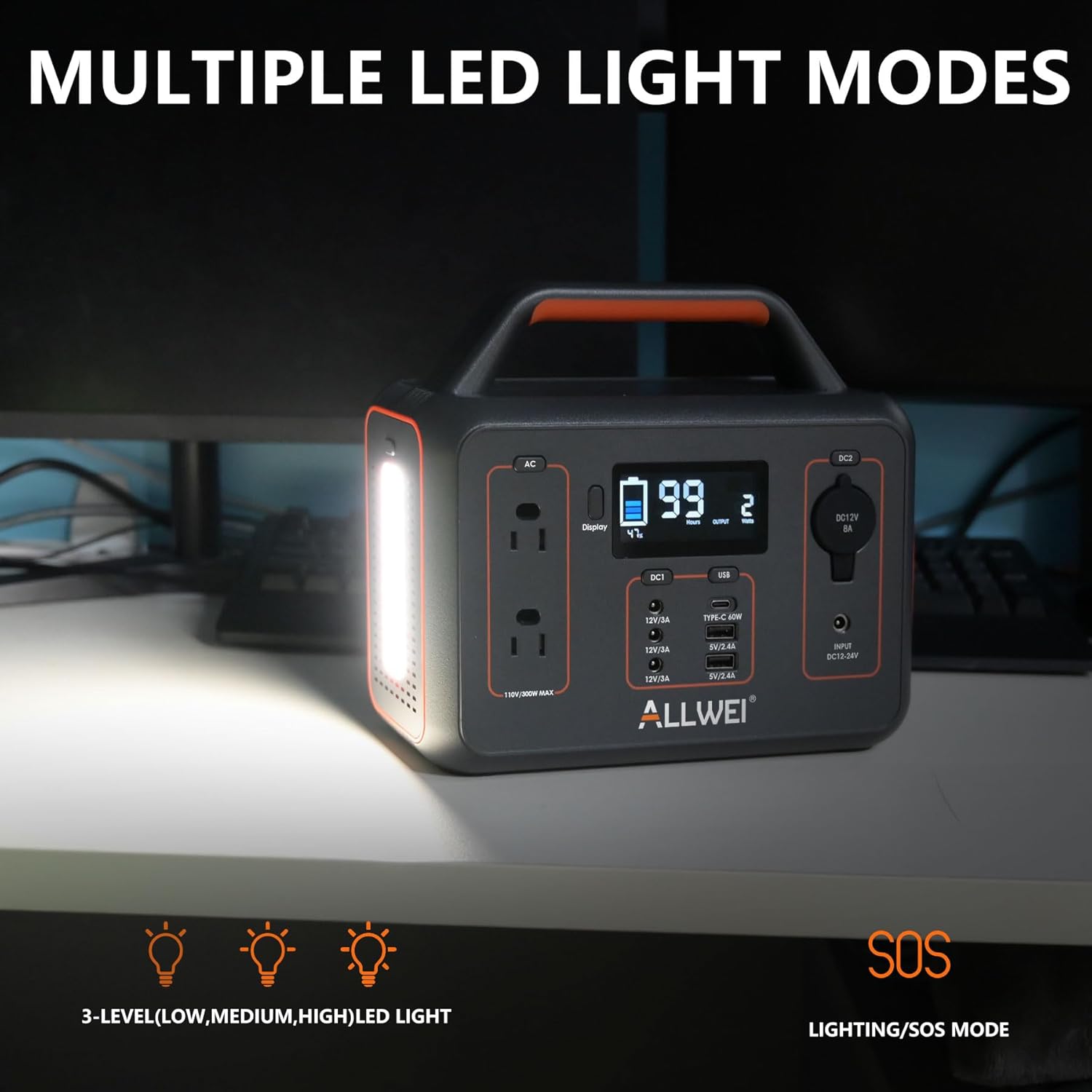
Figure 3.4: The power station's multiple LED light modes.
4. Setup
Before using your ALLWEI Portable Power Station for the first time, it is recommended to fully charge it. This ensures optimal battery performance and longevity.
- Unpack the power station and all accessories from the box.
- Connect the AC power adapter to the DC input port on the power station.
- Plug the AC power cord into a standard wall outlet.
- The LCD display will show charging progress. Once fully charged, the display will indicate 100%.
5. Charging the Power Station
The ALLWEI Portable Power Station offers multiple convenient charging methods:
- AC Wall Charging: Fully charged in approximately 5.5-6.5 hours.
- Car Charging: Fully charged in approximately 4.5-5.5 hours using the included car cable.
- Solar Panel Charging: Fully charged in approximately 3-4 hours with a 100W solar panel (solar panel not included).

Figure 5.1: Various methods for recharging the power station.
6. Operating Instructions
To power your devices, connect them to the appropriate output ports on the power station. Ensure the total power consumption of your devices does not exceed the power station's rated output (300W continuous, 600W surge).
- Turn On: Press the main power button to activate the power station. The LCD display will light up.
- Select Output: Press the button corresponding to the desired output type (AC, DC, USB) to enable it.
- Connect Device: Plug your device's power cable into the activated port.
- Monitor Usage: The LCD display shows real-time input/output power, battery capacity, and remaining charge/discharge time.
- Turn Off: After use, disconnect your devices and press the output buttons again to disable them, then press the main power button to turn off the power station.

Figure 6.1: The power station powering various devices in an outdoor setting.
7. Maintenance
Proper maintenance ensures the longevity and optimal performance of your power station.
- Storage: Store the power station in a cool, dry place, away from direct sunlight and extreme temperatures.
- Recharging: If not in regular use, recharge the power station every 3-6 months to maintain battery health and prevent deep discharge.
- Cleaning: Use a dry, soft cloth to clean the exterior. Do not use abrasive cleaners or immerse the unit in water.
- Ventilation: Ensure the ventilation openings are clear of dust and debris to prevent overheating.
8. Troubleshooting
If you encounter issues with your ALLWEI Portable Power Station, refer to the following common problems and solutions:
| Problem | Possible Cause | Solution |
|---|---|---|
| Power station not turning on. | Battery is completely depleted. | Connect to an AC charger and allow it to charge for a few minutes before attempting to turn on. |
| Devices not charging/powering. | Output port not activated; device exceeds wattage limit; cable issue. | Ensure the specific output port (AC/DC/USB) is turned on. Check if the device's power consumption is within the 300W limit. Try a different cable or device. |
| LCD screen shows error icon. | Overload, over-temperature, or other protection activated. | Disconnect all devices. Allow the unit to cool down if it's hot. Restart the power station. If the issue persists, consult the full user manual for specific error codes. |
| Slow charging time. | Using a low-power charger; environmental factors (for solar). | Ensure you are using the original AC adapter. For solar charging, ensure the panel is in direct sunlight and properly angled. |
9. Specifications
Detailed technical specifications for the ALLWEI 300W Portable Power Station:
| Feature | Specification |
|---|---|
| Brand | ALLWEI |
| Model Name | Portable Power Station |
| Item Model Number | SGR-PPS300-2 |
| Wattage (Running) | 300 Watts |
| Wattage (Starting/Surge) | 600 Watts |
| Energy Capacity | 280Wh |
| Fuel Type | Electric |
| Power Source | Battery Powered |
| Voltage | 120 Volts (AC) |
| Frequency | 60 Hz |
| Total Power Outlets | 9 |
| Item Weight | 6.5 Pounds |
| Product Dimensions | 8.8"L x 4.5"W x 8"H |
| Material | PC+ABS |
| Color | Black |
| Charge Cycle Life | 1500 times (to 80% capacity) |
| Recommended Uses | Camping, Commercial, Residential |
10. Warranty & Support
The ALLWEI 300W Portable Power Station is designed for durability, offering over 1500 charge cycles before its capacity drops to 80%. This indicates an expected service life of approximately 5 years under normal usage conditions.
For warranty claims, technical support, or further assistance, please refer to the contact information provided in the physical user manual included with your product or visit the official ALLWEI website. Please have your model number (SGR-PPS300-2) and purchase details ready when contacting support.
Related documentsSGR-PPS300-2


Ask a question about this manual
Ask about setup, troubleshooting, compatibility, parts, safety, or missing instructions. Manuals+ will review the question and use this page’s manual context to help answer it.