Introduction
This user manual provides comprehensive instructions for the installation, operation, and maintenance of your BLOW Autoradio 78-335#. Please read this manual thoroughly before using the device to ensure proper functionality and safety. Keep this manual for future reference.
Product Overview
The BLOW Autoradio 78-335# is a 2-DIN car stereo system designed to provide high-quality audio and versatile connectivity options in your vehicle. It features Bluetooth for wireless audio streaming and hands-free calling, USB and MicroSD card slots for media playback, and an AUX input for external devices. A remote control is included for convenient operation.

Figure 1: Front view of the BLOW Autoradio 78-335# showing the display, control buttons, USB, AUX ports, and included remote control and microphone.

Figure 2: Rear view of the BLOW Autoradio 78-335# displaying the wiring harness connector, RCA outputs, and antenna input.
Safety Information
- Ensure proper wiring and insulation to prevent short circuits and electrical hazards.
- Do not operate the device in extreme temperatures or high humidity.
- Avoid disassembling the unit; refer servicing to qualified personnel.
- Keep the volume at a safe level to avoid hearing damage and to remain aware of traffic conditions.
Setup and Installation
Package Contents
Before installation, verify that all components are present:
- BLOW Autoradio 78-335# Unit
- Remote Control
- External Microphone
- Mounting Hardware (brackets, screws)
- Wiring Harness
- User Manual (this document)

Figure 3: All components included in the BLOW Autoradio 78-335# package, including the main unit, remote, microphone, mounting brackets, and wiring harness.
Wiring Diagram
Connect the wiring harness according to your vehicle's electrical system. Refer to your vehicle's service manual for specific wiring details. Common connections include:
- Yellow Wire: Constant 12V (Battery)
- Red Wire: Switched 12V (Ignition/ACC)
- Black Wire: Ground
- Blue Wire: Power Antenna/Amplifier Remote Turn-On
- Speaker Wires: (e.g., White/White-Black for Front Left, Gray/Gray-Black for Front Right, Green/Green-Black for Rear Left, Purple/Purple-Black for Rear Right)
Note: Incorrect wiring can damage the unit or your vehicle's electrical system. If unsure, consult a professional installer.
Mounting the Unit
- Remove the existing car stereo from your dashboard.
- Attach the provided mounting brackets to the sides of the Autoradio unit using the supplied screws.
- Connect all necessary wiring harnesses (power, speakers, antenna, RCA, microphone).
- Slide the Autoradio unit into the dashboard opening until it clicks into place or is secured by the mounting brackets.
- Reassemble the dashboard trim.
Operating Instructions
Basic Controls
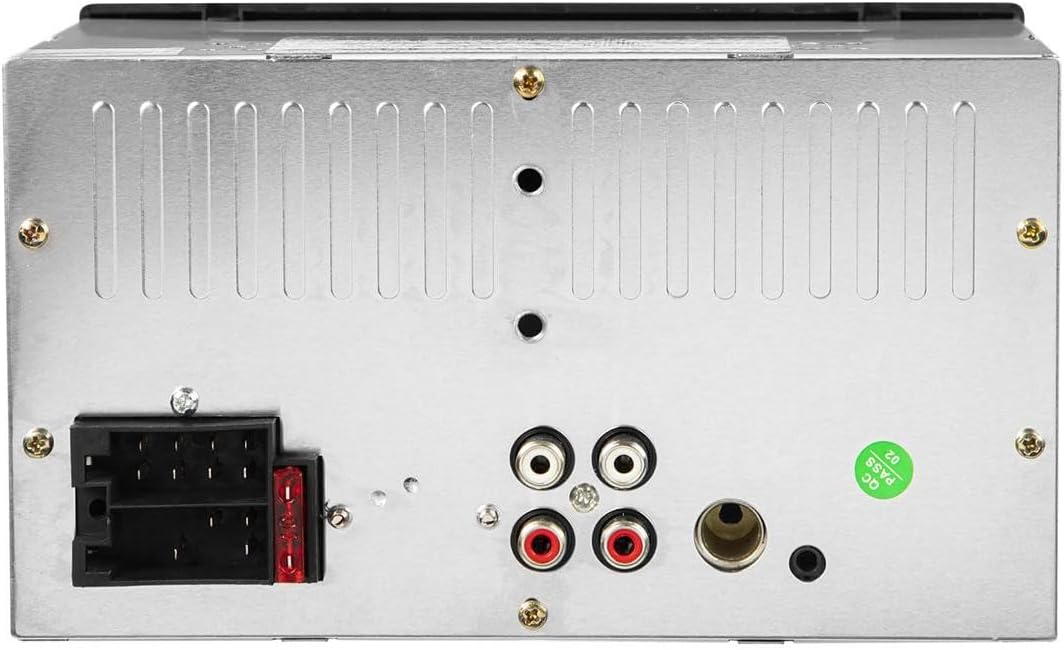
Figure 4: Close-up view of the main control panel, highlighting the volume knob, mode button, and USB/AUX inputs.
- Power Button (⏻): Press to turn the unit ON/OFF.
- VOL Knob: Rotate to adjust volume. Press to access menu options (e.g., Bass, Treble, Balance, Fader).
- MOD (Mode) Button: Press to cycle through available sources (FM, Bluetooth, USB, MicroSD, AUX).
- BND (Band) Button: In FM mode, press to switch between FM1, FM2, FM3 bands.
- CLK (Clock) Button: Press to display time. Press and hold to set time.
- AMS (Automatic Memory Store) Button: In FM mode, press and hold to automatically scan and store strong stations.
- MUTE Button: Press to mute/unmute audio.
- ◀◀ / ▶▶ Buttons: Short press for previous/next track (USB/MicroSD/Bluetooth). Long press for fast rewind/forward. In FM mode, short press for manual tuning, long press for auto-seek.
- USB Port: Insert USB flash drive for MP3 playback.
- TF (MicroSD) Slot: Insert MicroSD card for MP3 playback.
- AUX Input: Connect external audio devices using a 3.5mm audio cable.
Bluetooth Operation
- Pairing:
- Turn on the Autoradio and select Bluetooth mode using the MOD button. The display will show "BT".
- Enable Bluetooth on your mobile device and search for available devices.
- Select "BLOW 78-335#" (or similar name) from the list. If prompted for a password, enter "0000".
- Once paired, the display will show "CONNECTED" or a similar indicator.
- Hands-Free Calling:
- When a call comes in, press the ▶ button (Play/Pause) to answer.
- Press the ▶ button again to end the call.
- Use the external microphone for clear communication.
- Bluetooth Audio Streaming (A2DP):
- After successful pairing, play audio from your mobile device. The sound will be streamed through the Autoradio.
- Use the ◀◀ / ▶▶ buttons on the Autoradio or remote to control track playback.
USB/MicroSD Playback
- Insert a USB flash drive or MicroSD card into the respective slot. The unit will automatically switch to USB/SD mode and begin playing compatible audio files (MP3).
- Use the ◀◀ / ▶▶ buttons to navigate between tracks.
- Press the ▶ button (Play/Pause) to pause or resume playback.
- The unit supports MP3 audio format. Ensure your files are in this format for playback.
Maintenance
- Cleaning: Use a soft, dry cloth to clean the unit's surface. Do not use abrasive cleaners or solvents.
- Fuse Replacement: If the unit does not power on, check the fuse located at the rear of the unit (refer to Figure 2). Replace with a fuse of the same rating (typically 10A or 15A).
- Software Updates: Information on software updates is not available.
Troubleshooting
| Problem | Possible Cause | Solution |
|---|---|---|
| No power | Blown fuse; Incorrect wiring; Loose power connection. | Check and replace fuse; Verify wiring connections (Yellow, Red, Black wires); Ensure power harness is securely connected. |
| No sound | Volume too low; Mute activated; Incorrect speaker wiring; Damaged speakers. | Increase volume; Deactivate mute; Check speaker connections; Test with known good speakers. |
| Bluetooth not connecting | Bluetooth not enabled on device; Unit not in pairing mode; Interference. | Ensure Bluetooth is on and discoverable on your phone; Select Bluetooth mode on Autoradio; Move closer to the unit; Restart both devices. |
| USB/MicroSD not playing | Unsupported file format; Corrupted files; Drive/card not inserted correctly; Drive/card capacity too large. | Ensure files are MP3 format; Reformat drive/card; Reinsert drive/card; Try a smaller capacity drive/card. |
| Radio reception is poor | Antenna not connected; Weak signal area; Damaged antenna. | Ensure antenna is securely connected; Try auto-scanning for stations; Consider an antenna booster or replacement. |
Specifications
| Feature | Detail |
|---|---|
| Model Number | 78-335# |
| Brand | Blow |
| Type | 2-DIN Autoradio |
| Power Output | 4 x 60W |
| Operating Voltage | 12V |
| Connectivity | Bluetooth, USB, AUX In, MicroSD, RCA |
| Audio Format Support | MP3 |
| Microphone | Yes (External) |
| Dimensions (W x H x D) | 18 cm x 10.5 cm x 12 mm |
| Color | Black |
| Weight | 842 Grams |
Warranty and Support
This product is covered by the standard manufacturer's warranty. Please refer to your purchase documentation for specific warranty terms and conditions. For technical support or service inquiries, please contact your retailer or the BLOW customer service department.
Note: Information regarding spare parts availability and guaranteed software updates is not available for this product.


