
Introduction
The Moman H2 Pro Motorcycle Intercom Headset is designed to enhance your riding experience with seamless communication and entertainment features. This manual provides detailed instructions on setting up, operating, and maintaining your H2 Pro intercom system. Enjoy clear communication up to 1000 meters between two riders, high-quality audio, and robust weather resistance.
Package Contents
Please verify that all items listed below are included in your package:
- Moman H2 Pro Intercom Unit x 1
- Velcro Clip x 1
- Back Clip x 1
- Hook and Loop Fasteners
- Pair of Speakers with Microphone x 1
- Headphone Velcro x 4
- USB Cable x 1
- Screw Driver x 1
- User Manual x 1
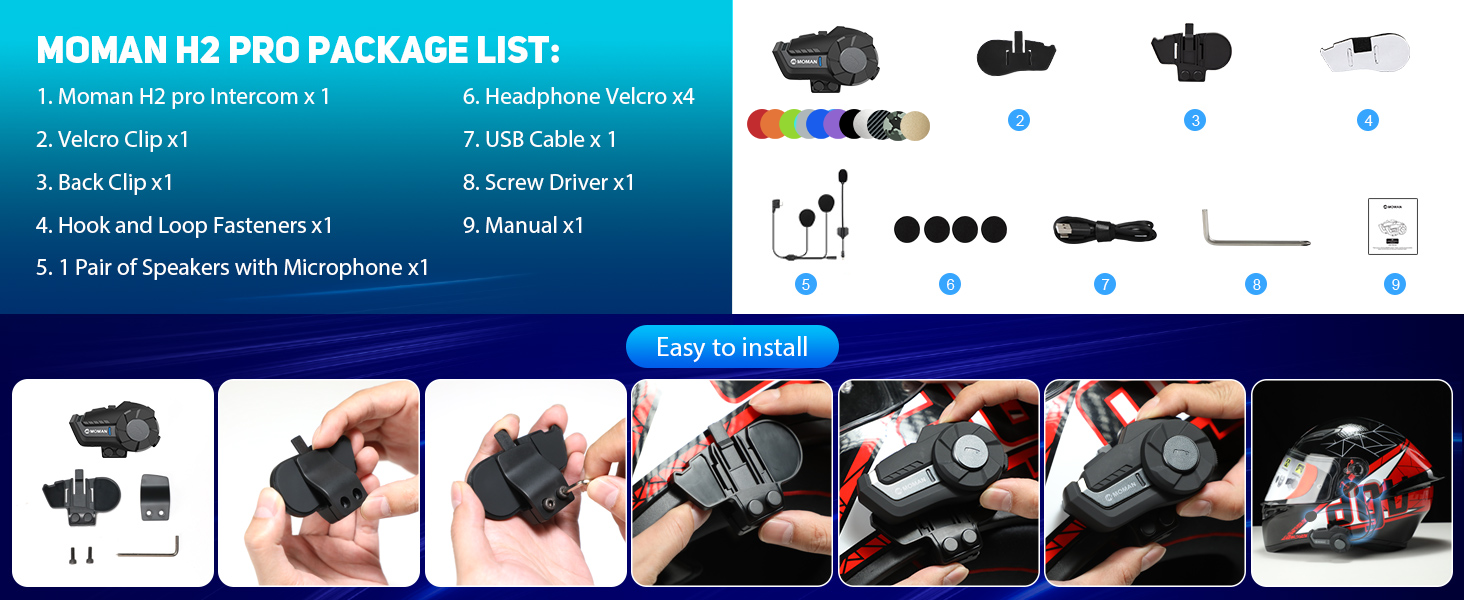
Image: Contents of the Moman H2 Pro package, including the intercom unit, various clips, speakers, cables, and tools.
Setup Instructions
Follow these steps to install your Moman H2 Pro intercom on your helmet:
- Choose Mounting Method: Decide between using the Velcro clip or the back clip for attachment to your helmet.
- Attach Clip: Securely attach the chosen clip to the side of your helmet. Ensure it is firmly in place.
- Mount Intercom Unit: Slide the Moman H2 Pro intercom unit onto the attached clip until it clicks into place.
- Install Speakers: Place the speakers inside the helmet's ear pockets. Use the provided headphone Velcro to secure them.
- Position Microphone: Position the microphone near your mouth for optimal voice pickup.
- Connect Cables: Connect the speaker and microphone cables to the intercom unit.

Image: Step-by-step guide illustrating the installation of the Moman H2 Pro intercom onto a motorcycle helmet using clips and Velcro.
Operating Instructions
Power On/Off and Basic Functions
- Power On/Off: Press and hold the On/Off key to switch the device on or off.
- Change Language: While powered on, press the On/Off key to cycle through available languages.
- Last Call Redial: Double-press the On/Off key to redial the last number.
Function Key Operations
The main function key controls various media and call features:
- Play/Pause Music: Single press the Function Key.
- Share Music: Long press the Function Key to initiate music sharing with another intercom.
- End/Reject Call: Single press the Function Key during an incoming call to answer, or long press to reject.
- FM Radio: Double press the Function Key to toggle FM radio on/off.
- Voice Assistant: Triple press the Function Key to activate your smartphone's voice assistant (e.g., Siri, Google Assistant).
Knob Control
The rotary knob provides intuitive control over volume and track selection:
- Volume Up: Rotate the knob clockwise.
- Volume Down: Rotate the knob counter-clockwise.
- Next Song: Press the knob forward.
- Previous Song: Press the knob backward.
- Change FM Channels: Rotate the knob while FM radio is active to tune to different stations.

Image: Diagram showing the precise function and easy control layout of the Moman H2 Pro, highlighting the On/Off key, Function Key, Knob, Indicator light, and Charging Interface.
Intercom Communication
The H2 Pro supports real-time communication between two riders up to 1000 meters.
- Pairing: Refer to the specific pairing instructions in the full manual for connecting two H2 Pro units.
- Initiating Intercom: Once paired, a short press of the intercom button (if available, or specific combination) will initiate the intercom conversation.

Image: Two motorcycle riders on a scenic road, illustrating the 1000m communication range of the Moman H2 Pro intercom system.

Image: Visual representation of the Moman H2 Pro's 2-rider, 1000m communication system, emphasizing hands-free and stable conversation.
Bluetooth 5.1 Connectivity
The H2 Pro features Wireless 5.1 technology for stable and efficient connections.
- Pairing with Phone: Enable Bluetooth on your smartphone and search for "Moman H2 Pro". Select to pair.
- Hands-Free Calls: Answer, reject, or hang up calls directly from the intercom.
- Music Streaming: Stream music from your device with high-quality audio.

Image: A visual representation of the upgraded connection technology featuring a prominent "5.1" chip, indicating faster transmission, longer distance, more stable, and more efficient performance.
Audio Features (DSP & CVC Noise Reduction)
Equipped with 40mm speakers and DSP & CVC noise reduction technology, the H2 Pro delivers clear audio even at high speeds.

Image: Diagram illustrating the Moman H2 Pro's dual noise reduction and Hi-Fi stereo sound quality, highlighting the 40mm Hi-Fi speaker, DSP Noise Reduction, and CVC Noise Cancelling features.
AI Voice Assistant & FM Radio
- AI Voice Assistant: Activate your phone's voice assistant for hands-free commands.
- FM Radio: Tune into your favorite FM stations while riding.

Image: Visual showing various ways to use the Moman H2 Pro, including Music Share, FM Radio, AI Voice Assistant, and Call Answer functions.
Specifications
| Feature | Description |
|---|---|
| Model Number | H2 |
| Intercom Range | Up to 1000 meters (2 riders) |
| Wireless Technology | Bluetooth 5.1 |
| Battery Capacity | 900 mAh |
| Working Time | 20 hours (continuous) |
| Standby Time | 300 hours |
| Charging Time | Approximately 2 hours |
| Water Resistance | IP65 (Waterproof & Dustproof) |
| Noise Reduction | DSP & CVC Technology |
| Speaker Size | 40mm Hi-Fi Speaker |
| Operating Temperature | -20°C to 50°C |
| Material | Plastic, Metal, Silicone/Rubber |

Image: Front view of the Moman H2 Pro Motorcycle Intercom Headset in green, showcasing its design and main features.

Image: Illustration of the Moman H2 Pro's large 900mAh battery capacity, highlighting 300H standby time, 20H working time, 20H music/call time, and 2H charging time via Type-C port.
Maintenance
To ensure the longevity and optimal performance of your Moman H2 Pro intercom, follow these maintenance guidelines:
- Cleaning: Wipe the unit with a soft, damp cloth. Do not use harsh chemicals or abrasive cleaners.
- Water Resistance: While IP65 rated, avoid prolonged submersion in water. Ensure the charging port cover is securely closed when not charging.
- Storage: Store the intercom in a cool, dry place when not in use. Avoid extreme temperatures.
- Charging: Use the provided USB cable for charging. Do not overcharge the battery.
- Cable Care: Handle cables gently to prevent damage. Avoid sharp bends or excessive pulling.

Image: Visual demonstrating the IP65 waterproof and dustproof capabilities of the Moman H2 Pro, showing resistance to snow, water, dust, and mud.
Troubleshooting
If you encounter issues with your Moman H2 Pro, try the following common troubleshooting steps:
- No Power: Ensure the battery is charged. Connect the unit to a power source using the USB cable.
- No Sound: Check volume levels on both the intercom and your connected device. Ensure speakers are properly connected.
- Cannot Pair: Make sure the intercom is in pairing mode. Turn off and on Bluetooth on your device and try again. Clear previous pairings if necessary.
- Intercom Disconnects: Ensure both units are within the specified range (1000m). Check for obstacles or interference.
- Poor Audio Quality: Verify microphone placement. Ensure noise reduction features are active.
For more complex issues, please refer to the official Moman support website or contact customer service.
Warranty and Support
Moman products are designed for reliability and performance. For information regarding warranty coverage, technical support, or service, please visit the official Moman website or contact their customer service department. Keep your purchase receipt as proof of purchase.
Manufacturer: Moman
Website: www.moman.co (Example, actual link not provided in input, so using a generic one)


