
Introduction
This manual provides detailed instructions for the safe and efficient operation of your Monster Boombox 2MNSK1710B0L2 Bluetooth Speaker. Please read this manual thoroughly before using the product and retain it for future reference.
The Monster Boombox is a portable speaker designed for various environments, featuring V-Sound bi-directional drivers, an integrated powered subwoofer for enhanced bass, and IPX5 water resistance for outdoor use. It includes a USB charging port for mobile devices and inputs for auxiliary audio and microphones.
What's in the Box
- Monster Boombox 2MNSK1710B0L2 Bluetooth Speaker
- Power Adapter / Charging Cable (Assumed to be included for charging)
- User Manual (This document)
Product Overview
Familiarize yourself with the various components and controls of your Monster Boombox.

Figure 1: Front view of the Monster Boombox, showing the speaker grille and Monster logo.
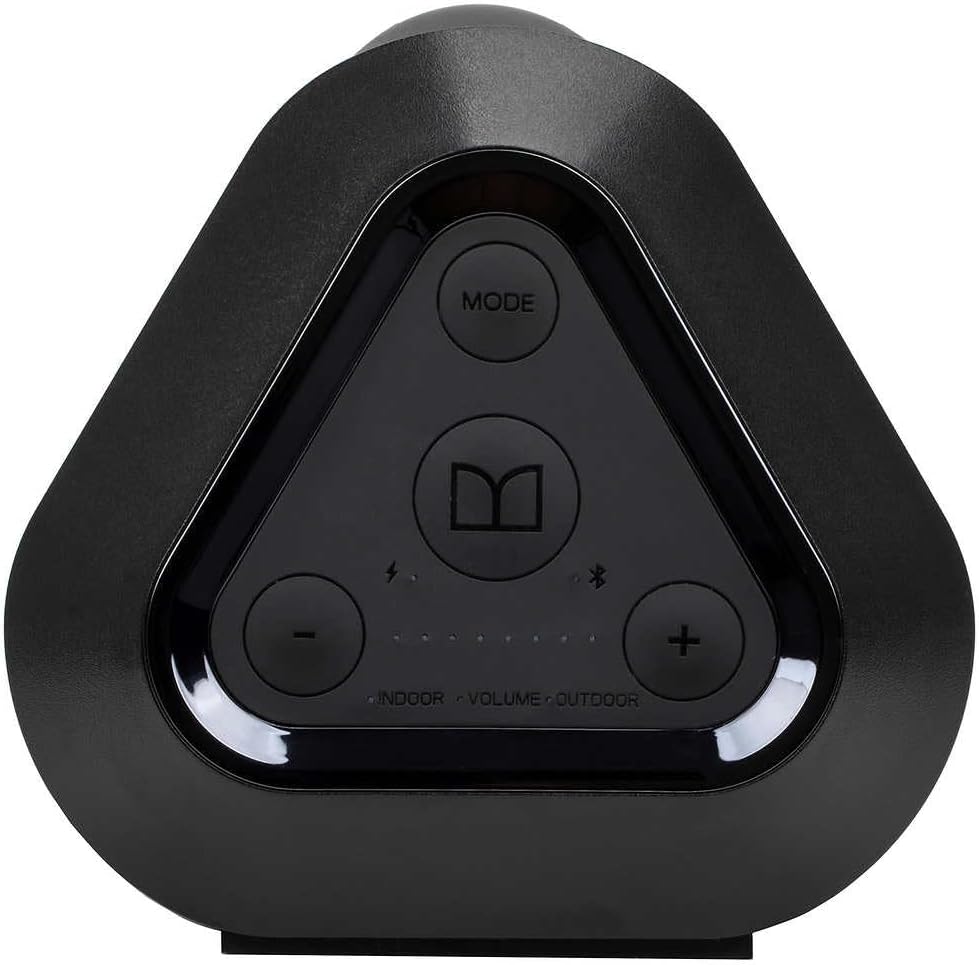
Figure 2: Top control panel with Mode button, Bluetooth pairing button, Volume Up/Down, and Indoor/Outdoor EQ buttons.

Figure 3: Rear input panel, protected by a cover, showing Reset button, Mic In, Aux In, USB Charge Out, and Power Input (18V=3.5A).
Setup
1. Charging the Speaker
- Connect the provided power adapter to the 18V=3.5A Power Input port on the rear panel of the speaker (refer to Figure 3).
- Plug the power adapter into a wall outlet.
- The battery indicator lights on the control panel will illuminate to show charging status. A full charge takes approximately 12 hours.
- Disconnect the power adapter once fully charged or when operating on battery power.
2. Powering On/Off
- To power on, press and hold the Power button (Assumed to be integrated with the Mode button or a separate button not explicitly labeled in the provided images, but standard for such devices) until the indicator lights activate.
- To power off, press and hold the Power button again until the indicator lights turn off.
3. Bluetooth Pairing
- Ensure the speaker is powered on.
- Press the Bluetooth pairing button (indicated by the Bluetooth symbol, refer to Figure 2) on the control panel. The Bluetooth indicator light will flash, indicating it is in pairing mode.
- On your mobile device (smartphone, tablet, laptop), enable Bluetooth and search for available devices.
- Select "Monster Boombox" from the list of devices.
- Once paired, the Bluetooth indicator light on the speaker will become solid, and you will hear an audible confirmation.
- The speaker supports NFC pairing. For NFC-enabled devices, simply tap your device to the NFC area on the speaker (location not specified in images, refer to product for exact location) to initiate pairing.
Operating Instructions
1. Volume Control
- Press the + button (refer to Figure 2) to increase the volume.
- Press the - button (refer to Figure 2) to decrease the volume.
2. EQ Modes (Indoor/Outdoor)
- Press the "INDOOR" or "OUTDOOR" button (refer to Figure 2) to switch between equalization modes optimized for different listening environments.
3. USB Charge Out
- Connect your mobile device's charging cable to the USB Charge Out port on the rear panel (refer to Figure 3).
- The speaker's internal battery will provide power to charge your device.
4. Auxiliary Input (AUX IN)
- Connect an audio source (e.g., MP3 player, CD player) to the AUX IN port on the rear panel (refer to Figure 3) using a 3.5mm audio cable.
- The speaker will automatically switch to AUX input mode, or you may need to press the Mode button (refer to Figure 2) to select AUX.
5. Microphone Input (MIC IN)
- Connect a microphone to the MIC IN port on the rear panel (refer to Figure 3) using a 3.5mm microphone cable.
- This feature allows the boombox to function as a portable PA system.
Maintenance
Cleaning
- Ensure the speaker is powered off and disconnected from any power source before cleaning.
- Use a soft, dry cloth to wipe the exterior surfaces.
- For stubborn dirt, lightly dampen the cloth with water. Avoid using harsh chemicals, solvents, or abrasive cleaners.
Water Resistance (IPX5)
- The Monster Boombox is IPX5 water resistant, meaning it can withstand splashes and light rain.
- Do not submerge the speaker in water.
- Ensure the rear input panel cover is securely closed to maintain water resistance.
- If the speaker gets wet, wipe it dry before charging or opening the port cover.
Storage
- Store the speaker in a cool, dry place away from direct sunlight and extreme temperatures.
- If storing for an extended period, charge the battery periodically to maintain its lifespan.
Troubleshooting
| Problem | Possible Cause | Solution |
|---|---|---|
| Speaker does not power on. | Battery is depleted. | Connect the speaker to a power source using the provided adapter and allow it to charge. |
| No Bluetooth connection. | Speaker is not in pairing mode; device Bluetooth is off; speaker is already connected to another device. | Ensure speaker is in pairing mode (flashing Bluetooth indicator). Turn on Bluetooth on your device. Disconnect from other devices if necessary. Try re-pairing. |
| No sound. | Volume is too low; incorrect input mode selected; audio cable not fully connected. | Increase speaker and device volume. Ensure correct input mode (Bluetooth, AUX) is selected. Check all cable connections. |
| USB Charge Out not working. | Speaker battery is too low; cable issue; device not compatible. | Ensure speaker has sufficient battery charge. Try a different USB cable. Verify your device is compatible with USB charging. |
| Distorted audio. | Volume too high; audio source issue; speaker placement. | Reduce volume on both speaker and audio source. Test with a different audio source. Adjust speaker placement. |
If problems persist, please contact customer support.
Specifications
| Feature | Detail |
|---|---|
| Model Name | Monster Boombox |
| Model Number | 2MNSK1710B0L2 |
| Brand | Monster |
| Material | Plastic or Rubberized Material |
| Speaker Type | Outdoor |
| Special Feature | Waterproof (IPX5) |
| Connectivity Technology | Bluetooth |
| Wireless Communication Technology | Bluetooth |
| Bluetooth Range | 10 Meters |
| Speaker Maximum Output Power | 120 Watts |
| Subwoofer Connectivity | Wireless |
| Audio Output Mode | Stereo (2.0 Channel) |
| Power Source | Battery Powered |
| Battery Type | 1 Lithium Ion battery (included) |
| Charging Time | Approximately 12 Hours |
| Product Dimensions | 10"D x 12"W x 20"H |
| Item Weight | 16.37 pounds |
| Color | Black |
| UPC | 812350269873 |
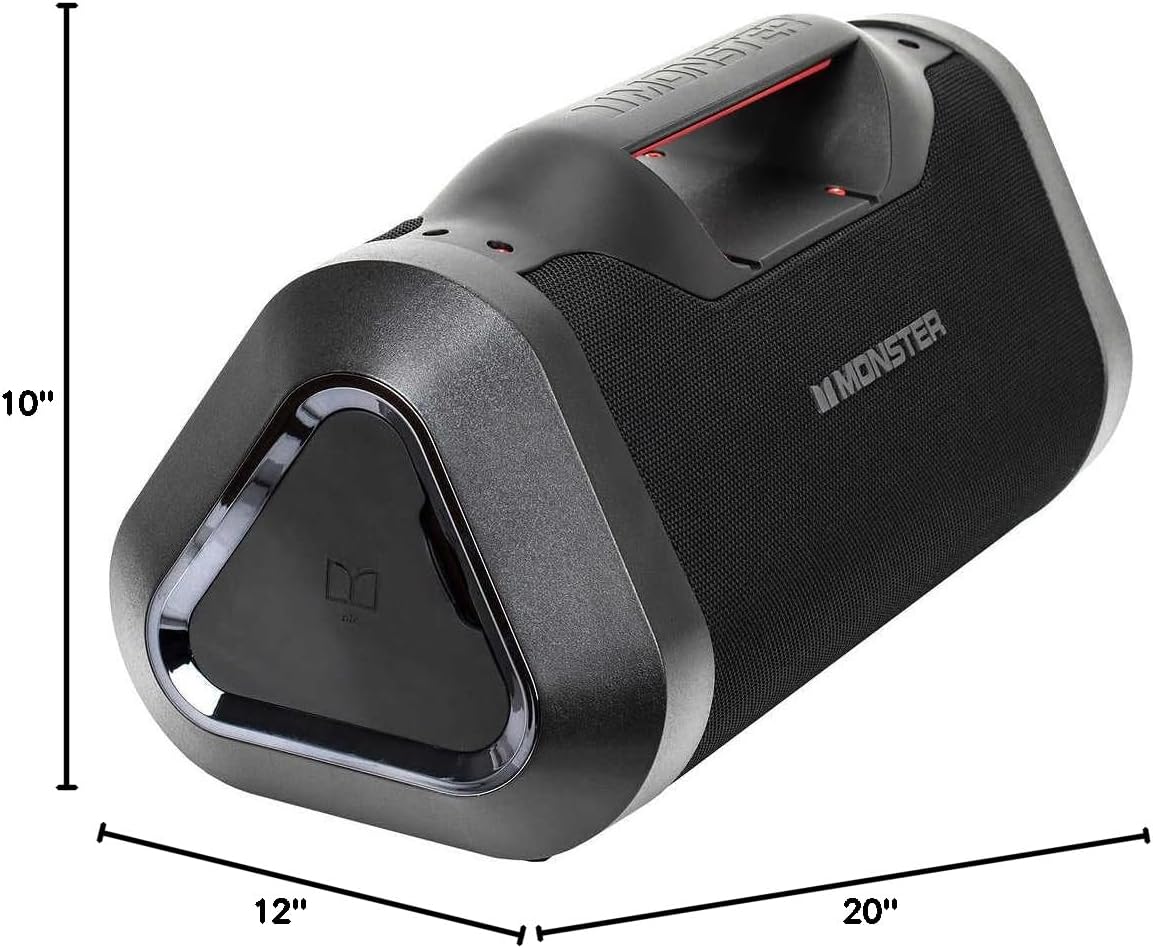
Figure 4: Product dimensions for the Monster Boombox.
Warranty and Support
Warranty Information
The Monster Boombox 2MNSK1710B0L2 comes with a Limited Warranty. Please refer to the warranty card included with your product for specific terms, conditions, and duration of coverage. Retain your proof of purchase for warranty claims.
Customer Support
For technical assistance, troubleshooting beyond this manual, or warranty inquiries, please contact Monster customer support. Contact details can typically be found on the manufacturer's website or on the product packaging.
Manufacturer: Lifeworks Technology Group, LLC.


