
awei T86
awei T86 ENC Noise Canceling Earbuds User Manual
Model: T86
Introduction
Welcome to the user manual for your awei T86 ENC Noise Canceling Earbuds. This guide provides detailed instructions on how to set up, operate, maintain, and troubleshoot your earbuds to ensure optimal performance and longevity. Please read this manual carefully before using the product.
Product Overview
The awei T86 earbuds are designed to deliver a high-fidelity audio experience with advanced Environmental Noise Cancellation (ENC) technology. They feature a digital display charging case for convenience and extended battery life.

Figure 1: awei T86 Earbuds and Charging Case. This image shows the black awei T86 earbuds resting in their transparent charging case, which features a digital battery display showing "100".

Figure 2: awei T86 Earbuds in various colors. This image displays the awei T86 earbuds and their charging cases in multiple colors (blue, white, orange) on a colorful, layered background, highlighting the "Jelly Bean Style" and "Classy Melodies and Colors".
Specifications
| Feature | Detail |
|---|---|
| Bluetooth Scheme | Jieli AD6976D8, V5.3 |
| Talk Time | 7 hours |
| Play Time | 6 hours |
| Charging Time | 1.5 hours |
| Earbuds Battery Capacity | 35mAh * 2 (with protective IC) |
| Charging Case Battery Capacity | 300mAh (with protective plate) |
| Horn Size | φ13mm/32Ω |
| Dimensions | 61.3 * 47.5 * 25mm (Charging Case) |
| ENC Depth (4 mics for voice call) | > -40dB |
| Waterproof Rating | IPX6 |
Note: Specifications are subject to change without prior notice.
Setup Guide
1. Initial Charging
Before first use, fully charge the earbuds and the charging case. The digital display on the case will indicate the battery level.
- Place both earbuds into the charging case.
- Connect the charging case to a USB power source using a compatible charging cable.
- The display will show charging progress. A full charge typically takes about 1.5 hours.
2. Pairing with a Device
The awei T86 earbuds use Bluetooth 5.3 for a stable and efficient connection.
- Ensure the earbuds are in the charging case and the case has power.
- Open the charging case lid. The earbuds will automatically enter pairing mode (indicated by flashing lights on the earbuds, if applicable, or a voice prompt).
- On your device (smartphone, tablet, computer), go to Bluetooth settings and turn Bluetooth on.
- Search for available devices. You should see "awei T86" in the list.
- Select "awei T86" to connect. Once connected, a voice prompt will confirm the successful pairing.
Note: If pairing fails, place the earbuds back in the case, close the lid, wait a few seconds, and then repeat the steps.

Figure 3: Bluetooth 5.3 connection. This image illustrates the Bluetooth 5.3 technology, showing an earbud with internal components and a "5.3" display, emphasizing smooth, anti-electromagnetic interference, and low power consumption connectivity.
Operating Instructions
Touch Controls
The awei T86 earbuds feature intuitive touch controls for various functions:
| Action | Function |
|---|---|
| Single Tap (Left/Right Earbud) | Play/Pause Music, Answer/End Call |
| Double Tap (Right Earbud) | Next Track |
| Double Tap (Left Earbud) | Previous Track |
| Triple Tap (Left/Right Earbud) | Activate Voice Assistant |
| Long Press (2 seconds, Left/Right Earbud) | Reject Call |
| Long Press (3 seconds, Left/Right Earbud) | Toggle ENC/Transparency Mode (if applicable) |
Environmental Noise Cancellation (ENC)
The awei T86 earbuds are equipped with ENC technology, utilizing four microphones to accurately pick up your voice and reduce ambient noise during calls, ensuring clear communication.

Figure 4: ENC Voice Call for HD Speaking & Listening. This image shows a person wearing the awei T86 earbuds in a public setting, illustrating how the ENC technology helps pick up voice and reduce ambient noise for clear communication.
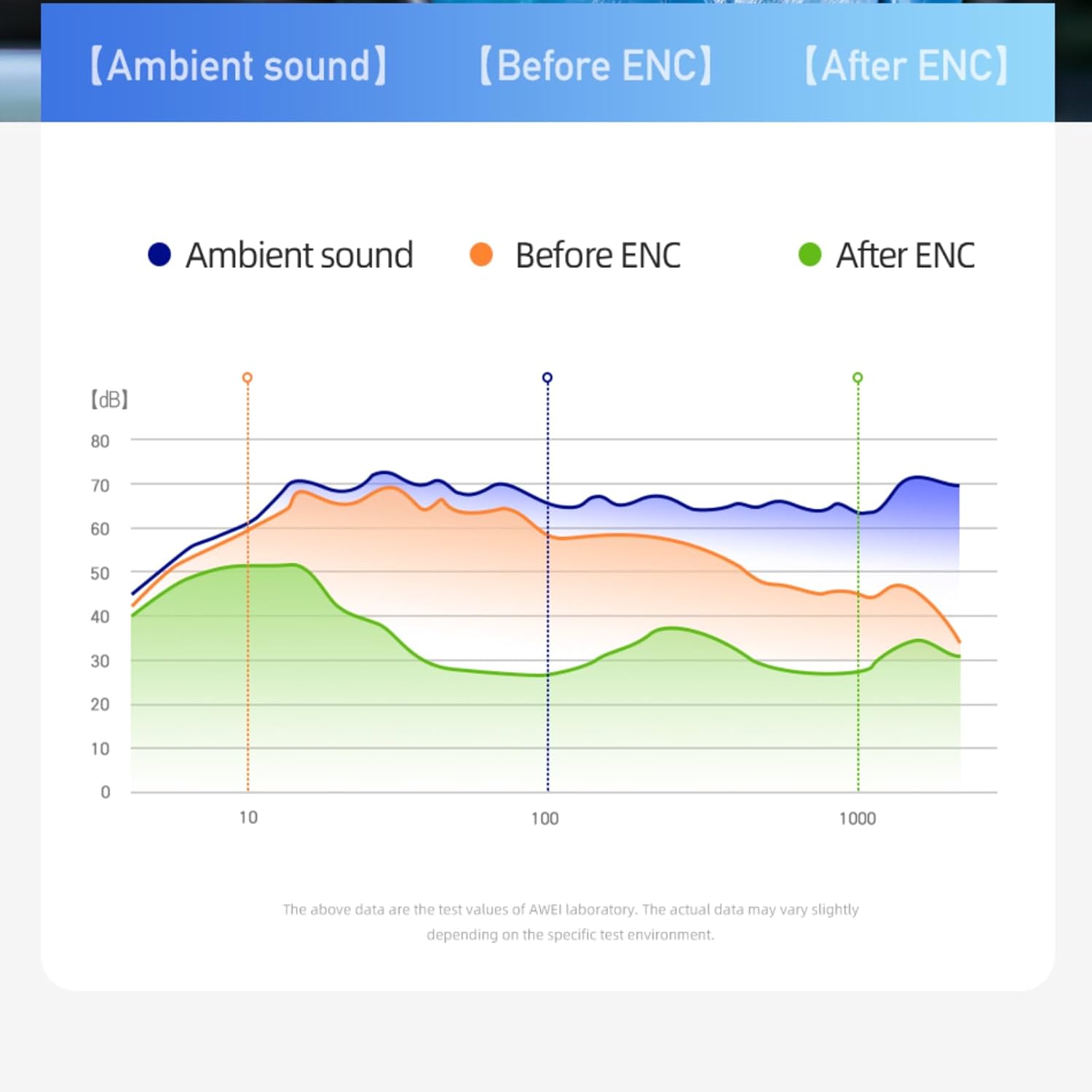
Figure 5: ENC Noise Reduction Graph. This graph visually represents the effectiveness of ENC, comparing ambient sound levels ("Ambient sound"), sound before ENC ("Before ENC"), and sound after ENC ("After ENC") across different frequencies, showing significant noise reduction.
Maintenance and Care
Proper maintenance ensures the longevity and optimal performance of your awei T86 earbuds.
- Cleaning: Regularly clean the earbuds and charging case with a soft, dry, lint-free cloth. Do not use abrasive cleaners or solvents.
- Water Resistance: The earbuds have an IPX6 waterproof rating, meaning they are resistant to strong jets of water. However, they are not designed for submersion. Avoid exposing them to excessive moisture or liquids.
- Storage: When not in use, store the earbuds in their charging case to protect them and keep them charged. Store in a cool, dry place away from direct sunlight and extreme temperatures.
- Battery Care: To preserve battery life, avoid fully discharging the earbuds and charging case frequently. Charge them regularly, even if not in constant use.
Troubleshooting
If you encounter issues with your awei T86 earbuds, refer to the following common problems and solutions:
| Problem | Possible Solution |
|---|---|
| Earbuds not pairing |
|
| No sound from one earbud |
|
| Low volume or poor sound quality |
|
| Charging case not charging |
|
If the problem persists, please contact customer support.
Warranty and Support
Your awei T86 earbuds come with a manufacturer's warranty. Please refer to the warranty card included in your product packaging for specific terms and conditions.
For technical support, warranty claims, or further assistance, please contact awei customer service through their official website or the retailer where you purchased the product.
Online Resources:
- Official awei Website: www.awei.com (Note: This is a placeholder URL, please refer to actual product documentation for correct URL.)
Note: The product information provided in this manual is for reference only. Due to continuous product improvement, the actual product may differ slightly.
Related documentsT86


Ask a question about this manual
Ask about setup, troubleshooting, compatibility, parts, safety, or missing instructions. Manuals+ will review the question and use this page’s manual context to help answer it.