
Tecno LH8n (256+8)
TECNO Pova 5 Pro 5G User Manual
Model: LH8n (256+8)
Introduction
This manual provides essential information for the safe and efficient operation of your TECNO Pova 5 Pro 5G smartphone. Please read it thoroughly before using your device to ensure optimal performance and longevity.

Image: The TECNO Pova 5 Pro 5G smartphone, showcasing its design and key feature of 68W Ultra Fast Charging.
What's in the Box
Verify that all items are present in the packaging:
- Smartphone
- 68 W Power Adapter
- Type-C Cable
- TPU Cover
- SIM Ejector Tool

Image: A flat lay of the TECNO Pova 5 Pro 5G packaging contents, showing the smartphone, 68W power adapter, USB-C cable, TPU protective cover, and the SIM ejector tool.
Setup
Initial Setup
- Insert SIM/SD Card: Locate the SIM tray on the side of the device. Use the provided SIM ejector tool to open the tray. Insert your Nano-SIM card(s) and/or microSD card into the designated slots. Ensure the tray is fully reinserted.
- Power On: Press and hold the Power button (located on the right side) until the TECNO logo appears.
- Follow On-Screen Prompts: The device will guide you through initial setup, including language selection, Wi-Fi connection, Google account setup, and security settings.
Charging the Device
The TECNO Pova 5 Pro 5G supports 68W Ultra Fast Charging.
- Connect the Type-C cable to the charging port at the bottom of the phone.
- Connect the other end of the cable to the 68W power adapter.
- Plug the power adapter into a wall outlet.
- A full charge typically takes approximately 45 minutes, with 50% charge achievable in about 15 minutes.
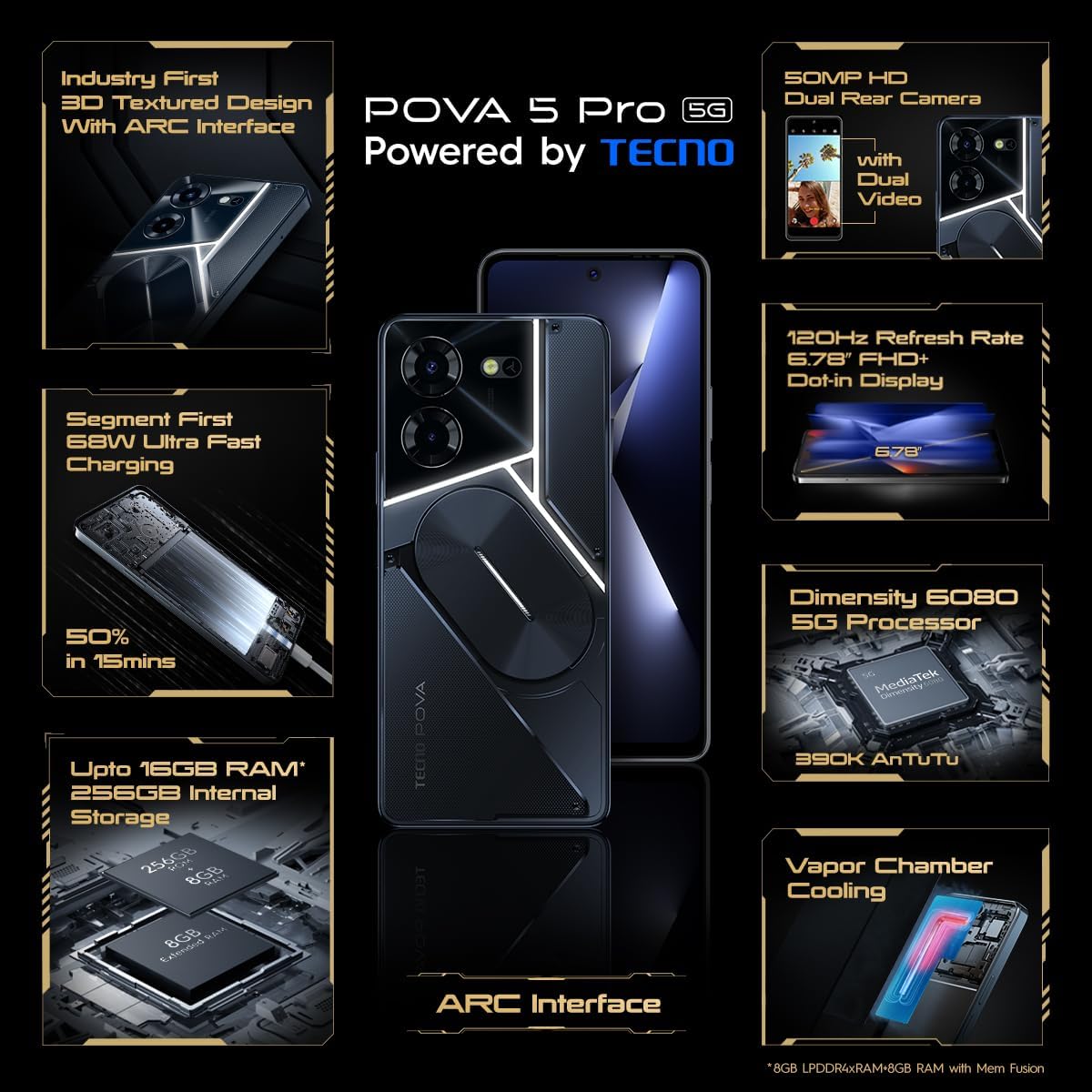
Image: A clear front view of the TECNO Pova 5 Pro 5G smartphone, highlighting its display and front camera.
Operating the Device
Basic Navigation
- Touchscreen: Tap to select, swipe to scroll, pinch to zoom.
- Power Button: Press to wake/sleep the screen. Press and hold to power off or restart.
- Volume Buttons: Adjust media volume, call volume, or ringtone volume.
Camera Usage
The device features a 50MP AI Dual Rear Camera and a 16MP Selfie Camera.
- Open the Camera app from the home screen or app drawer.
- Select desired mode (Photo, Video, Portrait, etc.).
- Tap the shutter button to capture photos or start/stop video recording.
- Utilize AI enhancements for optimized scene recognition and image quality.
ARC Interface and Notifications
The TECNO Pova 5 Pro 5G features a unique multi-color ARC interface with backlighting.
- The ARC interface provides customizable light effects for notifications, incoming calls, gaming, and music playback.
- Access settings to personalize the light patterns and colors for different alerts.

Image: The rear view of the TECNO Pova 5 Pro 5G, showcasing its distinctive 3D textured design and the illuminated ARC interface.

Image: A detailed view of the TECNO Pova 5 Pro 5G's ARC interface, illustrating the multi-color backlighting feature.
Maintenance
- Battery Care: To prolong battery life, avoid exposing the device to extreme temperatures. Do not fully discharge the battery regularly.
- Cleaning: Use a soft, lint-free cloth to clean the screen and body. Avoid using harsh chemicals or abrasive materials.
- Software Updates: Regularly check for and install system updates to ensure optimal performance, security, and access to new features. Navigate to Settings > System > System update.
- Storage Management: Periodically clear unnecessary files and apps to maintain sufficient storage space and device speed.
Troubleshooting
- Device Not Powering On: Ensure the battery is charged. Connect the device to the charger for at least 15 minutes before attempting to power on again. If the issue persists, perform a forced restart by holding the Power button for 10-15 seconds.
- Charging Issues: Verify that the charging cable and adapter are securely connected and undamaged. Try using a different outlet.
- App Crashing/Freezing: Close the problematic app and reopen it. If the issue continues, clear the app's cache and data in Settings > Apps. As a last resort, uninstall and reinstall the app.
- Poor Network Connectivity: Check if Airplane Mode is off. Restart the device. If using mobile data, ensure your SIM card is properly inserted and your data plan is active.
- Overheating: Avoid using the device in direct sunlight or during intensive tasks for extended periods. Close background applications.
Specifications
| Feature | Specification |
|---|---|
| Model Name | Pova 5 Pro 5G |
| Operating System | Android 13.0 |
| Processor | Dimensity 6080 (2.4 GHz Octa-Core) |
| RAM | 8 GB (expandable up to 16 GB with Memory Fusion) |
| Internal Storage | 256 GB (UMCP) |
| Display | 6.78-inch FHD+ Dot-in Display |
| Refresh Rate | 120 Hz |
| Rear Camera | 50 MP AI Dual Camera |
| Front Camera | 16 MP Selfie Camera |
| Battery | 5000 mAh Lithium-Polymer |
| Charging | 68W Ultra Fast Charging |
| Dimensions | 16.9 x 7.7 x 16.9 cm |
| Weight | 214 grams |
| Connectivity | 5G (10 bands supported), NFC, Bluetooth 5.1 |

Image: An internal diagram or view of the TECNO Pova 5 Pro 5G, illustrating its vapor chamber cooling system for efficient heat dissipation.
Warranty and Support
Your TECNO Pova 5 Pro 5G comes with a manufacturer's warranty. Please refer to the warranty card included in your product packaging for specific terms and conditions.
For technical support, service, or warranty claims, please contact TECNO customer service. TECNO maintains a large service network with over 1200 service centers in India.
You can find more information and support resources by visiting the official Tecno store on Amazon: Tecno Store
Related documentsLH8n (256+8)


Ask a question about this manual
Ask about setup, troubleshooting, compatibility, parts, safety, or missing instructions. Manuals+ will review the question and use this page’s manual context to help answer it.