
Product Overview
The HOCO EQ1 Wireless Earbuds offer a superior audio experience with powerful deep bass and crystal-clear highs, designed for convenience and active lifestyles. Featuring Bluetooth 5.3 connectivity, intuitive touch controls, and water resistance, these earbuds are built to deliver uninterrupted music and calls.
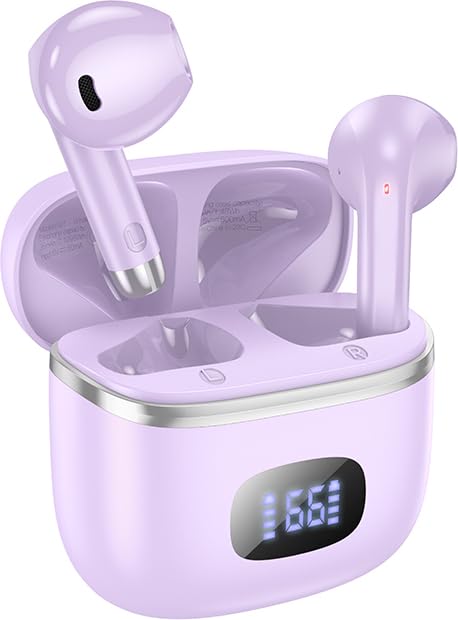
Image: HOCO EQ1 Wireless Earbuds in purple, resting in their open charging case, showing the earbuds and the digital battery display on the case.
Package Contents
Please ensure all items are present in the package:
- HOCO EQ1 Wireless Earbuds (Left and Right)
- Charging Case
- Charging Cable (USB)
- Ear Cushions (various sizes)
- Protective Case

Image: Back of the HOCO EQ1 Wireless Bluetooth Headset packaging, displaying technical specifications and 'What's In The Box' contents, which include the cable, ear cushions, and protective case.
Key Features
- Wireless Bluetooth 5.3 Connectivity: Seamlessly pairs with all Bluetooth devices.
- Deep Bass: Enjoy rich and powerful bass for an immersive audio experience.
- Wireless Freedom for Gaming: 10-meter wireless range for unrestricted movement and low latency gaming mode.
- Sweatproof and Water Resistant: Designed to withstand workouts and outdoor activities.
- Touch Controls: Effortlessly control music playback and calls with touch gestures.
- Long Playback Time: Up to 50 hours of total playback with the charging case.
- Compact and Lightweight Design: Comfortable in-ear fit with a weight of just 34g (total).
- TWS (True Wireless Stereo): Experience true wireless freedom with independent earbuds.
- Supports iOS and Android Devices: Compatible with a wide range of devices.

Image: Infographic highlighting key features of the HOCO EQ1 Earbuds, including battery life, Bluetooth version, sound quality, and design elements.
Setup Guide
1. Charging the Earbuds and Case
Before first use, fully charge the earbuds and the charging case. Connect the provided USB cable to the charging port on the case and a power source. The LED digital display on the case will indicate the charging status and battery level.
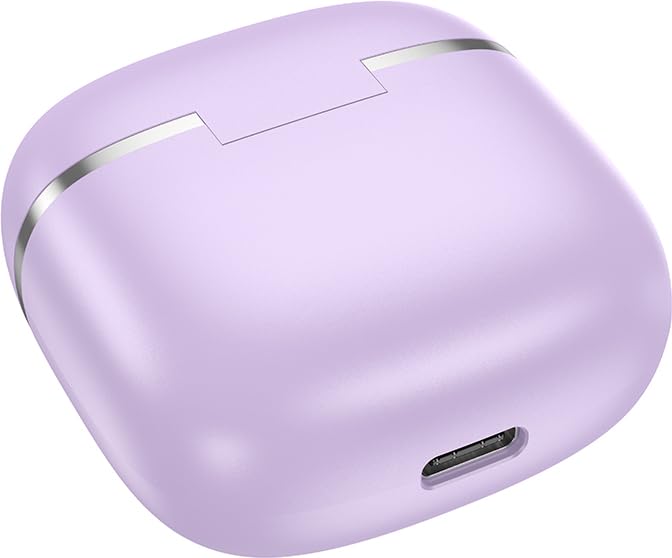
Image: Close-up view of the USB charging port on the HOCO EQ1 Earbuds charging case.
2. Bluetooth Pairing
- Ensure both earbuds are charged.
- Open the charging case. The earbuds will automatically power on and enter pairing mode.
- On your device (smartphone, tablet, etc.), enable Bluetooth.
- Search for "HOCO EQ1" in the list of available Bluetooth devices.
- Select "HOCO EQ1" to connect. Once connected, you will hear a confirmation tone, and the earbuds will be ready for use.
The earbuds feature automatic pairing; once initially paired, they will connect to the last paired device automatically when removed from the case.

Image: Graphic illustrating the automatic pairing feature and touch control gestures for the HOCO EQ1 Earbuds.
Operating Instructions
Touch Controls
The HOCO EQ1 Earbuds feature intuitive touch controls on each earbud. The functions are as follows:
| Action | Function |
|---|---|
| Single Tap (L/R) | Play/Pause music, Answer/End call |
| Double Tap (L/R) | Next Track |
| Triple Tap (L/R) | Previous Track |
| Long Press (2 seconds) (L/R) | Activate Voice Assistant |
Power On/Off
- Power On: Open the charging case, and the earbuds will automatically power on.
- Power Off: Place the earbuds back into the charging case and close the lid. They will automatically power off and begin charging.
Gaming Mode
The HOCO EQ1 Earbuds feature a low latency gaming mode for enhanced audio synchronization during gameplay. Refer to the product's specific instructions or try a long press combination (not explicitly stated in provided data, but common for gaming modes) to activate/deactivate this mode for optimal performance.
Maintenance
- Cleaning: Regularly clean the earbuds and charging case with a soft, dry, lint-free cloth. Do not use harsh chemicals or abrasive materials.
- Water Resistance: The earbuds are water-resistant and sweat-proof, suitable for workouts and light rain. They are not designed for submersion in water. Ensure the charging port is dry before charging.
- Storage: When not in use, store the earbuds in their charging case to protect them and keep them charged. Store in a cool, dry place away from extreme temperatures.
- Battery Care: To prolong battery life, avoid fully discharging the earbuds and case frequently. Charge them regularly, even if not in constant use.
Troubleshooting
If you encounter issues with your HOCO EQ1 Earbuds, please refer to the following common solutions:
- Earbuds not pairing:
- Ensure both earbuds are charged.
- Place earbuds back in the case, close the lid, wait a few seconds, then open the lid again.
- Turn off Bluetooth on your device and turn it back on.
- Forget "HOCO EQ1" from your device's Bluetooth list and attempt to pair again.
- No sound from one earbud:
- Ensure both earbuds are charged.
- Place both earbuds back in the case, close the lid, and then take them out again.
- Try resetting the earbuds (refer to specific reset instructions if available, or try a long press on both earbuds simultaneously while in the case).
- Charging case not charging:
- Check the charging cable and power adapter. Try a different cable or adapter.
- Ensure the charging port is clean and free of debris.
- Low volume or poor sound quality:
- Adjust the volume on both your device and the earbuds.
- Ensure the ear cushions are properly seated in your ears for a good seal.
- Clean any debris from the earbud speakers.
Specifications
| Specification | Detail |
|---|---|
| Model Name | EQ1_EARBUDS |
| Connectivity Technology | Wireless (Bluetooth 5.3) |
| Noise Control | Sound Isolation |
| Playback Time | Up to 50 Hours (with charging case) |
| Water Resistance Level | Water Resistant (Sweatproof) |
| Control Type | Touch, Volume Control |
| Microphone Format | Hands-Free |
| Item Weight | 50 Grams (total) |
| Product Dimensions | 11 x 11 x 5 cm |
| Material | Plastic |
| Country of Origin | China |
Warranty and Support
The HOCO EQ1 Wireless Earbuds come with a 1 Year Warranty from the date of purchase. This warranty covers manufacturing defects and issues arising from normal use.
For warranty claims, technical support, or any inquiries, please contact your retailer or the HOCO customer service department. Keep your proof of purchase for warranty validation.
Note: The warranty does not cover damage caused by misuse, accidents, unauthorized repairs, or normal wear and tear.
