
1. Introduction
The Blackview N6000 is a compact yet highly durable rugged smartphone designed to withstand challenging environments while offering robust performance and a comprehensive set of features. This manual provides essential information for setting up, operating, maintaining, and troubleshooting your device.

Figure 1.1: Blackview N6000 Rugged Smartphone. This image shows the front and back of the Blackview N6000, highlighting its compact 4.3-inch display and ruggedized design.
Video 1.1: Introduction to the Blackview N6000 Mini Rugged Smartphone. This video provides an overview of the N6000's key features and design.
Video 1.2: Official Introduction to the Blackview Mini Rugged Phone N6000. This video offers a concise official introduction to the N6000's capabilities.
2. Setup
Before using your Blackview N6000, please follow these steps to set up your device.
2.1 What's in the Box
- Blackview N6000 Rugged Smartphone
- Power Adaptor
- Type C Cable
- User Manual
Video 2.1: Blackview Rugged Phone N6000 Unboxing. This video demonstrates the unboxing process and contents of the N6000 package.
2.2 Initial Setup
- Insert SIM Card(s): Locate the SIM card tray on the side of the device. Use the provided SIM tray ejector tool to open the tray. Insert your Nano SIM card(s) and/or microSD card into the designated slots. Ensure the tray is securely closed to maintain water and dust resistance.
- Power On: Press and hold the power button (located on the side) until the Blackview logo appears.
- Follow On-Screen Prompts: The device will guide you through the initial setup process, including language selection, Wi-Fi connection, Google account setup, and security settings (fingerprint/face unlock).

Figure 2.1: Dual Nano SIM Slots. This image illustrates the dual Nano SIM card slots and their placement on the device.
3. Operating Your Device
The Blackview N6000 runs on Android 13 with Doke OS 3.1, offering a user-friendly interface and enhanced features.
3.1 Basic Navigation
- Touchscreen: Navigate the 4.3-inch QHD+ display by tapping, swiping, and pinching.
- Customized Function Button: A dedicated button on the side can be customized for quick access to 5 essential functions or your favorite apps.
- Fingerprint & Face Unlock: Securely unlock your device with a touch or glance.

Figure 3.1: Blackview N6000 User Interface and Features. This image displays the Android 13 interface, custom button, fingerprint unlock, and NFC capabilities.
3.2 Doke OS 3.1 Features
- Enhanced Privacy: Features like per-app language preferences, cleared clipboard history, and notification permissions provide greater control over your data.
- Data Security: Double protection with DAC + MAC for robust data security.
- System Management: Includes a cold room feature for app management and sports metrics monitoring.
- New Focus Mode App: Helps minimize distractions for improved productivity.

Figure 3.2: Android 13 and Doke OS 3.1. This image highlights the privacy, personality, and security enhancements of Doke OS 3.1 based on Android 13.
4. Camera Features
Capture high-quality photos and videos with the N6000's advanced camera system.
- Rear Camera: 48MP Samsung ISOCELL GM2 sensor with ArcSoft 5.0 algorithms for enhanced photographic results. Features include TetraPixel Technology for low-light, Super-PD Auto Focus, and Smart-ISO.
- Front Camera: 16MP SK Hynix HI-1634Q.
- Camera Modes: 2K Video Recording, Pro Mode, Improved HDR, Night Mode, Beauty Mode, Portrait Mode, and 360° Panorama.
- Smart Google Lens: Instantly identify objects, landmarks, and translate languages directly from your camera.

Figure 4.1: 48MP Rear Camera. This image showcases the 48MP rear camera module and its capabilities for clear photos.

Figure 4.2: Detailed 48MP Camera Features. This image provides a closer look at the camera's technical aspects like TetraPixel Technology, Super-PD Auto Focus, and Smart-ISO.

Figure 4.3: Google Lens Capabilities. This image illustrates various functions of Google Lens, including object identification, text translation, and homework help.
5. Audio Features
Experience superior audio quality with the N6000's specialized sound enhancements.
- Ultra-linear Box Speaker: Delivers crisp and clear sound.
- Smart-PA Technology: Enhances audio performance.
- BesLoudness: Boosts loudness and clarity.
- Hi-Fi Mode: Provides the highest audio quality for an immersive experience.

Figure 5.1: Audio Enhancement Features. This image highlights the ultra-linear box speaker, Smart-PA, BesLoudness, and Hi-Fi Mode for superior sound.
Video 5.1: How to set up and use Hi-Fi Mode on N6000. This video provides instructions on activating and utilizing the Hi-Fi audio mode.
6. Battery and Charging
The N6000 is equipped with a robust battery system for extended use.
- Battery Capacity: 3,880mAh solid-state battery.
- Temperature Endurance: Operates in extreme temperatures from -40°C to 80°C (-40°F to 176°F).
- Fast Charging: Supports 18W fast charging.
- OTG Reverse Charging: Provides 2.5W OTG reverse charging, allowing you to use your phone as a power bank for other devices.

Figure 6.1: Battery Life and Charging. This image details the 3880mAh solid-state battery, 18W fast charging, and standby times.

Figure 6.2: OTG Functionality. This image demonstrates how the N6000 can be used for OTG reverse charging to power other devices.
Video 6.1: Blackview N6000 Battery Drain Testing. This video showcases the battery performance under continuous video recording.
7. Durability and Protection
The Blackview N6000 is built to withstand harsh conditions.
- Certifications: IP68 & IP69K and MIL-STD 810H certified.
- Drop-proof: Withstands drops up to 5 meters.
- Dust-proof: 360° dustproof design.
- Waterproof: Submersible up to 1.5 meters deep for 30 minutes.
- Corning Gorilla Glass 5: The QHD+ display is protected by Corning Gorilla Glass 5 for enhanced toughness against cracks and scratches.

Figure 7.1: Corning Gorilla Glass 5. This image illustrates the scratch resistance provided by Corning Gorilla Glass 5.

Figure 7.2: Ruggedness Certifications. This image highlights the IP68, IP69K, and MIL-STD 810H certifications for water, dust, and drop resistance.
Video 7.1: Ruggedness Testing - N6000 Smartphone. This video demonstrates various durability tests, including being driven over by a car and dropped from a height.
Video 7.2: N6000: Waterproof, Dustproof and Dropproof Rugged Smartphone. This video highlights the phone's resistance to water, dust, and drops.
8. Connectivity and Functions
The N6000 offers a variety of useful functions for daily use and outdoor activities.
- NFC: For contactless payments and other convenient functions.
- Dual Nano SIM Slots & Dual 4G VoLTE: Ensures stable internet connectivity.
- GPS & GLONASS & Beidou & Galileo: Provides accurate positioning.
- Useful Toolkit: Includes professional apps like Compass, HeightMeasure, SoundMeter, Protractor, Barometer, and FM Radio.

Figure 8.1: Connectivity and Toolkit. This image showcases NFC, GPS, Glove Mode, Face/Fingerprint Unlock, Custom Button, and the built-in toolkit.
8.1 Carrier Compatibility
The Blackview N6000 is an unlocked phone compatible with GSM network carriers such as T-Mobile, BTC, MetroPCS, H2O, Movistar, Telcel, Tigo, Claro, Vivacom, Ultra Mobile, lycamobile, Tello Mobile, Bell Wireless, Rogers Wireless, Chatr, Luck Mobile, Virgin Mobile, Telus, Fido, FIZZ, Shaw Mobile, etc.
Note: It is NOT compatible with AT&T and Cricket Wireless SIM cards.
9. Specifications
| Feature | Description |
|---|---|
| Model Name | N6000 |
| Brand | Blackview |
| Operating System | Android 13.0 (Doke OS 3.1) |
| Processor | Octa-core MTK Helio G99 6nm |
| RAM | 8 GB (expandable to 16GB) |
| Memory Storage Capacity | 256 GB |
| Screen Size | 4.3 Inches |
| Resolution | 2560 x 1440 (QHD+) |
| Refresh Rate | 60 Hz |
| Display Protection | Corning Gorilla Glass 5 |
| Rear Camera | 48MP Samsung ISOCELL GM2 |
| Front Camera | 16MP SK Hynix HI-1634Q |
| Battery Capacity | 3880 mAh (Solid State Battery) |
| Charging | 18W Fast Charging, 2.5W OTG Reverse Charging |
| Durability | IP68 & IP69K, MIL-STD 810H (Drop-proof up to 5m, 360° Dustproof, Waterproof up to 1.5m for 30 mins) |
| Connectivity | Bluetooth 5.2, Wi-Fi, NFC, Dual 4G VoLTE |
| Navigation | GPS, GLONASS, Beidou, Galileo |
| Dimensions | 3.54 x 0.79 x 6.69 inches |
| Item Weight | 10.2 ounces |
10. Maintenance
To ensure the longevity and optimal performance of your Blackview N6000, follow these maintenance guidelines:
- Cleaning: Use a soft, damp cloth to clean the device. Avoid harsh chemicals or abrasive materials. For stubborn dirt, a mild soap solution can be used, followed by rinsing with clean water (ensure all ports are sealed).
- Port Protection: Always ensure the USB-C port cover is securely closed when not charging or connecting to prevent water and dust ingress.
- Avoid Extreme Conditions: While rugged, prolonged exposure to extreme temperatures (beyond specified operating range) or direct sunlight can affect battery life and internal components.
- Software Updates: Regularly check for and install software updates to ensure your device has the latest features, security patches, and performance improvements.
- Battery Care: Avoid completely draining the battery frequently. For long-term storage, charge the battery to around 50-60% and store in a cool, dry place.
11. Troubleshooting
This section addresses common issues you might encounter with your Blackview N6000.
11.1 Device Not Turning On
- Charge Battery: Connect the phone to the charger and allow it to charge for at least 30 minutes.
- Force Restart: Press and hold the Power button and Volume Down button simultaneously for about 10-15 seconds until the Blackview logo appears.
11.2 Network Connectivity Issues
- Check SIM Card: Ensure the SIM card is correctly inserted and activated with your carrier.
- Restart Device: A simple restart can often resolve temporary network glitches.
- Check APN Settings: Verify that your Access Point Name (APN) settings are correct for your carrier. You can usually find these settings in Settings > Network & internet > Mobile network > Access Point Names.
- Carrier Compatibility: Confirm your carrier is supported by the Blackview N6000 (refer to Section 8.1).
11.3 Apps Crashing or Freezing
- Clear Cache: Go to Settings > Apps > [App Name] > Storage & cache and tap "Clear cache".
- Update App: Ensure the app is updated to its latest version from the Google Play Store.
- Reinstall App: Uninstall and then reinstall the problematic app.
11.4 Touchscreen Unresponsive
- Restart Device: Perform a force restart as described in Section 11.1.
- Clean Screen: Ensure the screen is clean and free of dirt or moisture.
12. Warranty and Support
Blackview offers comprehensive support for your N6000 device.
- 2-Year Warranty: Enjoy a 2-year warranty on all Blackview cell phones purchased from authorized sellers.
- Customer Service: 24/7 customer service is available to assist with any issues or inquiries.
- Contact Information: For support, please refer to the contact details provided in your warranty card or visit the official Blackview website.
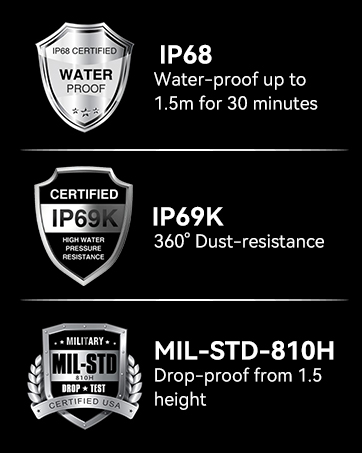
Figure 12.1: Blackview Warranty Support. This image emphasizes the 2-year warranty and customer support available for Blackview products.