
BOBLOV B4K4
BOBLOV B4K4 Body Worn Camera Instruction Manual
Model: B4K4
1. Introduction
This manual provides detailed instructions for the proper use and maintenance of your BOBLOV B4K4 Body Worn Camera. Please read this manual thoroughly before operating the device to ensure safe and effective use. The B4K4 is a high-definition body camera designed for security, law enforcement, and personal recording, featuring 4K video recording, 128GB internal storage, GPS functionality, IP67 waterproof rating, and a 4000mAh battery for extended operation.
2. Package Contents
Verify that all items listed below are present in your package:

Figure 2.1: BOBLOV B4K4 Package Contents. This image displays the complete set of items included with the camera, such as the camera unit, charging dock, various clips, and car accessories.
- BOBLOV B4K4 Body Camera
- Charging Dock Station
- Long Shoulder Clip
- Short Back Clip
- User Manual (this document)
- Car Suction Mount
- Charger Plug
- USB Cable
- Car Charger
3. Product Overview
The BOBLOV B4K4 features a robust design with intuitive controls and a clear display. Familiarize yourself with the camera's components and interface.
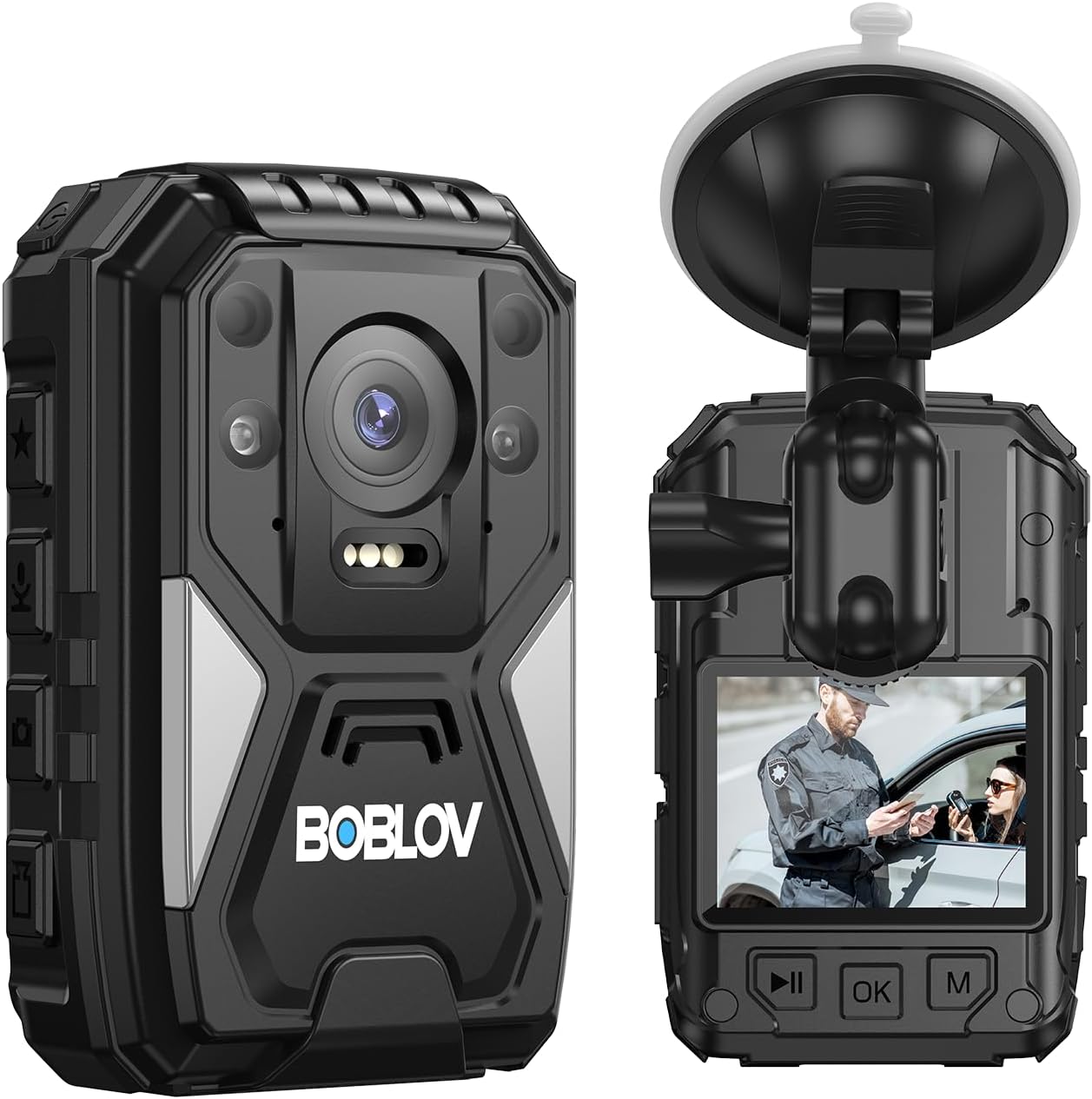
Figure 3.1: Front and Rear View of the B4K4 Camera. This image provides a detailed look at the camera's exterior, highlighting its compact design and visible features.
3.1 Key Features
- 4K Video Recording: Capture high-resolution video at 2160P.
- 40MP Photo Capture: High-quality still images.
- 140° Wide Angle Lens: Broad field of view for comprehensive recording.
- Built-in GPS: Records location data with video footage.
- IP67 Waterproof & 1M Drop Resistance: Durable design for various environments.
- 4000mAh Battery: Up to 15 hours of recording time (1080P, IR & screen off).
- Night Vision: Manual/Auto IR night vision for low-light conditions.
- Alarm Sound: Integrated panic button for emergency situations.
- White Flash Light: Provides illumination when needed.
- Red Beam Quick Locate: Assists in aiming or pointing.
- Charging Dock: Convenient charging and data transfer.
- Dash Camera Functionality: Can be used as a dash cam with the included car suction mount.
Video 3.1: BOBLOV B4K4 Body Worn Camera Feature Introduction. This video provides a visual overview of the camera's main features, including 4K video, battery life, charging methods, IP67 rating, dash cam use, GPS, white flash light, alarm sound, and night vision capabilities.
4. Setup
4.1 Charging the Battery
Before first use, fully charge the camera's built-in 4000mAh battery. Charging can be done via the USB cable or the charging dock station.
- Via USB Cable: Connect the camera directly to a power source using the provided USB cable and charger plug. The indicator light will be steady red during charging and turn green when fully charged.
- Via Charging Dock Station: Place the camera into the charging dock station and connect the dock to a power source. The indicator light on the camera will be steady red when connected to power and charging.

Figure 4.1: Charging the B4K4 Camera. This image illustrates both direct USB charging and charging using the included dock, along with battery performance metrics.
A full charge typically takes 4-5 hours and provides up to 15 hours of recording time (at 1080P with IR and screen off).
4.2 Attaching Clips and Mounts
The camera comes with various clips and mounts for different applications.
- Body Worn: Use the long shoulder clip or short back clip to attach the camera securely to your uniform or clothing. The clips allow for 360-degree rotation for optimal positioning.
- Dash Camera: Attach the car suction mount to your vehicle's windshield and secure the camera to it for use as a dash camera.

Figure 4.2: Various Mounting Options and Use Cases. This image demonstrates how the camera can be worn on a person or used in different professional settings.
5. Operating Instructions
5.1 Power On/Off
- Power On: Press and hold the Power button for a few seconds until the screen illuminates.
- Power Off: Press and hold the Power button until the shutdown prompt appears, then confirm.
5.2 Video Recording
The B4K4 supports 4K (2160P) video recording with a 140° wide-angle lens.
- Start Recording: In standby mode, press the Video Record button once to start recording.
- Stop Recording: Press the Video Record button again to stop recording.
- Loop Recording: The camera supports loop recording, overwriting the oldest files when storage is full.

Figure 5.1: 4K Video Recording Interface. This image shows the camera's display during 4K video recording, highlighting the wide-angle view.
5.3 Taking Photos
Capture high-resolution 40MP still images.
- Take Photo: In standby or video recording mode, press the Photo button once to take a picture.
5.4 Night Vision
The camera features manual and automatic infrared (IR) night vision for clear recording in low-light or dark conditions.
- Activate Night Vision: Refer to the camera's on-screen menu for specific settings to enable manual or automatic IR night vision.

Figure 5.2: Night Vision Capability. This image illustrates the camera's ability to record clearly in dark conditions using night vision.
5.5 GPS Functionality
The built-in GPS module records location data alongside your video footage. This data can be reviewed using the dedicated GPS Player software on a computer.
- GPS Player: Download the GPS Player software from the official BOBLOV website. Connect the camera to your computer to transfer files and view GPS routes.

Figure 5.3: GPS Enabled Feature. This image highlights the camera's integrated GPS for location tracking.

Figure 5.4: GPS Playback on Computer. This image demonstrates how recorded video and GPS data can be reviewed simultaneously on a computer using the dedicated software.
5.6 Alarm Sound
The camera includes an alarm sound feature for emergency situations.
- Activate Alarm: Press the dedicated alarm button (refer to the camera's physical layout for exact button location) to activate a loud siren sound.
5.7 White Flash Light & Red Beam
The camera is equipped with a white flash light for illumination and a red beam for quick targeting or pointing.
- Activate Lights: Refer to the camera's on-screen menu or dedicated buttons for activating these features.

Figure 5.5: White Illumination Light. This image shows the camera's white LED light providing illumination.

Figure 5.6: Red Beam Quick Locate. This image demonstrates the camera's red laser beam for quick targeting.
5.8 Dash Camera Mode
The B4K4 can function as a dash camera when mounted in a vehicle using the car suction mount and powered by the car charger.
- Installation: Secure the car suction mount to your windshield. Attach the camera to the mount.
- Power: Connect the camera to the car charger. The camera will typically power on and begin recording automatically when the vehicle starts.

Figure 5.7: B4K4 Used as a Dash Camera. This image shows the camera securely mounted on a car windshield, ready for use as a dash cam.
6. Maintenance
6.1 Cleaning
- Use a soft, dry cloth to clean the camera body.
- For the lens, use a specialized lens cleaning cloth and solution to avoid scratches.
- Do not use harsh chemicals or abrasive materials.
6.2 Storage
- Store the camera in a cool, dry place away from direct sunlight and extreme temperatures.
- If storing for an extended period, ensure the battery is partially charged (around 50%) to prolong its lifespan.
7. Troubleshooting
| Problem | Possible Cause | Solution |
|---|---|---|
| Camera does not power on. | Battery is depleted. | Charge the camera using the provided charger and cable/dock. |
| Cannot record video/take photos. | Insufficient storage space. | Transfer files to a computer and delete unnecessary files from the camera. |
| GPS data not recording. | GPS signal weak or disabled. | Ensure the camera has a clear view of the sky. Check GPS settings in the camera menu. |
| Camera not recognized by computer. | Faulty USB cable or port. Driver issues. | Try a different USB cable or port. Ensure necessary drivers are installed (if applicable). |
| Date/Time incorrect. | Settings not saved or battery drained. | Set the date and time in the camera's system settings. Ensure the battery is charged. |
8. Specifications
| Feature | Detail |
|---|---|
| Brand | BOBLOV |
| Model | B4K4 |
| Video Capture Resolution | 4K (2160P) |
| Photo Resolution | 40MP |
| Screen Size | 2.7 Inches |
| Battery Capacity | 4000mAh |
| Recording Time | Up to 15 hours (1080P, IR & screen off) |
| Charging Time | 4-5 hours |
| Water Resistance Level | IP67 Waterproof |
| Drop Resistance | 1 Meter |
| Special Features | GPS, Night Vision, Alarm Sound, White Flash Light, Red Beam |
| Product Dimensions | 3.94 x 2.36 x 1.18 inches |
| Item Weight | 1.52 pounds |
9. Warranty and Support
For warranty information and technical support, please refer to the official BOBLOV website or contact their customer service. Keep your purchase receipt for warranty claims.
Official BOBLOV Store: Visit the BOBLOV Store on Amazon
Related documentsB4K4


Ask a question about this manual
Ask about setup, troubleshooting, compatibility, parts, safety, or missing instructions. Manuals+ will review the question and use this page’s manual context to help answer it.