
Hoco WE-1005004459784466-002
Hoco Smart Ear Wireless Bluetooth 5.3 Earbuds User Manual
Model: WE-1005004459784466-002
Product Overview
The Hoco Smart Ear Wireless Bluetooth 5.3 Earbuds offer a seamless audio experience with advanced features. These smart touch stereo earbuds come with a digital LED display charging case, providing convenience and clear battery status at a glance. Designed for comfort and high-quality sound, they are ideal for daily use with mobile phones and other compatible devices.
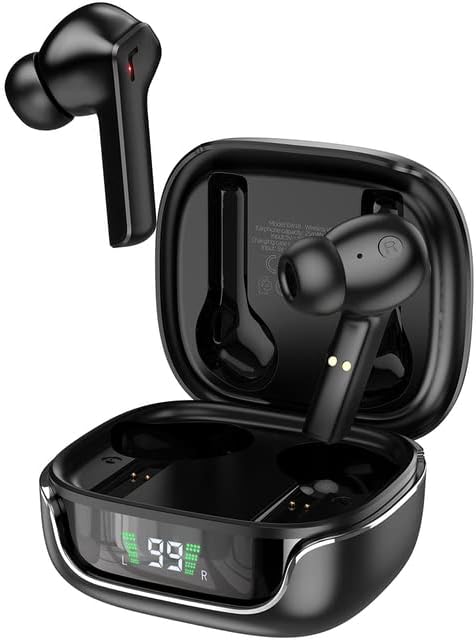
Image: The Hoco Smart Ear Wireless Bluetooth 5.3 Earbuds, showcasing both earbuds and their sleek charging case with a digital LED display.
Package Contents
- Hoco Smart Ear Wireless Bluetooth 5.3 Earbuds
- Charging Case
- User Manual
- Charging Cable
Setup
Initial Pairing
To pair your Hoco Smart Ear Earbuds for the first time, ensure they are fully charged. Open the charging case; the earbuds will automatically enter pairing mode. On your device (e.g., smartphone), navigate to Bluetooth settings and select 'Hoco EW18' or a similar name from the list of available devices. Once connected, the earbuds are ready for use.

Image: A visual representation of the Hoco earbuds establishing a wireless connection using Bluetooth 5.3 technology, highlighting stable and low-power consumption.

Image: The earbuds and charging case next to a smartphone, illustrating the automatic pairing feature and the ability to switch between devices seamlessly.
Reconnecting
After initial pairing, the earbuds will automatically reconnect to the last paired device when taken out of the charging case and Bluetooth is enabled on the device.
Operating Instructions
The Hoco Smart Ear Earbuds feature intuitive touch controls for various functions:

Image: A detailed diagram illustrating the touch control functions of the Hoco earbuds, including playback, track navigation, call management, power, and voice assistant activation.
- Play/Pause: Click the touch area once.
- Next Track: Double click the touch area.
- Previous Track: Triple click the touch area.
- Answer Call: Click the touch area once.
- Hang Up Call: Double click the touch area.
- Reject Call: Long press the touch area for 2 seconds.
- Turn On: Open the cover of the charging case (automatic boot).
- Wake up Siri/Voice Assistant: Long press the touch area for 2 seconds.
Maintenance
To ensure the longevity and optimal performance of your earbuds, follow these maintenance guidelines:
- Cleaning: Regularly clean the earbuds and charging case with a soft, dry, lint-free cloth. Do not use harsh chemicals or abrasive materials.
- Charging Contacts: Periodically clean the charging contacts on both the earbuds and inside the case to ensure a proper connection.
- Storage: When not in use, store the earbuds in their charging case to protect them from dust and damage.
- Avoid Moisture: Keep the earbuds and case away from water and excessive moisture.
- Temperature: Avoid exposing the product to extreme temperatures.
Troubleshooting
If you encounter issues with your Hoco Smart Ear Earbuds, refer to the following common solutions:
- No Sound:
- Ensure earbuds are charged.
- Check device volume and earbud volume.
- Verify Bluetooth connection. Try disconnecting and reconnecting.
- Earbuds Not Pairing:
- Ensure earbuds are in pairing mode (open case).
- Turn off and on Bluetooth on your device.
- Forget the device in your phone's Bluetooth settings and re-pair.
- Ensure no other devices are connected to the earbuds.
- Charging Issues:
- Check if the charging cable is securely connected.
- Ensure the charging contacts on both earbuds and case are clean.
- Try a different charging cable or power adapter.
- Intermittent Connection:
- Ensure you are within the effective Bluetooth range.
- Minimize interference from other wireless devices.
Specifications
Detailed technical specifications for the Hoco Smart Ear Wireless Bluetooth 5.3 Earbuds:
| Feature | Specification |
|---|---|
| Model | WE-1005004459784466-002 |
| Bluetooth Version | 5.3 |
| Number of Drivers | 2 |
| Driver Diameter | 13mm |
| Total Harmonic Distortion | 15% |
| Impedance | 32 Ohm |
| Headphone Form Factor | In-Ear |
| Connectivity Technology | Bluetooth |
| Wireless Communication Technology | Bluetooth |
| Compatible Devices | Mobile Phones |
| Cable Feature | Cable-free (Wireless) |
| Color | Black |
| First Available Date | July 6, 2023 |

Image: An exploded view illustrating the 13mm moving coil driver and bio-carbon fiber composite diaphragm, designed for immersive sound quality.

Image: A person wearing the Hoco earbuds, highlighting the soft silicone ear caps and in-ear ergonomic design for comfortable wear and pure sound enjoyment.
Warranty and Support
Hoco is committed to customer satisfaction and product quality. We offer the following:
- 12-Month Warranty: All products come with a 12-month warranty.
- Customer Service: If you experience any issues with defective or incorrect products, please contact us through the Amazon platform. We are dedicated to providing the best solution, including full refunds or product replacements, to ensure 100% customer satisfaction.
- Delivery Guarantee: We ensure product delivery within the specified timeframe on our sales page.
Ask a question about this manual
Ask about setup, troubleshooting, compatibility, parts, safety, or missing instructions. Manuals+ will review the question and use this page’s manual context to help answer it.