
JLab EB3JBASPRTRBLK82
JLab JBuds Air Sport Gen 3 True Wireless Bluetooth Earbuds Instruction Manual
Model: EB3JBASPRTRBLK82
Introduction
Welcome to your JLab JBuds Air Sport Gen 3 True Wireless Bluetooth Earbuds. This manual provides detailed instructions to help you set up, operate, maintain, and troubleshoot your new device. Please read this guide thoroughly to ensure optimal performance and longevity of your device.

Image: JLab JBuds Air Sport Gen 3 Earbuds in black, highlighting their active lifestyle design with the text "Let's Move".
What's in the Box
Your JLab JBuds Air Sport Gen 3 package includes the following items:
- JBuds Air Sport True Wireless Earbuds (Left and Right)
- Charging Case with Integrated Charging Cable
- 3 Sets of Gel Tips (various sizes)
- 1 Set of Cloud Foam™ Eartips
- JLab Two Year Warranty Information

Image: A visual representation of the JLab JBuds Air Sport Gen 3 package contents, showing the black earbuds, charging case, and different sizes of blue Cloud Foam and black gel ear tips.
Setup Instructions
1. Initial Charging
Before first use, fully charge your earbuds and charging case. The charging case features an integrated USB-A charging cable. Simply plug this cable into any compatible USB-A port (e.g., computer, wall adapter).
- The charging case has LED indicators to show its battery level.
- When earbuds are placed in the case, blue lights indicate they are charging.

Image: The JLab JBuds Air Sport Gen 3 earbuds resting in their open charging case. Blue LED lights on the case indicate that the earbuds are currently charging.
2. Fitting Your Earbuds
Achieving a secure and comfortable fit is crucial for sound quality and stability, especially during physical activity. The JBuds Air Sport Gen 3 come with various ear tips and ergonomic earhooks.
- Earhooks: The ergonomic earhook design fits around your ear to keep the earbuds securely in place.
- Gel Tips: Experiment with the three sizes of gel tips to find the best seal for your ear canal.
- Cloud Foam™ Eartips: For enhanced comfort and passive noise isolation, try the included Cloud Foam™ tips.

Image: A close-up view of the JLab JBuds Air Sport Gen 3 earbuds, highlighting their over-ear hook design for a secure fit.
3. Bluetooth Pairing
The JBuds Air Sport Gen 3 support Bluetooth Multipoint for connecting to multiple devices simultaneously and Dual Connect for independent earbud use.
- Remove both earbuds from the charging case. They will automatically enter pairing mode (indicated by flashing blue/white lights).
- On your device (smartphone, laptop, etc.), open Bluetooth settings and select "JLab JBuds Air Sport Gen 3".
- Once connected, you will hear a voice prompt confirming the connection.
- For Bluetooth Multipoint, connect to your first device, then put the earbuds back in the case briefly. Take them out, and connect to your second device. The earbuds will manage connections between both.

Image: A woman is shown lifting light weights while wearing the JLab JBuds Air Sport Gen 3 earbuds, illustrating their secure fit during exercise.
4. JLab App Integration
Enhance your earbud experience by downloading the JLab App. The app allows for customization of sound, touch controls, and firmware updates.
- Download the JLab App from the Google Play Store or Apple App Store.
- Connect your earbuds via Bluetooth to your device.
- Open the JLab App to access settings for Be Aware mode, EQ presets, custom touch controls, and software updates.

Image: A smartphone screen shows the JLab App interface, offering various settings such as Noise Canceling/Be Aware, Equalizer, Customize Controls, and Updates for the JBuds Air Sport earbuds.
Operating Instructions
1. Touch Controls
The JBuds Air Sport Gen 3 feature intuitive touch controls on each earbud. Refer to the JLab App for a full customization of these controls.
| Action | Left Earbud | Right Earbud |
|---|---|---|
| Single Tap | Volume Down | Volume Up |
| Double Tap | Voice Assistant | Play/Pause |
| Triple Tap | Change EQ Setting | Be Aware On/Off |
| Press & Hold | Previous Track | Next Track |
| Answer/End Call | Double Tap (Either Earbud) | |
2. EQ Sound Settings
The earbuds come with three pre-set EQ settings: JLab Signature, Balanced, and Bass Boost. You can cycle through these settings by triple-tapping the left earbud or customize them via the JLab App.
- JLab Signature: Enhanced vocals and bass.
- Balanced: Even sound distribution for all audio types.
- Bass Boost: Amplified bass for a powerful sound.

Image: The JLab JBuds Air Sport Gen 3 earbuds in their charging case, illustrating the three custom EQ3 sound settings: Signature, Balanced, and Bass Boost.
3. Be Aware Mode
Activate Be Aware Mode to allow ambient noise to pass through the earbuds, keeping you aware of your surroundings. This feature is useful for outdoor activities or when you need to hear conversations.
- Triple-tap the right earbud to toggle Be Aware Mode on or off.
- Customize the level of ambient noise in the JLab App.
4. Stereo Audio Calling
Enjoy clear phone calls with stereo audio, meaning you'll hear the call in both earbuds. Each earbud has a built-in MEMS microphone for clear conversations.
5. Battery Life
The JBuds Air Sport Gen 3 offer extended battery life:
- Up to 9+ hours of playtime in each earbud.
- An additional 35+ hours from the charging case, totaling 44+ hours of playtime.

Image: A man is shown drinking from a water bottle, wearing the JLab JBuds Air Sport Gen 3 earbuds. The image highlights the product's long battery life, stating "44+ Hours Playtime".
6. Find with Tile
The JBuds Air Sport Gen 3 are integrated with Tile technology, allowing you to locate your earbuds if they are misplaced.
- Download the free Tile app on your smartphone.
- Follow the in-app instructions to activate Tile for your earbuds.
- Use the Tile app to find your earbuds nearby or track their last known location.

Image: A smartphone displays the Tile app, showing it activated for JLab earbuds, positioned next to the open charging case containing the earbuds.
Key Features
- IP66 Sweat Resistance: Designed to withstand sweat and dirt, making them suitable for workouts and outdoor activities.
- Bluetooth Multipoint: Connect simultaneously to two devices (e.g., mobile, laptop) and seamlessly switch between them.
- Dual Connect: Use either earbud independently or both together for flexible listening.
- Integrated Charging Cable: The charging case includes a built-in USB-A cable for convenient recharging.
- Custom EQ3 Sound: Choose from JLab Signature, Balanced, or Bass Boost sound modes, or customize further with the JLab App.
- Be Aware Audio: Allows ambient noise in for situational awareness.
- MEMS Microphones: Built-in microphones in each earbud ensure clear call quality.
- Tile Integration: Locate misplaced earbuds using the Tile app.
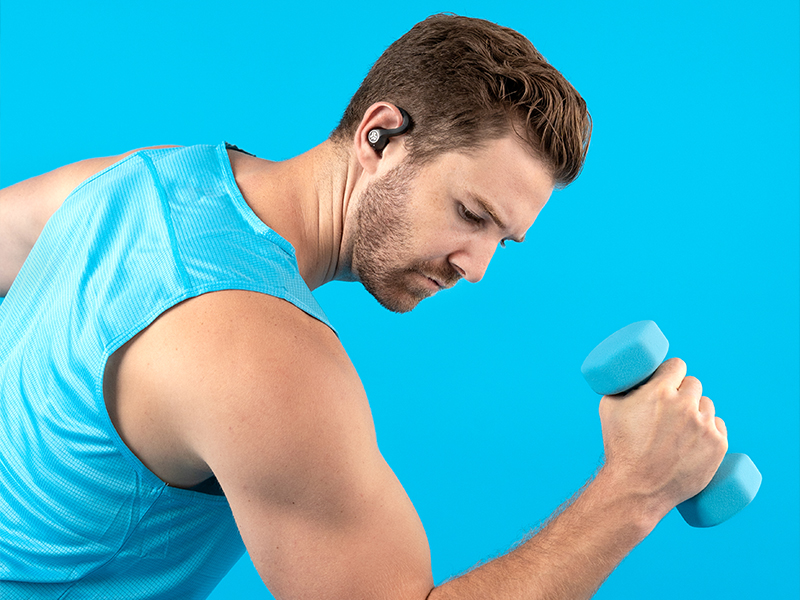
Image: A man is shown lifting a dumbbell, wearing the JLab JBuds Air Sport Gen 3 earbuds, highlighting their sweatproof design suitable for gym use.
Maintenance
Proper care ensures the longevity and performance of your earbuds:
- Cleaning: Regularly wipe down the earbuds and charging contacts with a dry, soft cloth to prevent sweat and dirt buildup, especially after workouts.
- Storage: Store earbuds in their charging case when not in use to protect them and keep them charged.
- Avoid Extreme Conditions: Do not expose earbuds to extreme temperatures, humidity, or corrosive liquids.
- Water Resistance: While IP66 sweat resistant, avoid submerging the earbuds in water.
Troubleshooting
If you encounter issues, try the following steps:
- No Sound/Connectivity:
- Ensure earbuds are charged and powered on.
- Check Bluetooth settings on your device to confirm connection.
- Try resetting the earbuds: Place them in the charging case, then quickly tap each earbud four times.
- Forget the device in your Bluetooth settings and re-pair.
- Low Volume:
- Adjust volume on both your connected device and the earbuds using touch controls.
- Ensure ear tips provide a good seal in your ear canal.
- Earbud Fit:
- Experiment with different sizes of gel tips or Cloud Foam™ tips for a better fit.
- Ensure earhooks are correctly positioned around your ears.
- JLab App Issues:
- Ensure your earbuds are connected via Bluetooth to your device.
- Check for app updates in your device's app store.
- Restart the app or your device.
- Firmware Updates: Regularly check the JLab App for available firmware updates to ensure optimal performance and new features.
Specifications
| Feature | Detail |
|---|---|
| Model Name | JBuds Air Sport |
| Connectivity Technology | Wireless (Bluetooth 5) |
| Battery Life (Earbuds) | 9 Hours |
| Total Playtime (with Case) | 44+ Hours |
| Water Resistance Level | IP66 Sweat Resistant |
| Control Method | Touch |
| Audio Driver Type | Dynamic Driver |
| Earpiece Shape | Rounded tip with earhook |
| Compatible Devices | Computers, Mobile Phones, Smartphones |
| Material | Plastic, Rubber, Silicone |
| Item Weight | 3.53 ounces (100 Grams) |
| Product Dimensions | 6 x 4 x 2 inches |
Warranty and Support
Your JLab JBuds Air Sport Gen 3 True Wireless Bluetooth Earbuds come with a JLab Two Year Warranty. For warranty claims, technical support, or further assistance, please visit the official JLab website or contact their customer service directly.
For additional information and resources, visit the JLab Store on Amazon.
Related documentsEB3JBASPRTRBLK82


Ask a question about this manual
Ask about setup, troubleshooting, compatibility, parts, safety, or missing instructions. Manuals+ will review the question and use this page’s manual context to help answer it.