
ESR 6E004_0530
ESR 65W 4-in-1 GaN Wireless Charging Station User Manual
Model: 6E004_0530
Introduction
The ESR 65W 4-in-1 GaN Wireless Charging Station is a versatile and efficient power solution designed to simplify your charging experience. This station allows you to conveniently charge multiple Apple devices and other USB-powered gadgets simultaneously from a single outlet. Featuring advanced GaN technology, it delivers high-speed charging in a compact form factor, making it ideal for home or office use.

Image: The ESR 65W 4-in-1 GaN Wireless Charging Station, showcasing its ability to charge an iPhone, AirPods, and an Apple Watch simultaneously, connected to a power outlet.
Package Contents
Please ensure all items are present in the package:
- ESR 65W 4-in-1 GaN Wireless Charging Station
- 1 adapter (power supply)
- USB-C to USB-C cable (3ft)
Features
- 5 Devices, 1 Charger: Conveniently charge all your everyday Apple essentials in one place, from one outlet.
- 65W Fast Charging: Charge your laptop at lightning speed with 65W single-port USB-C fast charging.
- Advanced GaN Tech: Powered by GaN (Gallium Nitride) for unparalleled charging efficiency and faster speeds packed into a more compact package.
- Power in a Snap: Strong magnets enable quick and easy place-and-go magnetic charging for iPhone and AirPods.
- 2 Ways to View and Charge: FaceTime in portrait or watch videos in landscape at a comfortable height while you charge.

Image: A user at a desk with the ESR 5-in-1 Charging Station, demonstrating its use for charging an iPhone, Apple Watch, AirPods, and a laptop simultaneously, highlighting its ability to reduce cable clutter.

Image: An internal view diagram of the charging station, highlighting the advanced GaN (Gallium Nitride) chip, indicating its compact, efficient, and powerful design.
Compatibility
The ESR 65W 4-in-1 GaN Wireless Charging Station is designed for broad compatibility with various devices:
- Wireless Charging:
- iPhone 16/15/14/13/12 Series (with MagSafe or MagSafe-compatible cases)
- AirPods Pro/3/2
- Apple Watch (all series)
- Wired Charging (via USB-A and USB-C ports):
- All USB-A and USB-C devices including phones, tablets, and laptops.
- Specifically, iPhone 16, iPhone 16 Plus, iPhone 16 Pro, iPhone 16 Pro Max, iPhone 15, iPhone 15 Plus, iPhone 15 Pro, iPhone 15 Pro Max, iPhone 14, iPhone 14 Plus, iPhone 14 Pro, iPhone 14 Pro Max, iPhone 13, iPhone 13 Pro, iPhone 13 Pro Max, iPhone 13 mini, iPhone 12, iPhone 12 Pro, iPhone 12 Pro Max, iPhone 12 Mini.
- AirPods 4/3/AirPods Pro.
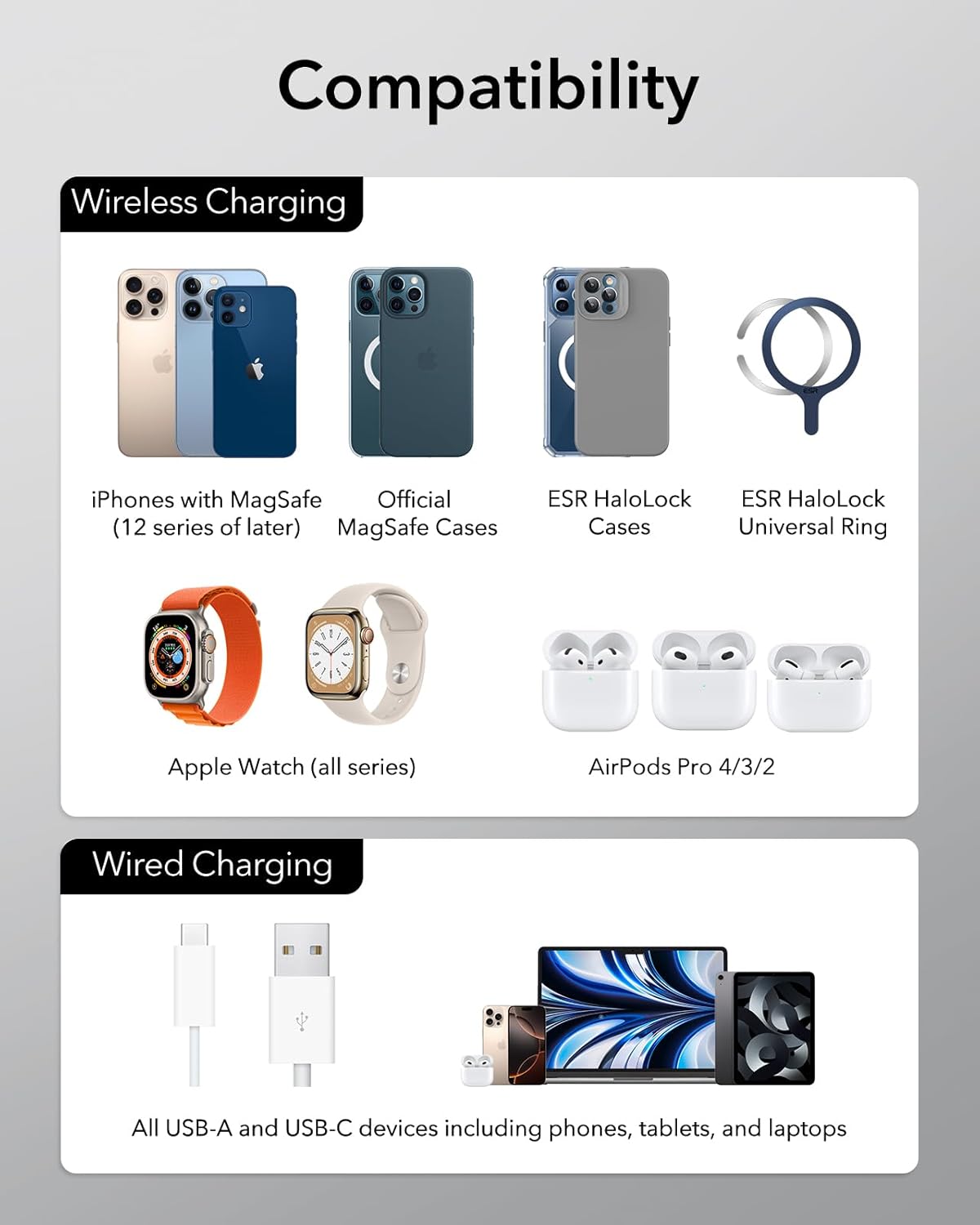
Image: A detailed compatibility chart illustrating which devices are supported for both wireless (iPhones with MagSafe, Apple Watch, AirPods Pro) and wired charging (all USB-A and USB-C devices).
Setup
Follow these steps to set up your charging station:
- Connect Power: Plug the provided power adapter into the charging station's power input port, then connect the adapter to a wall outlet.
- Install Apple Watch Charger (Optional): The station features discrete cable storage for your Apple Watch charger.
- Open the watch charging module cover.
- Insert your Apple Watch charging cable (USB-A or USB-C) into the corresponding port within the module.
- Route the cable neatly within the designated channels and close the cover.
- Positioning: Place the charging station on a stable, flat surface.

Image: A visual guide demonstrating the four steps for intuitive cable management within the charging station, specifically for the Apple Watch charger, showing how to open the compartment, insert the cable, route it, and close the cover.
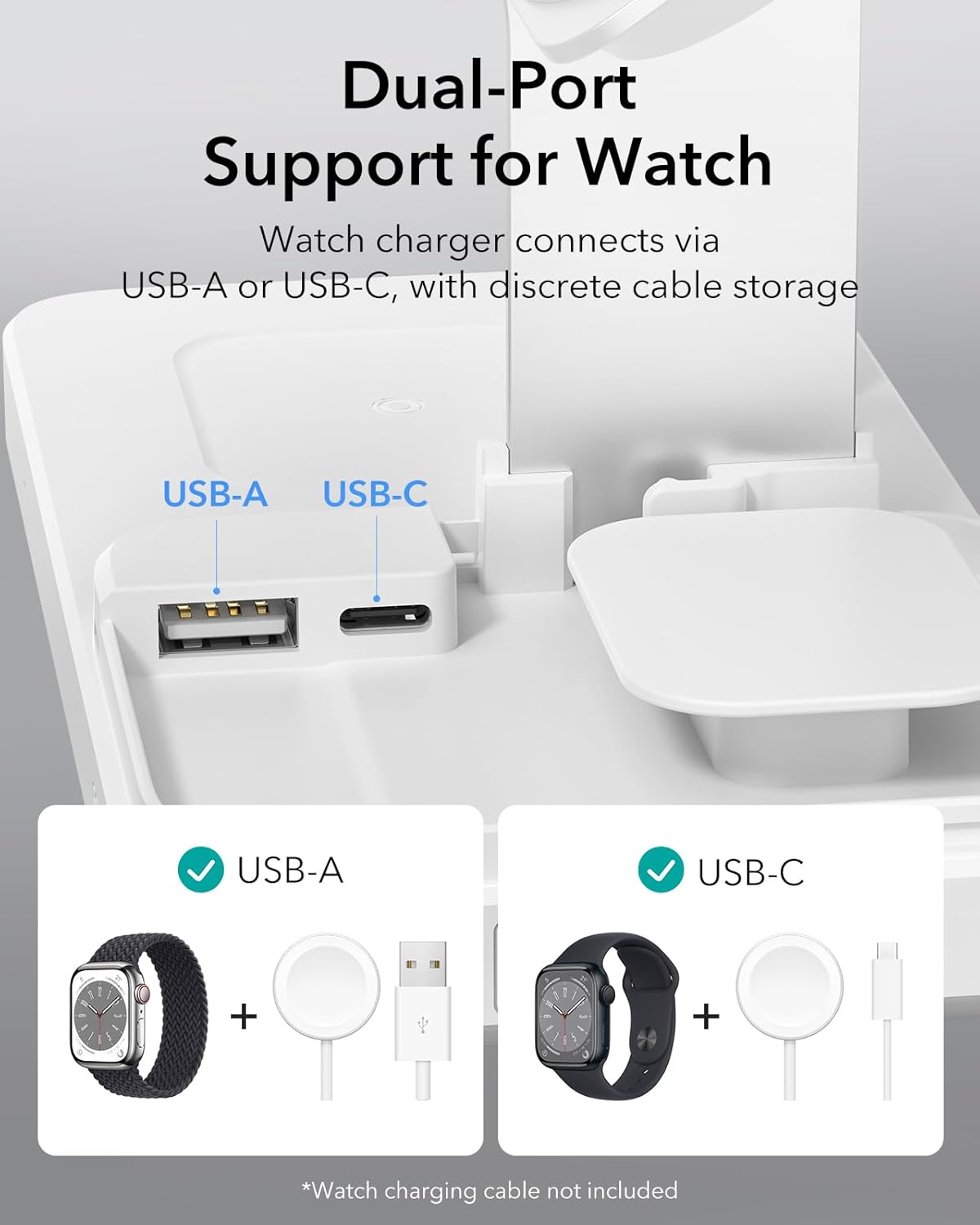
Image: A close-up view of the dual USB-A and USB-C ports located within the Apple Watch charging module, illustrating how either type of Apple Watch charging cable can be connected.
Operating Instructions
Using your ESR 65W 4-in-1 GaN Wireless Charging Station is straightforward:
- Charging iPhone: Place your MagSafe-compatible iPhone directly onto the magnetic charging stand. The strong magnets will align your device correctly for optimal charging.
- Charging AirPods: Place your AirPods charging case onto the designated magnetic charging pad at the base of the station.
- Charging Apple Watch: Once your Apple Watch charger is installed, place your Apple Watch onto the charging puck.
- Charging Other Devices (USB-A/USB-C): Connect your laptop, tablet, or other USB-powered devices to the available USB-A or USB-C ports on the side of the charging station. The station automatically adjusts power allocation for maximum charging speeds.

Image: A hand placing an iPhone onto the magnetic charging stand, illustrating the strong magnetic lock for secure and efficient charging. Magnetic strength values for iPhone (1,000 gf) and AirPods (400 gf) are displayed.
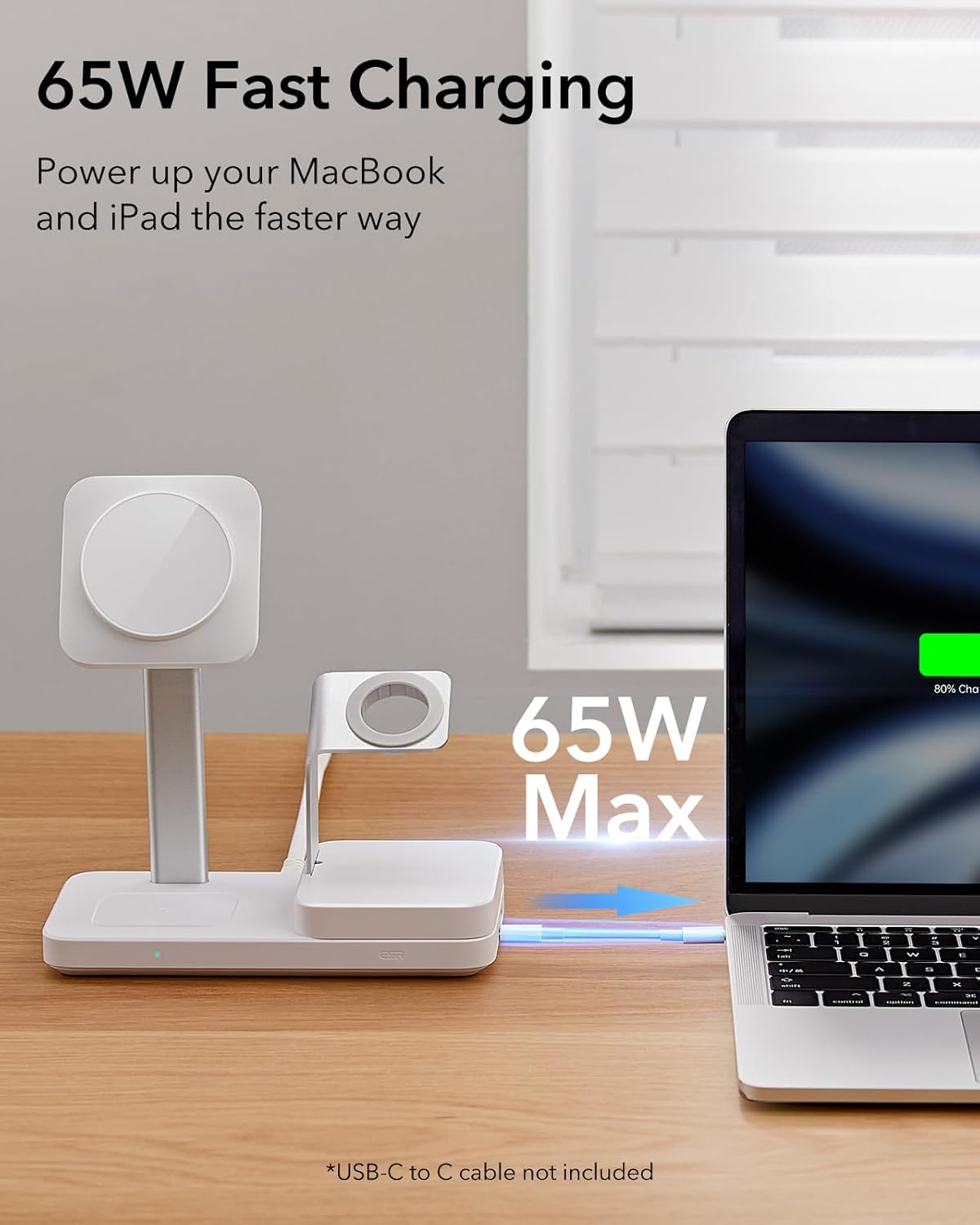
Image: The ESR charging station connected to a laptop via its USB-C port, demonstrating its capability for 65W Max fast charging to power up MacBooks and iPads quickly.

Image: Two scenarios showing the charging station's versatility: one with an iPhone in portrait view for FaceTime calls, and another with the iPhone in landscape view for watching videos, both while charging.

Image: A diagram illustrating the power distribution from the charging station, showing wattage allocation to different devices (e.g., 60W to laptop, 5W to watch) to ensure maximum charging speeds for each connected device.
Maintenance
To ensure the longevity and optimal performance of your charging station, follow these maintenance guidelines:
- Cleaning: Disconnect the power adapter before cleaning. Use a soft, dry, lint-free cloth to wipe the surface of the charging station. Do not use abrasive cleaners, solvents, or aerosol sprays.
- Storage: When not in use for extended periods, store the charging station in a cool, dry place away from direct sunlight and extreme temperatures.
- Handling: Avoid dropping or subjecting the charging station to strong impacts, as this may damage internal components.
Troubleshooting
If you encounter issues with your charging station, refer to the following common problems and solutions:
| Problem | Possible Cause | Solution |
|---|---|---|
| Device not charging wirelessly. | Device not properly aligned; case too thick; foreign object on charging pad; device not compatible with wireless charging. | Ensure device is centered on the charging pad. Remove thick cases or metal objects. Verify device supports wireless charging. |
| Slow charging. | Using a non-original power adapter; multiple devices drawing high power; device overheating. | Use the provided power adapter. Ensure proper ventilation. Reduce the number of high-power devices charging simultaneously if experiencing significant slowdowns. |
| USB-C or USB-A port not working. | Cable not fully inserted; faulty cable; port damage. | Ensure cables are securely connected. Try a different cable. If the issue persists, contact customer support. |
| Indicator light is distracting at night. | Light is always on when charging. | The product may have a button to turn off the indicator light. Refer to the product's physical controls for a light switch if available. |
If the problem persists after trying these solutions, please contact ESR customer support for further assistance.
Specifications
| Attribute | Detail |
|---|---|
| Model Number | 6E004_0530 |
| Brand | ESR |
| Connectivity Technology | USB |
| Connector Type | USB Type C |
| Input Voltage | 9 Volts |
| Item Weight | 1.74 pounds |
| Package Dimensions | 8.54 x 7.28 x 4.61 inches |
| Special Feature | MagSafe Compatible |
| Color | White |

Image: A diagram illustrating the power distribution from the charging station, showing wattage allocation to different devices both with and without active wireless charging.
Warranty and Support
ESR stands behind its products with comprehensive customer support:
- Warranty: The product includes a comprehensive 12-month protection plan.
- Lifetime Support: Enjoy lifetime support for your ESR product.
- Personalized Help: Access personalized help for any issues or questions you may have.
- Online Resources: Detailed setup videos and FAQs are available through ESR's official channels.
For support, please visit the official ESR website or contact their customer service directly.
Related documents6E004_0530


Ask a question about this manual
Ask about setup, troubleshooting, compatibility, parts, safety, or missing instructions. Manuals+ will review the question and use this page’s manual context to help answer it.