
Introduction
Thank you for choosing the RCB R19 Electric Scooter. This manual provides essential information for the safe operation, maintenance, and troubleshooting of your scooter. Please read it thoroughly before your first ride to ensure optimal performance and safety.
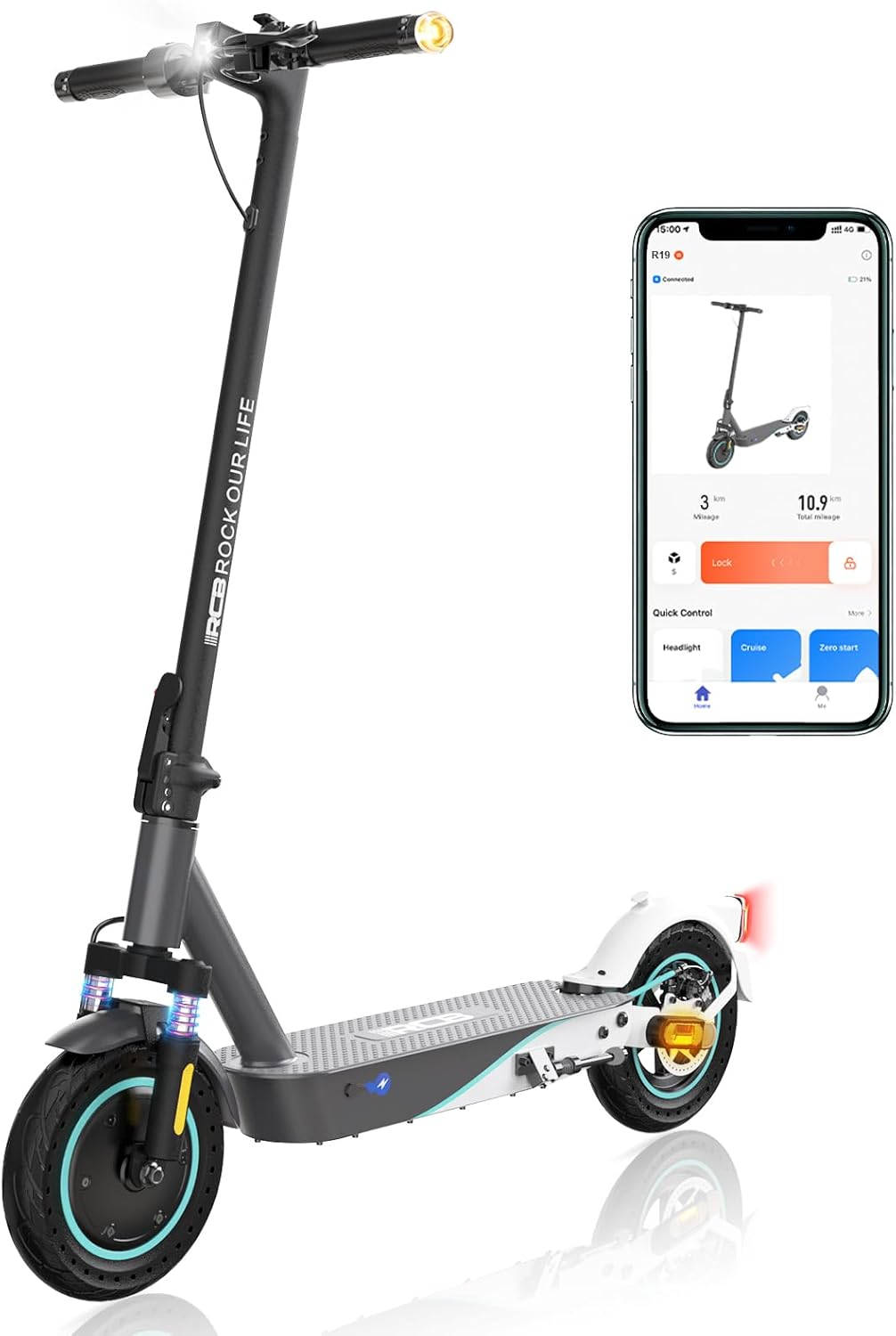
Image: The RCB R19 Electric Scooter, showcasing its sleek design and an accompanying smartphone app interface for smart control.
Safety Instructions
Your safety is paramount. Always adhere to local traffic laws and regulations. Wear a helmet and appropriate protective gear. Do not ride under the influence of alcohol or drugs.
- Always wear a helmet and other protective gear (knee pads, elbow pads).
- Do not ride in heavy rain or through puddles deeper than 2 cm.
- Avoid riding on slippery surfaces, loose gravel, or steep inclines.
- Maintain a safe distance from other vehicles and pedestrians.
- Do not perform stunts or sudden maneuvers.
- Ensure all screws and components are tightened before each use.
- Do not charge the battery while the scooter is in use.

Image: Illustration highlighting the scooter's night riding lighting system (headlight and taillight) and the dual braking system for enhanced safety.
Package Contents
Upon opening the package, please verify that all the following items are included:
- 1 x RCB R19 Electric Scooter
- 1 x Charger
- 4 x Screws (for handlebar assembly)
- 1 x L-shaped Allen Key
- 1 x User Manual (this document)
If any accessories are missing, please contact customer support immediately.
Setup
1. Unfolding the Scooter
- Place the scooter on a flat surface.
- Release the folding mechanism latch, usually located near the base of the steering column.
- Carefully lift the steering column until it locks into the upright position. Ensure the locking mechanism is fully engaged.
2. Attaching the Handlebar
- Align the handlebar with the top of the steering column.
- Insert the provided screws into the designated holes and tighten them securely with the L-shaped Allen key.
- Ensure the handlebar is firmly attached and does not wobble.
3. Initial Charge
Before first use, fully charge the scooter's battery. Connect the charger to the charging port on the scooter and then to a power outlet. The charging indicator light on the charger will change color (e.g., red to green) when fully charged. Charging time is approximately 6 hours.
Operating Instructions
1. Power On/Off
Press and hold the power button on the display to turn the scooter on or off.
2. Riding the Scooter
- Place one foot on the deck and push off with the other foot to gain initial momentum.
- Once moving, gently press the accelerator lever to engage the motor.
- To slow down or stop, release the accelerator and use the brake levers (disc brake and electronic brake).
3. Speed Modes
The RCB R19 features 4 speed modes. Press the mode button on the display to cycle through the available speeds (e.g., 12 km/h, 20 km/h, 25 km/h). Select the appropriate speed for your riding conditions and experience level.
4. APP Control (Smart Control)
Download the official RCB app to your smartphone. Connect your scooter via Bluetooth to access additional features:
- Lock & Unlock the scooter.
- Activate Cruise Control.
- View Battery Information.
- Control Lights.
- Access Navigation (if supported).
- Review Riding Data.

Image: A smartphone displaying the RCB app interface, illustrating features like lock/unlock, cruise control, battery info, light control, navigation, and riding data.
5. Folding the Scooter
To fold the scooter for transport or storage, ensure the scooter is powered off. Locate the folding mechanism latch, release it, and carefully fold the steering column downwards until it clicks into place. The folded dimensions are approximately 110 x 51 x 54 cm.

Image: A visual representation of the RCB R19 scooter in both its unfolded and folded states, with key dimensions (110cm length, 51cm width, 118cm height unfolded; 54cm height folded) and net weight (16kg) indicated.
Maintenance
Regular maintenance ensures the longevity and safe operation of your RCB R19 Electric Scooter.
- Tire Pressure: While the R19 uses solid honeycomb tires, regularly inspect them for any damage or wear.
- Brakes: Periodically check the brake levers and disc brake for proper function and wear. Adjust or replace brake components as needed.
- Cleaning: Clean the scooter with a damp cloth. Do not use high-pressure water jets or corrosive cleaners. Ensure the charging port cover is securely closed when cleaning.
- Battery Care: Charge the battery regularly, even if the scooter is not in use for extended periods (at least once every 30 days) to maintain battery health. Do not overcharge or completely drain the battery.
- Fasteners: Regularly check and tighten all screws and bolts, especially those on the handlebar, folding mechanism, and wheels. This is crucial for safety and product lifespan.
Troubleshooting
| Problem | Possible Cause | Solution |
|---|---|---|
| Scooter does not power on. | Low battery; Power button not pressed correctly; Internal fault. | Charge the battery fully. Press and hold the power button for 3-5 seconds. If problem persists, contact support. |
| Motor not engaging. | Not enough initial push-off; Accelerator fault; Brake engaged. | Ensure you push off to gain momentum before pressing the accelerator. Check if brake levers are fully released. Contact support if accelerator is faulty. |
| Reduced range/speed. | Low battery charge; Overload (rider weight); Steep incline; Headwind; Cold weather. | Fully charge the battery. Ensure rider weight is within limits (max 150 kg). These factors naturally affect performance. |
| Brakes feel weak. | Brake pads worn; Brake cable loose; Disc brake adjustment needed. | Inspect brake pads for wear and replace if necessary. Check brake cable tension. Consult a professional for brake adjustment if unsure. |
| Unusual noises. | Loose components; Debris in wheels/motor; Worn bearings. | Check all screws and bolts for tightness. Inspect wheels and motor area for foreign objects. If noise persists, contact support. |
Specifications
| Feature | Detail |
|---|---|
| Model | RCB-R19 |
| Motor Power | 400W (Peak 500W) |
| Max Speed | Up to 25 km/h (4 speed modes: 12/20/25 km/h) |
| Battery Capacity | 10.4 Ah (Lithium Battery) |
| Charging Time | Approx. 6 hours |
| Max Range | 30-35 km (affected by weight, road conditions, wind, incline) |
| Max Load | 150 kg |
| Tires | 10-inch Honeycomb Solid Tires |
| Braking System | Dual Brake (Disc Brake + Electronic Brake) |
| Suspension | Dual Suspension System |
| Folded Dimensions (L x W x H) | 110 x 51 x 54 cm |
| Unfolded Dimensions (L x W x H) | 110 x 51 x 118 cm |
| Net Weight | 16 kg |
| IP Rating | IP54 |
| Frame Material | Aluminum |

Image: Visual representation of the scooter's battery capacity (10.4 Ah), charging time (6 hours), and maximum range (35 km).
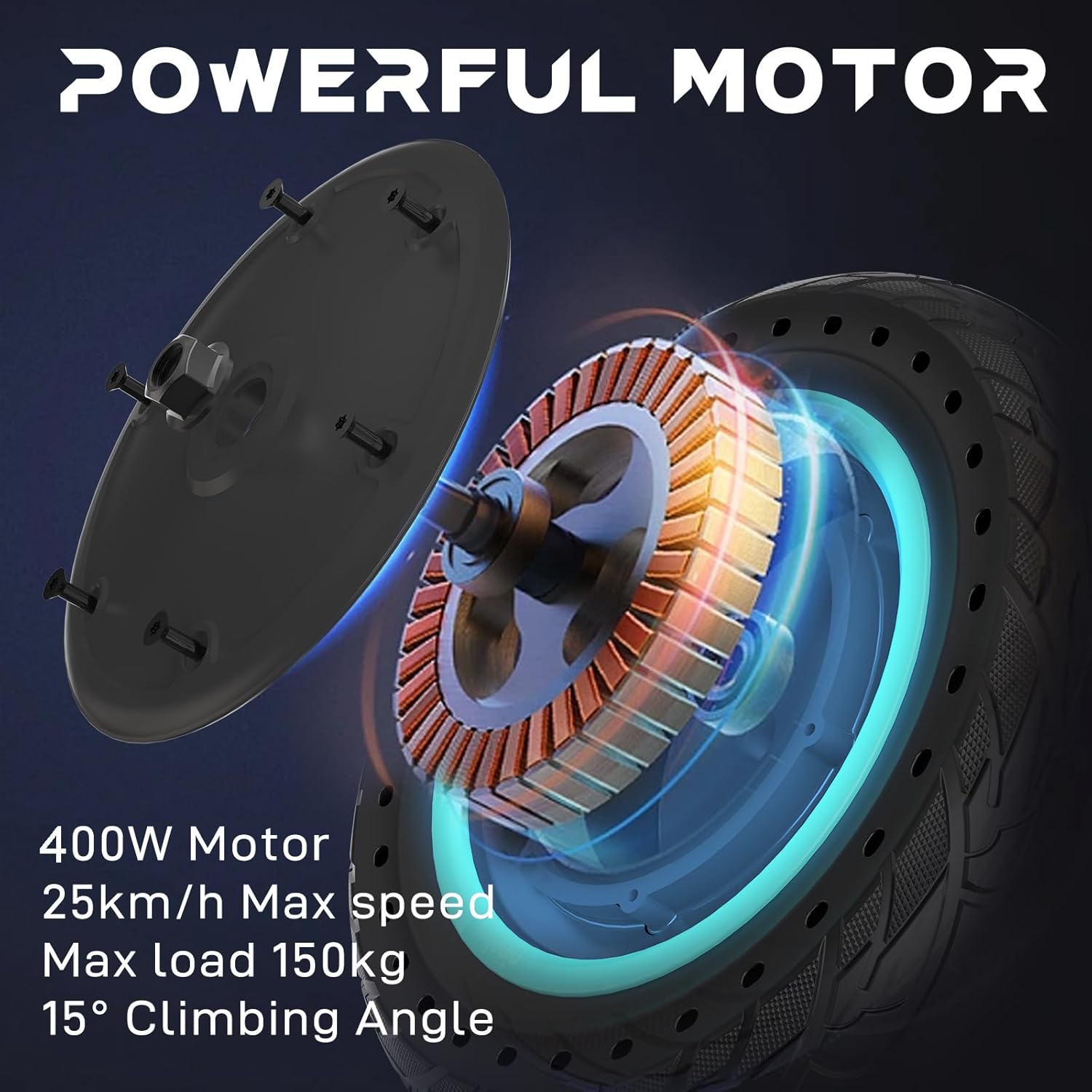
Image: An exploded view of the scooter's 400W motor, detailing its power, maximum speed (25 km/h), maximum load capacity (150 kg), and climbing angle (15°).
Warranty and Support
The RCB R19 Electric Scooter comes with a manufacturer's warranty. Please refer to the warranty card included in your package for specific terms and conditions. For any questions, technical support, or missing parts, please contact RCB EU STORE customer service. We provide 24-hour after-sales service.
Contact Information:
- Seller: RCB EU STORE
- Please refer to your purchase platform for direct contact methods.


