
Dyson Gen5outsize
Dyson Gen5outsize Cordless Vacuum Cleaner Instruction Manual
Model: Gen5outsize
Brand: Dyson
1. Introduction
The Dyson Gen5outsize cordless vacuum cleaner is engineered to provide powerful suction for deep cleaning larger spaces. It features a wider cleaner head and a larger bin for extended cleaning sessions. This manual provides essential information on the assembly, operation, maintenance, and troubleshooting of your Dyson Gen5outsize vacuum cleaner to ensure optimal performance and longevity.
2. Important Safety Information
Please read all instructions before using this appliance. Failure to follow these instructions may result in electric shock, fire, or serious injury.
- This appliance is intended for domestic use only. Do not use outdoors or on wet surfaces.
- Do not allow to be used as a toy. Close attention is necessary when used by or near children.
- Use only as described in this manual. Use only Dyson recommended attachments.
- Do not use with a damaged cord or plug. If appliance is not working as it should, has been dropped, damaged, left outdoors, or dropped into water, return it to a service center.
- Do not pull or carry by cord, use cord as a handle, close a door on cord, or pull cord around sharp edges or corners. Do not run appliance over cord. Keep cord away from heated surfaces.
- Do not unplug by pulling on cord. To unplug, grasp the plug, not the cord.
- Do not handle plug or appliance with wet hands.
- Do not put any object into openings. Do not use with any opening blocked; keep free of dust, lint, hair, and anything that may reduce air flow.
- Keep hair, loose clothing, fingers, and all parts of body away from openings and moving parts.
- Do not pick up anything that is burning or smoking, such as cigarettes, matches, or hot ashes.
- Do not use to pick up flammable or combustible liquids, such as gasoline, or use in areas where they may be present.
- Do not use without dust bin and/or filters in place.
- Turn off all controls before unplugging.
- Use extra care when cleaning on stairs.
3. What's in the Box
Your Dyson Gen5outsize cordless vacuum cleaner comes with the following components:
- Cordless vacuum unit
- Digital Motorbar™ XL cleaner head
- Fluffy Optic™ cleaner head
- Wand (extension tube)
- Combination tool
- Built-in dusting and crevice tool
- Hair screw tool
- Charger
- Docking Station
- Battery (2 included)
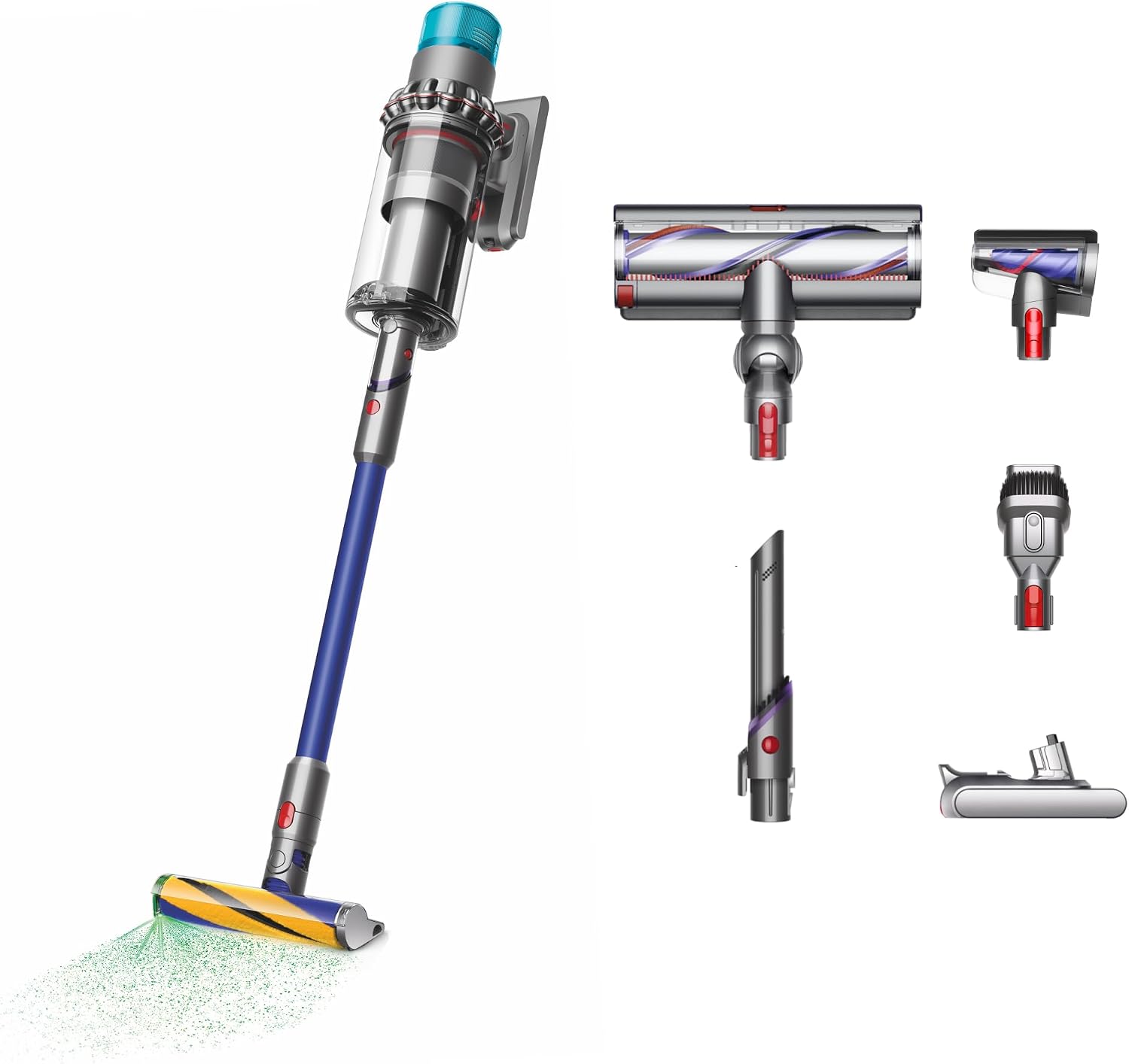
Image: All components included with the Dyson Gen5outsize, including the main vacuum unit, two cleaner heads, wand, various tools, charger, docking station, and two batteries.
4. Setup and Charging
4.1 Assembly
- Attach the Wand: Align the wand with the main body of the vacuum and push until it clicks securely into place.
- Attach a Cleaner Head: Select either the Digital Motorbar™ XL cleaner head for deep cleaning carpets and hard floors, or the Fluffy Optic™ cleaner head for hard floors to reveal invisible dust. Align your chosen cleaner head with the end of the wand and push until it clicks.
- Install Battery: Ensure the battery is fully charged before first use. Slide the battery into the base of the main vacuum unit until it clicks. Your Gen5outsize comes with two batteries for extended run time.
4.2 Charging
It is recommended to fully charge the battery before the first use. The vacuum can be charged directly or via the docking station.
- Direct Charging: Connect the charger cable directly to the charging port on the battery.
- Docking Station Charging: Mount the docking station to a wall in a convenient location near a power outlet. Connect the charger to the docking station, then place the vacuum onto the docking station.

Image: The Dyson Gen5outsize vacuum being docked into its wall-mounted charging station. This image also shows the no-touch bin emptying mechanism.
5. Operating Your Vacuum
5.1 Powering On and Off
Unlike previous Dyson models, the Gen5outsize features a power button for continuous cleaning without holding a trigger.
- Press the power button once to turn the vacuum on.
- Press the power button again to turn the vacuum off.
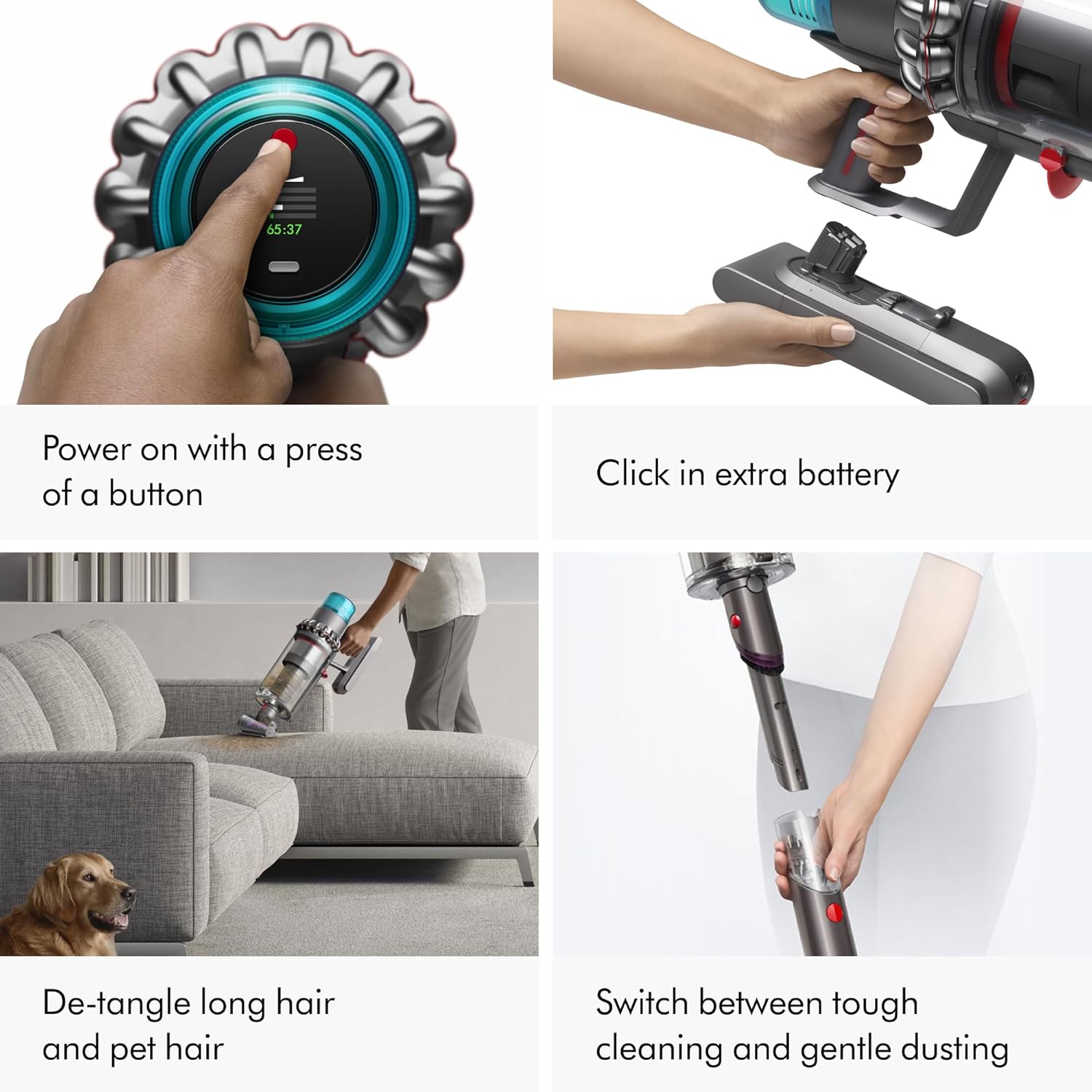
Image: A user's hand pressing the power button located on the LCD screen of the Dyson Gen5outsize, which displays battery life and cleaning modes.
5.2 Cleaning Modes
Your Dyson Gen5outsize offers three power modes to suit different cleaning tasks:
- Eco Mode: Provides the maximum run time for longer cleaning sessions on lighter debris.
- Auto Mode: Intelligently adapts suction power based on floor type and dust level, balancing power and run time. This is the recommended mode for everyday cleaning.
- Boost Mode: Delivers the most powerful suction for intensive spot cleaning and stubborn dirt. This mode will reduce battery run time.
You can switch between modes using the button on the LCD screen.

Image: The LCD screen of the Dyson Gen5outsize showing real-time particle count and the different cleaning modes (Eco, Auto, Boost) with their respective battery indicators.
5.3 Using Different Cleaner Heads and Tools
- Digital Motorbar™ XL cleaner head: Designed for deep cleaning carpets and hard floors. It automatically de-tangles hair as you clean.
- Fluffy Optic™ cleaner head: Features illumination technology to reveal invisible dust on hard floors, ensuring a thorough clean.
- Hair screw tool: Ideal for picking up long hair and pet hair from upholstery and tight spaces without tangling.
- Combination tool: A versatile tool that combines a wide nozzle and brush for quick switching between cleaning and dusting tasks.
- Built-in dusting and crevice tool: Integrated into the wand, this tool is always available for quick transitions to handheld cleaning in tight spots or for dusting.

Image: A split image showing the Digital Motorbar™ XL cleaner head effectively deep cleaning a floor and the Fluffy Optic™ cleaner head illuminating and revealing hidden dust on a hard surface.
6. Maintenance
6.1 Emptying the Bin
Empty the bin as soon as the dirt reaches the MAX level. For hygienic emptying, hold the machine over a bin and push the red lever to release the dirt.

Image: A user demonstrating the no-touch bin emptying process of the Dyson Gen5outsize, showing dirt falling directly into a waste bin.
6.2 Washing the Filter
The HEPA filter is washable and should be cleaned regularly to maintain optimal suction and filtration performance. Dyson recommends washing the filter at least once a month, or more frequently if used heavily.
- Twist the filter counter-clockwise to remove it from the main body of the vacuum.
- Wash the filter under cold running water until the water runs clear. Do not use detergents.
- Tap the filter gently to remove excess water.
- Leave the filter to dry completely for at least 24 hours in a warm, dry place. Do not dry in a tumble dryer, microwave, or near a naked flame.
- Once completely dry, reassemble the filter by twisting it clockwise back into the vacuum.

Image: A hand holding the teal-colored HEPA filter of the Dyson Gen5outsize under running water, demonstrating the washing process.
6.3 Cleaning Cleaner Heads and Tools
Regularly check cleaner heads and tools for blockages or debris. The brush bars can be removed for cleaning if necessary.
- To remove the brush bar from the Digital Motorbar™ XL cleaner head, use a coin to unlock the end cap.
- To remove the soft roller from the Fluffy Optic™ cleaner head, press the release button and slide it out.
- Clear any tangled hair or debris from the brush bars. Do not wash the brush bars.
- Reassemble once clean.
7. Troubleshooting
If you encounter issues with your Dyson Gen5outsize, refer to the following common problems and solutions:
| Problem | Possible Cause | Solution |
|---|---|---|
| No power / Vacuum not turning on | Battery not charged or not properly installed. | Ensure battery is fully charged and clicked securely into place. Check charger connection. |
| Reduced suction power | Bin is full, filter is dirty/blocked, or there is a blockage in the cleaner head/wand. | Empty the dust bin. Wash and thoroughly dry the filter. Check cleaner head, wand, and tools for blockages and remove any debris. |
| Cleaner head not spinning | Brush bar is jammed by debris or cleaner head is blocked. | Turn off the vacuum and remove any tangled hair or debris from the brush bar. Check for blockages in the cleaner head's airway. |
| Short run time | Using Boost mode frequently, battery not fully charged, or battery degradation. | Use Eco or Auto mode for longer run times. Ensure battery is fully charged. If battery life significantly degrades, contact Dyson support for replacement options. |
| LCD screen error message | Indicates a specific issue (e.g., blockage, filter warning). | Refer to the specific error code or message displayed on the screen and consult the MyDyson app or Dyson support for detailed instructions. |
8. Specifications
| Feature | Detail |
|---|---|
| Brand | Dyson |
| Model Name | Gen5outsize |
| Special Feature | Bagless, Cordless, Washable HEPA Filter, Illumination Technology, Large Bin Size, Extra Battery |
| Filter Type | HEPA Filter |
| Included Components | Combination tool, Built-in dusting and crevice tool, Hair screw tool, Digital Motorbar XL cleaner head, Fluffy Optic cleaner head, Cordless vacuum, Charger, Docking Station, Wand, Battery (2) |
| Is Cordless? | Yes |
| Capacity | 5.3 Cubic Inches |
| Wattage | 350 watts |
| Recommended Uses | All floor types |
| Color | Nickel/Blue |
| Product Dimensions | 10.87"L x 9.84"W x 47.76"H |
| Battery Type | Lithium-Ion |
| Battery Life (Max) | 140 minutes (actual runtime varies by mode and usage) |
| Item Weight | 8.6 pounds |
| UPC | 885609031149 |
| Item Model Number | 447923-01 |
9. Warranty and Support
Your Dyson Gen5outsize Cordless Vacuum Cleaner is covered by a 2-year warranty from the date of purchase, covering parts and labor for defects in materials and workmanship.
For personalized machine guides, maintenance tips, and direct support, we recommend registering your machine on the MyDyson™ app or the official Dyson website. Lifetime Dyson support is available for your product.
For warranty claims or technical assistance, please contact Dyson Customer Service through their official channels, which can be found on the Dyson website or within the MyDyson™ app.
Related documentsGen5outsize


Ask a question about this manual
Ask about setup, troubleshooting, compatibility, parts, safety, or missing instructions. Manuals+ will review the question and use this page’s manual context to help answer it.