
1. Introduction
The CYCPLUS C3 Cycling Speed and Cadence Sensor is a compact, dual-mode device designed to accurately measure your cycling speed or cadence. It supports both Bluetooth and ANT+ protocols, ensuring wide compatibility with various cycling computers, smartwatches, and fitness applications. Its IP67 waterproof rating makes it suitable for all weather conditions.

Figure 1: CYCPLUS C3 Speed and Cadence Sensor
2. Product Features
- BLUETOOTH & ANT+ MULTI-PROTOCOL: Supports all kinds of equipment and applications that collect speed or cadence data via Bluetooth or ANT+.
- ULTRA SMALL DESIGN & LONG ENDURANCE: Measures only 38mm x 29.5mm x 9.5mm and weighs only 9.2g. Designed not to affect bike appearance or increase cycling burden. Offers approximately 300 hours of using time and 300 days of standby time. Automatically enters SLEEP MODE when not in motion.
- DUAL-MODE SENSOR: Quickly switch between cadence and speed sensor modes by toggling the switch to different positions.
- EASY INSTALLATION: Easily attaches to your bike with included elastic bands and double-sided tape. No magnet or calibration needed. Mounts to any bike's wheel hub for speed or crank for cadence.
- IP67 Waterproof: Designed to withstand rain and splashes, ensuring reliable performance in various weather conditions.

Figure 2: IP67 Waterproofing
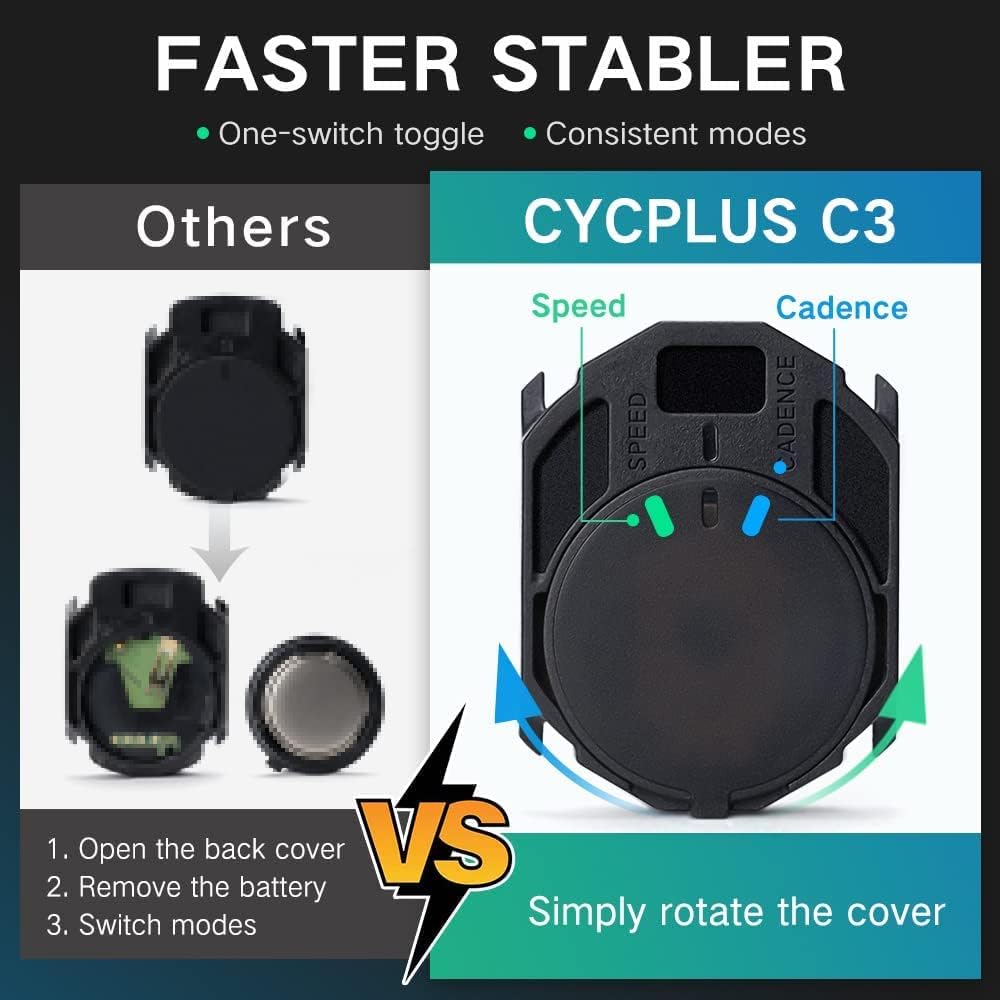
Figure 3: Easy Mode Switching
3. Setup and Installation
The CYCPLUS C3 sensor can function as either a speed sensor or a cadence sensor. The mode is selected by rotating the battery cover. A blue light indicates speed mode, and a green light indicates cadence mode.
3.1. Mode Selection
- Open the battery cover by gently prying it open or rotating it counter-clockwise if it's a twist-lock design.
- Observe the internal switch or indicator.
- To select Speed Mode, ensure the internal switch is aligned with the 'S' marking or rotate the cover until the blue light flashes upon activation.
- To select Cadence Mode, ensure the internal switch is aligned with the 'C' marking or rotate the cover until the green light flashes upon activation.
- Close the battery cover securely.
3.2. Installation as Speed Sensor
- Ensure the sensor is in Speed Mode (blue light).
- Attach the sensor to the wheel hub using the provided elastic band. For curved hubs, use the curved rubber mat between the sensor and the hub for a secure fit.
- Ensure the sensor is firmly attached and does not interfere with wheel rotation.
3.3. Installation as Cadence Sensor
- Ensure the sensor is in Cadence Mode (green light).
- Attach the sensor to the inside of the crank arm using the provided elastic band. For flat crank arms, use the flat rubber mat between the sensor and the crank for a secure fit.
- Ensure the sensor is firmly attached and does not interfere with pedaling.

Figure 4: Installation Guide for Speed and Cadence Modes
3.4. Official Installation Video
Video 1: How to Use C3. This video demonstrates the mode switching and installation process for both speed and cadence modes, as well as pairing with a cycling computer.
4. Operation
4.1. Activating the Sensor
The sensor will automatically activate when motion is detected. For speed mode, rotate the wheel. For cadence mode, rotate the crank arm. The indicator light (blue for speed, green for cadence) will flash to confirm activation.
4.2. Pairing with Devices
The CYCPLUS C3 sensor supports both Bluetooth and ANT+ connections. Ensure your receiving device (cycling computer, smartwatch, or smartphone app) has Bluetooth or ANT+ enabled.
- Activate the sensor by rotating the wheel or crank arm.
- On your cycling computer or fitness app, navigate to the sensor pairing menu.
- Select to add a new speed or cadence sensor. The device should detect the CYCPLUS C3.
- Confirm the pairing on your device. Once paired, the sensor's data will be displayed.
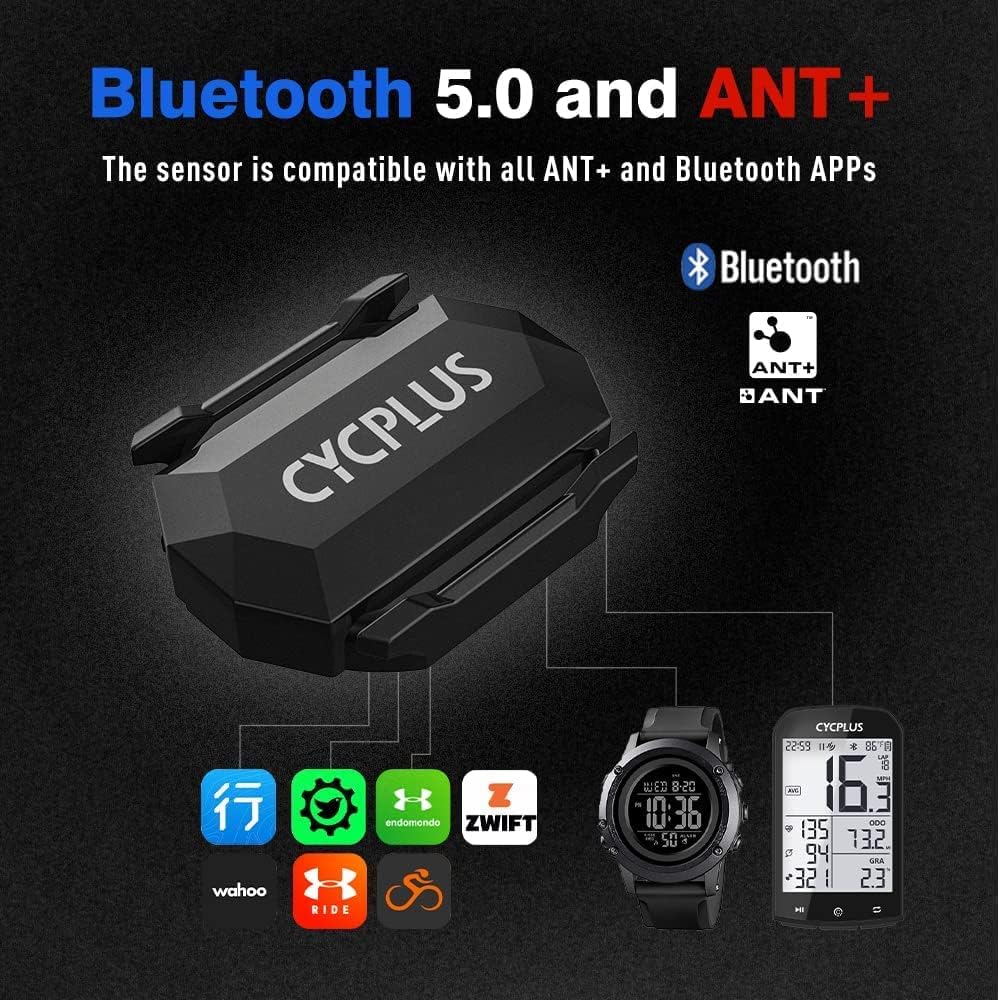
Figure 5: Bluetooth and ANT+ Compatibility
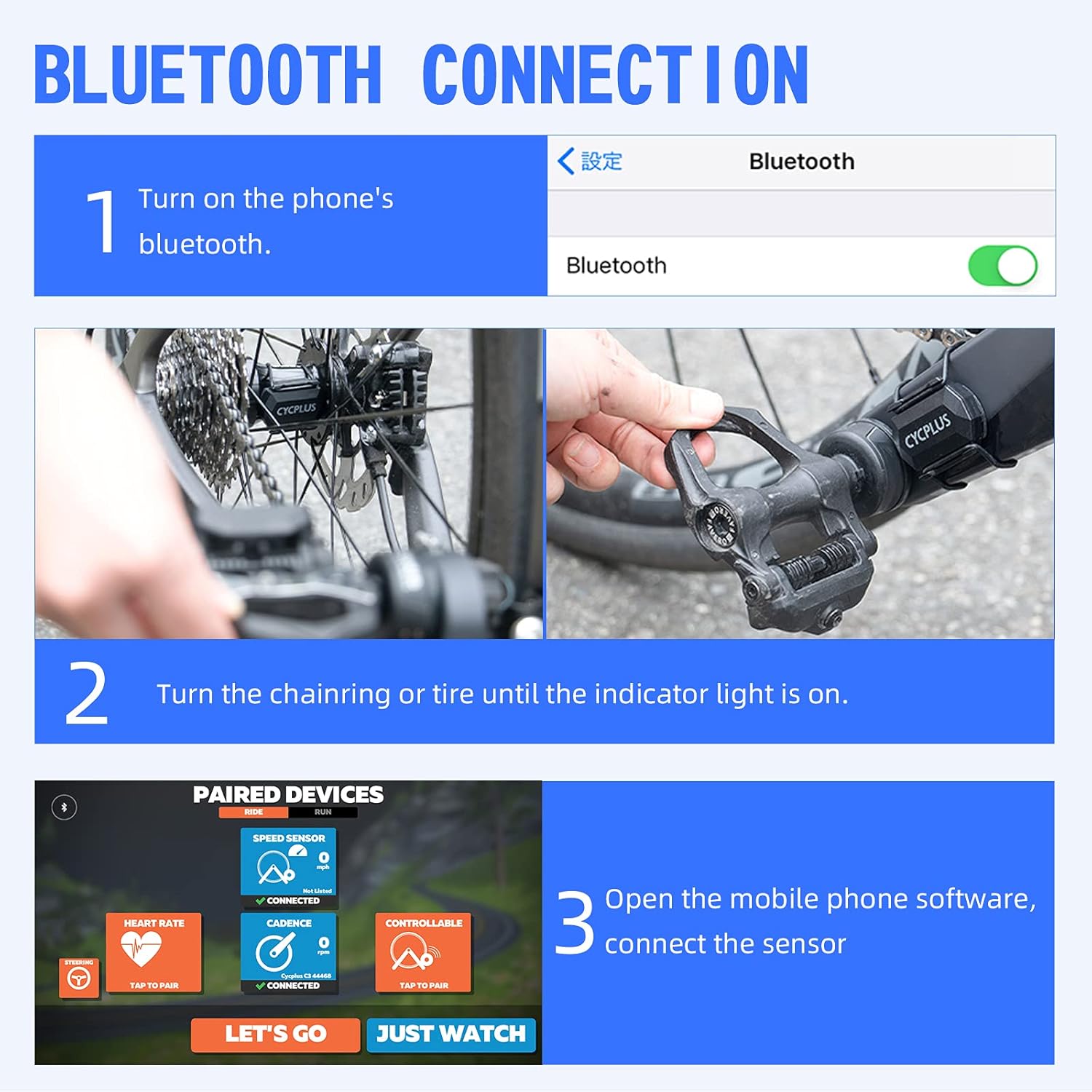
Figure 6: Bluetooth Connection Steps
5. Maintenance
5.1. Battery Replacement
The sensor uses a CR2032 button cell battery. When the indicator light no longer flashes or the sensor fails to connect, it's time to replace the battery.
- Locate the battery cover on the back of the sensor.
- Use a coin or a small flat tool to gently pry open or twist the battery cover counter-clockwise until it can be removed.
- Remove the old CR2032 battery.
- Insert a new CR2032 battery with the positive (+) side facing up.
- Replace the battery cover, ensuring it is securely closed to maintain waterproofing.

Figure 7: Battery Information
5.2. Cleaning
Wipe the sensor with a soft, damp cloth as needed. Do not use abrasive cleaners or solvents, as they may damage the device.
6. Troubleshooting
- Sensor not activating: Ensure the sensor is properly installed and motion (wheel or crank rotation) is sufficient to wake it up. Check battery level.
- Cannot pair with device:
- Ensure the sensor is active and within range of your device.
- Check if Bluetooth/ANT+ is enabled on your device.
- Verify the sensor is in the correct mode (speed or cadence) for the data you are trying to receive.
- Restart both the sensor (by removing and reinserting the battery) and your receiving device.
- Note: The Bluetooth of this product can only be applied to corresponding fitness apps (e.g., Zwift) and cannot be directly connected to a mobile phone's general Bluetooth settings due to protocol differences.
- Inaccurate readings: Ensure the sensor is securely mounted and not shifting during use. Check for any obstructions.
- Intermittent connection: Ensure there are no strong electromagnetic interferences nearby. Check battery level.
7. Specifications
| Attribute | Value |
|---|---|
| Model Name | C3 |
| Brand | CYCPLUS |
| Color | Black |
| Item Weight | 0.32 Ounces |
| Item Dimensions LxWxH | 1.49 x 1.16 x 0.37 inches (38mm x 29.5mm x 9.5mm) |
| Lithium Battery Energy Content | 0.2 Watt Hours |
| Specific Uses For Product | Speed Sensor, Cadence Sensor |
| Included Components | 1x Speed Cadence sensor, 1x Battery, 2x Rubber band, 1x Curved rubber mat (For speed sensor), 1x Flat rubber mat (For cadence sensor), 1x User guide |
8. Warranty and Support
All CYCPLUS products come with a two-year warranty from the date of purchase. If you encounter any problems using the product during this period, please feel free to contact us. Our customer service team is available to assist with repair and replacement inquiries.
For support, please refer to the contact information provided with your product packaging or visit the official CYCPLUS store on Amazon.


