
1. Product Overview
The ThermoPro TP605 is a digital instant-read thermometer designed for accurate temperature measurement of various foods. Its features include a fast response time, wide temperature range, and a waterproof design for easy cleaning.
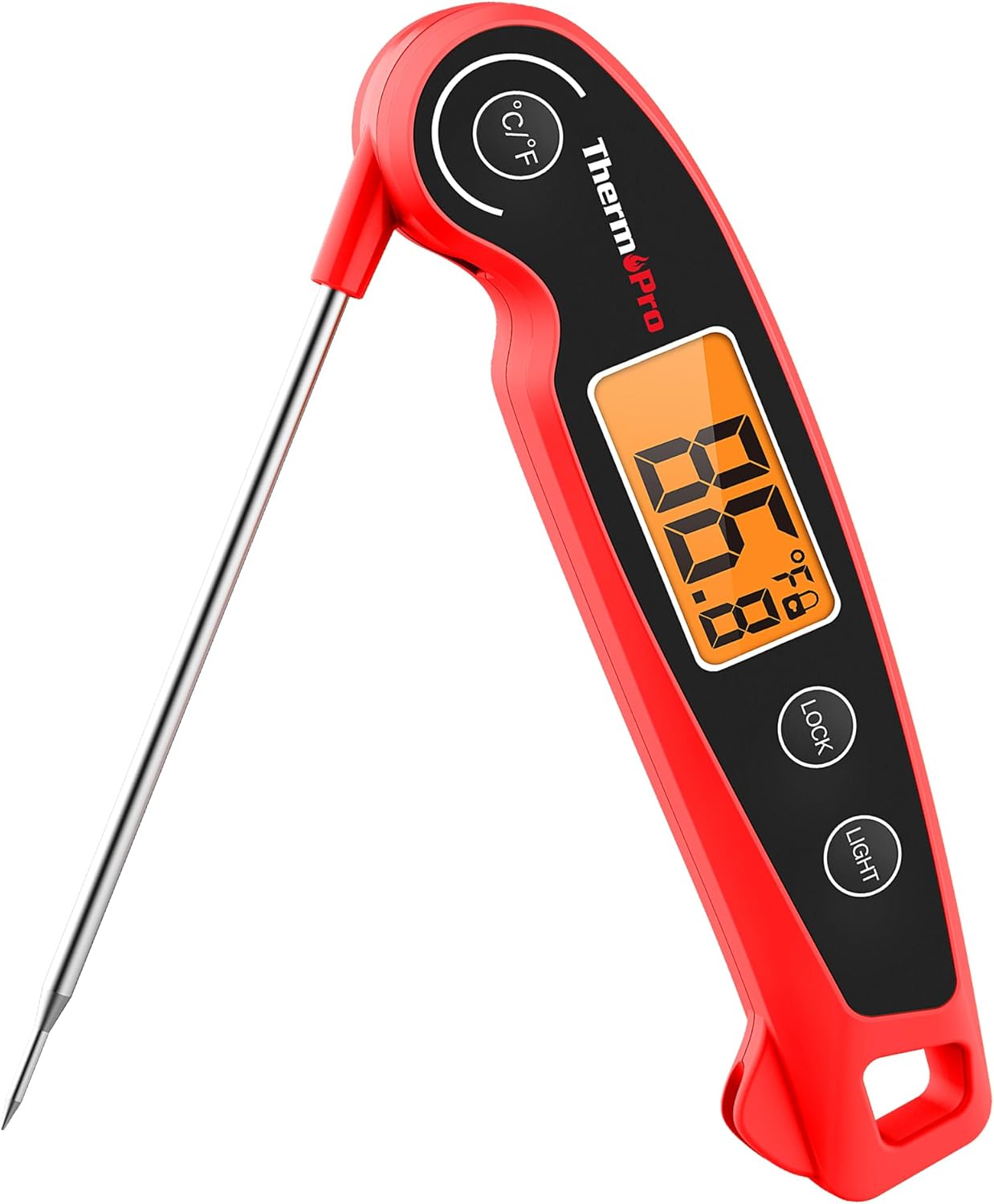
Image 1.1: ThermoPro TP605 Instant Read Meat Thermometer. This image displays the thermometer in its open position, showing the digital display and the stainless steel probe extended.
Key Features:
- Quick and Accurate Readings: Measures temperature with an accuracy of ±1.8°F (±1°C) in 2-3 seconds.
- Wide Measuring Range: Operates from -58°F to 572°F (-50°C to 300°C).
- 180° Foldaway Probe: The temperature probe can be adjusted to various angles for user convenience and folds away for safe storage.
- IPX6 Waterproof: Designed to withstand splashes and can be cleaned under running water.
- Large Backlit LCD Display: Provides clear temperature readings, even in low-light conditions.
- Temperature Lock Function: Allows users to hold the temperature reading after removing the probe from food.
- Auto-Sleep: Automatically shuts off after 10 seconds of inactivity to conserve battery life.
- User Calibration Function: Enables recalibration to maintain accuracy over time.
- Magnetic Back and Hanging Mount: Offers versatile storage options.

Image 1.2: Key performance indicators of the ThermoPro TP605, highlighting its measurement range, rapid response time, and accuracy.
Product Components:
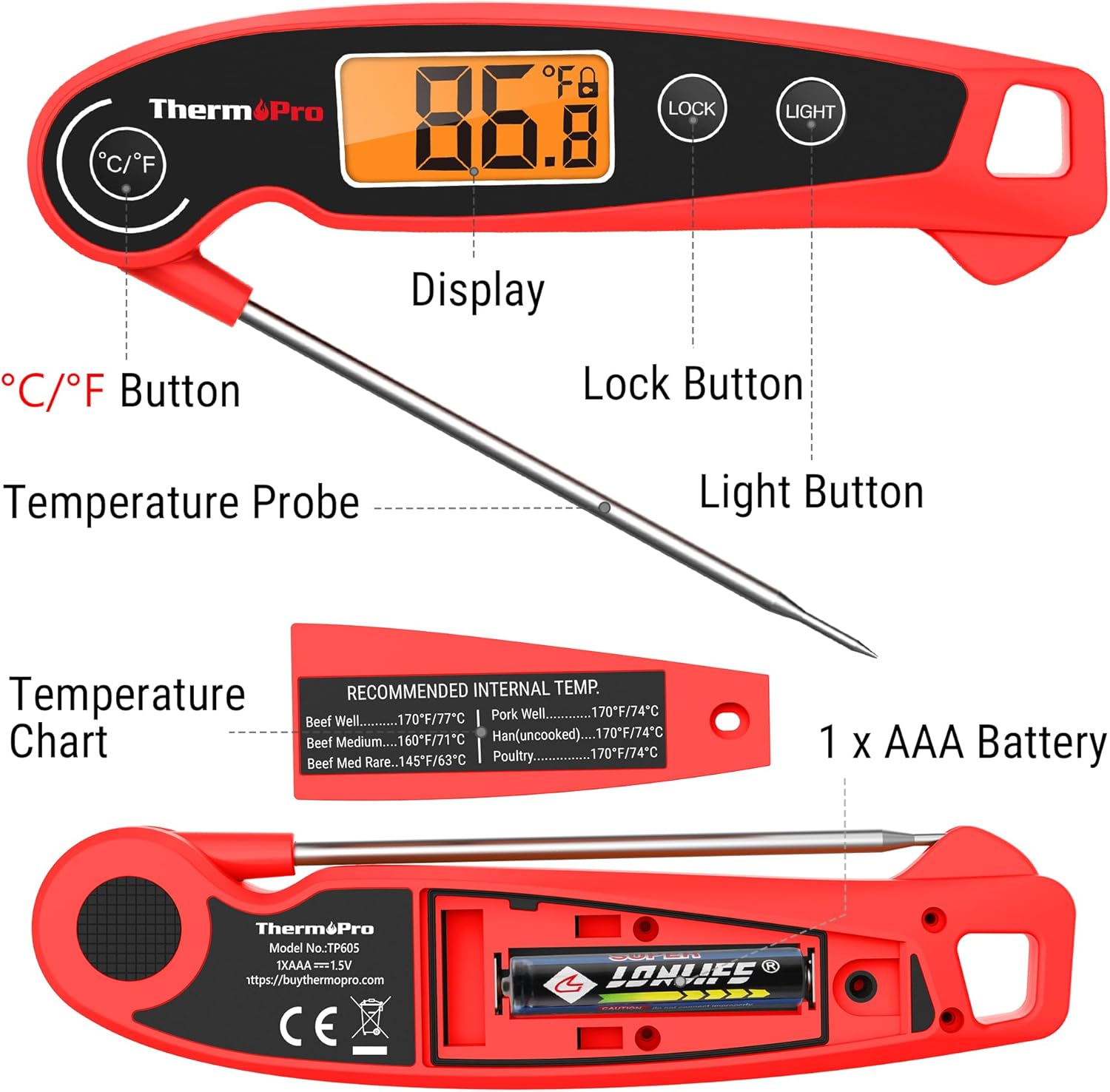
Image 1.3: Diagram illustrating the various components of the ThermoPro TP605, including the display, probe, buttons, battery compartment, and integrated temperature chart.
- °C/°F Button: Press to switch between Celsius and Fahrenheit.
- Temperature Probe: Stainless steel probe for temperature measurement.
- Display: Large LCD screen showing temperature readings.
- Lock Button: Press to hold the current temperature reading.
- Light Button: Activates the backlight for the display.
- Temperature Chart: Printed on the back for quick reference of recommended internal temperatures.
- Battery Compartment: Holds 1 AAA battery.
2. Setup
Battery Installation
The ThermoPro TP605 requires one AAA battery (included). To install or replace the battery:
- Locate the battery compartment cover on the back of the thermometer.
- Use a small screwdriver (included) to open the battery compartment.
- Insert one AAA battery, ensuring the correct polarity (+/-) as indicated inside the compartment.
- Replace the battery compartment cover and secure it with the screw.
3. Operating Instructions
Power On/Off
- To power on the thermometer, simply unfold the stainless steel probe from the body. The display will activate automatically.
- To power off the thermometer, fold the probe back into the body. The display will turn off.

Image 3.1: Illustration of the thermometer's intelligent design, showing how unfolding the probe turns it on, the auto-sleep function, and the 180° adjustable probe angle.
Taking a Temperature Reading
- Unfold the probe to power on the device.
- Insert the tip of the stainless steel probe into the thickest part of the food, avoiding bone or gristle.
- Wait for 2-3 seconds for the temperature reading to stabilize on the LCD display.
- Once the reading is stable, remove the probe from the food.
Temperature Lock Function
The Temperature Lock function allows you to hold the current temperature reading on the display, which is useful when measuring temperatures in hard-to-reach areas or when you need to read the temperature away from the heat source.
- While the probe is inserted and displaying a temperature, press the LOCK button. The current temperature will be held on the display.
- Press the LOCK button again to release the held temperature and resume live temperature readings.

Image 3.2: Demonstrates the Temperature Lock function for reading temperatures away from heat, and the clear backlit LCD display for visibility in low-light conditions.
Changing Temperature Units (°C/°F)
To switch between Celsius (°C) and Fahrenheit (°F) temperature units:
- With the thermometer powered on, press the °C/°F button located on the front of the device.
- The display will switch to the selected temperature unit.
Backlight Function
The backlight illuminates the LCD display for improved visibility in dim environments.
- Press the LIGHT button to activate the backlight.
- The backlight will remain on for a few seconds before automatically turning off to conserve battery.
Auto-Sleep Feature
To extend battery life, the ThermoPro TP605 will automatically enter sleep mode after 10 seconds of inactivity (no button presses or significant temperature changes). To reactivate, simply unfold the probe or press any button.
Calibration Function
The calibration function allows you to adjust the thermometer's accuracy over time. It is recommended to calibrate the thermometer using an ice-water bath.
- Prepare an ice-water bath by filling a glass with crushed ice and topping it with cold water. Stir well.
- Insert the thermometer probe into the ice-water bath, ensuring the tip is fully submerged but not touching the bottom or sides of the glass.
- Wait for the reading to stabilize (it should be close to 32°F or 0°C).
- Refer to the full instruction manual for specific steps on how to enter calibration mode and adjust the reading if necessary. This typically involves pressing and holding certain buttons.

Image 3.3: Demonstrates the thermometer's calibration function, showing the probe in a glass of ice water, indicating a reading of 32.0°F.
4. Maintenance and Care
Cleaning
The ThermoPro TP605 features an IPX6 waterproof rating, allowing for easy cleaning.
- After each use, clean the stainless steel probe with a damp cloth and mild soapy water.
- The entire thermometer can be rinsed under running water. Avoid submerging the entire unit for extended periods.
- Dry the thermometer thoroughly before storing.
- Do not place the thermometer in a dishwasher.

Image 4.1: Demonstrates the IPX6 waterproof capability of the ThermoPro TP605, showing it being rinsed under a faucet.
Storage
Proper storage helps maintain the thermometer's condition and extends its lifespan.
- Always fold the probe back into the body before storing to protect it.
- The thermometer features a magnetic back, allowing it to be conveniently stored on metallic surfaces like refrigerators or oven hoods.
- A hanging mount is also integrated for storage on hooks.

Image 4.2: Illustrates the portable design, magnetic back for refrigerator attachment, and hanging mount for easy storage of the ThermoPro TP605.
5. Troubleshooting
- No Display or Fading Display:
This usually indicates a low battery. Replace the AAA battery following the instructions in the "Battery Installation" section.
- "888" Error Message:
An "888" error often signifies a battery issue or a need for battery replacement. Ensure the battery is correctly installed and has sufficient charge.
- Inaccurate Readings:
If you suspect inaccurate readings, perform a calibration using an ice-water bath as described in the "Calibration Function" section. Ensure the probe is inserted into the thickest part of the food and not touching bone or the cooking vessel.
- Probe Not Responding:
Ensure the probe is fully unfolded and locked into position. If the issue persists, contact customer support.
6. Specifications
| Feature | Specification |
|---|---|
| Temperature Range | -58°F to 572°F (-50°C to 300°C) |
| Accuracy | ±1.8°F (±1°C) |
| Response Time | 2-3 seconds |
| Waterproof Rating | IPX6 |
| Display Type | Digital LCD with Backlight |
| Power Source | 1 x AAA Battery (included) |
| Auto-Off | 10 minutes of inactivity |
| Probe Material | Stainless Steel |
| Certifications | CE, FCC, NSF |

Image 6.1: Displays the certifications for the ThermoPro TP605, including NSF, CE, and RoHS compliance, indicating safety and quality standards.
7. Warranty and Support
ThermoPro products are designed for reliability and performance. For warranty information, technical support, or any questions regarding your ThermoPro TP605 thermometer, please contact ThermoPro customer service.
- Website: buythermopro.com
- Email: Refer to the product packaging or website for specific contact email.
- Phone: Refer to the product packaging or website for specific contact phone number.
Please have your model number (TP605) and purchase date available when contacting support.


