
VEGER V1115
VEGER Portable Charger V1115 User Manual
Model: V1115 | Brand: VEGER
1. Introduction
Thank you for choosing the VEGER V1115 Portable Charger. This manual provides essential information for the safe and efficient use of your device. Please read it thoroughly before operation and retain it for future reference.
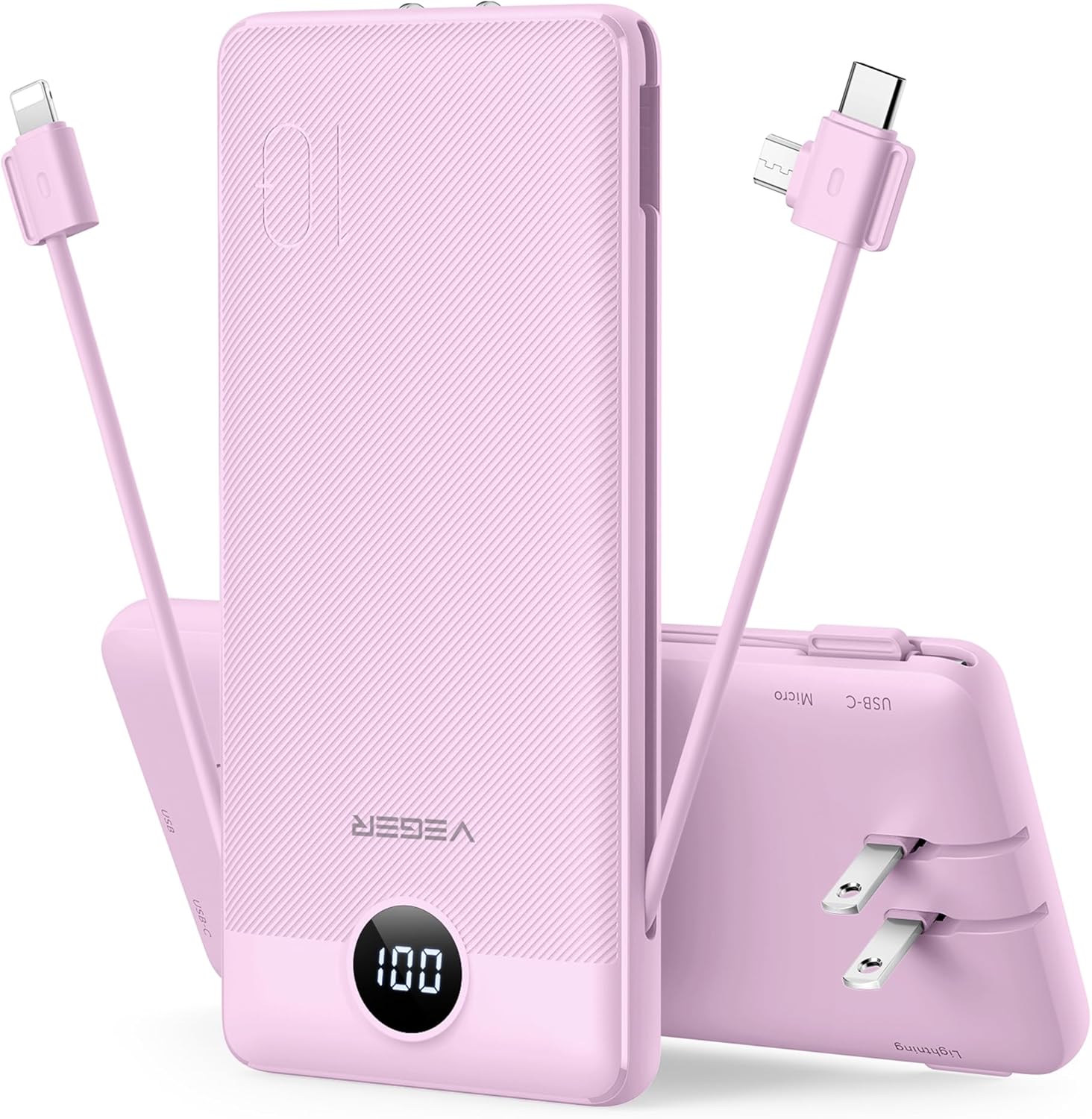
Image: The VEGER V1115 Portable Charger, highlighting its compact design and integrated charging solutions.
2. Product Overview and Features
The VEGER V1115 is a versatile 10000mAh portable power bank designed for convenience and universal compatibility. Key features include:
- Built-in Cables: Equipped with integrated Micro USB, USB-C, and Lightning cables, eliminating the need to carry separate charging cords.
- Integrated AC Wall Plug: Features a foldable AC wall plug for direct recharging from any standard wall outlet.
- Multiple Device Charging: Offers four output options (built-in cables, USB-C port, USB-A port) to charge up to four devices simultaneously.
- High Capacity: A 10000mAh battery capacity provides multiple charges for various devices.
- Compact and Portable: Slim design (5.9 x 2.7 x 0.72 inches, 8 oz) for easy portability.
- Universal Compatibility: Compatible with a wide range of devices including iPhones, iPads, Samsung, Google Pixel, and other tablets.
- Comprehensive Protections: Built-in safeguards against short circuit, over current, over voltage, and over heat.

Image: An overview of the VEGER V1115's various charging interfaces, including the AC plug and built-in cables.
3. Setup
3.1 Initial Charging of the Power Bank
Before first use, fully charge your VEGER V1115 portable charger. There are two methods for recharging:
- Using the Built-in AC Wall Plug: Fold out the integrated AC wall plug and insert it directly into a standard wall outlet. The digital display will show the charging progress.
- Using the USB-C Input Port: Connect a USB-C cable (not included) to the USB-C input port on the power bank and plug the other end into a USB wall adapter or computer USB port.
A full charge typically takes approximately 6 hours via the wall plug or 5 hours via the USB-C port.

Image: Demonstrates the two methods for recharging the power bank: directly from a wall outlet or via a USB-C cable.
4. Operating Instructions
4.1 Charging Your Devices
The VEGER V1115 offers multiple ways to charge your electronic devices:
- Using Built-in Cables: Extend the appropriate built-in cable (Micro USB, USB-C, or Lightning) and connect it directly to your device's charging port.
- Using USB-C Output Port: Connect your device's USB-C charging cable to the power bank's USB-C output port.
- Using USB-A Output Port: Connect your device's USB-A charging cable to the power bank's USB-A output port.
The power bank will automatically begin charging your device once connected. The digital display will show the remaining battery percentage of the power bank.
4.2 Simultaneous Charging
You can charge up to four devices concurrently using a combination of the built-in cables and the USB-C/USB-A output ports. The power bank will distribute power efficiently among the connected devices.

Image: The power bank actively charging multiple devices, demonstrating its multi-output capability.
4.3 Checking Battery Level
The integrated digital display on the power bank shows the precise percentage of remaining battery charge. This allows you to monitor the power bank's status at a glance.
5. Maintenance
To ensure the longevity and optimal performance of your VEGER V1115 Portable Charger, follow these maintenance guidelines:
- Cleaning: Use a soft, dry cloth to clean the exterior of the power bank. Avoid using harsh chemicals, solvents, or abrasive cleaners.
- Storage: Store the power bank in a cool, dry place away from direct sunlight, extreme temperatures, and high humidity.
- Battery Care: For best battery health, avoid fully discharging the power bank regularly. Recharge it when the battery level is low. If storing for extended periods, charge it to about 50-70% every three months.
- Handle with Care: Avoid dropping the device or subjecting it to strong impacts, which can damage internal components.
6. Troubleshooting
If you encounter issues with your VEGER V1115, please refer to the following common solutions:
| Problem | Possible Cause | Solution |
|---|---|---|
| Power bank not charging | Loose connection, faulty cable/adapter, power bank fully charged. | Ensure secure connections. Try a different wall outlet or USB-C cable/adapter. Check digital display for 100%. |
| Device not charging from power bank | Power bank low on charge, loose connection, incompatible device, faulty cable. | Recharge the power bank. Ensure secure connection. Verify device compatibility. Try a different cable or port. |
| Slow charging | Using non-fast charging port/cable, multiple devices connected, device's charging limit. | Ensure you are using the appropriate port for fast charging. Disconnect other devices. Some devices have slower charging limits. |
| Power bank feels warm during use | Normal operation during charging/discharging. | This is normal. If it becomes excessively hot or emits smoke/odor, disconnect immediately and contact support. |
If the problem persists after attempting these solutions, please contact VEGER customer service for further assistance.
7. Specifications
Detailed specifications for the VEGER V1115 Portable Charger:
- Model Number: V1115
- Battery Capacity: 10000 Milliamp Hours (mAh)
- Product Dimensions: 5.9 x 2.7 x 0.72 inches
- Item Weight: 8 ounces
- Battery Type: 1 Lithium Polymer battery (included)
- Input (AC Wall Plug): 100-240VAC, 50/60 Hz
- Input (USB Type C): 5V/3A
- Output (Built-in Cables): 5V/2.4A (Micro USB, USB-C, Lightning)
- Output (USB Type C Port): 5V/3A
- Output (USB Type A Port): 5V/3A
- Special Features: Built-in Cables, Foldable AC Wall Plug, Digital Display
- Color: E Purple (as per this model variant)

Image: The compact dimensions of the power bank, shown in comparison to a typical smartphone.
8. Warranty and Support
Your VEGER V1115 Portable Charger comes with a worry-free 12-month guarantee from the date of purchase. This warranty covers manufacturing defects and ensures reliable performance.
For any questions, concerns, or technical support, please contact VEGER customer service. Our team is available 7 days a week, 24 hours a day to provide friendly and prompt assistance.
Please refer to your product packaging or the VEGER official website for the most current contact information.
Related documentsV1115


Ask a question about this manual
Ask about setup, troubleshooting, compatibility, parts, safety, or missing instructions. Manuals+ will review the question and use this page’s manual context to help answer it.