
1. Introduction
Welcome to the ieGeek ZS-GX3S Outdoor Wireless Solar Security Camera user manual. This guide provides detailed instructions to help you set up, operate, and maintain your security camera effectively. The ieGeek ZS-GX3S is designed for outdoor surveillance, featuring 3MP high-definition video, color night vision, AI human detection, two-way audio, and IP65 weather resistance, powered by an efficient solar panel for continuous operation.
2. Product Overview
Key Features
- Long-lasting Battery & 100% Wireless: Equipped with a high-efficiency solar panel (over 90% efficiency) and a long-lasting battery, ensuring continuous operation for 365 days with just 3 days of strong direct sunlight per week. Supports 2.4GHz WiFi only, with enhanced antenna for stable signal transmission.
- 130° Wide Angle & 3MP High-Quality Color Night Vision: Features a 1/4 color CMOS sensor for 3-megapixel resolution, capturing clear details like faces and license plates. The 130° wide-angle lens covers essential areas like entrances, backyards, and garages. Includes 3 infrared lights and 2 white LED lights for color night vision when human motion is detected, providing clear images even at night.
- AI Human Detection & Storage Options: PIR heat sensor detects human motion, reducing false alarms. Customizable detection areas trigger immediate smartphone notifications and recording. Optional AI image analysis (paid feature) categorizes detected objects (people, pets, vehicles, packages) for efficient video search. Supports up to 128GB MicroSD card (sold separately) for continuous loop recording and free cloud storage (6-second recording, 7-day loop) to prevent data loss.
- Two-Way Talk & Family Sharing & Alexa Compatibility: Built-in speaker and microphone with noise-canceling technology enable smooth two-way communication. Share camera access with family and friends via QR code. Compatible with Alexa for voice control, allowing easy viewing of camera footage.
- IP65 Waterproof & Easy Installation: IP65 dustproof and waterproof rating ensures reliable operation in various weather conditions. Battery-powered design eliminates the need for wiring. Upgraded from Type-B to Type-C power cord for stable and robust connection.

Image: ieGeek ZS-GX3S Outdoor Wireless Solar Security Camera with its solar panel.
3. Setup Guide
3.1 Package Contents
Before you begin, please ensure all items are present:
- Battery-powered Security Camera x 1
- Solar Panel x 1
- Stand x 1
- Screws x 6
- Anchors x 6
- Power Cable x 1
3.2 Physical Installation
The camera and solar panel are designed for easy installation. Choose a location that provides optimal sunlight for the solar panel and a clear view for the camera.
Video: Instructions on installing the camera base and solar panel.
Video: Guide for installing a security camera.
3.3 App Installation and Connection
To connect your camera to your smartphone, download the ieGeek Cam app from your device's app store. Follow the in-app instructions to pair your camera.
- Ensure your camera is fully charged before initial setup.
- Power on the camera by pressing and holding the power button until the red light blinks slowly.
- Open the ieGeek Cam app and tap 'Add Device'.
- Select your camera model and follow the prompts to connect to your 2.4GHz Wi-Fi network. (5GHz Wi-Fi is not supported).
- Scan the QR code displayed on your phone with the camera lens. A 'bugu' sound indicates successful scanning.
- Once connected, the indicator light will turn blue.
Video: Detailed steps for camera setup and app connection.
4. Operating Instructions
4.1 Live View and Two-Way Audio
Access the live feed of your camera through the ieGeek Cam app. The built-in microphone and speaker allow for real-time two-way communication with visitors or to deter intruders.

Image: Demonstrates two-way audio communication with a delivery person.
4.2 Motion Detection and Alerts
The camera utilizes a PIR sensor for human motion detection, minimizing false alarms from pets or vehicles. When motion is detected in the configured area, you will receive instant notifications on your smartphone, and recording will begin.

Image: Illustrates PIR human detection with highlighted detection zones.
For enhanced security, the camera can activate a sound and light alarm to deter unwanted visitors upon detection.

Image: Shows the camera activating a sound and light alarm to deter an intruder.
4.3 Night Vision
The ieGeek ZS-GX3S features advanced color night vision, allowing you to see clear, full-color images even in low-light conditions. This is achieved through its infrared and white LED lights, providing detailed footage for identification.

Image: Depicts the camera's color night vision capability, showing a clear image at night.
4.4 Recording and Storage
The camera supports local storage via a MicroSD card (up to 128GB, sold separately) and offers free cloud storage for 6-second event recordings with a 7-day loop. This dual storage option ensures your footage is securely saved.
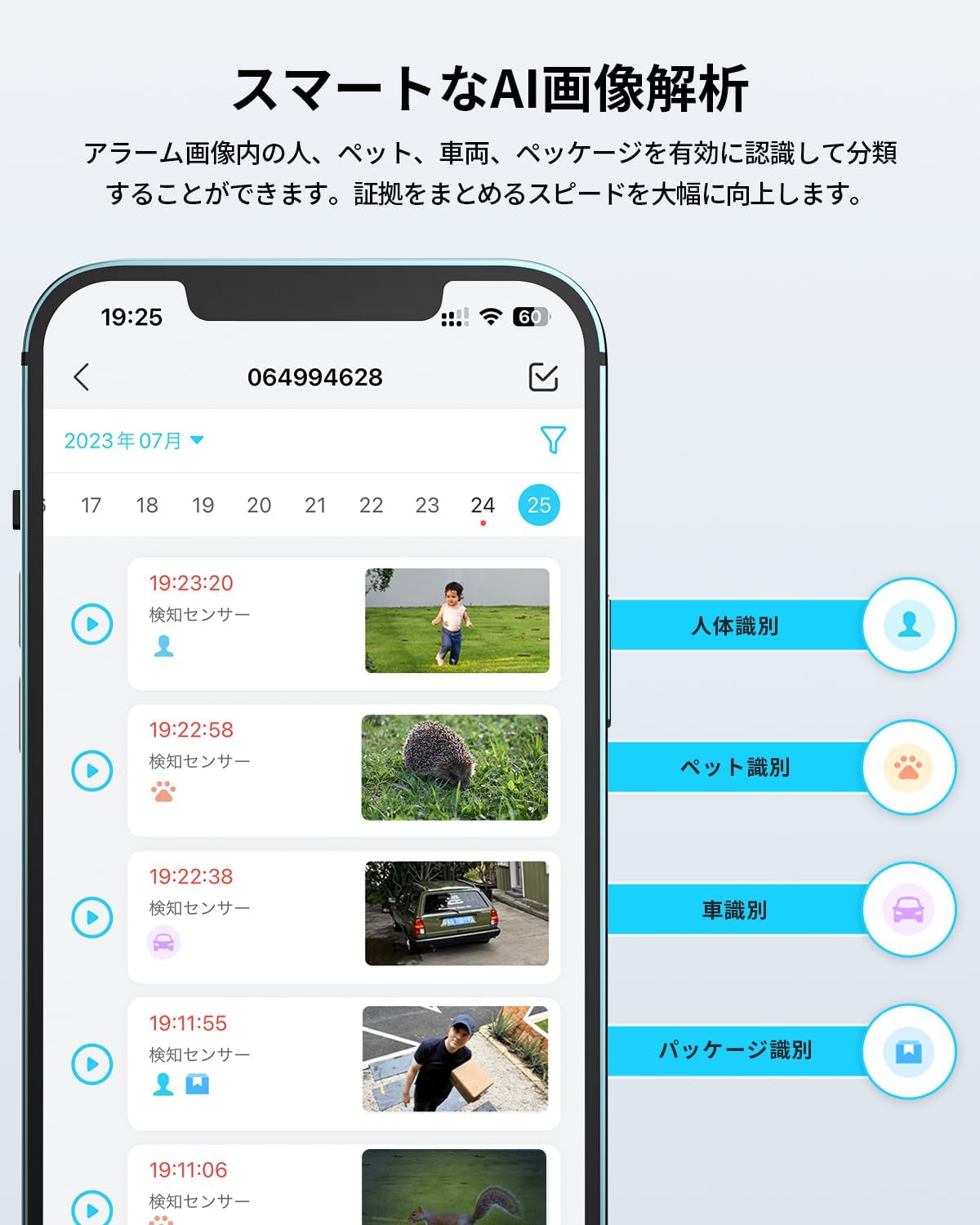
Image: Close-up of the camera showing the MicroSD card slot.

Image: Smartphone app interface displaying live camera view and recording options.
5. Maintenance
5.1 Power Management
The ieGeek ZS-GX3S camera is powered by a built-in battery and an external solar panel. Ensure the solar panel is positioned to receive maximum direct sunlight to maintain continuous power and minimize the need for manual charging.
Image: The camera connected to its solar panel, illustrating solar charging.
5.2 Weather Resistance
With an IP65 waterproof and dustproof rating, the camera is built to withstand various outdoor weather conditions, including hot summers, rain, and snow. Regular cleaning of the lens and solar panel is recommended to ensure optimal performance.

Image: The camera operating reliably in rainy conditions, highlighting its IP65 rating.
6. Troubleshooting
If you encounter any issues with your ieGeek ZS-GX3S camera, please refer to the following common solutions:
- Camera not connecting to Wi-Fi: Ensure your Wi-Fi is 2.4GHz. Check Wi-Fi signal strength at the camera's location. Try resetting the camera by pressing the reset button for 5 seconds.
- Battery draining quickly: Verify the solar panel is receiving sufficient direct sunlight. Adjust motion detection sensitivity and recording duration in the app to conserve power.
- False alarms: Adjust PIR sensitivity settings in the app. Define specific detection zones to exclude areas with frequent non-human motion.
- No recording: Check if the MicroSD card is inserted correctly and formatted. Verify cloud storage settings in the app.
- Poor image quality: Ensure the camera lens is clean. Check your Wi-Fi connection speed.
For further assistance, please contact customer support using the details provided in the Warranty and Support section.
7. Technical Specifications
| Feature | Specification |
|---|---|
| Recommended Use | Outdoor Security |
| Brand | ieGeek |
| Model Name | ZS-GX3S |
| Connectivity Technology | Wireless (Wi-Fi 2.4GHz) |
| Special Features | HD Resolution, Image Sensor, Portable, Motion Sensor, Night Vision |
| Indoor/Outdoor Use | Outdoor |
| Compatible Devices | Smartphones, Tablets |
| Power Source | Solar Powered |
| Controller Type | iOS/Android App |
| Mounting Type | Wall-Mounted |
| Color | White |
| Waterproof Rating | IP65 |
| Image Sensor Resolution | 3 MP |
| Video Pixels | 1536p |
| Frame Rate | 25 fps |
| Field of View | 130 degrees |
| Night Vision Range | 10 meters |
| Product Dimensions | 8.6 x 4.8 x 5.2 cm |
| Product Weight | 0.32 kg |
| Voltage | 7.18 Volts |
| Wattage | 19.24 W |
| UPC | 734931271238 |
8. Warranty and Support
Your ieGeek ZS-GX3S camera comes with a one-year free warranty from the date of purchase. The product has obtained technical and PSE certification.
For any inquiries or support, please contact us via:
- The official ieGeek email address listed in the instruction manual.
- Amazon's 'Order History' > 'Purchase History' > 'Ask a Question' feature. We aim to respond within one business day.


