
Geevon 228646-T
Geevon Indoor Outdoor Thermometer Wireless User Manual
Model: 228646-T
Introduction
The Geevon Indoor Outdoor Thermometer Wireless system provides accurate temperature and humidity readings for up to four locations simultaneously. This manual will guide you through the setup, operation, and maintenance of your new thermometer system, ensuring optimal performance and a healthier living environment.
What's in the Box
- 1 x Wireless Weather Thermometer (Main Unit)
- 3 x Remote Outdoor Sensors
- 1 x User Manual
Key Features
- Accurate Temperature & Humidity Readings: Measures real-time temperature and humidity with past 24 hours Max/Min records and trends arrows.
- Multiple Wireless Sensors: Supports connection to display readings from 4 different places simultaneously (main unit + 3 remote sensors) up to 200FT/60M apart (Wireless Frequency: 433 MHz).
- Wide Measuring Range: Indoor temperature from 50°F ~ 140°F (-10°C ~ 60°C), outdoor temperature from -58°F ~ 158°F (-50°C ~ 70°C) with ± 1.8°F /1°C accuracy. Humidity range is 20%-95% with ± 5% accuracy.
- Max/Min Record & Temp Alert: Features Max/Min and Alarm functions for both in/out temperature and humidity. Max&Min data updates every 24 hours. Audible alarm for pre-set max/min values.
- Comfort Indicator: Quickly assess home living conditions (Wet: humidity≥70%; COM: 40%≤humidity≤70% & 20°C≤Temperature≤28°C; DRY: humidity≤40%).
- Multiple Applications: Suitable for bedroom, baby room, wine cellar, basement, garden, greenhouse, grow tent, or office.
Setup
1. Battery Installation
The main unit requires 2 AA batteries, and each remote sensor requires 2 AAA batteries (not included). Ensure correct polarity when inserting batteries.

Figure 1: Battery compartments for the main unit and remote sensors. Insert 2 AA batteries into the main unit and 2 AAA batteries into each sensor, observing polarity.
2. Sensor Placement
Place the remote sensors in desired locations within the 200ft/60m wireless transmission range. For outdoor use, ensure the sensor is placed under an eave or in a sheltered area as it is IPX4 splash-proof but not fully waterproof. Avoid direct sunlight and rain.
- Place the outdoor sensor vertically.
- Place sensors 1.5-2 meters away from electronic devices (TV, computer, microwave, radio, etc.) to avoid interference.
- Place sensors at 1.2 to 2.4 meters above the ground with permanent shade for accurate outdoor readings.

Figure 2: Guidelines for optimal sensor placement, including vertical orientation, distance from electronics, and height for outdoor sensors.
3. Main Unit Placement
The main unit can be placed on a desk using its built-in stand or mounted on a wall.
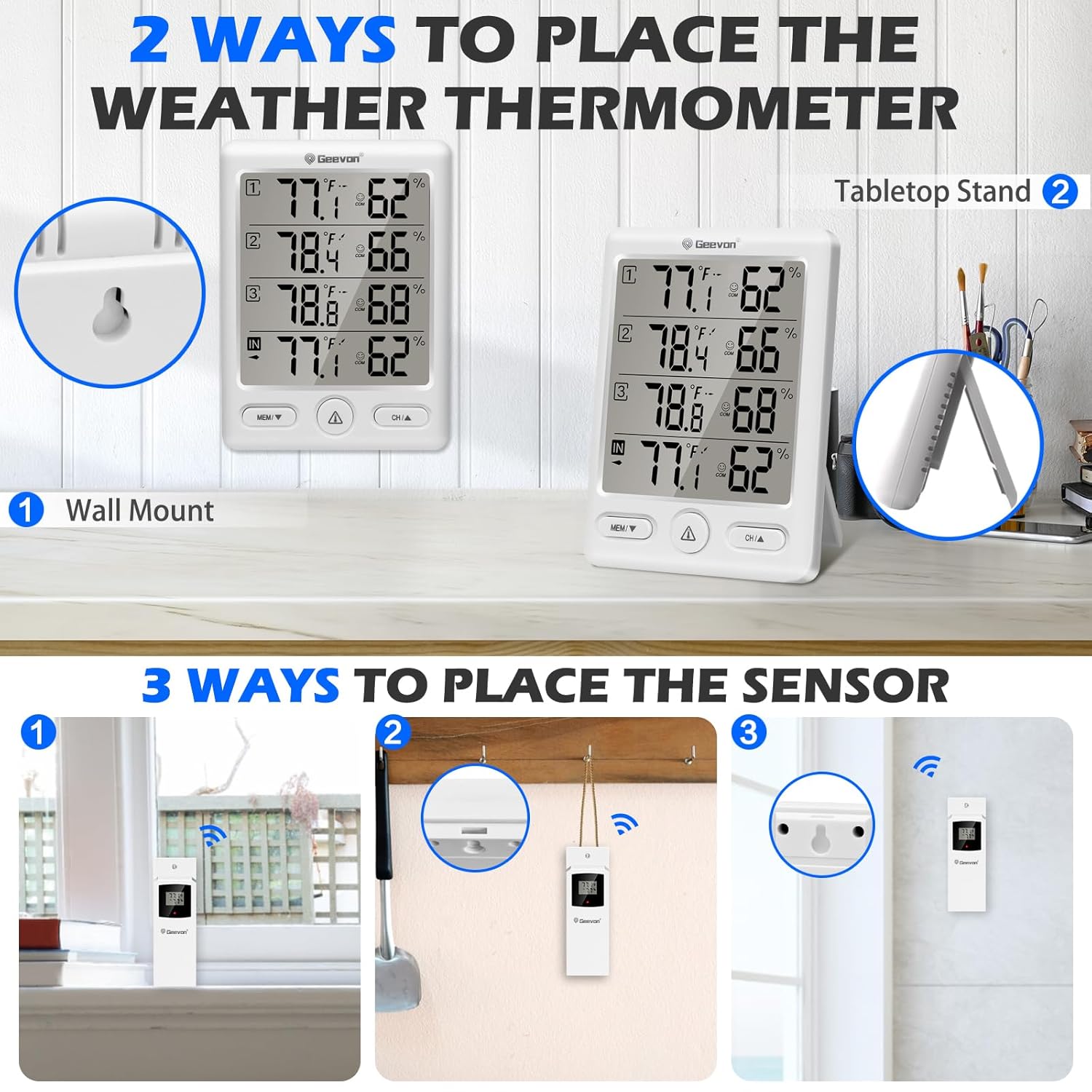
Figure 3: The main unit can be wall-mounted using the keyhole slot or placed on a flat surface using its integrated stand.
Operating Instructions
1. Display Overview
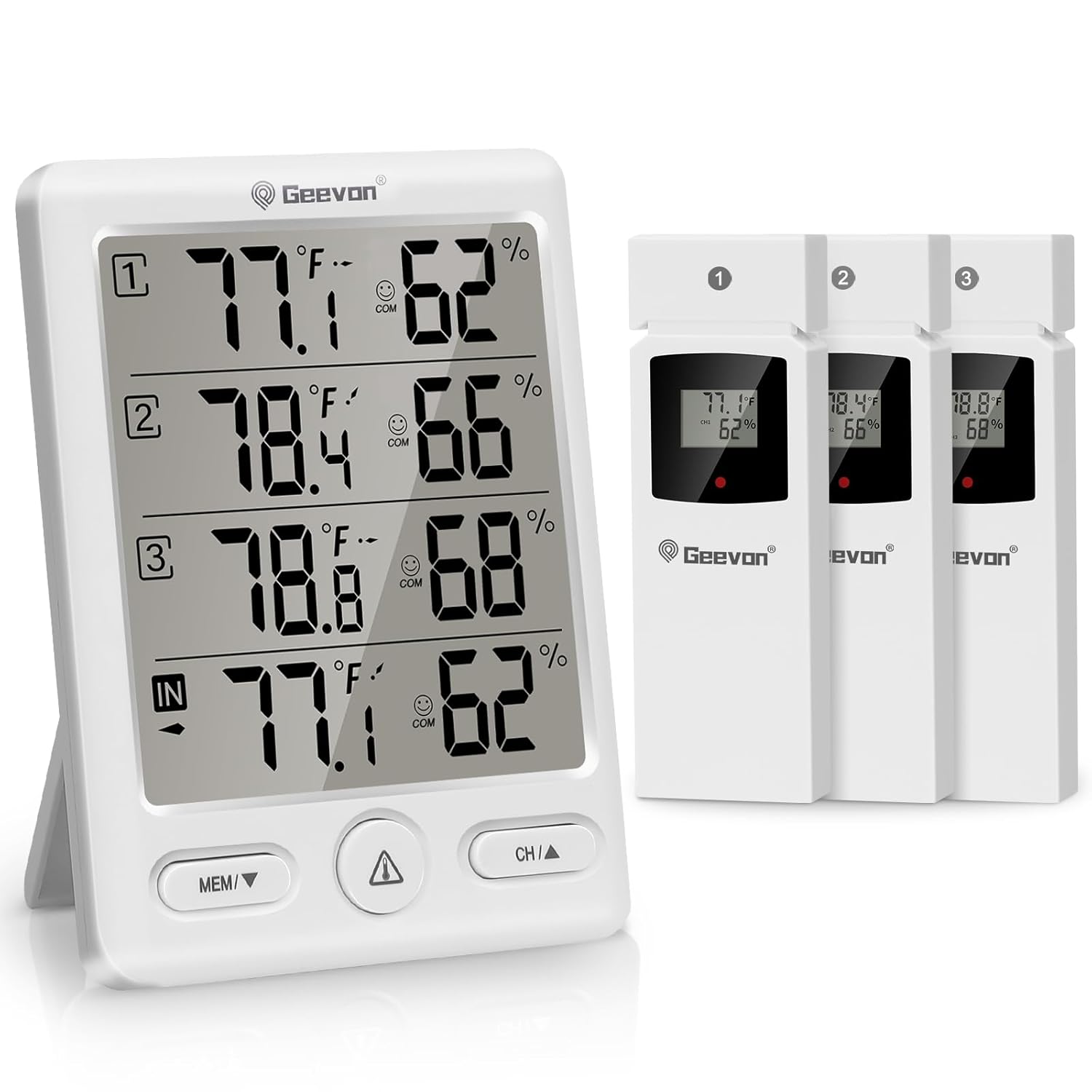
Figure 4: The main display unit shows indoor temperature and humidity, along with readings from up to three remote sensors (labeled 1, 2, 3).
2. Switching Temperature Units (°C/°F)
Press the "MEM/▼ /°C/°F" button on the main unit to switch between Celsius and Fahrenheit. For remote sensors, use a needle or thin object to press the small button inside the °C/°F hole on the sensor itself.

Figure 5: The main unit's display shows temperature and humidity for indoor and three outdoor channels. Buttons for MEM/▼/°C/°F, Alert, and CH/▲ are visible below the screen.
3. Max/Min Records
Press the "MEM/▼ /°C/°F" button to cycle through current, maximum (MAX), and minimum (MIN) temperature and humidity records for the past 24 hours. The Max&Min data will update every 24 hours.
4. Temperature and Humidity Alerts
Press the "Alert" button to activate or deactivate the temperature and humidity alert function. You can manually set the maximum and minimum alert values. The unit will ring when the value reaches the pre-set max or min alarm values.

Figure 6: The display indicates when the alert function is active, allowing users to set custom high and low temperature/humidity thresholds.
5. Channel Selection
Press the "CH/▲" button to switch between the different remote sensor channels (1, 2, 3) or to view all channels in a rotating display.
Maintenance
- Clean the unit and sensors with a soft, damp cloth. Do not use abrasive cleaners or solvents.
- Avoid exposing the main unit to direct sunlight, extreme temperatures, or high humidity.
- Replace batteries when the low battery indicator appears on the display to ensure continuous and accurate readings.
- Ensure outdoor sensors are protected from heavy rain and direct water exposure, as they are only splash-proof.
Troubleshooting
| Problem | Possible Cause | Solution |
|---|---|---|
| No display on main unit or sensor | Batteries are dead or incorrectly inserted. | Check battery polarity and replace with fresh batteries. |
| No remote sensor reading | Sensor out of range, interference, or not paired. | Move sensor closer to the main unit. Avoid large metal objects or electronic devices. Re-pair the sensor by removing and reinserting batteries in both units, then pressing the CH/▲ button on the main unit to search for sensors. |
| Inaccurate readings | Sensor exposed to direct sunlight, heat sources, or moisture. | Relocate the sensor to a shaded, well-ventilated area away from direct heat or moisture. Allow time for readings to stabilize. |
| Alert not sounding | Alert function is off or volume is too low. | Ensure the alert function is activated by pressing the "Alert" button. Check if the alert volume is set appropriately (if adjustable). |
Specifications
| Feature | Detail |
|---|---|
| Product Dimensions (Main Unit) | 4"W x 5"H (4 x 4 x 5 inches; 11.2 ounces) |
| Item Model Number | 228646-T |
| Batteries (Main Unit) | 2 AA batteries (not included) |
| Batteries (Remote Sensors) | 2 AAA batteries per sensor (not included) |
| Indoor Temperature Range | 50°F ~ 140°F (-10°C ~ 60°C) |
| Outdoor Temperature Range | -58°F ~ 158°F (-50°C ~ 70°C) |
| Temperature Accuracy | ± 1.8°F / 1°C |
| Humidity Range | 20% - 95% |
| Humidity Accuracy | ± 5% |
| Wireless Frequency | 433 MHz |
| Wireless Transmission Range | Up to 200FT / 60M (open air) |
| Sensor Water Resistance | IPX4 splash-proof |
| Manufacturer | Geevon |
Warranty & Support
Geevon products are designed for quality and reliability. For any issues or questions regarding your Indoor Outdoor Thermometer Wireless, please contact Geevon customer support. We are committed to providing excellent service and will do our best to resolve any problems you may encounter.
Please refer to the contact information provided on the product packaging or the official Geevon website for the most up-to-date support details.
Related documents228646-T


Ask a question about this manual
Ask about setup, troubleshooting, compatibility, parts, safety, or missing instructions. Manuals+ will review the question and use this page’s manual context to help answer it.