
1. Important Safety Instructions
Always observe basic safety precautions when using electric tools to reduce the risk of fire, electric shock, and personal injury. Read all instructions before operating this tool.
- Work Area Safety: Keep the work area clean and well-lit. Cluttered or dark areas invite accidents. Do not operate power tools in explosive atmospheres, such as in the presence of flammable liquids, gases, or dust.
- Electrical Safety: Power tool plugs must match the outlet. Never modify the plug in any way. Do not abuse the cord. Never use the cord for carrying, pulling, or unplugging the power tool. Keep cord away from heat, oil, sharp edges, or moving parts.
- Personal Safety: Always wear eye protection. Use hearing protection when operating for extended periods. Dress properly. Do not wear loose clothing or jewelry. Keep hair and clothing away from moving parts.
- Tool Use and Care: Do not force the power tool. Use the correct power tool for your application. Disconnect the plug from the power source before making any adjustments, changing accessories, or storing power tools.
- Service: Have your power tool serviced by a qualified repair person using only identical replacement parts. This will ensure that the safety of the power tool is maintained.
2. Product Overview
The Cat DX27U 1-1/4” SDS-Plus Rotary Hammer Drill is engineered for demanding applications, offering robust performance and versatility for professional users. It features a powerful 12.5-Amp motor and multiple operating functions.

Image 2.1: The Caterpillar Cat DX27U 1-1/4” SDS-Plus Rotary Hammer Drill, showcasing its robust design and auxiliary handle.
Key Features:
- Powerful 12.5A Motor: Delivers 920 RPM and 3,700 BPM for heavy-duty applications.
- 4 Versatile Functions: Drill, Hammer Drill, Bit Rotation, and Chisel modes for various tasks.
- Variable Speed Control: Offers 6 speeds for optimal control in any application.
- 1-1/4” SDS-Plus Chuck: Designed for quick bit changes and compatibility with standard SDS-Plus bits.
- Anti-Vibration Design: Maximizes user comfort during extended use.
- Lock-On Switch: Enables continuous operation for long sessions.
- Ergonomic Grip: Rubber overmold grip with a 360° side handle for enhanced comfort and control.
- Trade-Length Cord: An extra-long 10-ft. power cord provides extended reach.
3. What's Included
Your Cat DX27U Rotary Hammer Drill package includes the following components:
- Cat 12.5A SDS-Plus Rotary Hammer Drill (DX27U)
- Depth Gauge Rod
- Auxiliary Handle
- Kit Box for storage
- Dust Cover

Image 3.1: Visual representation of the items included with the Cat DX27U Rotary Hammer Drill: the drill unit, depth gauge rod, auxiliary handle, dust cover, and slide lock storage case.
4. Components and Controls
Familiarize yourself with the main components and controls of your rotary hammer drill for safe and efficient operation.

Image 4.1: Diagram highlighting key features such as the SDS-Plus chuck, 4 functions selector, and corded power supply.
- SDS-Plus Chuck: For quick and secure bit changes.
- Mode Selector: Allows switching between Drill, Hammer Drill, Bit Rotation, and Chisel functions.
- Auxiliary Handle: Provides additional grip and control.
- Depth Gauge Rod: Used to set the desired drilling depth.
- Trigger Switch: Activates the tool.
- Lock-On Button: For continuous operation.
- Variable Speed Dial: Adjusts the operating speed.

Image 4.2: Close-up view of the 1.25-inch SDS-Plus chuck, designed for efficient bit insertion and removal.
5. Setup
Attaching the Auxiliary Handle:
- Loosen the auxiliary handle by rotating it counter-clockwise.
- Slide the handle over the chuck and onto the barrel of the tool.
- Adjust the handle to a comfortable and secure position.
- Tighten the handle by rotating it clockwise until it is firmly secured.
Inserting and Removing SDS-Plus Bits:
- To Insert: Pull back the chuck collar, insert the SDS-Plus bit into the chuck until it clicks into place. Release the collar. Pull on the bit to ensure it is securely locked.
- To Remove: Pull back the chuck collar and pull the bit out of the chuck.
Adjusting the Depth Gauge:
- Loosen the auxiliary handle.
- Insert the depth gauge rod through the hole in the auxiliary handle.
- Position the drill bit against the workpiece and slide the depth gauge rod until its end touches the workpiece.
- Adjust the rod to the desired drilling depth.
- Tighten the auxiliary handle to secure the depth gauge.
6. Operating Instructions
Selecting Operating Modes:
The DX27U offers four operating modes. Use the mode selector switch to choose the appropriate function for your task.
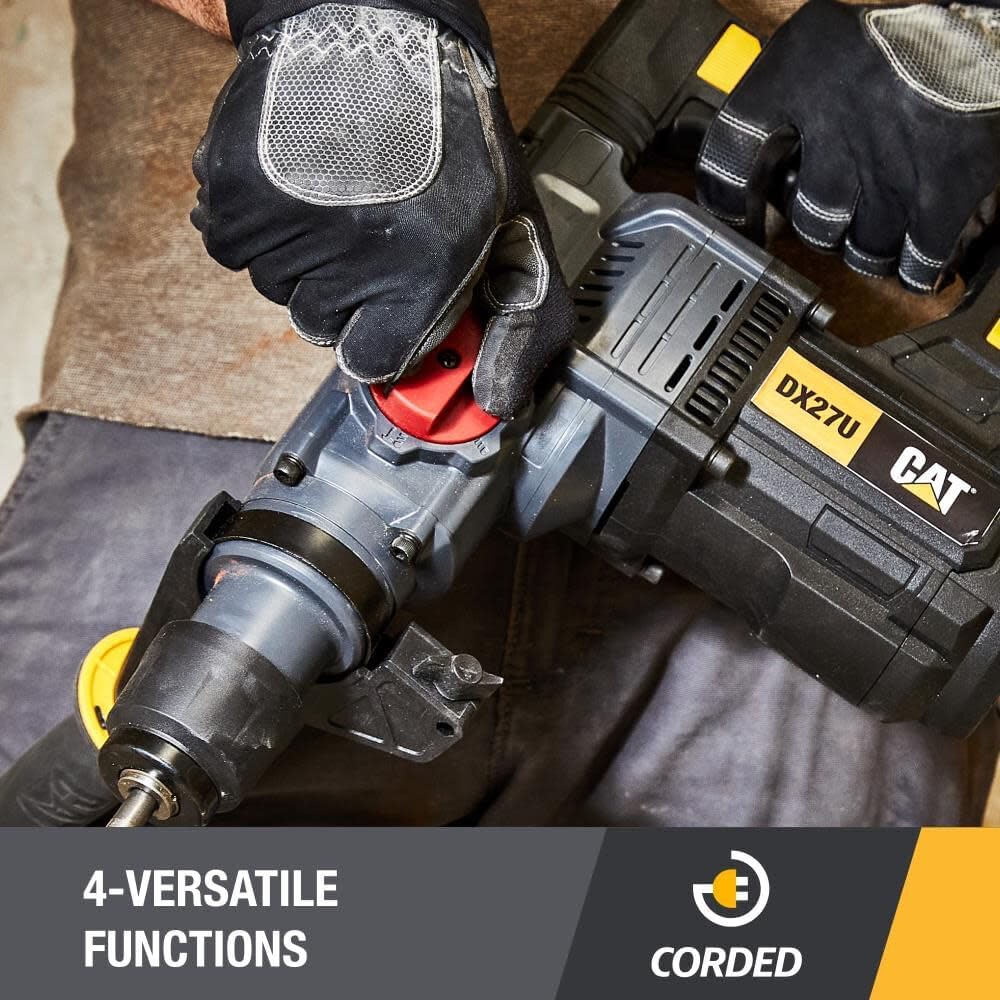
Image 6.1: Close-up of the mode selector, indicating the four versatile functions: Drill, Hammer Drill, Bit Rotation, and Chisel.
- Drill Mode: For drilling in wood, metal, and plastic without hammer action.
- Hammer Drill Mode: For drilling in concrete, masonry, and stone with combined rotation and hammer action.
- Bit Rotation Mode: Allows for adjusting the chisel angle without hammer action or rotation.
- Chisel Mode: For chiseling, chipping, and demolition work in concrete and masonry with hammer action only.
Variable Speed Control:
The tool features a 6-position variable speed control dial. Rotate the dial to select the desired speed for your application. Lower speeds are suitable for larger bits or softer materials, while higher speeds are for smaller bits or harder materials.
Using the Lock-On Switch:
For continuous operation, depress the trigger switch and then press the lock-on button. To release, depress the trigger switch again.
General Operation Guidelines:
- Ensure the workpiece is securely clamped or held.
- Start drilling at a low speed to prevent the bit from wandering, then increase speed as needed.
- Apply steady, even pressure. Do not force the tool.
- Allow the tool to cool down during prolonged use to prevent overheating.

Image 6.2: A worker demonstrating the use of the rotary hammer drill for breaking concrete, highlighting its application in demolition tasks.

Image 6.3: The rotary hammer drill in action, drilling into a concrete surface, demonstrating its impact energy for tough materials.
7. Maintenance
Regular maintenance ensures the longevity and optimal performance of your rotary hammer drill.
- Cleaning: After each use, clean the tool with a soft, damp cloth. Do not use harsh chemicals or abrasive cleaners. Keep ventilation openings clear of dust and debris.
- Chuck Maintenance: Periodically clean the SDS-Plus chuck to remove dust and debris. Apply a small amount of grease to the bit shank before insertion to reduce wear.
- Cord Inspection: Regularly inspect the power cord for any signs of damage, cuts, or fraying. If damaged, have it replaced by a qualified technician.
- Storage: Store the tool in its kit box in a dry, secure location, out of reach of children.
8. Troubleshooting
If you encounter issues with your Cat DX27U Rotary Hammer Drill, refer to the following common troubleshooting tips:
| Problem | Possible Cause | Solution |
|---|---|---|
| Tool does not start | No power supply; Damaged cord/plug; Faulty switch | Check power outlet and connections. Inspect cord for damage. If issues persist, contact service. |
| Reduced drilling performance | Worn drill bit; Incorrect mode selection; Overheating | Replace worn bits. Ensure correct mode (e.g., Hammer Drill for masonry). Allow tool to cool. |
| Bit not locking in chuck | Chuck collar not fully pulled back; Debris in chuck; Incorrect bit type | Ensure collar is fully retracted. Clean chuck. Use only SDS-Plus bits. |
| Excessive vibration/noise | Loose components; Internal damage | Cease operation immediately and contact a qualified service center. |
9. Specifications
| Specification | Value |
|---|---|
| Model Number | DX27U |
| Power Source | Corded Electric |
| Voltage | 120 Volts (AC) |
| Amperage | 12.5 Amps |
| Maximum Power | 900 Watts |
| No-Load Speed | 920 RPM |
| Blows Per Minute (BPM) | 3,700 BPM |
| Impact Energy | 5 Joules (3.7 ft-lbs) |
| Chuck Type | SDS-Plus |
| Maximum Chuck Size | 1.25 Inches |
| Product Dimensions | 44.4 x 15.01 x 35.2 cm |
| Item Weight | 7.98 kg |
| Special Features | Variable Speed |
| Included Components | Rotary Hammer Drill, Depth Gauge Rod, Auxiliary Handle, Kit Box, Dust Cover |
10. Warranty and Support
Warranty Information:
This product comes with a 30-day warranty. Please retain your proof of purchase for any warranty claims. The warranty covers defects in materials and workmanship under normal use.
Customer Support:
For technical assistance, service, or to inquire about replacement parts, please contact Caterpillar customer support. Refer to the contact information provided with your product packaging or visit the official Caterpillar tools website.


