
LIGE ST9-B-HSJ
LIGE Military Smart Watch User Manual
Model: ST9-B-HSJ | Brand: LIGE
Introduction
Thank you for choosing the LIGE Military Smart Watch. This device is designed to be a robust and versatile companion for your daily life and outdoor activities, offering advanced features like Bluetooth calling, comprehensive health monitoring, and a wide array of sports modes. This manual will guide you through the setup, operation, and maintenance of your new smartwatch.
What's in the Box
- LIGE Military Smart Watch (Model: ST9-B-HSJ)
- Charging Cable
- User Manual
- Additional Watch Strap (if included with specific model variant)
Setup Guide
1. Charging the Watch
Before first use, fully charge your smartwatch. Connect the magnetic charging cable to the charging points on the back of the watch and plug the USB end into a power adapter (not included) or a computer USB port. A full charge typically takes approximately 2 hours.

Image: The LIGE Military Smart Watch, showcasing its rugged design and the magnetic charging cable connection.
2. App Installation and Pairing
To unlock the full potential of your smartwatch, download the companion application on your smartphone. Search for the official LIGE app in your device's app store (iOS or Android). Once installed:
- Enable Bluetooth on your smartphone.
- Open the LIGE app and follow the on-screen instructions to create an account or log in.
- Select "Add Device" or similar option within the app.
- The app will search for your smartwatch. Select "ST9-B-HSJ" from the list of available devices.
- Confirm the pairing request on both your phone and the watch.
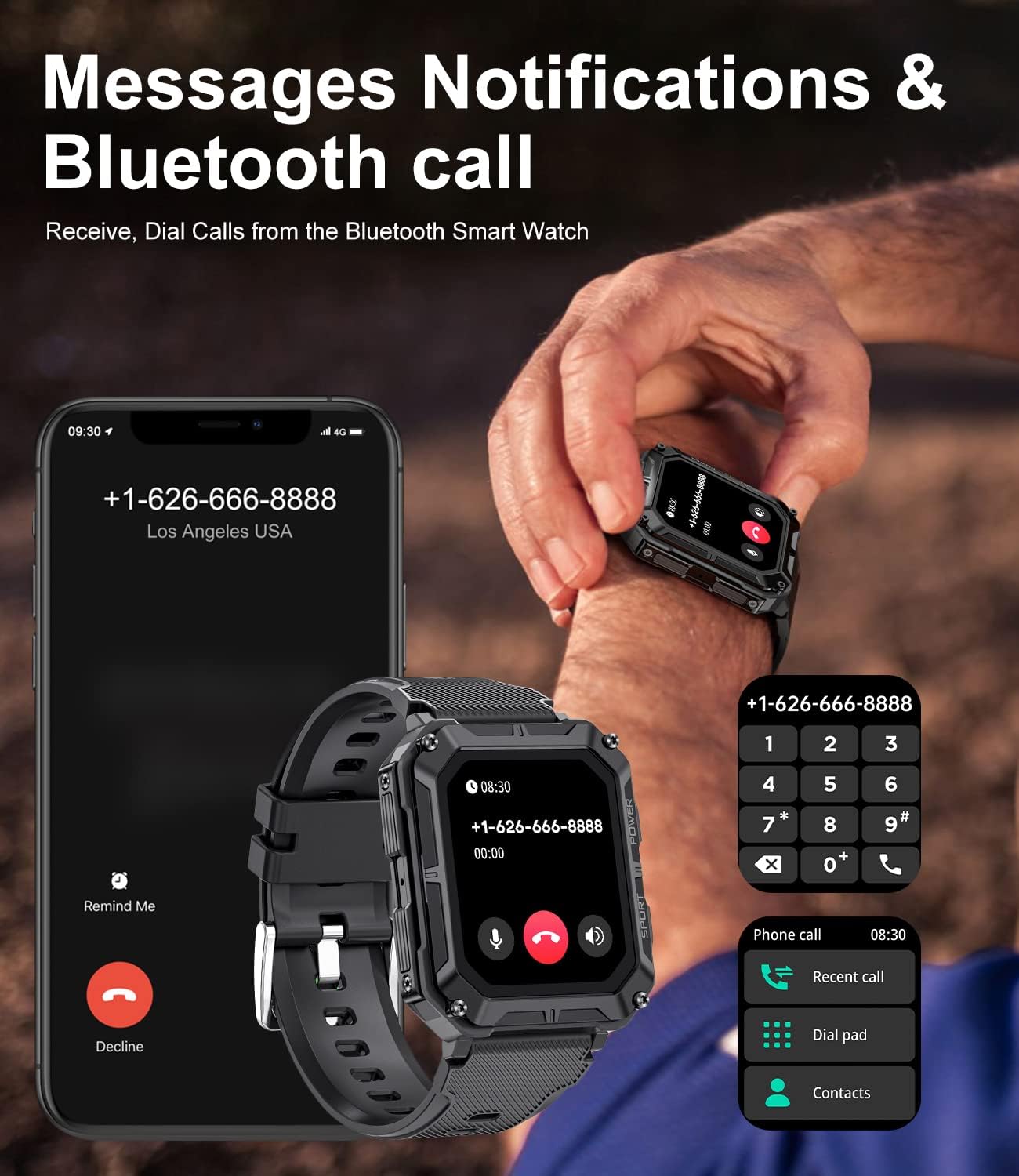
Image: A LIGE Smart Watch on a wrist, displaying an incoming call, next to a smartphone showing the same call, illustrating the Bluetooth calling feature.
3. Customizing Watch Faces
Your LIGE Smart Watch offers a variety of pre-installed watch faces, and over 100 more are available through the companion app. You can also create personalized watch faces using your own photos.
- On the Watch: Swipe left or right on the home screen to browse and select different watch faces.
- Via App: Navigate to the "Dial Market" or "Watch Face" section in the app to explore and download new designs, or upload your own images for a custom look.

Image: A display of multiple customizable watch faces for the LIGE Smart Watch, including digital, analog, and data-rich options, demonstrating personalization.

Image: A smartphone screen displaying the option to customize the watch face with a personal photo, showing a corgi, alongside the watch itself with the customized face.
Operating the Watch
Basic Navigation
The LIGE Smart Watch features a 1.83-inch HD touch screen and physical buttons for intuitive control.
- Touch Screen: Swipe up, down, left, or right to navigate through menus and notifications. Tap to select items.
- Side Buttons: The "POWER" button typically serves as a home/back button and can be used to wake/sleep the screen. The "SPORT" button provides quick access to sports modes.

Image: A close-up view of the LIGE Smart Watch, highlighting its 1.83-inch HD screen and the "POWER" and "SPORT" buttons on the side.
Bluetooth Calling and Notifications
With its built-in speaker and Bluetooth connectivity, the watch allows you to manage calls and receive notifications directly on your wrist.
- Making/Receiving Calls: Once paired, you can dial numbers, answer, or reject calls directly from the watch.
- Message Notifications: The watch vibrates and displays notifications for incoming calls, SMS texts, and various app alerts (e.g., Facebook, Twitter, WhatsApp, LinkedIn, Messenger, Instagram).

Image: A LIGE Smart Watch on a wooden surface next to a smartphone, both displaying message notifications from various social media and messaging applications.

Image: A man wearing the LIGE Smart Watch, smiling while talking on the phone, with an overlay showing an incoming call notification on the watch face.
Health Monitoring
The watch provides comprehensive health tracking features to help you monitor your well-being.
- Heart Rate: Continuously monitors your heart rate throughout the day.
- Blood Oxygen (SpO2): Measures your blood oxygen saturation levels.
- Sleep Monitor: Tracks your sleep patterns, including deep sleep, light sleep, and awake time.
- Stress Monitoring: Provides insights into your stress levels.
- Blood Pressure: Offers blood pressure readings.

Image: Two scenes: a man cycling outdoors, representing health monitoring, and a man sleeping in bed, representing the sleep monitoring feature of the watch.

Image: A man running outdoors, with an overlay of the LIGE Smart Watch displaying various health metrics such as SpO2, blood pressure (BP), heart rate, and stress levels.
Sports Modes and Activity Tracking
The watch supports 123 sports modes, tracking your exercise data efficiently.
- Activity Tracking: Records steps, distance, and calories burned.
- Sports Modes: Select from a wide range of activities like running, walking, cycling, swimming, basketball, football, and more to get specific workout data.

Image: A snowboarder in action, with an overlay showing the LIGE Smart Watch displaying various sports modes and activity tracking data like distance, steps, and calories.

Image: A man cycling on a mountain bike, accompanied by icons representing multi-functional smartwatch features such as weather, find phone, music control, calories, alarm clock, and step count.
Other Functions
- Music Control: Control music playback on your smartphone directly from the watch.
- Remote Photography: Use the watch as a remote shutter for your phone's camera.
- Weather Forecast: Get real-time weather updates.
- Alarm Clocks, Stopwatch, Timer: Essential utility functions.
- Sedentary & Drinking Water Reminders: Prompts to encourage healthy habits.
- Find Phone: Helps locate your paired smartphone.
Maintenance
Water Resistance (IP68)
The LIGE Smart Watch is IP68 waterproof, meaning it is resistant to dust and can withstand immersion in water up to 1.5 meters for 30 minutes. It is suitable for daily use, hand washing, and light rain. However, it is not recommended for hot showers, saunas, or deep diving, as steam and high water pressure can compromise the seal.
Video: Demonstration of the LIGE Military Smart Watch's durability, including water resistance, scratch prevention, and anti-smashing capabilities. This video highlights the watch's robust design for various environments.
Scratch Prevention and Durability
Constructed with special composite materials and a metal shell, the watch is designed to withstand various environmental challenges, including temperature fluctuations, low pressure, dust, and fluid contamination. While highly durable, avoid direct impact with sharp objects to maintain screen integrity.
Cleaning
To clean your watch, wipe it with a soft, damp cloth. Avoid using harsh chemicals or abrasive materials that could damage the finish or sensors.
Battery Life
The LIGE Smart Watch is equipped with a 380mAh battery, offering extended usage times:
- Up to 5 days of typical daily use.
- Up to 10 days with high-intensity use.
- Up to 40 days in standby mode.

Image: The LIGE Smart Watch with visual indicators for its large capacity battery, showing 2 hours for full charge, 10 days for high intensity use, 15 days for daily use, and 40 days for standby.
Troubleshooting
| Problem | Possible Solution |
|---|---|
| Watch not turning on | Ensure the watch is fully charged. Connect to the charger and wait a few minutes before attempting to power on. |
| Cannot pair with phone |
|
| Notifications not appearing |
|
| Inaccurate health data |
|
| Short battery life |
|
Specifications
| Feature | Detail |
|---|---|
| Model | ST9-B-HSJ |
| Screen Size | 1.83 Inches |
| Resolution | 240 x 286 HD |
| Memory Storage Capacity | 256 MB |
| Operating System | Android, iOS compatible |
| Battery Capacity | 380 mAh Lithium Polymer |
| Water Resistance | IP68 |
| Connectivity | Bluetooth |
| Human Interface Input | Touchscreen |
| Product Dimensions | 17.78 x 5.08 x 7.62 cm; 160 g |
Warranty and Support
LIGE products are manufactured to the highest quality standards. For warranty information or technical support, please refer to the contact details provided with your purchase or visit the official LIGE website. Keep your purchase receipt as proof of purchase.
Related documentsST9-B-HSJ


Ask a question about this manual
Ask about setup, troubleshooting, compatibility, parts, safety, or missing instructions. Manuals+ will review the question and use this page’s manual context to help answer it.