
Introduction
This manual provides comprehensive instructions for the assembly, operation, and maintenance of your Tribesigns Computer Desk with 5 Drawers. Please read this document thoroughly before beginning assembly or using the product to ensure proper setup and longevity.
Important Safety Information
- Always assemble the desk strictly according to the provided instructions.
- Do not place heavy items on the desk that could exceed its weight capacity or cause it to tip over.
- Ensure the desk is stable and level on the floor before placing any items on it or commencing use.
Package Contents
Before starting assembly, carefully unpack all components and verify that all parts are present and undamaged. Lay them out on a clean, soft surface to prevent scratches.
- Desktop panels
- Drawer panels (for 2 desk drawers and 3 file cabinet drawers)
- Metal frame components
- Drawer handles
- Adjustable leg pads
- Assembly hardware kit (screws, bolts, tools)

Image: All components of the Tribesigns Computer Desk laid out on a soft surface, including wooden panels, metal frames, and hardware bags, ready for assembly.
Video: A detailed unboxing and overview of all desk components, showing how they are organized before assembly.
Setup & Assembly
Assembly is required for this product. It is recommended to have at least one person for assembly. Follow the numbered steps in the instruction manual provided with your product for the most accurate guidance.
Step 1: Assemble the Main Desk Frame
Connect the metal frame components for the main desk section. Use the provided screws and tools to secure all connections. Ensure the frame is stable before proceeding.

Image: The main desk frame assembled, featuring the desktop and two upper drawers.
Step 2: Assemble the Reversible File Cabinet
Assemble the frame for the file cabinet. Important: Decide whether you want the cabinet on the left or right side of the main desk before attaching the panels, as this affects the orientation of certain parts during assembly.
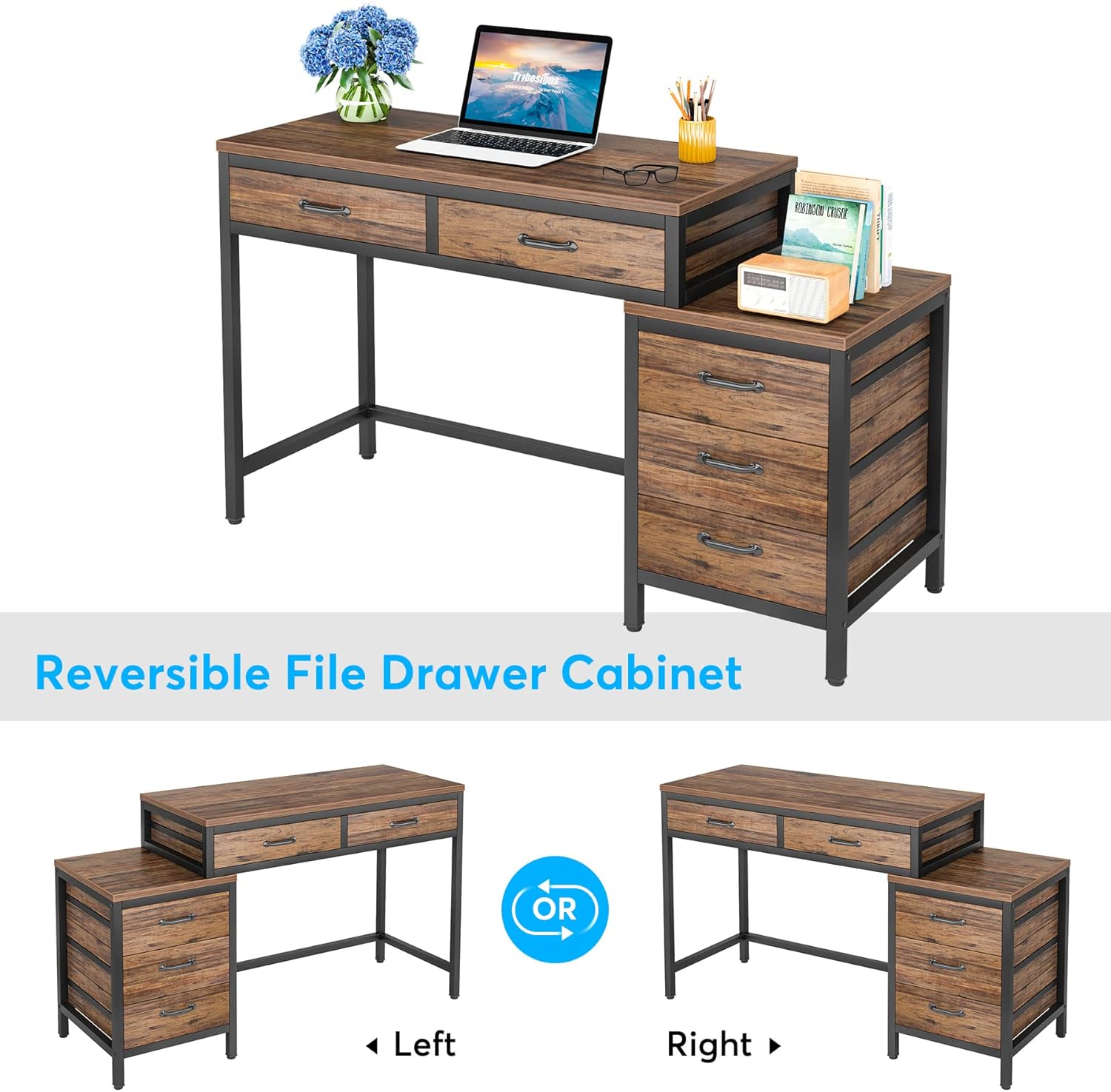
Image: A diagram illustrating the two possible configurations for the reversible file drawer cabinet: on the left or right side of the main desk.
Video: A detailed walkthrough of the desk assembly process, highlighting the reversible nature of the file cabinet and its installation.
Step 3: Install Drawers
Construct the two desk drawers and three file cabinet drawers. Attach the handles to each drawer front. Carefully slide the assembled drawers into their respective frames. Note that these drawers do not use traditional metal rails but slide within integrated grooves.

Image: The desk with its drawers open, showcasing the internal storage space for office supplies and personal items.
Step 4: Final Adjustments
Once the desk is fully assembled, adjust the leg pads located at the bottom of each leg. Rotate them clockwise or counter-clockwise to achieve a stable and level surface, especially on uneven floors.

Image: A close-up view of one of the desk's adjustable leg pads, designed to stabilize the desk on uneven floors.
Operating Instructions
Using the Drawers
The desk features two upper drawers integrated into the main desktop and a three-drawer file cabinet. To open a drawer, gently pull the handle. To close, push the drawer back into the frame until it is flush. The drawers are designed with internal stops to prevent them from being pulled out completely during normal use.
Reversible File Cabinet
The file cabinet component offers flexibility in your workspace layout. It can be positioned on either the left or right side of the main desk during the initial assembly process. Additionally, the top surface of the file cabinet is suitable for use as a printer stand, providing convenient access to your printing device.
Maintenance & Care
To maintain the appearance and longevity of your Tribesigns Computer Desk, follow these care guidelines:
- Cleaning: Use standard cleaning and dusting methods appropriate for wood and metal surfaces. A soft, damp cloth is generally sufficient for routine cleaning.
- Avoid Harsh Chemicals: Do not use abrasive cleaners, strong chemical solvents, or polishes that may damage the finish of the desk.
- Spills: Wipe up spills immediately to prevent moisture damage to the wood surfaces.
- Heat and Moisture: Avoid placing hot items directly on the desktop. Use coasters or protective pads as needed. Protect the desk from excessive moisture.
Troubleshooting
Wobbly Desk
If your desk feels unstable or wobbly, check the adjustable leg pads at the bottom of each leg. Rotate them to extend or retract until all legs make firm contact with the floor and the desk is stable.
Drawers Not Sliding Smoothly
Ensure that the drawers are correctly aligned within their designated grooves in the frame. Check for any obstructions, debris, or items inside the drawers that might be preventing smooth operation. If necessary, remove the drawer and inspect the grooves for any issues.
Specifications
| Feature | Detail |
|---|---|
| Brand | Tribesigns |
| Model Number | JW0390X |
| Product Dimensions (D x W x H) | 17.72"D x 51.18"W x 32.28"H |
| Color | Rustic Brown |
| Style | Industrial |
| Base Material | Metal |
| Top Material Type | E1 Particleboard and MDF Board |
| Number of Drawers | 5 |
| Required Assembly | Yes |
| Recommended Number of People for Assembly | 1 |
| Item Weight | 30 Kilograms |
Warranty & Support
This Tribesigns Computer Desk comes with a Limited Warranty. For specific details regarding coverage, duration, and terms, please refer to the warranty information included with your original purchase documentation.
For any product-related issues, assembly questions, or customer service inquiries, Tribesigns provides 24-hour customer support. You can also visit the official Tribesigns store for additional information and assistance:


