
Introduction
This instruction manual provides essential information for the proper installation, operation, and maintenance of your Belife BVC11 Direct Drive Cleaner Head. This cleaner head is specifically designed as a replacement or accessory for the Belife BVC12 Cordless Vacuum Cleaner, enhancing its cleaning performance on various floor types. Please read this manual thoroughly before use to ensure optimal performance and longevity of your product.
Product Overview
The Belife BVC11 Direct Drive Cleaner Head is an advanced floor tool featuring a powerful motor that drives the brush bar directly into carpets and hard floors to remove ground-in dirt and fine dust. It includes an integrated LED headlight for improved visibility in dimly lit areas and offers 180° adjustable maneuverability for easy navigation around furniture.
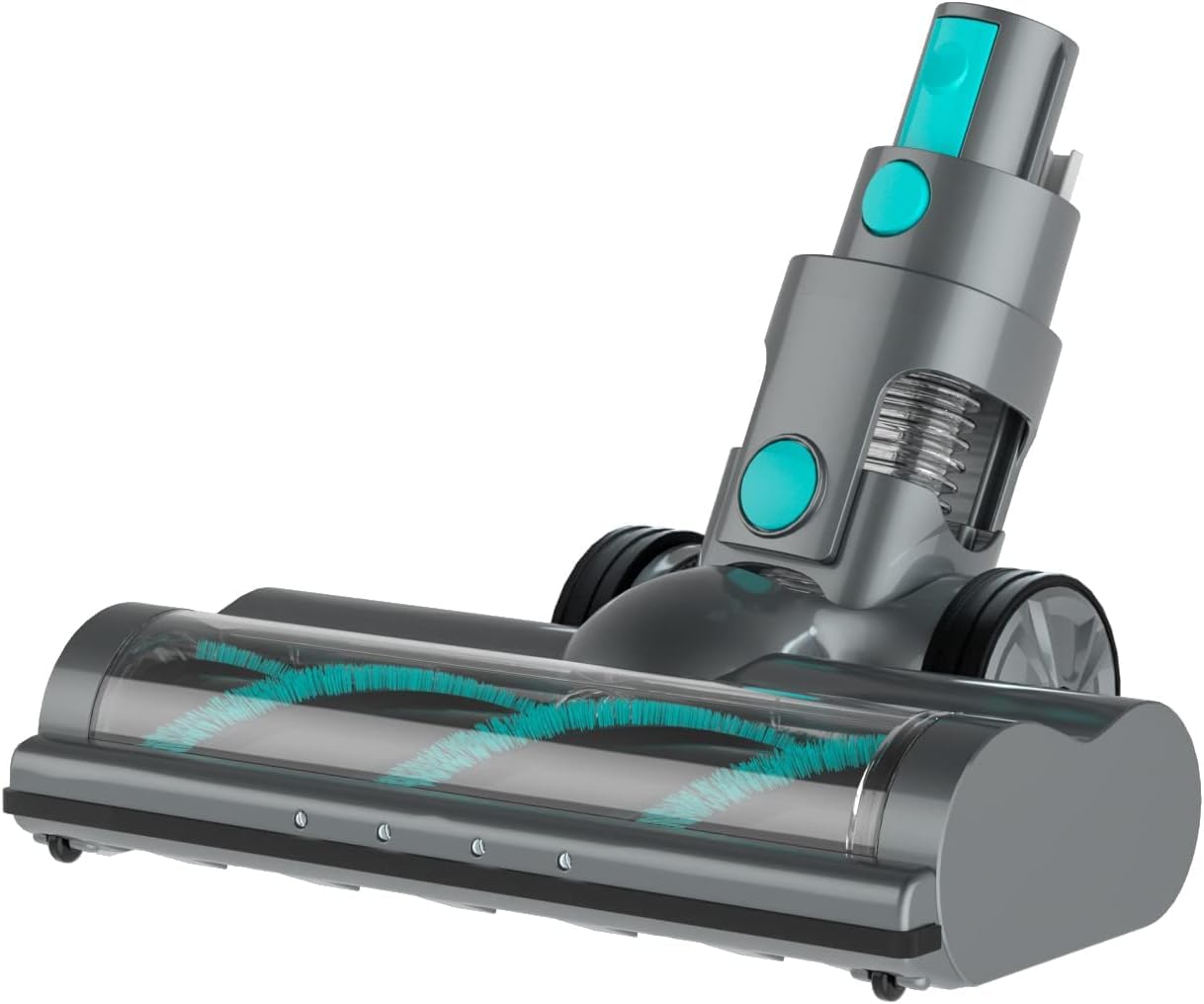
Image: The Belife BVC12 Cordless Vacuum Cleaner shown with the BVC11 Direct Drive Cleaner Head attached. This image illustrates the cleaner head's appearance and how it integrates with the main vacuum body and extension wand. Note the LED headlights on the front of the cleaner head and its low-profile design for reaching under furniture.
Key Features:
- Direct Drive Motor: Provides powerful and consistent brush bar rotation.
- LED Headlight: Illuminates dust and debris on the floor for thorough cleaning.
- 180° Adjustable Swivel: Allows for easy steering and access to tight spaces.
- Compatibility: Designed exclusively for the Belife BVC12 Cordless Vacuum Cleaner.
Setup and Installation
Before installing the BVC11 Direct Drive Cleaner Head, ensure your Belife BVC12 Cordless Vacuum Cleaner is turned off and disconnected from any power source.
- Prepare the Vacuum: If a different floor tool is currently attached, press the release button (if applicable) and gently pull it away from the extension wand or main body.
- Attach the Cleaner Head: Align the connection end of the BVC11 Direct Drive Cleaner Head with the bottom end of the vacuum's extension wand (or directly to the main body if using in handheld mode without the wand).
- Secure Connection: Push the cleaner head firmly onto the wand/body until you hear a click, indicating it is securely locked in place. Ensure there is no wobble and the connection is stable.
- Verify Operation: Once attached, turn on your Belife BVC12 vacuum to confirm the cleaner head's brush bar rotates and the LED headlights illuminate.
Operating Instructions
The BVC11 Direct Drive Cleaner Head is designed for efficient cleaning on both hard floors and carpets. Its direct drive motor ensures consistent performance across different surfaces.
- Power On: Activate your Belife BVC12 Cordless Vacuum Cleaner. The cleaner head's brush bar will begin to rotate, and the LED headlights will turn on automatically.
- Surface Recommendation: This cleaner head is suitable for various surfaces, including hard floors (wood, tile, laminate) and low-to-medium pile carpets.
- Maneuverability: Utilize the 180° adjustable swivel feature to easily steer the vacuum around obstacles and reach under furniture.
- LED Headlights: The headlights assist in revealing hidden dust and debris, ensuring a thorough clean, especially in darker areas.
- Cleaning Technique: Move the vacuum in a steady, overlapping motion. For heavily soiled areas, a slower pass may be beneficial.
- Power Off: Turn off the vacuum when cleaning is complete. The brush bar will stop rotating, and the LED headlights will turn off.
Caution: Avoid using the cleaner head on wet surfaces or to pick up large, sharp objects, liquids, or burning materials, as this may cause damage to the brush bar or motor.
Maintenance
Regular maintenance of your BVC11 Direct Drive Cleaner Head ensures optimal performance and extends its lifespan.
Cleaning the Brush Bar:
- Disconnect Power: Always ensure the vacuum is turned off and disconnected from the power source before performing any maintenance.
- Remove Brush Bar: Locate the brush bar release mechanism on the side or bottom of the cleaner head. Follow the instructions in your main BVC12 vacuum manual to safely remove the brush bar.
- Remove Debris: Use scissors or a brush to carefully cut and remove any tangled hair, threads, or debris from the brush bar. Pay attention to the ends where hair often accumulates.
- Clean Housing: Wipe the inside of the cleaner head housing with a dry cloth to remove dust and dirt.
- Reinstall Brush Bar: Once clean, reinsert the brush bar, ensuring it clicks securely into place.
Checking for Blockages:
Periodically check the air intake opening of the cleaner head and the connection point to the extension wand for any blockages that might reduce suction.
Warning: Do not wash the brush bar or cleaner head with water, as this can damage the motor and electrical components. Use only dry cleaning methods.
Troubleshooting
| Problem | Possible Cause | Solution |
|---|---|---|
| Brush bar not rotating. | Tangled hair/debris, blockage, improper installation, motor issue. |
|
| Reduced suction at the cleaner head. | Blockage in cleaner head or wand, full dustbin, dirty filter. |
|
| LED headlights not illuminating. | Loose connection, electrical fault. |
|
Specifications
- Model: BVC11 (Direct Drive Cleaner Head)
- Compatibility: Belife BVC12 Cordless Vacuum Cleaner
- Special Features: 180° Adjustable Swivel, Integrated LED Headlight
- Surface Recommendation: Hard Floor, Low-to-Medium Pile Carpet
- Included Components: Direct Drive Cleaner Head (1)
- Manufacturer: Belife
Warranty and Support
For warranty information, technical support, or to purchase additional replacement parts, please refer to the warranty card included with your original Belife BVC12 Cordless Vacuum Cleaner or visit the official Belife website. You may also contact Belife customer service directly for assistance.
Belife Customer Service: Please refer to your product packaging or the official Belife website for the most current contact information.


